The GTM
What is The GTM?
The GTM Co-Founder is a practical AI-powered go-to-market companion built for people taking developer tools and AI products to market. Instead of offering generic marketing advice, it focuses on the realities faced by founders, first GTM hires, and founding account executives who need to turn a technical product into a repeatable sales and market strategy.
The approach is refreshingly direct. The service positions itself as the person on the team willing to point out uncomfortable problems rather than simply agreeing with every idea. Users answer five questions and receive a prioritized go-to-market roadmap that can then be turned into concrete work.
Another appealing aspect is its accessibility. The project is free, MIT-licensed, and designed to run inside an agent environment that developers already use, making it particularly interesting for technical founders who prefer working close to their existing development workflow.
Key Features
- Five-question assessment designed to quickly understand a product and its go-to-market situation.
- Prioritized GTM roadmap focused on what should be addressed first.
- Built specifically around developer tools and AI products.
- Useful for founders, early GTM hires, and founding AEs.
- Designed to work within an existing AI agent environment.
- Available as a free, MIT-licensed project.
- Can be installed through a command-line workflow when using the supported agent setup.
User Interface
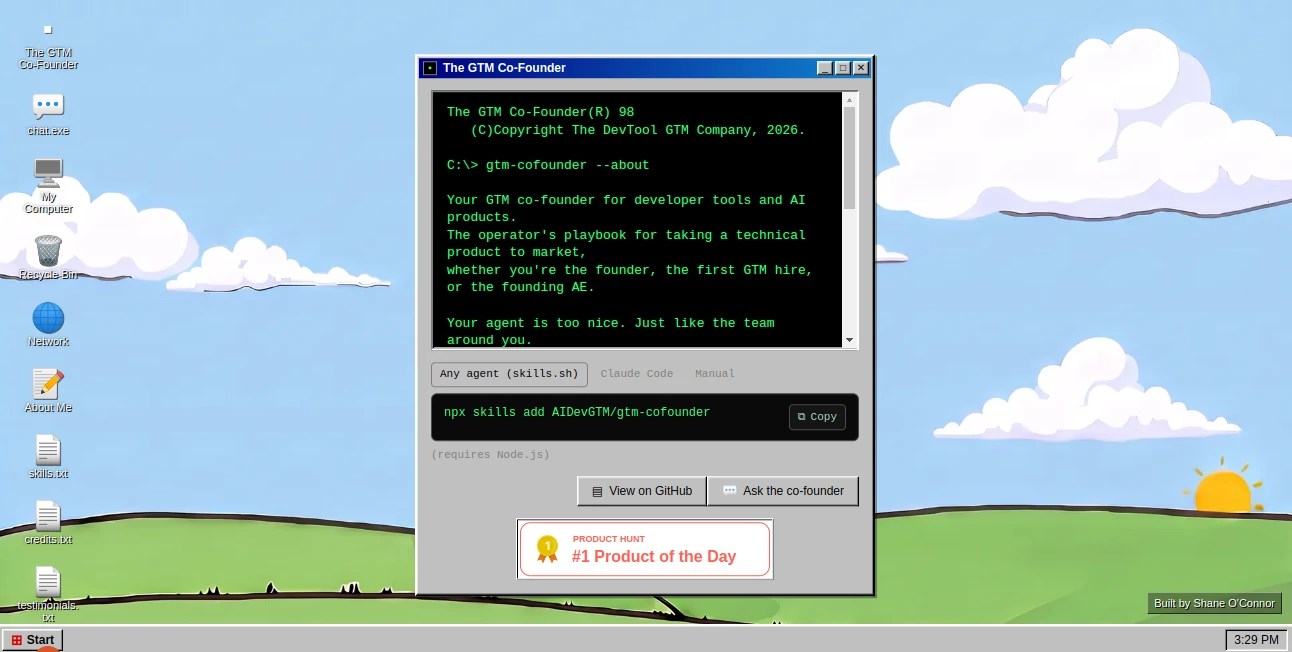
The website takes an intentionally playful desktop-style approach rather than looking like a conventional SaaS dashboard. A retro computer interface presents the project, with familiar elements such as a chat window, files, network access, and a start control. This gives the product a distinctive personality without getting in the way of its main purpose.
For developers, the actual interaction can be even simpler. The installation interface presents options for Any Agent through skills.sh, Claude Code, or a manual setup, allowing users to choose the workflow that best fits the way they already work.
Accuracy & Performance
The value here comes less from producing large volumes of text and more from structuring a go-to-market decision process. By starting with five questions and turning the answers into a prioritized roadmap, the experience is designed to help users focus on the highest-impact actions instead of creating an endless list of marketing tasks.
That approach can be especially useful for technical founders. A product may be technically strong but still have unclear positioning, weak customer targeting, or an unfocused sales process. A structured GTM assessment can expose those gaps before more time and money are invested in promotion.
Capabilities
The core capability is strategic GTM guidance for technical products. It is designed around the journey from having a developer-focused or AI product to figuring out how that product should actually reach customers.
The roadmap-oriented workflow can help users think through priorities rather than treating every possible marketing channel as equally important. For a small startup with limited resources, that distinction matters. Knowing what not to work on can be just as valuable as knowing what to do next.
Security & Privacy
The project is designed to run inside an AI agent that the user already works with rather than presenting itself as a conventional hosted marketing dashboard. The public website identifies the project as free and MIT-licensed. Users should still review the configuration and privacy practices of the particular agent environment they choose, especially when entering confidential business information.
Use Cases
AI startup go-to-market planning: Founders launching an AI product can use the assessment to turn a broad marketing challenge into a prioritized action plan.
Developer tool launches: Technical teams often understand their product deeply but have less clarity around positioning, sales, and customer acquisition. The focused GTM approach is well suited to this situation.
First GTM hire: Someone joining a startup as its first marketing or sales operator can use a structured roadmap as a starting point for identifying priorities and gaps.
Founding AE preparation: Early sales professionals can use the framework to think beyond individual deals and consider the wider go-to-market system surrounding the product.
GTM strategy review: Teams that already have a marketing plan can use a prioritized assessment to challenge assumptions and decide which areas deserve attention first.
Pros and Cons
- Pros: Free to use, MIT-licensed, focused on developer tools and AI products, produces a prioritized roadmap, supports several agent-based workflows, and takes a direct approach to GTM problems.
- Pros: The five-question starting point keeps the process relatively focused and avoids overwhelming users with a long setup process.
- Cons: It is specialized rather than a general-purpose marketing platform.
- Cons: Users who prefer a traditional visual SaaS application may need some adjustment to the agent-based workflow.
- Cons: Getting the most value may require users to provide thoughtful answers and actively work through the resulting roadmap.
Pricing Plans
The project is presented as free and MIT-licensed, which makes it particularly accessible to early-stage founders and small teams. There is no conventional paid subscription plan presented on the main website. The installation workflow requires Node.js when using the command-line setup shown on the site.
How to Use It
- Open the project and choose the preferred way to run the GTM agent.
- Select an available workflow such as Any Agent through skills.sh, Claude Code, or manual installation.
- Make sure Node.js is available if using the command-line installation method.
- Install the provided skill using the displayed command.
- Answer the five questions about the product and its current go-to-market situation.
- Review the resulting prioritized GTM roadmap.
- Work through the recommendations in order, using the roadmap as an operating plan rather than simply treating it as a one-time report.
Comparison with Similar Tools
Traditional marketing platforms usually concentrate on execution, such as email campaigns, analytics, advertising, CRM workflows, or content production. This project takes a different position by concentrating on the strategic question of what a technical product should do next from a go-to-market perspective.
It also differs from generic AI chat assistants. Instead of starting with an open-ended conversation and hoping the right strategy emerges, the workflow begins with a small set of focused questions and aims to produce a prioritized roadmap. For a founder who already knows the product but feels uncertain about the next commercial move, that structure can be more useful than an unrestricted brainstorming session.
The agent-based model is another important distinction. Rather than requiring users to adopt another large marketing dashboard, it can fit into development-oriented AI workflows that technical teams may already be using.
Conclusion
For founders building developer tools and AI products, the hardest part is often not building the technology. It is deciding who should buy it, how to reach those people, and which commercial actions deserve attention first. This project addresses that gap with a focused, opinionated approach.
Its combination of a five-question assessment, prioritized roadmap, agent-based workflow, and free MIT-licensed distribution makes it an interesting option for early-stage technical teams. It is not trying to replace every marketing or sales system. Instead, it works best as a strategic co-pilot for deciding what deserves attention before the team starts spending significant effort on execution.
Frequently Asked Questions (FAQ)
What is the main purpose of this tool?
It helps founders and early go-to-market professionals create a prioritized strategy for bringing developer tools and AI products to market.
Who is it designed for?
The primary audience includes founders, first GTM hires, and founding account executives working with developer tools and AI products.
Is it free?
Yes. The project is presented as free and MIT-licensed.
How does the GTM assessment work?
Users answer five questions about their product and go-to-market situation. The system then provides a prioritized GTM roadmap that can be used to guide subsequent work.
Can developers use it with their existing AI workflow?
Yes. The website provides installation options for Any Agent through skills.sh, Claude Code, and manual use.
Does it replace a CRM or marketing automation platform?
No. Its primary role is strategic GTM guidance rather than replacing operational systems such as CRMs, advertising platforms, or email marketing software.
Is Node.js required?
The command-line installation shown on the website requires Node.js. Requirements may depend on the particular installation method selected.
What makes the approach different from generic AI marketing advice?
The workflow is specifically aimed at developer tools and AI products and focuses on producing a prioritized roadmap rather than a broad collection of generic marketing suggestions.
AI Consulting Assistant , AI Marketing Plan Generator , AI Developer Tools , AI Sales Assistant .
These classifications represent its core capabilities and areas of application. For related tools, explore the linked categories above.

The GTM Alternatives Product

DeepSeek V4

Dedoctive

SellerPic

LeadCanvas

Toonifyit

LeadAny

Sendmux

Mythx AI

Mage Flow AI…