
Hairstyle Advisor
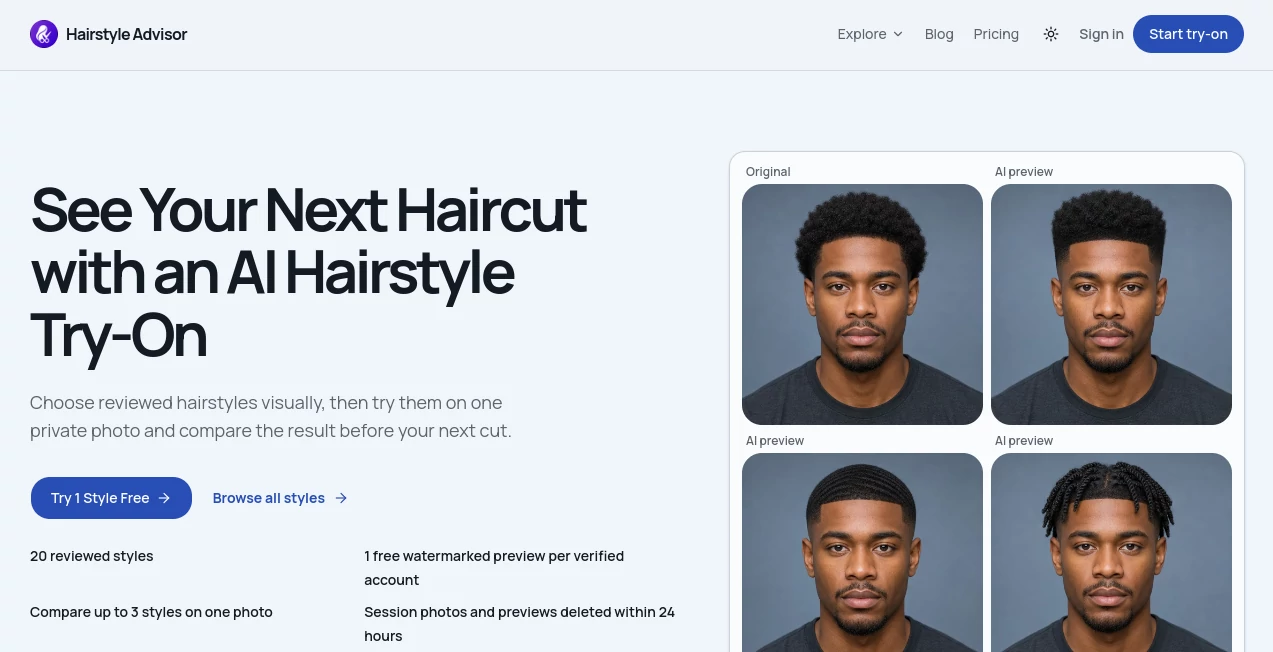
What is Hairstyle Advisor?
Choosing a new haircut can be surprisingly difficult. A style may look great in a reference photo, yet it is not always easy to imagine how the same direction will look on your own face and hair. Hairstyle Advisor takes a more practical approach by letting people explore reviewed hairstyles first and then preview selected looks on a private photo.
The platform currently features a library of 20 reviewed hairstyles, covering options such as textured crops, classic side parts, soft wavy bobs, and long layered looks. Users can select up to three styles and compare them using the same photo, making it easier to narrow down a haircut before visiting a barber or salon.
There is also a free watermarked preview available for verified accounts, although free generations are subject to the site's daily generation budget. The service is designed around making a haircut decision rather than simply producing random hairstyle inspiration.
Key Features
- AI hairstyle try-on: Preview selected haircut directions on your own photo before committing to a real cut.
- Reviewed hairstyle library: Browse a curated collection with practical information about maintenance and barber context.
- Three-style comparison: Compare up to three hairstyles on one photo to make differences easier to judge.
- Free preview: Verified accounts can try one style with a watermarked preview, subject to daily availability.
- Men's and women's styles: The library can be explored using separate men's and women's filters.
- Hairstyle guides: Additional guides cover short haircuts, long hairstyles, face shapes, curly hair, and low-maintenance options.
- Pay-as-you-go credits: Credits are purchased when needed rather than through a recurring subscription.
- Temporary photo storage: Session photos and previews are designed to be deleted within 24 hours.
User Interface
The interface is straightforward and built around the decision a person actually needs to make. Instead of immediately asking for a photo, visitors can first browse the available hairstyles and create a shortlist. Featured looks are presented visually, with options to filter the collection and select styles for comparison.
This approach feels particularly useful for someone who has a general idea of wanting a change but does not yet know which haircut to choose. The flow from browsing to selecting and finally uploading a photo keeps the experience focused rather than overwhelming.
Accuracy & Performance
The platform is intended as a visual preview rather than a promise of exactly how a haircut will look after a professional cut. That distinction is important because real-world results depend on factors such as hair texture, density, hairline, styling habits, and the barber's execution.
Its comparison feature is especially practical because several candidate styles can be viewed against the same photo. Rather than switching between unrelated reference images, users can make a side-by-side visual decision based on a consistent starting point.
Capabilities
The core capability is AI-powered hairstyle visualization. A user chooses hairstyles from the reviewed library, uploads one clear front-facing photo, and generates previews of the selected looks. Up to three styles can be compared during the process.
Beyond the try-on feature, the platform provides editorial hairstyle guides that address practical questions people often have before getting a haircut. Topics include face-shape considerations, curly hair, maintenance requirements, and how to communicate a desired haircut to a barber.
The combination of visual previews and practical haircut information makes the service more useful than a simple image generator. Someone considering a textured crop, for example, can explore the style visually while also thinking about the maintenance and barber conversation that come with it.
Security & Privacy
Privacy is an important part of the photo-based experience. The service states that uploaded session photos and previews are deleted within 24 hours. This temporary handling is reassuring for users who want to experiment with their appearance without keeping personal photos stored indefinitely.
Users should still review the platform's privacy policy and terms before uploading personal images, especially when using any online service that processes photographs.
Use Cases
Planning a haircut: The most obvious use is checking several possible cuts before making an appointment. This can reduce uncertainty and help turn a vague idea into a more specific choice.
Comparing different styles: Someone deciding between a short textured haircut, a classic side part, or a longer layered look can compare several directions using the same photograph.
Preparing for a barber visit: A visual preview can make it easier to explain what kind of haircut you have in mind. The accompanying guides can also help users understand terminology and maintenance expectations.
Trying a different look: People who are considering a noticeable change can experiment virtually before making a real-world commitment.
Finding a lower-maintenance option: Users who are tired of daily styling can explore haircut guides and compare styles based on upkeep rather than appearance alone.
Pros and Cons
Pros
- Focused specifically on hairstyle decisions rather than general image generation.
- Reviewed hairstyle library provides more context than a collection of random inspiration images.
- Up to three hairstyles can be compared on the same photo.
- One free watermarked preview is available for verified accounts.
- No recurring subscription is required for paid usage.
- Unused purchased credits remain available for a later decision.
- Photo sessions and previews are designed to be deleted within 24 hours.
Cons
- The free preview is limited and subject to the daily generation budget.
- AI previews cannot perfectly predict the result of a real haircut.
- The current reviewed library contains a relatively focused selection of hairstyles.
- Users looking for completely unrestricted image manipulation may prefer a broader image-editing platform.
Pricing Plans
The service uses a credit-based, pay-as-you-go model instead of requiring a monthly subscription. This is a sensible structure for people who only need hairstyle previews occasionally.
- 10 credits: $14.99
- 50 credits: $59.99
- 100 credits: $99.99
A free watermarked preview is also available for one style per verified account, subject to daily generation availability. Purchased credits do not require a recurring subscription and unused credits remain available for future comparisons.
How to Use It
- Browse the hairstyle library: Start by looking through the available styles and consider which cuts genuinely interest you.
- Select your favorites: Choose up to three hairstyles that you would realistically consider.
- Upload a photo: Use one clear, front-facing image for the preview.
- Generate the preview: Use the free preview if available or use purchased credits.
- Compare the results: Review the selected styles on the same photo and decide which direction feels most suitable.
- Use the result for your haircut conversation: Treat the preview as a visual reference when discussing your desired style with a barber or stylist.
Comparison with Similar Tools
Many AI image tools are built for broad photo generation or editing, while this platform takes a narrower and more practical approach. Its focus is on helping someone decide what haircut to ask for, rather than creating an entirely new character or heavily modifying a photograph.
The reviewed hairstyle library is another meaningful distinction. Users can start with specific haircut ideas and then test them, instead of relying entirely on a text prompt. The ability to compare up to three selected styles on the same image also makes the experience closer to creating a shortlist for a real appointment.
For someone who simply wants creative image effects, a general-purpose AI image editor may offer more flexibility. For someone standing in front of the mirror wondering whether a different haircut would actually suit them, the focused approach is considerably more useful.
Conclusion
Hairstyle Advisor offers a practical answer to a very familiar problem: wanting a different haircut but not being completely sure what to choose. Its combination of a reviewed hairstyle library, AI previews, and multi-style comparison makes the process more deliberate and less dependent on guesswork.
The temporary handling of uploaded photos and the absence of a mandatory subscription are also appealing for occasional users. Most importantly, the platform does not position an AI preview as a replacement for professional advice. Instead, it works best as a preparation tool—something you can use to explore possibilities, narrow down your choices, and walk into your next barber or salon appointment with a clearer idea of what you want.
Frequently Asked Questions (FAQ)
What does the AI hairstyle try-on do?
It creates visual previews of selected hairstyles using a user's uploaded photo, allowing different haircut directions to be compared before making a real-world change.
How many hairstyles can I compare?
Up to three selected styles can be compared on one photo.
Is there a free option?
Yes. Verified accounts can receive one free watermarked preview for one style, although availability depends on the site's daily generation budget.
Do I need a subscription?
No. Paid usage is based on credits rather than a recurring subscription. Available credit packs include 10, 50, and 100 credits.
What kind of photo should I upload?
A clear, front-facing photo is recommended because it gives the system a better starting point for creating the hairstyle preview.
Are uploaded photos stored permanently?
The service states that session photos and previews are deleted within 24 hours.
Can the AI preview guarantee the exact haircut result?
No. A generated preview should be treated as a visual reference. Real results can vary depending on hair texture, density, hairline, styling routine, and professional execution.
Can I use the previews when talking to my barber?
Yes. One of the most useful applications is using a preferred preview as a visual reference when explaining the desired direction to a barber or stylist.
Photo & Image Editor , AI Selfie & Portrait , AI Image to Image .
These classifications represent its core capabilities and areas of application. For related tools, explore the linked categories above.
Hairstyle Advisor details
Website unavailable — View Alternatives
Pricing
- Free
Apps
- Web App
Categories

Hairstyle Advisor Alternatives Product

Transform An…

Medical Illu…

square face …

free ai face…

BeadPattern

Kogashitsuka…

Sora Waterma…

Playyy AI

AI Hairstyle