
HereImg
What is HereImg?
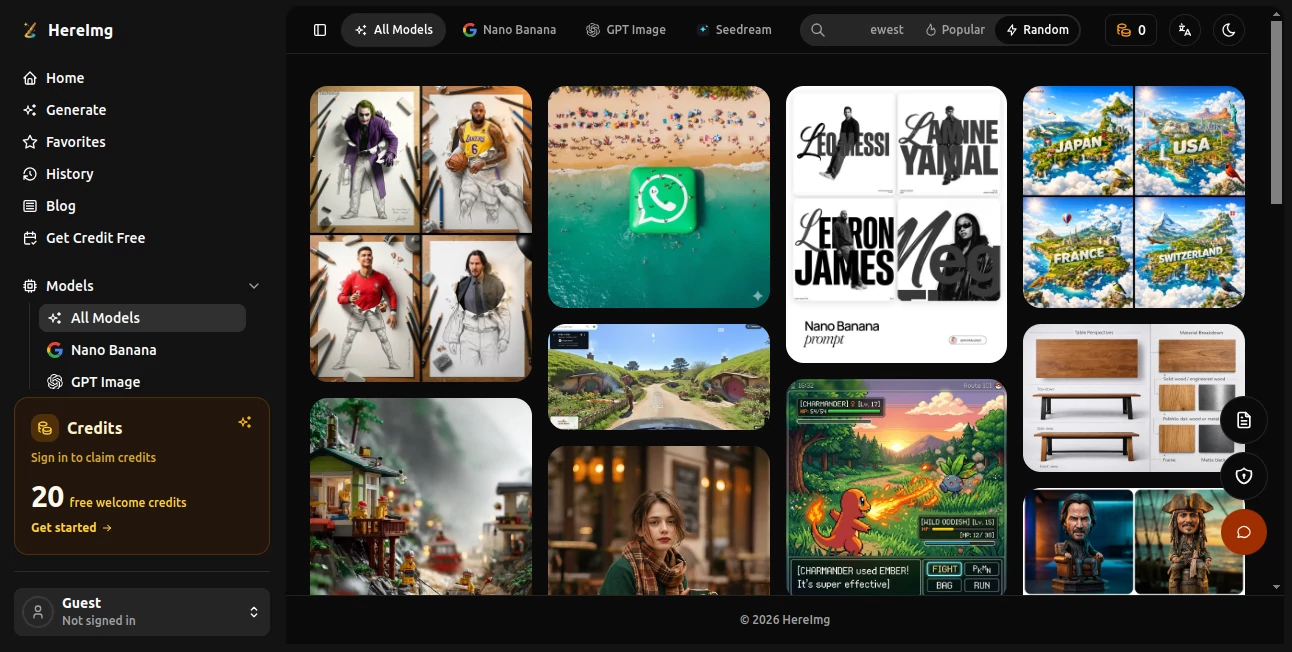
HereImg is an AI-powered image creation workspace built for people who want to turn ideas, prompts, and existing images into polished visual content. Instead of relying on a single generation model, the platform brings several modern image models into one place, including Nano Banana 2, Nano Banana Pro, GPT Image 2, and Seedream 5.0 Pro.
The experience is particularly useful for creators, marketers, designers, ecommerce teams, and anyone who needs to experiment with visual concepts quickly. You can start with a written description, upload an image for transformation, choose an aspect ratio, select a model, and refine the result through natural-language instructions.
There is also a prompt gallery organized around areas such as photography, poster design, product and brand visuals, UI and graphic design, food and drink, and illustration. For someone who knows what they want visually but is not sure how to phrase the prompt, this gallery can be a practical starting point.
Key Features
- Text-to-image generation from natural-language prompts.
- Image-to-image creation and editing using an existing visual as a reference.
- Access to multiple image generation models from one workspace.
- Support for different aspect ratios including square, portrait, landscape, and social-friendly formats.
- High-resolution image generation, with supported models offering outputs up to 4K.
- Natural-language image editing without requiring traditional layer or masking workflows.
- Character and object consistency for multi-image creative projects.
- Accurate in-image text generation for posters, packaging, advertisements, and mockups.
- A searchable prompt gallery with ready-to-use creative examples.
- Built-in image utilities such as resizing, cropping, compression, format conversion, filters, and background removal.
User Interface
The interface keeps the main generation workflow straightforward. Users can enter a prompt, select an image model, choose an aspect ratio, set the available resolution, and generate an image from the same workspace.
Navigation is also organized around useful areas such as generation, favorites, history, the prompt gallery, and image utilities. This makes the service feel more like a compact creative workspace than a single-purpose image generator.
A nice touch is the session history, which allows generated images from the current session to remain accessible while experimenting. The prompt gallery is equally useful when inspiration is running low. A designer working on a product campaign, for example, can browse existing photography or poster ideas before creating a variation of their own.
Accuracy & Performance
Performance depends on the selected model and the complexity of the request, but the available models are designed for different creative priorities. Faster generation can be useful when producing many variations, while more advanced models are better suited to detailed commercial imagery and complex edits.
One of the stronger areas is instruction-based editing. Rather than rebuilding an image manually, users can describe a change such as removing an unwanted object, changing lighting, replacing an item, or adjusting part of a composition.
Text rendering is another notable strength across the supported advanced models. This matters when creating posters, advertisements, product packaging, menus, presentation graphics, or social media creatives where incorrectly rendered words can make an otherwise attractive image unusable.
Capabilities
The platform covers a broad range of image-generation workflows. A simple text prompt can be turned into an original visual, while an existing image can serve as the starting point for a redesign or transformation.
For more demanding projects, the supported models provide capabilities such as high-resolution generation, multilingual text inside images, local editing, realistic photography, structured diagrams, product visuals, and consistent characters or objects across a series.
This makes it suitable for both quick experiments and more deliberate production work. For example, an ecommerce team could create several product campaign concepts, while a content creator could generate a consistent set of images for a social media series without manually recreating every scene.
Security & Privacy
The service places clear restrictions on certain types of generated content. Its generation interface specifically states that nudity and NSFW content are not allowed, with users directed to its Terms of Service and Privacy Policy for the applicable rules.
As with any online image-generation service, users should avoid uploading confidential documents, private photographs, unreleased commercial assets, or other sensitive material unless they have reviewed the provider's current privacy terms and are comfortable with the applicable data practices.
Use Cases
- Marketing campaigns: Create advertising concepts, promotional graphics, product visuals, and campaign variations.
- Ecommerce: Develop product scenes, promotional images, packaging concepts, and lifestyle visuals.
- Social media: Produce square, portrait, and landscape creatives for different platforms.
- Graphic design: Explore poster layouts, brand concepts, illustrations, and visual directions.
- Content creation: Generate supporting images for articles, videos, newsletters, and online publications.
- Photography concepts: Experiment with portraits, locations, lighting, compositions, and editorial styles.
- Product development: Turn rough ideas, sketches, or references into polished visual concepts.
- Localization: Adapt image-based designs and text for different languages and markets.
- Education: Create diagrams, explainers, visual examples, and information-rich graphics.
- Creative experimentation: Test different models and prompts without switching between multiple services.
Pros and Cons
Pros
- Combines several modern image models in one interface.
- Supports both text-to-image and image-to-image workflows.
- Useful natural-language editing capabilities.
- Strong focus on readable text inside generated images.
- Supports multiple aspect ratios and high-resolution workflows.
- Prompt gallery provides practical inspiration and ready-to-use examples.
- Includes additional image utilities beyond AI generation.
- Offers free welcome credits for new users.
Cons
- Generation consumes credits, so frequent users need to monitor usage.
- Results can still vary depending on the model, prompt, and complexity of the requested image.
- The large number of available models may require some experimentation before users find their preferred workflow.
- Advanced commercial workflows may require paid credits depending on usage.
Pricing Plans
The platform uses a credit-based generation system rather than presenting image creation as an unlimited free service. New users can claim 20 free welcome credits, giving them an opportunity to test the workflow before committing to additional usage.
The generation interface displays the credit requirement before creating an image, and a standard generation can require 10 credits depending on the selected configuration. If a generation fails, the displayed policy states that the credits are automatically refunded.
Because credit requirements and available purchasing options can change as new image models are introduced, users should check the current credit options inside the platform before purchasing additional usage.
How to Use the Platform
- Open the image generation workspace.
- Enter a detailed description of the visual you want to create, or provide an existing image as a reference.
- Select an available image model based on the type of result you need.
- Choose an appropriate aspect ratio for your destination, such as square, portrait, or landscape.
- Set the available resolution and review the displayed credit requirement.
- Generate the image and inspect the result.
- If the result needs improvement, refine it with a more specific prompt or use natural-language editing instructions.
- Keep useful results in your session history or favorites while developing the final concept.
Comparison with Similar Tools
Many AI image generators focus primarily on producing an image from a text prompt. This platform takes a broader approach by combining multiple models, image-to-image editing, prompt discovery, and practical image utilities in the same environment.
That difference can be valuable for users who frequently move between experimentation and production. Instead of generating an image in one application, editing it somewhere else, and searching another website for prompt inspiration, several parts of that workflow can happen in one place.
The model selection is another advantage for users who want flexibility. One project may benefit from fast iteration, while another may require more detailed image editing, realistic photography, consistent subjects, or high-resolution commercial output. Having several models available makes it easier to choose according to the job rather than forcing every project through the same generation engine.
Conclusion
For creators who want more than a basic prompt-to-picture experience, this platform offers a well-rounded environment for generating, editing, and refining visual content. Its combination of multiple image models, image-to-image workflows, natural-language editing, high-resolution output, and a practical prompt gallery gives it appeal across creative and commercial use cases.
The biggest benefit is flexibility. A user can begin with a simple idea, experiment with different models, refine an existing image, and prepare variations for different formats without constantly changing tools. Whether the goal is a social media graphic, product concept, poster, illustration, or polished marketing visual, the workflow is designed to make that process faster and less dependent on traditional design skills.
Frequently Asked Questions (FAQ)
What can I create with this platform?
You can create a wide range of visual content including realistic photographs, illustrations, posters, product imagery, marketing graphics, social media assets, diagrams, and other AI-generated visuals.
Does it support image-to-image generation?
Yes. Users can upload an existing image and use it as the basis for an AI-assisted transformation or redesign.
Which AI image models are available?
The generation workspace provides access to models including Nano Banana 2, Nano Banana Pro, GPT Image 2, and Seedream 5.0 Pro, with model availability subject to change.
Can I generate images with text inside them?
Yes. The supported advanced models are designed to produce readable text inside posters, advertisements, packaging, mockups, infographics, and other visual designs.
Is there a free option?
New users can claim 20 free welcome credits. Image generation then uses credits according to the selected generation configuration.
Can I edit an image using a written instruction?
Yes. The platform supports natural-language editing, allowing users to describe changes such as modifying an object, adjusting lighting, changing a background, or refining part of a composition.
Does the platform allow NSFW image generation?
No. The generation interface states that nudity and NSFW content are not permitted.
Is it useful for commercial image creation?
It can be useful for marketing, ecommerce, advertising, product concepts, brand visuals, and other commercial creative workflows. Users should review the current terms and licensing conditions for their specific use case.
AI Photo & Image Generator , AI Background Remover , AI Image to Image , AI Text to Image .
These classifications represent its core capabilities and areas of application. For related tools, explore the linked categories above.

HereImg Alternatives Product
NanoAI
![FLUX.2 [max] Image Generator - AI image generator with prompt gallery and production-ready editing workflows.](/media_submitaitools/telegram/flux2max.app-favicon.webp)
FLUX.2 [max]…

Leonardo.ai
Picsart

Removebg one

Krea 2

PhotoEditorAI

Remove Text

ChromaPeel