
Hevzo
What is Hevzo?
Hevzo is an AI-powered creative platform built for people who want to turn ideas, images, and written prompts into engaging visual content without setting up a complicated production workflow. Its current experience centers around advanced AI video generation, while also bringing image creation and editing tools into the same workspace.
The platform puts several modern video models in one place, giving creators more freedom to choose the right approach for a project. Whether the goal is a product advertisement, a short social media clip, a cinematic concept, or an animated version of an existing image, the workflow is straightforward: provide your input, select the settings, generate, and review the result.
Key Features
- Text-to-video and image-to-video generation.
- Access to multiple AI video models from one platform.
- MiniMax H3 support with 2K output and native stereo audio.
- Multiple aspect ratios including 1:1, 4:3, 3:4, 16:9, and 9:16.
- Image-to-image and text-to-image generation on paid plans.
- Image tools for additional creative work.
- Free daily credits for trying the platform.
- Cloud storage for generated images and videos.
- Priority processing on paid plans.
- Watermark-free downloads on paid subscriptions.
User Interface
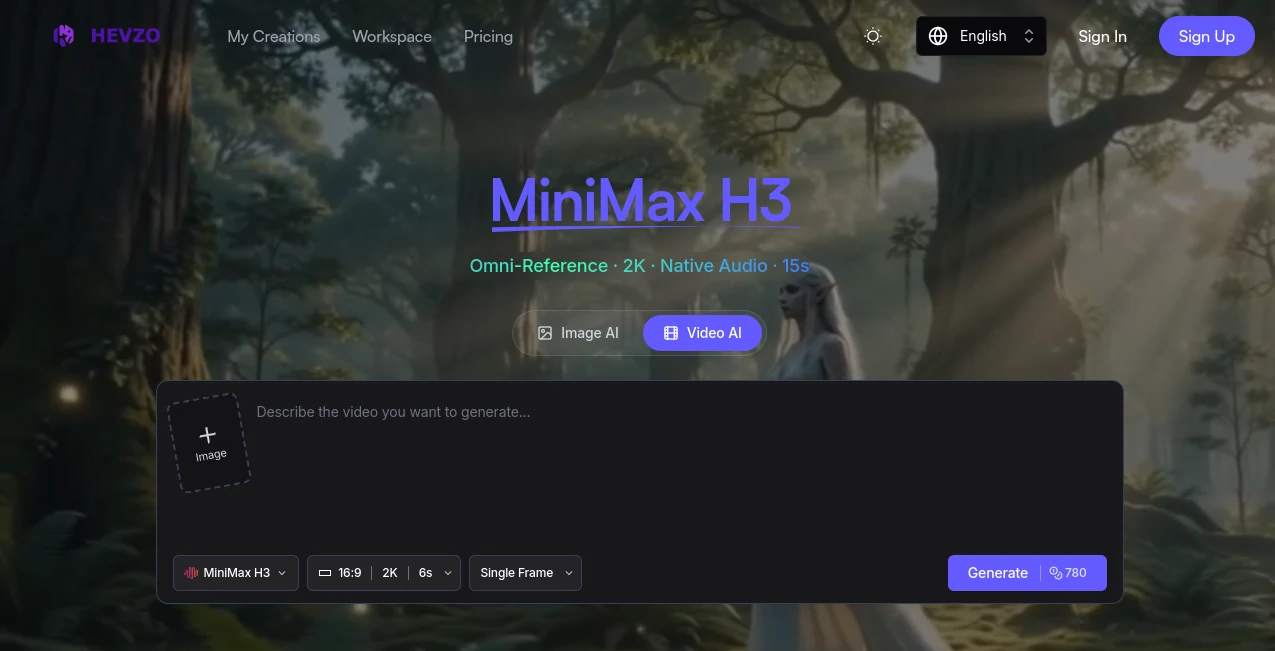
The interface keeps the creative process focused on the generation itself. Users can enter a prompt, upload an image when appropriate, choose an aspect ratio and resolution, select a generation mode, and start creating without having to move through a long series of configuration screens.
For example, someone working on a product campaign can upload a product image, choose a suitable format for social media, describe the desired movement, and generate a short promotional clip. The same workflow can be adapted for vertical videos, landscape presentations, or square social content.
Accuracy & Performance
Video generation quality naturally depends on the selected model, prompt, reference material, and generation settings. The platform provides access to several models so creators can compare different approaches rather than being locked into one generation engine.
The featured MiniMax H3 workflow supports 768P and 2K output, multiple generation modes, and video durations that can extend to 15 seconds. Native stereo audio is another notable addition for projects where sound needs to be part of the generated experience.
Paid plans also provide priority processing, while the highest subscription tier adds turbo access and parallel generation capabilities. These options are particularly useful for users producing multiple variations rather than waiting through a single-generation workflow.
Capabilities
The platform covers a surprisingly broad range of creative scenarios. Its video tools can animate static product photography, transform artwork into moving scenes, create social media clips, develop brand animations, and produce game-related cinematic material.
Its current model selection includes Veo 3.1, Seedance 2.0, Seedance 2.5, and MiniMax H3, with different strengths around audio, duration, resolution, and reference-driven generation. This model variety gives creators a practical way to match a model to the requirements of a particular project.
Security & Privacy
Payment processing is handled through Stripe, with card information sent directly to the payment provider rather than being stored on the platform's own servers. The service also provides cloud storage for generated content, making it possible to access creations from the workspace.
Users should still review the platform's current terms and privacy documentation before uploading confidential, proprietary, or sensitive material, especially when working on commercial projects.
Use Cases
Product Marketing: Turn product photos into short promotional videos, animated showcases, and social advertisements. This can be useful for ecommerce brands that have plenty of product photography but limited video resources.
Social Media Content: Convert posters, photographs, illustrations, and other static visuals into motion clips for Instagram Reels, TikTok, YouTube Shorts, and advertising campaigns.
Brand Animation: Animate logos, mascots, and existing brand artwork to create intros, outros, promotional sequences, and other branded visual assets.
Concept Development: Artists and filmmakers can use generated clips to test how a character, environment, or storyboard might look in motion before committing to a larger production.
Gaming Content: Game developers and artists can animate character artwork, environments, skins, and key visuals to create trailers, teasers, promotional loops, and cinematic concepts.
Creative Experimentation: The combination of different models, reference modes, resolutions, and aspect ratios makes the platform useful for quickly testing visual ideas that would otherwise require considerably more production work.
Pros and Cons
Pros:
- Several leading AI video models are available in one workspace.
- Supports both text-to-video and image-to-video workflows.
- MiniMax H3 offers 2K generation, native stereo audio, and multimodal input.
- Multiple aspect ratios make the platform suitable for different publishing channels.
- A free plan provides daily credits for experimentation.
- Paid subscriptions include commercial licensing.
- Generated content is automatically saved to cloud storage.
Cons:
- The free plan has limited daily credits.
- Free generations include a watermark and are restricted to personal, non-commercial use.
- Higher-end models can require considerably more credits per generation.
- AI-generated video results can still vary depending on prompts and source material.
- Some advanced capabilities are reserved for paid plans.
Pricing Plans
The platform offers a free option alongside several paid monthly subscriptions. The Free plan provides 15 credits per day and includes image-to-video and text-to-video generation with limited models, standard queue access, and watermarked downloads.
The Basic plan costs $23.90 per month and provides 9,000 credits. It adds access to all models, image-to-image and text-to-image generation, image tools, priority processing, and downloads without a watermark.
The Plus plan costs $39.90 per month and includes 18,000 monthly credits with the same core paid features. The Pro plan costs $79.90 per month and raises the allowance to 45,000 credits while adding turbo access and parallel generation.
Subscription users also receive a commercial license for their generated images and videos. Annual billing is available with a stated 20% discount, making it worth considering for users who expect to work with the platform regularly.
How to Use Hevzo
Start by choosing the type of content you want to create and enter a clear description of the scene or result you have in mind. If your project is based on an existing visual, upload the image and use the appropriate image-to-video or reference workflow.
Next, select the aspect ratio and available resolution that match the intended destination. A vertical format works well for short-form social content, while 16:9 is more suitable for traditional landscape video.
Choose the generation mode and model that fit the project, then start the generation. Once processing is complete, review the result and make another attempt with a refined prompt or different settings if the movement, composition, or overall style needs adjustment.
Comparison with Similar Tools
Many AI video platforms focus primarily on a single generation model or a particular creative workflow. This platform takes a broader approach by bringing several video models together and allowing users to compare their strengths within one service.
That makes it especially appealing to creators who do not want to maintain multiple subscriptions simply to experiment with different video models. The combination of image generation, image editing, video generation, cloud storage, and model selection also gives it a more flexible role in a creator's workflow.
It is not necessarily the perfect choice for every production. Users who need extensive manual editing, detailed timeline control, or a traditional post-production environment may still prefer dedicated video editing software. For fast AI-assisted generation, however, having several models and workflows available from one place can save considerable time.
Conclusion
Hevzo is a strong option for creators who want a practical way to explore modern AI video generation without juggling several separate platforms. Its combination of text-to-video, image-to-video, image creation, multiple AI models, high-resolution output, and cloud storage creates a useful environment for both experimentation and commercial content production.
The free daily credits make it easy to test the workflow before committing to a subscription, while the paid plans are designed for users who need more credits, faster processing, broader model access, and commercial usage. For marketers, ecommerce teams, designers, filmmakers, and social media creators, it offers a convenient starting point for turning static ideas into polished moving content.
Frequently Asked Questions (FAQ)
What is Hevzo used for?
It is primarily used for AI-assisted image and video creation. Users can generate videos from text or images, animate existing visuals, create images, and experiment with several AI generation models.
Can I use it for free?
Yes. The free plan provides 15 credits per day and includes limited access to video generation features. Free downloads contain a watermark and are intended for personal, non-commercial use.
Does it support 2K video?
Yes. The MiniMax H3 workflow supports 2K video output in addition to 768P generation.
Can I generate videos from images?
Yes. Image-to-video generation is available, allowing users to transform static photographs, artwork, product images, and other visuals into animated clips.
Can generated content be used commercially?
Paid subscription plans include a full commercial license according to the service's current FAQ. The free service is intended for personal, non-commercial use.
How long can generated videos be?
The featured MiniMax H3 model supports video generation of up to 15 seconds, while the exact duration available can vary between models and generation options.
Does the platform provide cloud storage?
Yes. Generated images and videos are automatically saved to the platform's free cloud storage, allowing users to access and manage their creations from their workspace.
Which AI video models are available?
The platform currently lists several models, including Veo 3.1, Seedance 2.0, Seedance 2.5, and MiniMax H3. Their available capabilities, credit costs, resolutions, and generation characteristics differ.
AI Image to Video , AI Video Generator , AI Video Enhancer , AI Text to Video .
These classifications represent its core capabilities and areas of application. For related tools, explore the linked categories above.

Hevzo Alternatives Product

Seedance 2.5…

Veo4

FreeWanVideo

Seedance 3.0…

ai seedance …

Pixelfox AI

ViraFlow

Faceless Ree…

Seedance Art