
Rango
What is Rango?
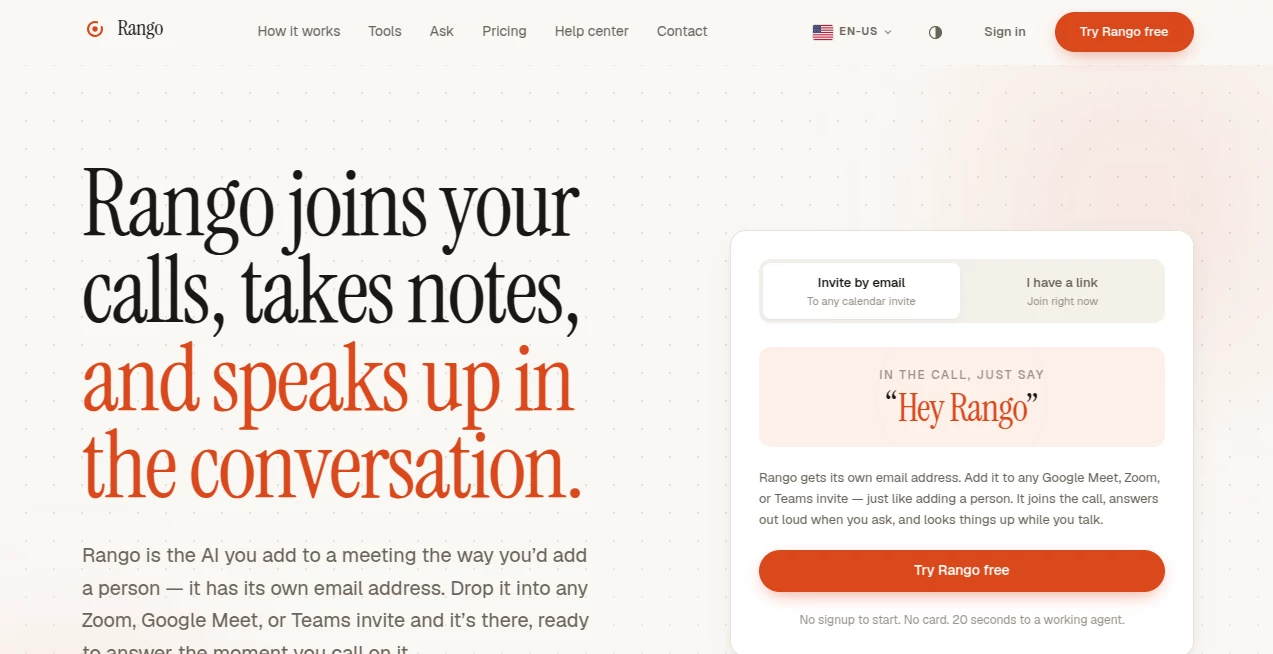
Meetings have become the center of modern teamwork, but keeping track of discussions, action items, and important decisions often pulls attention away from the conversation itself. This AI-powered meeting assistant approaches the problem differently by participating as an actual meeting attendee instead of acting as a background recorder. Simply invite it using its own email address, and it joins virtual meetings alongside everyone else.
Unlike traditional note-taking assistants that quietly capture transcripts, this solution is designed to become an active participant whenever needed. During conversations, it can answer questions, recall details mentioned earlier, summarize discussions, and help teams stay focused without constantly searching through meeting notes.
Whether the meeting happens on Zoom, Google Meet, or Microsoft Teams, the experience remains consistent. It blends naturally into existing workflows without requiring complicated setup or additional software installations, making it attractive for businesses, remote teams, consultants, educators, and startups.
Key Features
- Joins meetings using its own email address.
- Works with Zoom, Google Meet, and Microsoft Teams.
- Takes detailed meeting notes automatically.
- Responds when participants ask questions during meetings.
- Captures action items and key decisions.
- Helps participants recall previous discussion points.
- Provides real-time assistance instead of passive transcription.
- Requires minimal setup before joining calls.
- Supports collaborative team meetings.
- Reduces manual note-taking effort.
User Interface
The overall experience is refreshingly straightforward. Adding the assistant feels similar to inviting another colleague to a calendar event. There are no complicated dashboards to learn before getting started. This familiar workflow lowers the learning curve, allowing new users to adopt the platform almost immediately.
Because the assistant integrates directly with common meeting platforms, teams can continue using their preferred communication tools without changing existing habits. This seamless approach encourages regular use across organizations.
Accuracy & Performance
The assistant performs well in capturing conversations and organizing information into structured meeting notes. Instead of simply generating lengthy transcripts, it focuses on identifying meaningful discussion points, decisions, and follow-up tasks.
Its ability to respond when participants ask questions during a meeting creates a more interactive experience than conventional meeting recorders. Team members can retrieve information without interrupting the natural flow of discussion.
Capabilities
Beyond recording conversations, the platform serves as an intelligent meeting companion. It listens throughout discussions, keeps track of context, remembers earlier topics, and provides answers when invited into the conversation.
This makes it especially useful for recurring meetings where remembering previous decisions is just as important as documenting current ones. Project managers, sales teams, customer success departments, and leadership groups can all benefit from having an assistant that remains attentive throughout every session.
Security & Privacy
Organizations frequently handle confidential information during meetings, making privacy an essential consideration. The platform is designed for professional environments where responsible handling of meeting content matters. Users should still review the official privacy policy and organizational compliance requirements before using any AI meeting assistant with sensitive business information.
Use Cases
- Weekly team stand-up meetings.
- Remote company meetings.
- Sales discovery and client calls.
- Project planning sessions.
- Customer onboarding meetings.
- Product development discussions.
- Educational workshops.
- Internal brainstorming sessions.
- Executive leadership meetings.
- Cross-functional collaboration.
Pros and Cons
Pros
- Easy to invite into meetings.
- Supports major meeting platforms.
- Acts as an interactive meeting participant.
- Creates organized meeting notes automatically.
- Helps reduce manual documentation.
- Improves meeting productivity.
Cons
- Requires virtual meeting platforms for full functionality.
- Organizations should verify privacy requirements before deployment.
- Advanced features may depend on subscription plans.
Pricing Plans
The service offers plan options that may change over time as new features are introduced. Prospective users should review the official pricing page for the latest information regarding available subscriptions, included meeting limits, and enterprise offerings.
How to Use Rango
- Create an account.
- Schedule a meeting on your preferred conferencing platform.
- Add the assistant's email address to the meeting invitation.
- Allow it to join the meeting automatically.
- Ask questions during the conversation whenever information is needed.
- Review the generated notes and action items after the meeting ends.
Comparison with Similar Tools
Many AI meeting assistants specialize in transcription or post-meeting summaries. This platform distinguishes itself by behaving more like an active participant than a silent recorder. Instead of waiting until the meeting concludes, it can contribute during the discussion whenever participants request assistance.
This conversational approach reduces interruptions caused by searching through notes and helps teams make better use of meeting time. Organizations looking for a more interactive meeting experience may appreciate this difference over traditional transcription-focused solutions.
Conclusion
For teams that spend significant time in virtual meetings, having an assistant that not only records conversations but also participates intelligently can transform everyday collaboration. The simple invitation process, compatibility with leading conferencing platforms, and ability to answer questions in real time create a practical solution for modern workplaces.
By combining automatic documentation with interactive assistance, the platform reduces administrative work while helping teams stay engaged in meaningful discussions. Businesses searching for a smarter way to manage meetings will find this approach both efficient and refreshingly natural.
Frequently Asked Questions (FAQ)
Does it work with Zoom?
Yes. It supports Zoom meetings alongside other popular conferencing platforms.
Can it join Google Meet sessions?
Yes. Simply invite it using its dedicated email address when scheduling the meeting.
Does it only record meetings?
No. It can also answer questions during meetings and assist participants in real time.
Can it identify action items?
Yes. It helps organize important decisions, follow-up tasks, and meeting notes.
Who can benefit most from this platform?
Remote teams, businesses, consultants, educators, project managers, and customer-facing teams can all benefit from automated meeting assistance.
AI Productivity Tools , AI Team Collaboration , AI Meeting Assistant , AI Notes Assistant .
These classifications represent its core capabilities and areas of application. For related tools, explore the linked categories above.

Rango Alternatives Product

Myjourney

EasyVC

Zamicus

Maestra

broop
MeetAssist

Wild and Fre…

Video To Text

Monkey Eatin…