Workforce AI
What is Workforce AI?
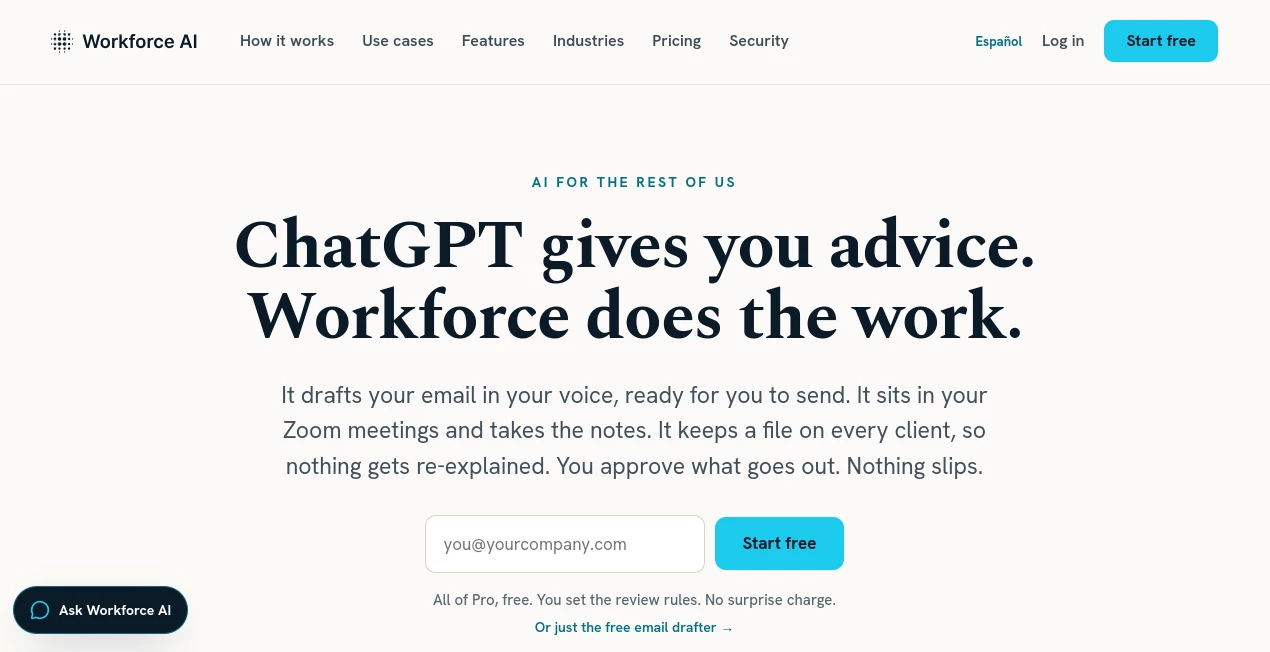
Modern businesses spend countless hours replying to emails, following up with clients, organizing meetings, and keeping projects on track. Instead of forcing teams to juggle multiple disconnected applications, this platform introduces the idea of an AI employee that works alongside people throughout the day. It helps with communication, captures important information from meetings, remembers customer interactions, and automates repetitive tasks while allowing users to remain in complete control of every important decision.
Designed especially for small and growing businesses, agencies, consultants, law firms, accounting firms, real estate professionals, and service-based organizations, the platform focuses on reducing administrative work rather than replacing human expertise. It integrates naturally into existing workflows, allowing teams to spend more time building relationships with clients instead of managing endless follow-ups. The result is a smoother workday, better organization, and fewer missed opportunities. :contentReference[oaicite:0]{index=0}
Key Features
User Interface
The dashboard is intentionally simple and easy to navigate. Meetings, tasks, chats, documents, approvals, and integrations are organized into clear sections, making daily work feel familiar instead of overwhelming. Users can even communicate through email, text messages, WhatsApp, or chat without constantly switching between applications.
Accuracy & Performance
The platform builds context from connected emails, meetings, uploaded documents, and previous conversations. This allows it to draft personalized emails, summarize meetings, identify action items, and generate follow-ups that reflect previous discussions instead of generic responses. Every interaction becomes part of an organized knowledge base that grows more valuable over time. :contentReference[oaicite:1]{index=1}
Capabilities
- Drafts emails in your writing style.
- Joins Zoom meetings automatically.
- Creates meeting summaries and searchable transcripts.
- Extracts action items and follow-up tasks.
- Maintains detailed client history.
- Schedules recurring work.
- Supports natural language task execution.
- Works through email, chat, text messaging, and WhatsApp.
- Connects with more than 60 popular business applications.
- Generates daily briefings and business updates.
Security & Privacy
Security is treated as a core feature rather than an afterthought. Approval workflows allow users to review sensitive client-facing actions before anything is sent. Data is protected through encryption, customer information remains isolated, and the service is built on SOC 2 Type II security standards with HIPAA support available for eligible organizations. Every approval and action is logged to provide a complete audit trail. :contentReference[oaicite:2]{index=2}
Use Cases
- Managing client communication for consulting firms.
- Automatically documenting Zoom meetings.
- Preparing follow-up emails after sales calls.
- Helping agencies organize multiple client projects.
- Supporting recruiting and staffing workflows.
- Keeping customer records synchronized across conversations.
- Reducing inbox overload for busy executives.
- Handling recurring administrative tasks.
- Improving collaboration between distributed teams.
- Assisting financial advisors, accountants, legal professionals, and real estate businesses.
Pros and Cons
Pros
- Works across multiple communication channels.
- Excellent meeting transcription and follow-up automation.
- Natural email drafting based on previous conversations.
- Large collection of business integrations.
- Human approval controls for sensitive actions.
- Simple onboarding with no technical expertise required.
- Maintains long-term client memory across interactions.
Cons
- Many advanced capabilities require paid plans.
- Best experience depends on connecting business applications.
- Some meeting features currently prioritize Zoom users.
Pricing Plans
A free plan is available for the email drafting feature, allowing users to experience the platform without providing payment information. Premium plans unlock the complete AI employee experience, including meeting participation, workflow automation, integrations, client memory, and advanced productivity capabilities. Pricing is positioned as significantly lower than hiring additional administrative staff while delivering continuous availability. :contentReference[oaicite:3]{index=3}
How to Use Workforce AI
- Register with your business email.
- Connect your email, calendar, and preferred business applications.
- Create an AI employee by selecting its role, personality, and responsibilities.
- Upload company documents to provide business context.
- Invite it to meetings and daily workflows.
- Review suggested actions through approval controls.
- Allow recurring tasks and follow-ups to run automatically.
Comparison with Similar Tools
Unlike traditional meeting assistants that simply record conversations or email assistants that only generate drafts, this solution combines communication, client memory, task execution, meeting intelligence, workflow automation, and multi-channel collaboration into one experience. Instead of functioning as another isolated productivity application, it behaves like a digital teammate capable of supporting daily operations across an entire business.
Conclusion
Businesses often lose valuable hours to administrative work rather than meaningful client interactions. This platform approaches the challenge differently by providing an AI employee that becomes part of everyday operations instead of another tool requiring constant attention. From meeting documentation and personalized email drafting to client follow-ups and workflow automation, it delivers practical value while keeping humans in control of important decisions.
Organizations looking to improve productivity, strengthen customer relationships, and reduce repetitive work will appreciate its combination of intelligent automation, business memory, strong security practices, and extensive integrations. It is particularly well suited for small and medium-sized businesses that want enterprise-level AI assistance without enterprise-level complexity. :contentReference[oaicite:4]{index=4}
Frequently Asked Questions (FAQ)
Does it replace employees?
No. It is designed to automate repetitive administrative work while allowing employees to focus on customer relationships and strategic decisions.
Can it attend online meetings?
Yes. It can participate in supported meetings, capture transcripts, create summaries, and generate action items automatically.
Does it require technical knowledge?
No. The onboarding process is designed for business users without programming or AI experience.
Is business data protected?
Yes. The platform supports encrypted data handling, approval workflows, audit logs, and enterprise-grade security practices.
Which organizations benefit the most?
Consultants, agencies, accounting firms, legal practices, staffing companies, financial advisors, real estate professionals, and other service-based businesses can gain significant productivity improvements.
AI Productivity Tools , AI Task Management , AI Team Collaboration , AI Meeting Assistant .
These classifications represent its core capabilities and areas of application. For related tools, explore the linked categories above.

Workforce AI Alternatives Product

Trimless for…

Youfiliate

Kaamfu
GameClick.io

Oasis

Magpie

gpt-plus.ai

Toolquix

IdeaHunter