HubVanta AI
What is HubVanta AI?
Finding one platform that can handle images, videos, audio generation, and text creation without jumping between multiple tabs often feels impossible. Many creators, marketers, students, and professionals spend more time switching tools than creating actual work. This platform changes that experience by bringing several advanced AI capabilities together in one workspace.
Designed as an all-in-one creative environment, it gives users access to image generation, video creation, text assistance, and audio tools powered by multiple modern AI models. Instead of forcing users into complicated workflows, everything feels connected and accessible. For anyone who has ever thought, "there should be one place for all of this," the experience feels surprisingly refreshing.
A designer can create visuals in the morning, a content creator can prepare scripts in the afternoon, and a marketer can produce promotional materials before the day ends—all without switching ecosystems.
Key Features
User Interface
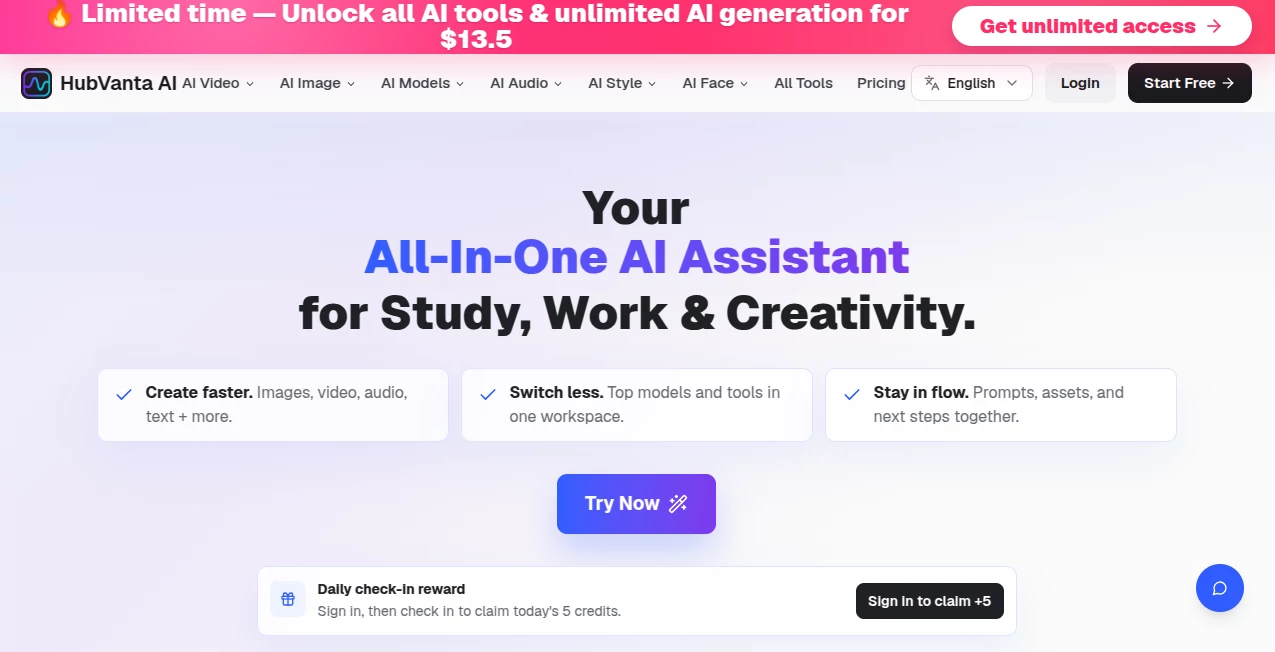
The interface is designed around simplicity. The dashboard feels clean, organized, and practical. Navigation is straightforward, making it easy for beginners while still giving experienced users quick access to advanced capabilities. Tool sections are grouped logically, reducing unnecessary clicks and confusion.
Instead of overwhelming users with technical language, the platform focuses on direct actions and intuitive workflows.
Accuracy & Performance
Performance is one of the strongest areas. Since multiple well-known AI technologies are integrated into the experience, generated results feel polished and responsive. Text generation flows naturally, image outputs maintain quality, and multimedia tasks deliver impressive speed.
Whether someone creates content for social media, educational projects, or business presentations, the output quality consistently feels capable of supporting professional work.
Capabilities
- AI image generation from text prompts
- Video creation powered by modern AI models
- Audio generation and processing tools
- Text writing and content assistance
- Access to multiple AI engines within one workspace
- Creative workflows for study and productivity
- Support for visual and multimedia content generation
The biggest advantage is flexibility. Instead of solving one problem, the platform acts like a digital creative toolkit.
Security & Privacy
User privacy appears to be approached with a minimal-data philosophy. Authentication systems, account protections, encrypted storage practices, and controlled access mechanisms help create a safer environment for user activity.
Modern authentication and account management systems also support a more secure experience while maintaining convenience.
Use Cases
- Content creators generating visuals, scripts, and videos
- Students preparing educational projects and presentations
- Social media managers creating campaign assets
- Small businesses producing marketing materials
- Designers exploring rapid visual concepts
- Writers creating text drafts and creative content
- Teams experimenting with multimedia production workflows
Imagine a startup founder preparing an investor pitch. Images, visuals, presentation material, and promotional content could all be produced from a single workspace instead of relying on several subscriptions.
Pros and Cons
Pros
- Multiple AI functions combined into one platform
- Clean and beginner-friendly design
- Supports image, audio, video, and text generation
- Access to various leading AI technologies
- Useful for both productivity and creativity
Cons
- Advanced users may require additional specialized features
- New users may spend time exploring numerous capabilities
- Feature availability can evolve as AI models change
Pricing Plans
The platform currently offers a generous free experience for users exploring AI-powered creation tools. Certain premium capabilities, expanded usage options, or future workspace plans may become available over time for users needing larger-scale production.
The free entry point makes experimentation easy without creating commitment pressure.
How to Use HubVanta AI
- Create an account or sign in.
- Select the AI tool category you need.
- Choose image, text, audio, or video functionality.
- Enter prompts or upload relevant material.
- Generate results.
- Review, adjust, and refine outputs.
- Export content for personal or professional use.
The process feels simple enough for first-time users while remaining useful for experienced creators.
Comparison with Similar Tools
Many AI platforms focus only on one area. Some specialize in image generation, others concentrate on writing, and several target video production alone.
What creates a stronger impression here is the ability to combine multiple creative functions under one roof. Instead of maintaining subscriptions for several services, users can manage a larger portion of their workflow in one environment.
This broader approach creates convenience that many standalone solutions struggle to match.
Conclusion
Modern creators rarely work with a single format anymore. A blog post becomes a video, a video becomes social content, and ideas often move across several channels. Having an AI environment that supports this type of workflow creates a practical advantage.
The experience feels less like using separate tools and more like working with a creative assistant that adapts to different tasks. For students, creators, marketers, and professionals looking to simplify digital work, this all-in-one approach deserves attention.
Frequently Asked Questions (FAQ)
Is it beginner-friendly?
Yes. The interface is designed to be accessible even for users with no previous AI experience.
Can users create both visual and written content?
Yes. The platform supports text generation alongside image, audio, and video workflows.
Does it support multiple AI technologies?
Yes. Multiple AI engines and generation models are available within the ecosystem.
Can it be used for business projects?
Absolutely. Marketing assets, presentations, visuals, and content workflows can all benefit.
Is there a free plan available?
Yes. Users can begin with free access and explore many capabilities before considering upgrades.
AI Photo & Image Generator , AI Content Generator , AI Video Generator , AI Productivity Tools .
These classifications represent its core capabilities and areas of application. For related tools, explore the linked categories above.

HubVanta AI Alternatives Product

AI ASMR Gene…
GPT Image 2-…

Sora AI Vide…
PromptFix

PDF Inspector

Oasis

Wan-Animate.…
Thinkesta

SuperAI