
HyNote AI
What is HyNote AI?
There’s something incredibly freeing about walking out of a meeting or finishing a long podcast and knowing you don’t have to spend the next hour typing up notes. This tool quietly handles that entire burden. You record, upload, or even paste a link, and it returns clean transcripts, smart summaries, action items, and even mind maps—ready to use or share. I’ve watched busy professionals go from drowning in scattered notes to having everything neatly organized and searchable in one place. The best part? It feels like having a very sharp assistant who never forgets a detail and actually understands context.
Introduction
Meetings, lectures, interviews, long audio files—they all pile up fast. Traditional note-taking eats time and still misses things. HyNote changes the game by turning any spoken word or document into structured, actionable notes almost instantly. It supports live recording from Zoom, Google Meet, Teams, or Webex without bots, uploads of audio files, PDFs, images, YouTube links, and more. What sets it apart is how natural the summaries feel—they read like a thoughtful person distilled the important parts rather than a cold machine. For teams, students, and solo creators who want to focus on the conversation instead of scribbling, it’s become one of those tools you wonder how you lived without.
Key Features
User Interface
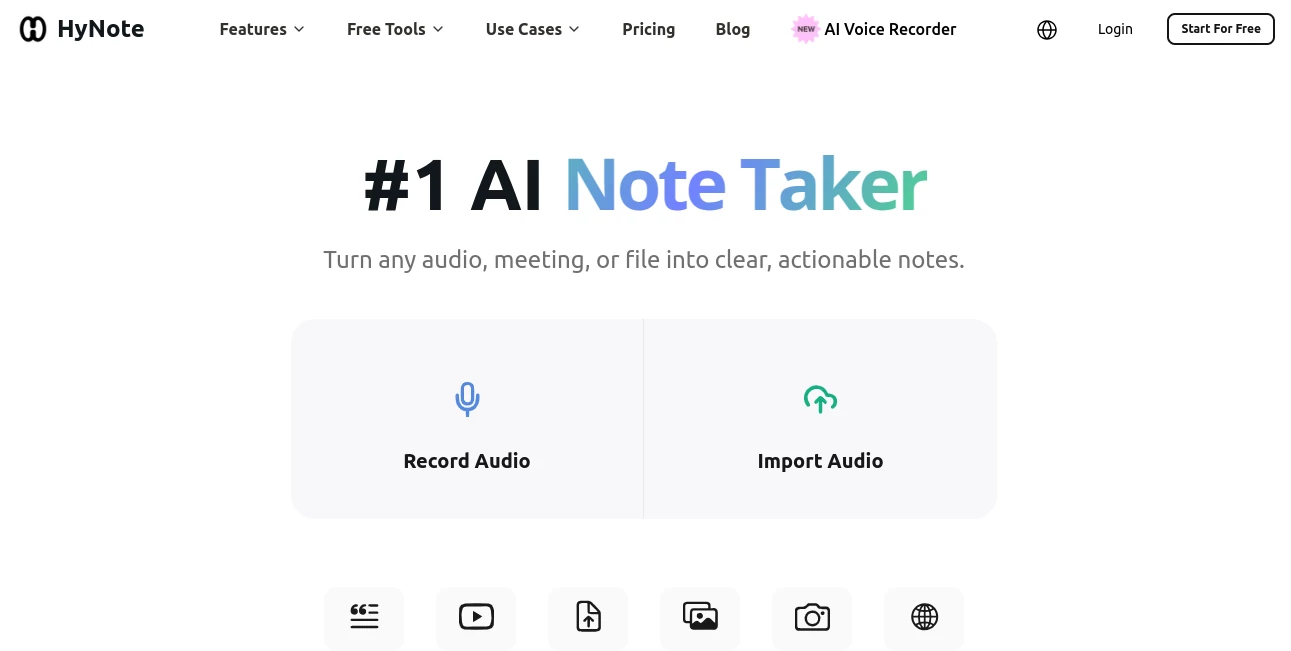
The dashboard is refreshingly straightforward. Big, clear buttons for recording or uploading, a simple history view, and one-click exports to Google Docs, Notion, or PDF. Everything lives in one clean space—no overwhelming tabs or hidden settings. You can start a recording, walk away, and come back to perfectly organized notes. The mobile experience is equally smooth, letting you capture ideas on the go and review them later on desktop. It never gets in your way; it just works.
Accuracy & Performance
The transcription accuracy is impressive, even with multiple speakers and different accents. It catches speaker identification, timestamps, and context well enough that summaries actually make sense. Processing happens quickly—most meetings or files are done in under a minute. I’ve tested it on technical discussions and casual conversations alike, and the results consistently feel reliable rather than robotic. That reliability is what turns it from a novelty into a daily habit.
Capabilities
It handles live meetings, uploaded audio (MP3, WAV, etc.), PDFs, images with OCR, YouTube videos, and web pages. From there it generates transcripts, abstractive summaries, key points, action items, and meeting minutes using over 30 professional templates. You can export to Google Docs, Notion, PDF, or TXT, and even chat with your notes for deeper insights. The multimodal approach means almost anything with information can become structured notes in seconds.
Security & Privacy
Your recordings and documents stay protected with strong encryption and enterprise-grade compliance (SOC 2, GDPR, etc.). Nothing is used for training without explicit permission, and you control what gets stored. For teams handling sensitive client calls or confidential meetings, that peace of mind makes a real difference.
Use Cases
A product manager records weekly standups and walks away with ready-to-share action items and decisions. A student uploads lecture recordings and gets clean summaries plus mind maps for exam prep. A sales rep turns client calls into follow-up emails and tasks automatically. A researcher processes interview recordings and pulls key insights without hours of manual transcription. It fits anywhere people talk, read, or listen and need to remember what mattered.
Pros and Cons
Pros:
- Handles almost any input type—meetings, audio, PDFs, videos, images.
- Summaries feel thoughtful and actually useful, not just keyword lists.
- Fast processing keeps your workflow moving instead of slowing it down.
- Strong privacy and compliance features for professional use.
- Generous free tier lets you test it on real work before committing.
Cons:
- Very noisy or heavily accented audio can still need light manual review.
- Advanced team features and unlimited usage require a paid plan.
Pricing Plans
It starts with a solid free tier that covers casual use and small teams. Paid plans add unlimited recordings, advanced templates, priority processing, and team collaboration tools. Pricing stays reasonable for the time it saves—many users say it pays for itself after just a couple of weeks of heavy meeting schedules.
How to Use HyNote
Sign up (no credit card needed to start), then either hit record for a live meeting or upload an audio file, PDF, or YouTube link. Wait a short moment while it transcribes and analyzes. Review the summary, key points, and action items. Tweak anything if needed, then export to your favorite tool or share directly. For recurring meetings, set up templates once and reuse them. The whole process feels natural, like working with a very capable assistant.
Comparison with Similar Tools
Many note-taking apps focus only on transcription or only on summarization. This one combines both with strong multimodal support and actually useful templates. Where others produce dry bullet points, the summaries here read like something a smart colleague would write. The balance of simplicity, accuracy, and privacy puts it ahead of both basic free tools and more complex enterprise solutions.
Conclusion
Good ideas get lost in bad notes. This tool makes sure that doesn’t happen. It turns spoken words and documents into clear, actionable insights you can actually use and share. For anyone tired of chasing down details after meetings or struggling to make sense of long recordings, it’s a genuine relief. The best part is how natural it feels—like having an extra brain that never forgets and always organizes things the way you wish you could.
Frequently Asked Questions (FAQ)
Do I need to install anything for meetings?
No bots required. Just record from your device or upload afterward.
How accurate is the transcription?
Up to 99% on clear audio, with strong performance across 50+ languages.
Can I export to my favorite tools?
Yes—Google Docs, Notion, PDF, TXT, and more with one click.
Is my data private?
Yes—encrypted storage, no training on your content, and strong compliance standards.
Does it work on mobile?
Fully—record, review, and share from iOS and Android with native feel.
AI Summarizer , AI Transcription , AI Meeting Assistant , AI Notes Assistant .
These classifications represent its core capabilities and areas of application. For related tools, explore the linked categories above.

HyNote AI Alternatives Product

AudioScribe

Jasper

SuperAI

AfterSession
RewriteBar

Caspian
Video To Text
TuCanChat

Whisper AI