


















Idea2Clip
What is Idea2Clip?
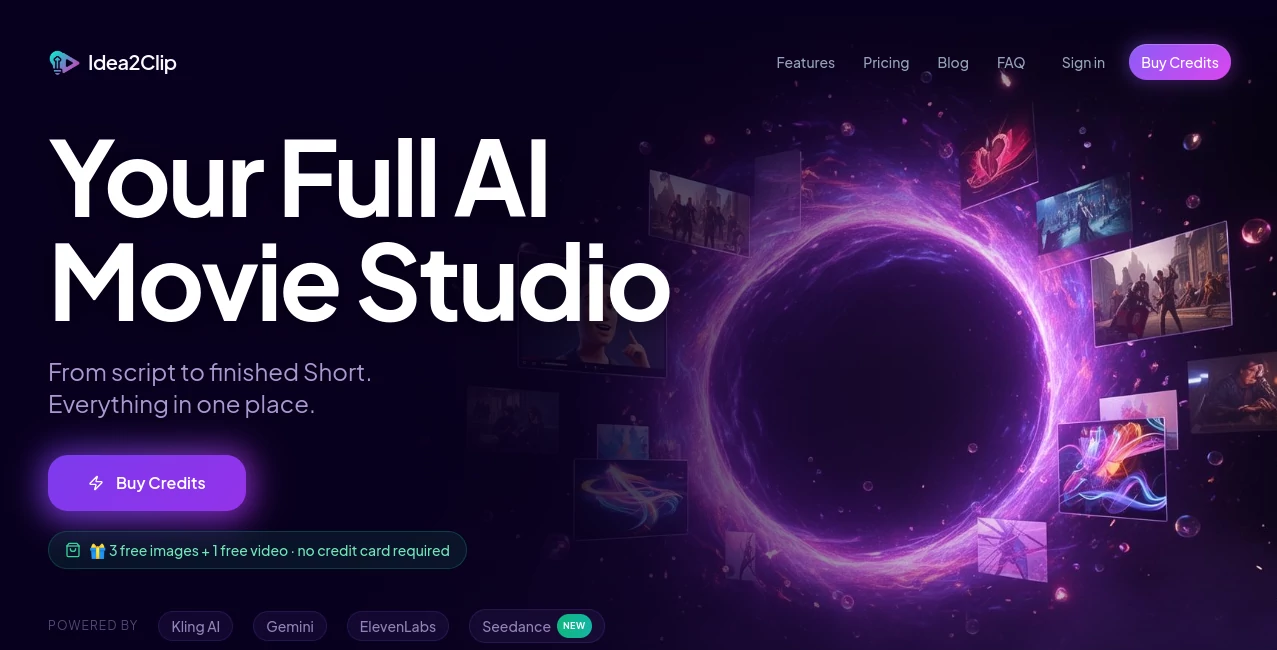
Creating engaging short-form videos often requires several different applications for scripting, voice generation, image creation, editing, and animation. This platform simplifies that entire workflow by bringing every essential production step into a single AI-powered workspace. Whether you are producing content for YouTube Shorts, TikTok, or Instagram Reels, it helps transform a simple concept into a polished video within minutes.
Instead of spending hours switching between editors and creative tools, users can brainstorm ideas, generate compelling scripts, create visuals, produce realistic voiceovers, animate scenes, and export ready-to-publish videos from one dashboard. The result is a faster and more enjoyable creative process without sacrificing quality.
Content creators, marketers, educators, agencies, and entrepreneurs can all benefit from an efficient production workflow that removes repetitive tasks while leaving room for creativity and storytelling.
Key Features
User Interface
The interface is thoughtfully organized, allowing users to move naturally from brainstorming to script creation, image generation, video production, voiceovers, and final editing. Projects remain organized inside a dedicated workspace, making it easy to manage multiple campaigns and creative ideas.
Accuracy & Performance
The platform combines several advanced AI technologies to generate scripts, scenes, images, voices, and videos with impressive speed. Character consistency, automatic scene generation, and intelligent workflow automation help reduce manual editing while maintaining professional-looking results throughout the production process.
Capabilities
- Generate complete video scripts from simple ideas.
- Create attention-grabbing hooks for social media.
- Produce AI-generated videos from text prompts.
- Animate still images into dynamic video scenes.
- Generate realistic AI voiceovers.
- Create talking avatars with lip synchronization.
- Maintain character consistency across multiple scenes.
- Transfer motion from reference videos to AI characters.
- Build multi-scene storytelling projects.
- Create content optimized for YouTube Shorts, TikTok, and Instagram Reels.
Security & Privacy
User projects are managed within personal workspaces protected through secure authentication. Uploaded media and generated assets remain associated with individual accounts, allowing creators to manage ongoing projects with confidence while maintaining control over their creative work.
Use Cases
- Creating viral short-form social media videos.
- Producing marketing campaigns for products and services.
- Building educational video content.
- Generating promotional videos for startups.
- Creating AI avatar presentations.
- Developing branded storytelling campaigns.
- Producing multilingual social content using AI voiceovers.
- Accelerating content production for digital agencies.
Pros and Cons
Pros
- Complete end-to-end AI video production workflow.
- Excellent for short-form social media content.
- Powerful script generation and brainstorming tools.
- Realistic voice synthesis and lip-sync capabilities.
- Character consistency across multiple scenes.
- Fast production with minimal editing experience required.
Cons
- Primarily focused on short-form videos rather than long-form productions.
- Advanced features require a paid subscription.
- Creative results still depend on well-written prompts.
Pricing Plans
A free trial with AI generation credits allows new users to explore the platform before subscribing. Paid plans begin at approximately $19 per month, with higher tiers providing additional credits, premium AI models, expanded workspace capabilities, priority support, and early access to new features.
How to Use Idea2Clip
Begin by entering a simple content idea or topic. Generate an AI-assisted script complete with engaging hooks and scene descriptions. Create visuals using text prompts or existing images, then add AI-generated voiceovers or animated avatars with lip synchronization. Assemble scenes inside the workspace, preview the final production, make adjustments if needed, and export a social-media-ready video for publishing.
Comparison with Similar Tools
Many AI video platforms specialize in only one stage of production, such as text-to-video generation or voice synthesis. This solution stands out by combining brainstorming, scripting, image generation, animation, motion transfer, voiceovers, character consistency, and editing within a unified workflow. For creators producing large volumes of short-form content, this integrated approach significantly reduces production time while improving creative consistency.
Conclusion
For creators who regularly publish videos on modern social platforms, having every production tool in one environment can dramatically improve efficiency. From the earliest brainstorming session to the final rendered clip, the workflow remains smooth, intuitive, and highly automated. Its combination of intelligent scripting, AI-powered visuals, professional voice generation, and advanced animation features makes it an impressive solution for individuals, businesses, and creative teams seeking faster video production without compromising quality.
Frequently Asked Questions (FAQ)
Is there a free version available?
Yes. New users can start with free AI generation credits to test the platform before choosing a paid subscription.
Can it create complete videos from a simple idea?
Yes. A basic concept can be transformed into a structured script, visuals, voiceovers, and a finished short-form video.
Does it support AI voice generation?
Yes. The platform includes realistic AI voiceovers and supports lip synchronization for animated characters.
Who is the platform designed for?
It is suitable for content creators, marketers, educators, agencies, entrepreneurs, and anyone producing videos for social media.
Can beginners use it?
Absolutely. Its guided workflow makes professional-quality AI video creation accessible even to users without prior video editing experience.
AI Video Generator , AI Short Clips Generator , AI Text to Video , AI Voice & Audio Editing .
These classifications represent its core capabilities and areas of application. For related tools, explore the linked categories above.

Idea2Clip Alternatives Product
Seedance 2 A…

PureMIDI

Spark Robin

Ltx AI - Ltx…

GrokImagineAI

Seedance 2.0…
PostPlus AI

AI Animate I…

See dance 2.…
