

















Igly Image Editor
What is Igly Image Editor?
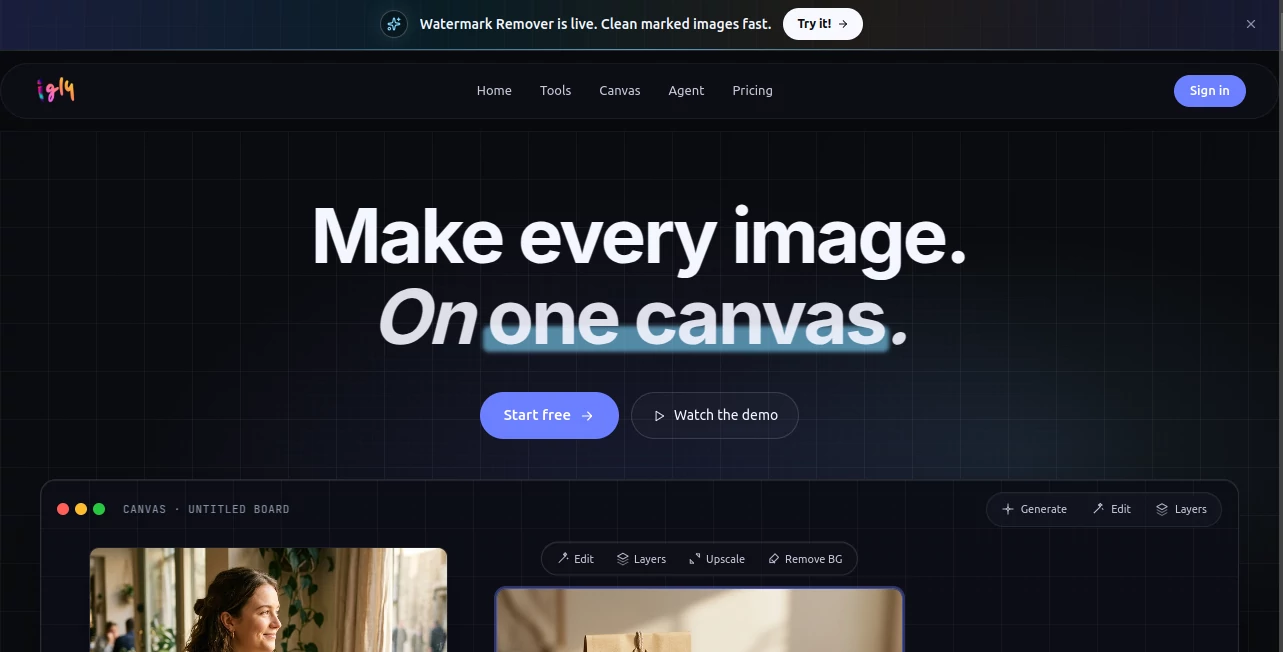
Most image tools force you to jump between tabs, apps, and endless exports. You generate something here, edit it there, then fight to keep everything consistent. Igly changes that feeling completely. It gives you one endless canvas where you can generate, edit, refine, and compose everything in the same space. Drop a product photo, tell it what background you want, upscale, remove distractions, or create variations—all without losing your flow. I’ve watched designers and store owners go from scattered files to a finished set of assets in one sitting. It feels like the tool finally understands how real creative work actually happens.
Introduction
Creating visuals used to mean switching between a dozen different programs and hoping the styles matched at the end. Igly brings it all together on one infinite board. You start with a prompt or upload, then keep building, editing, and layering right there. It’s especially loved by e-commerce creators who need consistent product shots, lifestyle scenes, and variations quickly. The platform combines strong generation with practical editing tools, so you spend less time fighting technology and more time making things look right. For anyone who creates images regularly, that single workspace is a genuine relief.
Key Features
User Interface
The canvas feels open and inviting from the first moment. You can drag in images, type prompts directly on the board, and see tools like AI Edit, Remove Background, or Upscale appear exactly when you need them. Layers stay manageable, and the infinite space means you never run out of room to experiment. It’s designed so you stay in the creative zone instead of hunting through menus. Even when working on multiple variations, everything stays visible and editable in one place.
Accuracy & Performance
The AI understands context remarkably well. When you mask an area and describe what should replace it, the results blend naturally with the original lighting and style. Upscaling keeps fine details without adding weird artifacts, and background removal is clean even on tricky edges. Processing stays fast enough that you can iterate quickly, which keeps the creative energy alive instead of waiting around.
Capabilities
You get a full toolkit in one place: intelligent AI editing where you paint and describe changes, background removal, upscaling, object removal, style transfer, and more. The infinite canvas lets you compose multiple images or variations side by side. It excels at product photography workflows—turning plain shots into lifestyle scenes, creating variations for different platforms, or building complete visual stories. The combination of generation and precise editing tools makes it powerful for both quick fixes and more ambitious projects.
Security & Privacy
Your work stays private on the canvas. Images are processed responsibly, and you control what gets saved or exported. For creators handling client work or brand assets, that respectful approach to data makes a real difference in comfort level.
Use Cases
An online store owner uploads plain product photos and creates polished lifestyle scenes for their website and social channels in one session. A designer experiments with multiple brand variations on the same canvas before presenting to a client. A content creator builds a week’s worth of visuals by generating base images and refining them together. Freelancers use it to deliver faster turnarounds on visual projects without switching between different specialized tools. It shines anywhere you need consistent, high-quality images without the usual workflow headaches.
Pros and Cons
Pros:
- Everything lives on one infinite canvas—no more jumping between tools.
- Smart AI editing that understands what you want when you describe it.
- Fast, practical results that work well for real commercial projects.
- Great for maintaining visual consistency across multiple assets.
Cons:
- Learning to write effective edit prompts takes a little practice.
- Heavy daily use benefits from a paid plan for higher limits.
- Some very complex compositions may still need final touches in other software.
Pricing Plans
You start with free credits to explore and create right away. Paid plans give you more credits each month, priority access, and higher usage limits that suit regular creators and small teams. The system is designed around paying for what you actually use, with credits that roll over in some tiers. Many users find the value clear after their first bigger project because of the time saved.
How to Use Igly
Start a new canvas and either generate fresh images with a prompt or upload existing ones. Use the AI Edit tool by painting over areas and describing what you want instead. Remove backgrounds, upscale, or create variations with simple clicks. Keep everything on the same board so you can compare and refine easily. When you’re happy, export individual images or groups. The workflow rewards experimentation while staying fast enough for real deadlines.
Comparison with Similar Tools
Many AI image tools are either pure generators or basic editors. Igly brings both together on one workspace, which saves enormous time and helps keep visual consistency. Where other platforms feel fragmented, this one feels cohesive. It’s particularly strong for practical commercial work rather than just artistic experimentation, making it a favorite for creators who need results they can actually ship.
Conclusion
Great visuals shouldn’t require switching between five different programs and hoping everything matches at the end. Igly brings generation, editing, and composition into one thoughtful space that respects how real creators work. It turns what used to be a scattered, frustrating process into something focused and enjoyable. For anyone who needs strong images regularly—whether for selling products, telling stories, or building a brand—this platform quietly makes the whole experience better.
Frequently Asked Questions (FAQ)
Do I need design experience to use it?
Not at all. The tools are built to be approachable while still giving serious creators the control they need.
How good is the AI editing?
It’s one of the stronger parts—paint an area and describe the change, and it usually blends naturally with the original image.
Can I work on multiple images at once?
Yes—the infinite canvas lets you keep variations, different sizes, and related assets together in one project.
Is it suitable for commercial work?
Many users successfully use it for e-commerce, marketing, and client projects.
What if I need very high resolution?
Paid plans support higher resolutions and more intensive processing.
AI Photo & Image Generator , Photo & Image Editor , AI Art Generator , AI Image to Image .
These classifications represent its core capabilities and areas of application. For related tools, explore the linked categories above.
Igly Image Editor details
Website unavailable — View Alternatives
Pricing
- Free
Apps
- Web App
Categories

Igly Image Editor Alternatives Product

insMind

Nano Banana …
RightAI
Nano Banana …

IMAGE 2

String Art G…
AniFlow AI

Berrioo

Nano Banana …
