
Image2.to
What is Image2.to?
Creating a polished visual from a simple idea no longer has to begin with a complicated design workflow. Image2.to brings AI image generation, visual experimentation, and creative editing into a focused workspace where users can turn written ideas and reference images into finished-looking visuals.
The platform is particularly interesting for people who need more than attractive pictures. Its current image-generation workflow is built around GPT Image 2, with an emphasis on prompt accuracy, readable text, photorealistic scenes, product imagery, multilingual layouts, and practical design work. There are also dedicated video-generation workflows, making it possible to move from a still concept toward motion when a project calls for it.
For example, a marketer can start with a product concept, create a lifestyle scene around it, test several compositions, and then use the strongest result as part of a campaign. A designer can explore an app interface before the development work begins. These are small workflow improvements, but they can save a surprising amount of time.
Key Features
- AI image generation from detailed text prompts
- Reference-image support for more controlled visual creation
- High-quality photorealistic image generation
- Strong handling of text and typography inside images
- Product photography and branded visual creation
- UI mockup and interface concept generation
- Multilingual visual content creation
- Technical and editorial image generation
- Example-based creative workflows
- Project-based iteration and saving
- AI video generation alongside image workflows
- Multiple supported generation models and settings
User Interface
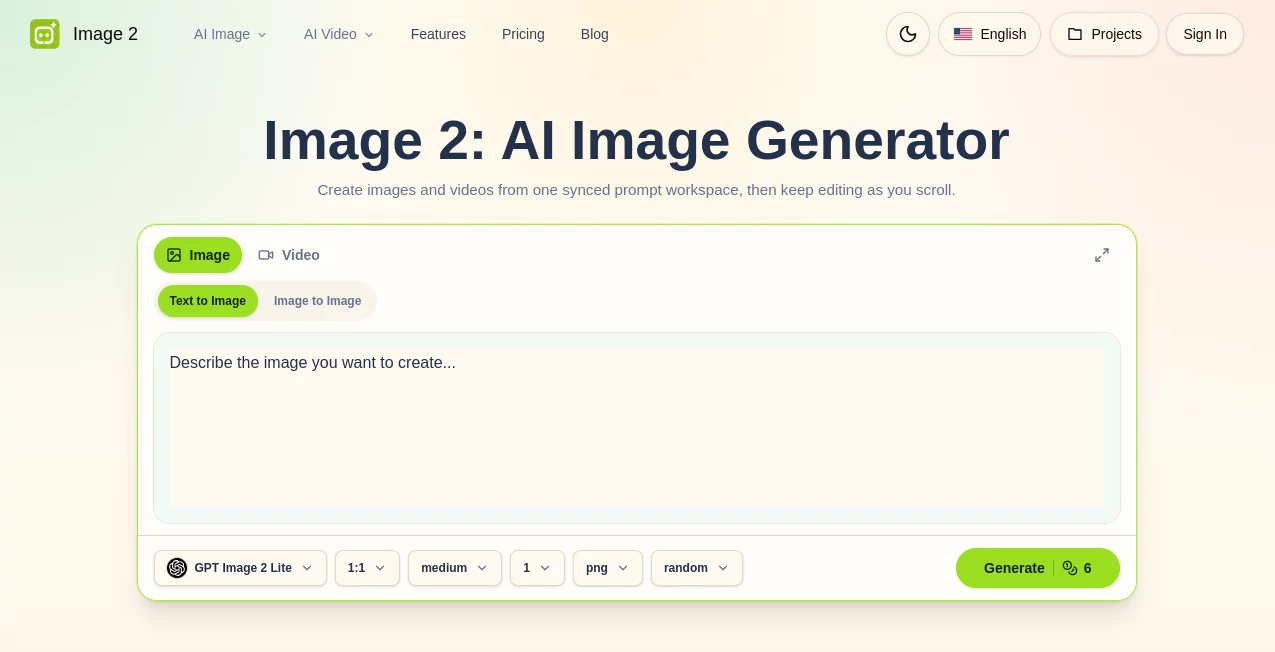
The interface is designed around a fairly direct creative process. Instead of forcing users through a long sequence of complicated design controls, the workspace keeps the prompt, generation settings, examples, model selection, credits, and project workflow close together.
This approach is useful for both newcomers and experienced creators. Someone experimenting for the first time can start with an example and adapt its prompt, while a more experienced user can write a detailed brief and move through several iterations without constantly switching between different applications.
The example-driven approach is one of the more practical touches. Seeing a finished visual before writing a prompt can make it much easier to understand what kind of description is needed.
Accuracy & Performance
One of the strongest areas is the handling of detailed visual instructions and text inside generated images. The underlying GPT Image 2 workflow is positioned for projects where typography, labels, structured layouts, and readable copy matter rather than treating text as a secondary decorative element.
It is also designed for photorealistic results, with attention to materials, lighting, depth, environments, and composition. This makes the platform a useful option when a generic AI illustration is not enough and the final image needs to resemble something that could realistically appear in an advertisement, product page, editorial layout, or presentation.
As with any generative image system, results can still vary from one generation to another. Clear prompts, useful references, and a willingness to make a second or third pass generally produce better results than expecting a complex visual brief to be perfect on the first attempt.
Capabilities
The platform covers a surprisingly broad range of visual tasks. Product teams can create packaging concepts, lifestyle product shots, advertising compositions, and e-commerce imagery. Marketing teams can work on posters, social media graphics, livestream screens, campaign visuals, and other text-heavy creative assets.
Designers can also use it for early UI exploration. Instead of opening a full design application just to test an idea, they can generate possible dashboards, onboarding screens, app interfaces, hero sections, and visual systems and use those results as discussion points.
Another useful area is multilingual visual content. Campaign concepts, educational graphics, technical explainers, and localized designs can be explored in different language systems while maintaining a consistent visual direction.
The workflow does not stop with still images either. Dedicated video tools support text-to-video, image-to-video, and multi-reference workflows, giving creators a practical route from a finished keyframe to a short moving sequence.
Security & Privacy
Users should review the platform's current Privacy Policy and Terms of Use before uploading private, confidential, or commercially sensitive material. This is especially important for product teams working with unreleased packaging, internal concepts, customer photographs, or proprietary brand assets.
For ordinary creative experimentation, the account-based workspace provides a structured environment for generating and managing projects. However, sensitive material should always be handled according to the platform's current policies and the user's own organization's data requirements.
Use Cases
- E-commerce: Create product scenes, lifestyle compositions, packaging concepts, and promotional imagery without organizing a complete photo shoot for every idea.
- Marketing: Produce posters, campaign concepts, social graphics, advertising visuals, and text-rich promotional assets.
- Product Design: Explore app interfaces, dashboards, onboarding screens, and product concepts before development begins.
- Branding: Test different visual directions, product presentations, campaign moods, and brand-consistent imagery.
- Content Creation: Build editorial illustrations, article visuals, social media images, and creative concepts.
- Education: Generate diagrams, explanatory graphics, localized educational visuals, and presentation concepts.
- Creative Direction: Quickly test composition, lighting, camera perspective, environments, and visual styles before committing to a final production direction.
- Video Production: Turn suitable still concepts into short AI-generated video sequences using the available video workflows.
Pros and Cons
Pros
- Strong focus on realistic image generation
- Useful text rendering for posters and structured graphics
- Good fit for product and advertising imagery
- Reference images can provide additional creative direction
- Helpful examples make experimentation easier
- Supports UI and design concept exploration
- Multilingual visual creation is supported
- Image and video workflows are available within the same ecosystem
Cons
- Complex generations may require several attempts
- Credit usage should be considered when producing many variations
- Results can differ depending on prompt quality and selected model
- Users needing highly specialized professional editing controls may still prefer a dedicated design application for final production work
Pricing Plans
The platform uses a credit-based generation model, with credits connected to the available creative workflows. This makes it possible to experiment with AI generation while keeping heavier usage tied to the amount of generation performed.
The website currently promotes annual plans with a 50% discount. Since pricing, credit allocations, and available models can change, users should check the current pricing information before choosing a plan.
For someone testing the service for the first time, starting with a small amount of generation is a sensible approach. It gives you a chance to understand the output quality, prompt behavior, and credit consumption before committing to a larger workflow.
How to Use Image2.to
Start by deciding what you want the final image to accomplish. A useful prompt should describe the subject, environment, composition, visual style, lighting, and intended context rather than relying on a few disconnected keywords.
Next, add a reference image when the written description alone is not enough. A visual reference can help establish the direction of the subject, composition, or overall look.
Generate the first result and inspect it carefully. Do not immediately rewrite the entire prompt if one element is wrong. It is often more effective to identify the specific issue, such as the background, typography, lighting, camera angle, or product placement, and adjust that part for the next attempt.
Once the result is close to the intended direction, save the useful version and continue refining it if necessary. For projects that need motion, a suitable still can also serve as the starting point for an image-to-video workflow.
Comparison with Similar Tools
There are many AI image generators available today, but they do not all target the same workflow. Some are primarily focused on artistic experimentation, while others concentrate on image editing, design templates, or model access.
This platform stands out by combining image generation with practical commercial use cases such as product photography, advertising graphics, UI mockups, multilingual layouts, and text-rich visuals. The example-based workflow is also useful for people who know what kind of result they want but are not sure how to construct the ideal prompt from scratch.
Another advantage is the connection between still-image creation and video generation. A creator can develop a visual concept first and then explore how that concept might work as moving content, rather than treating image and video production as completely separate tasks.
Conclusion
For creators who want AI-generated visuals that can serve a practical purpose, this platform offers a compelling combination of image quality, prompt control, text rendering, product visualization, design exploration, and video workflows.
Its biggest strength is not simply generating attractive pictures. The real value comes from using those generations as working assets: testing a product campaign, visualizing an interface, preparing a social post, exploring a brand direction, or creating the first frame of a video.
If your work regularly involves visual concepts and you want to move from an idea to several polished directions without building every concept manually, this is a tool worth exploring.
Frequently Asked Questions (FAQ)
What can this AI image generator create?
It can create photorealistic scenes, product visuals, advertising graphics, posters, UI concepts, editorial imagery, technical visuals, multilingual layouts, and other image-based creative assets.
Can I use a reference image?
Yes. Reference images can be added when a visual anchor is useful for communicating the desired subject, composition, or creative direction.
Is it useful for product photography?
Yes. The platform is designed for product shots, packaging scenes, lifestyle compositions, e-commerce visuals, and branded campaign concepts.
Can it generate images containing text?
Yes. One of its highlighted capabilities is creating images with readable typography, including posters, product sheets, labels, social graphics, and structured visual layouts.
Can it create UI mockups?
Yes. Designers and product teams can use it to explore app screens, dashboards, onboarding concepts, hero sections, and other interface ideas before development.
Does it support video generation?
Yes. In addition to still-image generation, the platform provides AI video workflows that include text-to-video, image-to-video, and multi-reference options.
How should I write prompts?
Describe the subject, setting, composition, lighting, style, camera perspective, and important constraints. Specific instructions usually provide a stronger starting point than a short list of generic keywords.
Can I generate multilingual visual content?
Yes. The platform highlights multilingual layouts and visual content as one of its use cases, making it suitable for localized campaigns, educational graphics, product visuals, and other international content.
Is it suitable for professional creative work?
It can be useful for professional concept development, advertising, e-commerce imagery, product exploration, UI ideation, and marketing content. Final production requirements should still be reviewed carefully before publishing.
Does generating an image always produce the final result immediately?
Not necessarily. Complex visual briefs can benefit from several iterations. Reviewing each result and making targeted prompt adjustments is often the best way to reach the desired composition.
AI Photo & Image Generator , AI Video Generator , AI Image to Image , AI Text to Image .
These classifications represent its core capabilities and areas of application. For related tools, explore the linked categories above.

Image2.to Alternatives Product

Image2GPT

Nodu AI

Pic 2 Meme

VoooAI

AIGPTImage

AI Photo Edi…

Transform An…

Kling 3.0 Vi…

Createimg.ai