
ImageToTable.ai
What is ImageToTable.ai?
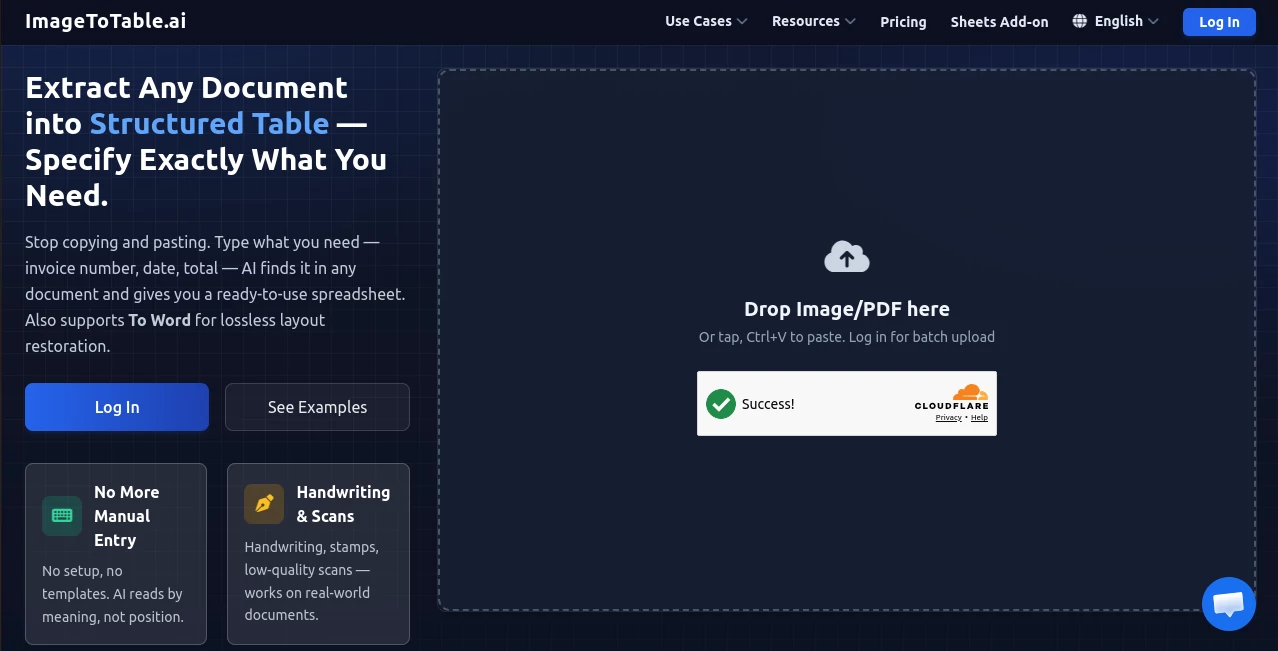
Managing data trapped inside invoices, receipts, bank statements, handwritten notes, or scanned forms often means hours of repetitive typing. This platform transforms that workflow by turning documents into clean, structured spreadsheets within seconds. Instead of relying on templates or manually selecting text, users simply upload files, define the information they need, and receive organized results ready for analysis or business use.
Designed for professionals who regularly process documents, the platform understands the meaning of content rather than depending on fixed layouts. Whether documents come from different vendors, contain handwritten notes, or include stamps and checkboxes, it adapts automatically. The result is a faster, more reliable way to convert complex paperwork into editable Excel, CSV, JSON, or Word files while reducing human error and saving valuable time.
Key Features
User Interface
The interface is refreshingly straightforward. Documents can be uploaded with only a few clicks, and users simply type the column names they want to extract. Those who are unsure which fields to choose can let the system analyze the document automatically. The entire workflow is designed to minimize learning time, making it suitable for beginners and experienced professionals alike.
Accuracy & Performance
Unlike traditional OCR solutions that rely on templates and predefined zones, the AI interprets documents by understanding their content. It performs exceptionally well with invoices, receipts, resumes, bank statements, application forms, and even handwritten records. Multiple files can be processed together, with extracted information merged into a single structured table for faster reporting and analysis. According to the service, most documents can be processed within seconds. :contentReference[oaicite:0]{index=0}
Capabilities
- Extracts custom fields from almost any document.
- Processes PDFs, JPG, PNG, WebP, screenshots, and scanned files.
- Supports handwriting, signatures, stamps, and checkboxes.
- Converts documents into Excel, CSV, JSON, or editable Word files.
- Allows batch uploads with automatic table merging.
- Automatically standardizes dates, amounts, and identifiers.
- Works across multiple document layouts without templates.
- Offers a Google Sheets integration for direct spreadsheet workflows.
Security & Privacy
Security is treated as a core feature rather than an afterthought. Documents are transferred over encrypted connections and stored using encryption at rest. Uploaded files are not used for AI model training, and guest uploads are automatically deleted after a limited retention period. Logged-in users can also configure automatic deletion preferences, providing additional control over sensitive business documents. :contentReference[oaicite:1]{index=1}
Use Cases
- Extract invoice details for accounting and bookkeeping.
- Convert bank statements into searchable spreadsheets.
- Digitize handwritten forms and medical records.
- Compare multiple resumes during recruitment.
- Process receipts for expense management.
- Create structured datasets from scanned reports.
- Organize survey responses and registration forms.
- Prepare financial documents for ERP integration.
Pros and Cons
Pros
- No template configuration required.
- Excellent support for handwritten and scanned documents.
- Fast batch processing for large document collections.
- Multiple export formats for different workflows.
- Simple interface suitable for non-technical users.
- Strong privacy controls and encrypted storage.
Cons
- Free usage is limited by a daily quota.
- Advanced enterprise features require higher-tier plans.
- Extraction quality still depends on document readability.
Pricing Plans
The platform offers a free daily usage allowance, making it easy to evaluate its capabilities before spending anything. Once the free quota has been exceeded, users pay only for what they process through a flexible pay-as-you-go model instead of committing to a mandatory subscription. Enterprise plans are also available for organizations with high-volume document processing needs. :contentReference[oaicite:2]{index=2}
How to Use ImageToTable.ai
Getting started requires only three simple steps. First, upload one or multiple documents in supported formats such as PDF or images. Next, specify the column names you want to extract, or allow the AI to detect the structure automatically. Finally, review the extracted data and export it as Excel, CSV, JSON, or an editable Word document. The process is fast enough to fit naturally into everyday business workflows without additional setup or technical knowledge.
Comparison with Similar Tools
Many OCR applications focus primarily on converting images into plain text, often requiring templates or predefined extraction zones. This solution takes a more flexible approach by understanding document content semantically, allowing users to define exactly which information should be extracted regardless of document layout. Batch processing, automatic data standardization, editable Word conversion, and support for handwriting further distinguish it from conventional OCR software that often demands manual cleanup after extraction. :contentReference[oaicite:3]{index=3}
Conclusion
For organizations and individuals who spend valuable time entering information from documents into spreadsheets, this platform delivers a practical and highly efficient alternative. Its combination of intelligent document understanding, flexible field extraction, batch processing, and multiple export formats makes it suitable for finance teams, HR departments, researchers, healthcare professionals, and administrative staff alike.
By reducing repetitive work while maintaining strong security practices and an intuitive workflow, it helps users focus on higher-value tasks instead of manual data entry. Whether processing a handful of receipts or thousands of business documents, it provides a reliable solution that scales with growing workloads.
Frequently Asked Questions (FAQ)
Can it extract data from handwritten documents?
Yes. The AI is designed to recognize handwritten text, signatures, stamps, and other complex document elements.
Which file formats are supported?
It accepts common formats including PDF, JPG, PNG, WebP, screenshots, and several other image formats.
What export formats are available?
Users can export extracted information as Excel, CSV, JSON, or editable Word documents.
Is it suitable for processing multiple files at once?
Yes. Batch processing allows multiple documents to be uploaded together, with extracted information merged into one structured table.
Is my uploaded data private?
Yes. Files are encrypted during transfer and storage, are not used for AI training, and automatic deletion options are available.
AI Document Extraction , AI PDF , AI Files Assistant , AI Spreadsheet .
These classifications represent its core capabilities and areas of application. For related tools, explore the linked categories above.
ImageToTable.ai details
Website unavailable — View Alternatives
Pricing
- Free
Apps
- Web App
Categories

ImageToTable.ai Alternatives Product
Photo to Text

PDF to MD

GLM-OCR Onli…

Clearterms

TopPDF

jpg to excel

Image to URL…

Watermark in…

Photo Retouch