ImgPilot
What is ImgPilot?
Creating professional images often requires advanced design skills, expensive software, and a lot of time. ImgPilot makes the creative process much simpler by allowing users to generate new visuals from text prompts and refine existing images through natural language conversations. It combines AI image generation and editing in one streamlined workspace, helping creators turn ideas into polished visuals faster.
Whether you need marketing graphics, social media content, product visuals, blog illustrations, thumbnails, or creative concepts, this platform provides an accessible way to explore different styles and improve images without complicated editing workflows. Its conversational editing approach makes it especially useful for users who prefer describing changes instead of manually adjusting dozens of settings.
Key Features
- Text-to-Image Generation: Create original images by simply describing your idea in everyday language.
- AI Image Editing: Upload a reference image and request changes such as background replacement, style adjustments, object additions, or visual improvements.
- Conversational Refinement: Continue improving images through multiple chat-based editing steps while keeping previous context.
- Multiple AI Models: Access different image generation engines designed for various creative needs, including realistic images, artistic styles, and text-focused designs.
- Prompt Library: Explore tested creative prompts for portraits, product images, posters, covers, logos, and other visual projects.
- High Resolution Outputs: Generate and export images in high-quality formats suitable for professional projects.
- Generation History: Save previous creations and continue working on earlier ideas whenever needed.
User Interface
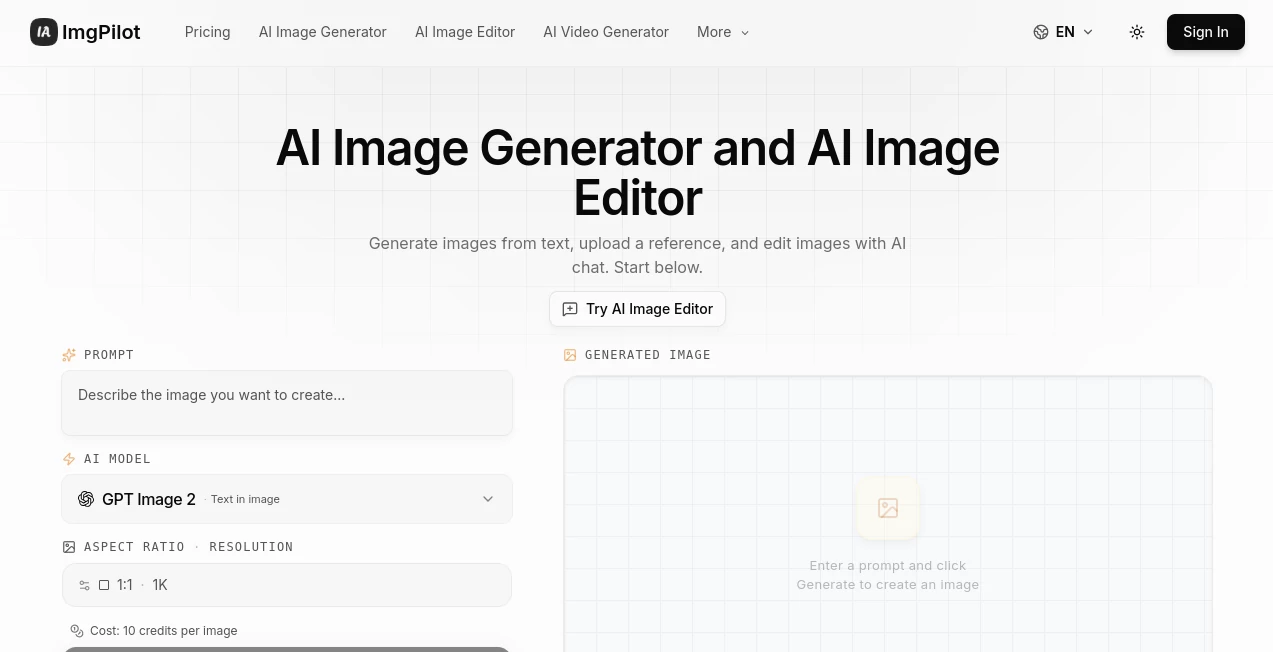
The interface is designed around simplicity. Instead of overwhelming users with complicated controls, it focuses on a direct conversation-based workflow. A beginner can start with a simple description, while experienced creators can experiment with detailed prompts and different models.
The clean workspace makes it easy to switch between generating a new image and editing an existing one. This approach feels more like collaborating with a creative assistant rather than operating traditional design software.
Accuracy & Performance
The platform delivers strong results by combining several advanced image models behind one interface. Users can select different engines depending on their goals, whether they need realistic photography, creative artwork, accurate text placement, or detailed image modifications.
The ability to refine images through multiple conversations improves the creative process because users do not need to restart from zero after every change. For example, a designer can create a product scene, adjust lighting, modify the background, and improve small details through a single workflow.
Capabilities
This tool supports a wide range of creative tasks. Users can generate images from simple descriptions, transform existing photos, create marketing assets, design social media visuals, develop concept art, and experiment with new creative directions.
Its reference-image editing feature is particularly helpful for maintaining the original idea while applying new styles or improvements. This makes it suitable for creators who need flexibility rather than a one-click generation experience.
Security & Privacy
The platform focuses on providing a controlled creative environment where users can manage their generated content and saved projects. Images can be reviewed through personal history, allowing creators to return to previous work and continue improving their designs.
As with any AI creative service, users should review usage rights and commercial licensing details based on their specific project requirements before publishing generated assets.
Use Cases
ImgPilot can support many types of creators and businesses. Some common applications include:
- Marketing Teams: Create campaign visuals, advertisements, and promotional graphics quickly.
- Social Media Creators: Design engaging posts, thumbnails, and branded images without hiring a designer for every project.
- E-commerce Businesses: Generate attractive product scenes and improve existing product photos.
- Bloggers and Publishers: Create unique cover images and illustrations that match article topics.
- Designers: Explore concepts, create drafts, and speed up the creative brainstorming process.
- Content Agencies: Produce more visual variations for clients in less time.
Pros and Cons
Pros
- Simple text-based image creation process.
- Combines image generation and editing in one platform.
- Supports multiple AI models for different creative styles.
- Useful for both beginners and professional creators.
- Allows iterative editing through natural conversations.
- Includes prompt ideas to help users get started faster.
Cons
- Advanced users may still prefer specialized professional design software for detailed manual editing.
- Credit-based generation limits may require a paid plan for frequent creators.
- Results can vary depending on the selected model and prompt quality.
Pricing Plans
The platform offers flexible options for different levels of usage. New users can start with free credits to explore image generation and editing features before choosing a subscription plan.
- Free Access: Includes starter credits for testing image generation and editing features.
- Pro Plan: Provides more credits, higher resolution output, and extended generation history.
- Ultra Plan: Designed for heavy creators who need maximum quality, larger limits, and advanced access.
- Apex Plan: Built for high-volume users who require larger monthly capacity and advanced creative workflows.
How to Use ImgPilot
- Step 1: Enter a description of the image you want to create or upload an existing image for editing.
- Step 2: Choose the preferred AI model, aspect ratio, and resolution settings.
- Step 3: Generate the image and review the result.
- Step 4: Continue refining the image by requesting additional changes through conversation.
- Step 5: Download, share, or save the final version for future use.
Comparison with Similar Tools
Many AI image platforms focus only on generating images from text prompts. This solution stands out by combining generation and editing into a single workflow. Instead of creating a new image every time a change is needed, users can continue improving the same visual through natural instructions.
Compared with traditional design software, it reduces the technical learning curve. Compared with simple AI generators, it provides more flexibility by supporting reference images, multiple models, and ongoing refinement.
Conclusion
ImgPilot offers a practical approach to modern AI-powered visual creation. By combining text-based generation, conversational editing, and multiple creative models, it helps users transform ideas into professional-looking images with less effort.
For marketers, designers, entrepreneurs, and content creators who need fresh visuals regularly, this platform provides an efficient way to experiment, create, and improve images without complicated workflows. It is a valuable addition to the growing ecosystem of AI creative tools.
Frequently Asked Questions (FAQ)
What can this AI image tool create?
It can create images from text prompts, edit existing photos, generate creative concepts, design marketing visuals, and produce content for social media, websites, and business projects.
Can I edit an existing image?
Yes. Users can upload a reference image and describe the changes they want, such as modifying backgrounds, changing styles, or adding new elements.
Is it suitable for beginners?
Yes. The conversational workflow makes it easy for beginners because users can describe their ideas instead of learning complex design tools.
Does it support high-resolution images?
Yes. Depending on the selected plan and model, users can generate high-quality images suitable for professional creative work.
Can businesses use generated images?
Businesses can use generated visuals for many commercial purposes, but they should review the platform's current licensing terms for specific usage requirements.
AI Photo & Image Generator , Photo & Image Editor , AI Image to Image , AI Text to Image .
These classifications represent its core capabilities and areas of application. For related tools, explore the linked categories above.

ImgPilot Alternatives Product

Sovibe AI

Nano Banana …

SuperAI

Kynelio

Stylize Image

Uni-1

Nano Banana …

Krea 2 Turbo

SellerPic