InkStudio.ai
What is InkStudio.ai?
Creating a tattoo is a personal journey, and every detail matters. From the first sketch to the final artwork, people often spend weeks searching for inspiration or trying to explain their ideas to an artist. This platform makes that process much easier by transforming simple text descriptions into professional tattoo concepts with impressive visual quality. It also allows users to preview designs on realistic body placements before making any permanent decision, making the planning experience far more confident and enjoyable.
Unlike traditional image generators, this solution focuses entirely on tattoo creation. It understands popular tattoo styles, body placement, composition, and linework, helping users generate concepts that look much closer to real tattoo designs instead of generic illustrations. Whether someone is planning a minimalist symbol, a realistic portrait, or a full Japanese sleeve, the creative workflow feels intuitive from start to finish.
Another highlight is its ability to generate clean artwork and stencil-ready linework that tattoo artists can further refine. Instead of arriving at a consultation with only rough references from the internet, users can bring polished concepts that make communication faster and more productive. This creates a better experience for both clients and professional tattoo artists.
Key Features
User Interface
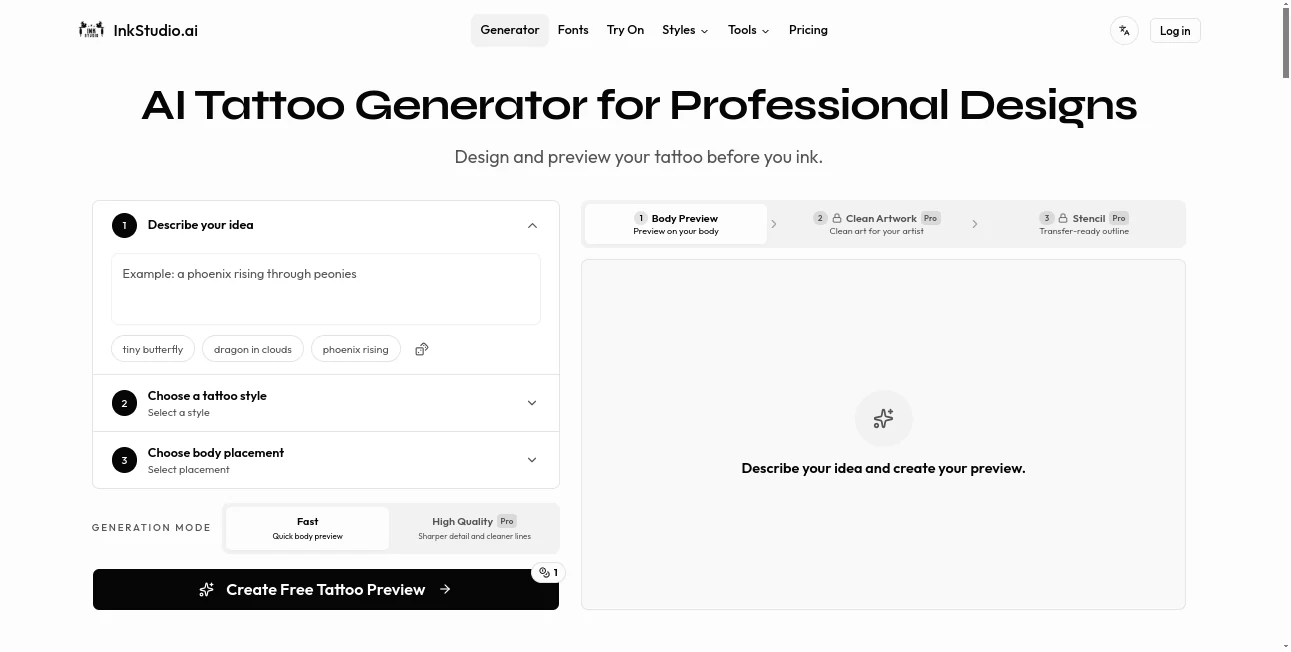
The interface is designed for simplicity. Users begin by describing their tattoo idea, selecting a preferred artistic style, and choosing the desired body placement. The workflow follows a logical sequence that guides beginners without overwhelming experienced users. Every step feels focused on helping people visualize their ideas as quickly as possible.
Accuracy & Performance
The platform produces highly detailed tattoo previews with remarkable consistency across different artistic styles. It can generate realistic body previews, clean white-background artwork, and professional stencil linework suitable for further refinement by tattoo artists. High-quality rendering options provide sharper details and improved precision for more advanced projects. :contentReference[oaicite:0]{index=0}
Capabilities
- Generate tattoo concepts from text descriptions.
- Preview tattoos on realistic body placements.
- Create clean artwork for review and editing.
- Generate stencil-style linework.
- Support multiple tattoo styles including Fine Line, Realism, Japanese, American Traditional, and many others.
- Experiment with different placements before committing.
- Produce high-quality artwork suitable for artist consultations.
- Explore multiple design variations using credits.
Security & Privacy
User-generated designs are stored within personal accounts for convenient access and downloading. Since tattoos are often deeply personal, maintaining private access to creative projects is an important part of the overall experience. Users remain in control of their generated artwork while collaborating with their preferred tattoo professionals. :contentReference[oaicite:1]{index=1}
Use Cases
- Designing a first tattoo with confidence.
- Testing different tattoo placements before making a final decision.
- Creating reference artwork for tattoo artists.
- Exploring multiple artistic styles without hiring a designer.
- Planning large sleeves, chest pieces, or back tattoos.
- Comparing minimalist and realistic concepts.
- Generating stencil-ready references for consultations.
- Finding inspiration when only a rough idea exists.
Pros and Cons
Pros
- Purpose-built specifically for tattoo creation.
- Realistic body preview feature improves decision making.
- Professional stencil generation saves preparation time.
- Supports many popular tattoo styles.
- Simple workflow suitable for beginners.
- Free daily generation available.
Cons
- Advanced features require a Pro plan.
- Final tattoo adjustments still require a professional artist.
- Credit limits apply depending on the selected plan.
Pricing Plans
A free plan allows users to experiment with daily credits and fast body previews. Those who need higher-quality previews, clean artwork, stencil generation, and additional credits can upgrade to either a 7-Day Pro Pass or a 30-Day Pro Pass. Both premium options unlock the complete tattoo planning workflow and provide significantly more creative flexibility. :contentReference[oaicite:2]{index=2}
How to Use InkStudio
Start by describing your tattoo concept using natural language. Select your preferred tattoo style and choose where the design should appear on the body. Generate a realistic body preview to evaluate the overall look. Once satisfied, create clean artwork followed by stencil linework that can be shared directly with a tattoo artist for further customization and final preparation.
Comparison with Similar Tools
Many AI image generators can create tattoo-inspired artwork, but they usually lack understanding of practical tattoo design principles. This platform focuses entirely on tattoo planning rather than general image generation. Features like realistic body previews, stencil creation, style-specific optimization, and artist-friendly outputs make it significantly more practical for real tattoo projects. Instead of simply generating attractive images, it helps bridge the gap between imagination and professional tattoo execution.
Conclusion
Planning a tattoo should feel exciting rather than stressful. This platform transforms abstract ideas into realistic concepts that users can confidently evaluate before making a lifelong commitment. Its specialized workflow, professional-quality artwork, body previews, and stencil generation create a complete creative experience that goes beyond standard AI image generators. Whether someone is preparing for their first tattoo or designing a complex full sleeve, it offers a thoughtful combination of creativity, practicality, and convenience that genuinely improves the planning process.
Frequently Asked Questions (FAQ)
Can beginners use this platform?
Yes. The guided workflow makes it easy for first-time users to create detailed tattoo concepts without design experience.
Does it support different tattoo styles?
Yes. Multiple styles are available, including Fine Line, Realism, Japanese, American Traditional, and many other popular tattoo aesthetics.
Can I preview the tattoo before getting it?
Yes. One of its strongest features is realistic body placement previews that help users visualize tattoos before making permanent decisions.
Can tattoo artists use the generated artwork?
Yes. Clean artwork and stencil linework can be shared with professional tattoo artists for review and customization.
Is there a free version?
Yes. A free plan includes daily credits for creating tattoo previews, while premium plans unlock higher-quality outputs and advanced features. :contentReference[oaicite:3]{index=3}
AI Photo & Image Generator , AI Art Generator , AI Tattoo Generator , AI Design Generator .
These classifications represent its core capabilities and areas of application. For related tools, explore the linked categories above.

InkStudio.ai Alternatives Product
chibi art

ColorPalette…
SurgePix

Fine Image

Nano Banana …

Wolfcut Onli…
Flux 2 Klein

nana banana …
FaceShapeDet…