InsertPeople
What is InsertPeople?
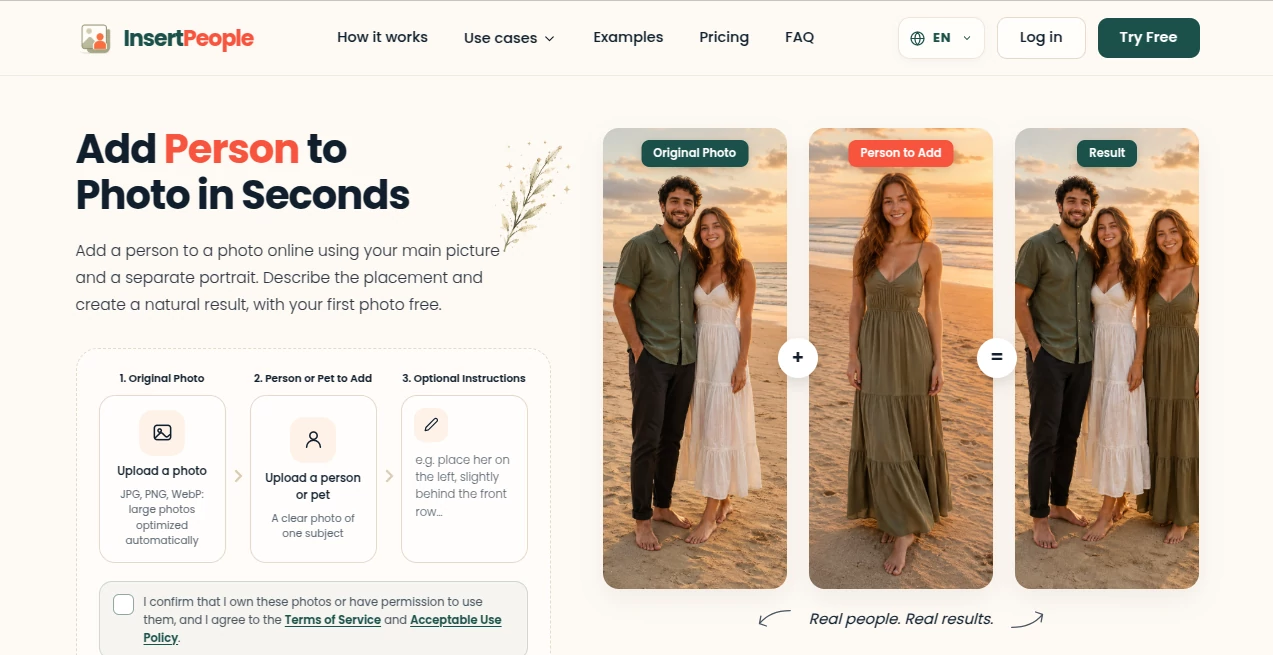
InsertPeople is an AI-powered photo editing tool built around a simple idea: adding someone who was missing from a photo should not require Photoshop skills or hours of manual editing. Users can upload an original photo, add a separate image of a person or pet, describe where they want the subject to appear, and generate a finished image directly in the browser.
The service is particularly useful for family photographs, wedding pictures, travel memories, group shots, and other moments where someone was unfortunately left out. It can also be used to add pets to scenes or bring an absent family member into an important photograph. The first generation is free, so users can test the experience without entering payment details.
Key Features
- Add a person or pet to an existing photograph.
- Automatically match lighting, shadows, colors, and perspective.
- Remove the background from the added subject automatically.
- Relight the subject to better fit the target scene.
- Use written instructions to control placement, pose, and position.
- Support for smartphone photos, professional portraits, vintage images, black-and-white photographs, and scanned prints.
- Browser-based editing without requiring Photoshop or a dedicated application.
- Support for instructions in multiple languages.
- Encrypted image transfers and automatic deletion of uploaded images and generated results within 24 hours.
User Interface
The interface keeps the editing process pleasantly straightforward. There are three main steps: upload the original photograph, upload the person or pet that needs to be added, and optionally describe the desired placement.
For example, a user can write something as practical as “standing between Mom and Dad in the back row.” This makes the process easier for people who know what they want but do not want to deal with layers, masks, selections, or manual perspective adjustments.
Accuracy & Performance
The strongest part of the experience is the attention given to visual integration. The system is designed to consider lighting, shadows, colors, perspective, and depth of field rather than simply placing a cutout on top of another image.
This matters because small details often determine whether an edited photograph looks convincing. The service also automatically removes the background from the uploaded subject and adapts elements such as lighting to better fit the destination scene.
Results can be generated and downloaded within seconds according to the service, making it practical for quick edits as well as more meaningful personal projects.
Capabilities
The tool goes beyond simply adding another face to a picture. People can be inserted into family photographs, wedding photos, travel scenes, group pictures, and other personal memories. Pets can also be added to scenes where they were not originally present.
It is also designed to work with older material. Vintage black-and-white photographs and scanned prints can be used alongside modern smartphone pictures, with the system adapting to differences in grain, color grading, and focus.
The optional instruction field is another useful touch. If the first result is not positioned exactly where expected, users can provide more specific directions and generate a refined version.
Security & Privacy
Privacy is especially important when working with personal and family photographs. The service states that uploaded images and generated results are encrypted during transfer, are not publicly shared or sold, and are automatically deleted from its servers within 24 hours.
Users are also required to confirm that they own the photographs or have permission to use them. The service prohibits uses involving impersonation, deceptive evidence, privacy violations, non-consensual content, and certain other inappropriate material.
Use Cases
- Family photos: Add a family member who could not attend a gathering or was missing from the original shot.
- Memorial photographs: Create a respectful family image that includes a deceased loved one.
- Wedding photos: Complete a group or wedding photograph when someone was accidentally left out.
- Travel memories: Add yourself or another traveler to a photograph where the person was originally behind the camera.
- Pet photography: Place a pet naturally into a family scene, holiday card, or other photograph.
- Old photographs: Work with vintage images and scanned prints to create new compositions from older memories.
- Group pictures: Recreate a complete group shot when one participant was unavailable.
Pros and Cons
- Pros: Very simple workflow, no advanced editing knowledge required, realistic attention to lighting and perspective, supports people and pets, works with old photographs, browser-based, one free generation for new users, and strong privacy protections.
- Cons: More advanced manual photo-editing controls are not the focus, results can depend on the quality and clarity of the source images, and additional generations require purchasing credits after the free attempt.
Pricing Plans
The pricing structure is based on one-time credit purchases rather than a recurring subscription. New users receive one free credit with standard-quality generation and do not need a credit card to try the service.
- Free: 1 credit with standard quality.
- Starter: 20 credits for $7.99 as a one-time purchase, including high-quality results and priority processing.
- Pro: 100 credits for $24.99 as a one-time purchase, with high-quality results, priority processing, and commercial use.
The one-time approach is particularly appealing for people who only need to edit a handful of photographs. Someone preparing a wedding album or restoring a few family memories does not necessarily need another monthly subscription, making the credit system a practical alternative.
How to Use InsertPeople
- Upload the original photograph you want to edit.
- Upload a clear photograph of the person or pet you want to add.
- Enter optional instructions describing where the subject should appear.
- Generate the edited photograph.
- Preview the result and download it if it meets your expectations.
For better results, use a clear, well-lit image of the person or pet. If positioning matters, be specific about the desired location, such as placing someone between two particular people or in the front row. More precise instructions can help when the first generation does not place the subject exactly where intended.
Comparison with Similar Tools
Traditional photo editors give users detailed control over every layer, mask, crop, and adjustment, but that flexibility comes with a learning curve. This approach is different. Instead of manually cutting out a person, matching colors, adjusting perspective, and rebuilding shadows, the user provides the images and describes the intended result.
Compared with general-purpose AI image generators, the focus here is also narrower. The goal is not to invent an entirely new scene from a text prompt. It is to preserve an existing photograph while integrating a specific person or pet into it. That focused workflow makes the service particularly suitable for personal photographs where keeping the original people and environment recognizable matters.
Conclusion
Adding someone to an existing photograph sounds simple until the lighting, scale, perspective, shadows, and background all have to line up. This service takes care of much of that technical work behind the scenes, leaving users with a considerably simpler process.
Its strongest appeal is the combination of a focused purpose and an accessible workflow. Whether the goal is completing a family picture, adding a pet to a Christmas card, rebuilding a wedding group shot, or placing yourself into a travel memory, the process can be completed without traditional photo-editing software.
The free first generation also makes it easy to judge the results before spending anything. For occasional photo projects, the one-time credit packages provide a straightforward way to continue without committing to another recurring subscription.
Frequently Asked Questions (FAQ)
How do I add a person to a photo?
Upload the original photo and a separate image of the person or pet you want to add. You can then provide optional instructions describing where the subject should appear before generating the result.
Can I add a pet to a photo?
Yes. The service supports adding pets as well as people, and it is designed to integrate the added subject into the existing scene.
Can I use it on an iPhone?
Yes. It works through a modern web browser on iPhone, Android devices, tablets, Mac, and PC, so there is no separate photo-editing application that needs to be installed.
Does it work with old photographs?
Yes. Vintage black-and-white photographs and scanned prints are supported in addition to modern smartphone and professional photographs.
Is there a free option?
Yes. New users receive one free photo generation, with no credit card required. Additional generations can be purchased through one-time credit packages.
What happens if the person is placed incorrectly?
You can provide more detailed instructions describing the desired position, such as asking for the subject to stand between specific people or in a particular row. The result can then be refined with another generation.
Are uploaded photos private?
The service states that uploaded images and generated results are encrypted during transfer, are not publicly shared or sold, and are automatically deleted from its servers within 24 hours.
AI Photo & Image Generator , Photo & Image Editor , AI Photography , AI Image to Image .
These classifications represent its core capabilities and areas of application. For related tools, explore the linked categories above.
InsertPeople details
Website unavailable — View Alternatives
Pricing
- Freemium
Apps
- Web App
Categories

InsertPeople Alternatives Product

nana banana …

Image 2 AI

AI Anime

Photo Grid C…

BatchRemover

Square Image

Image To Ima…

Flux 2 Klein

insMind