
InterMIND
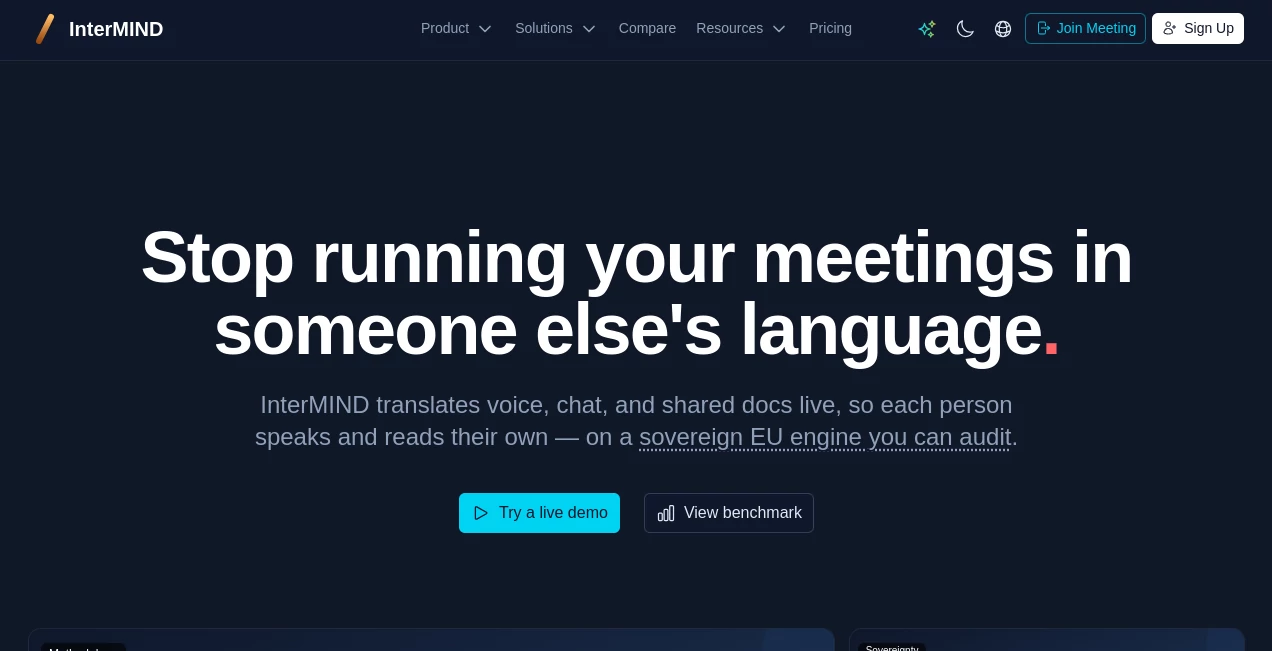
What is InterMIND?
Global collaboration should never be limited by language. This AI-powered meeting platform transforms multilingual communication by translating voice, chat, and shared documents in real time, allowing every participant to communicate naturally in their preferred language. Instead of relying on interpreters or switching between translation tools, teams can focus entirely on conversations, decisions, and productivity.
Designed for businesses, international organizations, remote teams, and regulated industries, the platform combines high-quality video conferencing with AI-driven translation, live subtitles, searchable transcripts, collaborative workspaces, and secure document sharing. Whether hosting a client presentation, legal negotiation, or company-wide town hall, it helps participants communicate confidently without language becoming a barrier.
Key Features
User Interface
The interface is modern, intuitive, and built for productivity. Meetings start with a simple invitation link, while guests can join directly from their browsers without creating an account. During conversations, translated captions, chat messages, shared documents, collaborative notes, and recordings remain organized within a unified workspace, making every meeting easy to follow.
Accuracy & Performance
Real-time AI translation delivers impressive responsiveness with minimal delay, helping conversations flow naturally even between speakers using different languages. Context-aware processing improves translation quality by preserving tone, meaning, and industry terminology, making discussions feel far more natural than traditional subtitle-based solutions.
Capabilities
- Real-time voice translation during video meetings.
- Automatic translation of meeting chat.
- Shared document translation while collaborating.
- Live subtitles and searchable transcripts.
- AI-assisted meeting notes and collaboration.
- Guest access without mandatory registration.
- Secure cloud storage for recordings and files.
- Team channels with multilingual messaging.
- File sharing with automatic translation.
- Google Workspace and Microsoft 365 integrations.
- Meeting recordings with searchable history.
- Administrative analytics and team management.
Security & Privacy
Security is one of the platform's strongest advantages. AI processing is designed around privacy-focused infrastructure with zero data retention for AI features, helping organizations protect sensitive conversations and documents. The platform also emphasizes GDPR compliance and offers deployment options suitable for organizations with strict regulatory requirements.
Use Cases
- International business meetings.
- Cross-border sales presentations.
- Global recruitment interviews.
- Legal negotiations.
- Investor relations meetings.
- Government and compliance discussions.
- Remote multilingual teams.
- Customer support consultations.
- International exhibitions and conferences.
- Educational webinars and virtual classrooms.
Pros and Cons
Pros
- Excellent real-time multilingual communication.
- Voice, chat, and document translation in one workspace.
- Fast meeting setup without software installation.
- Built-in collaboration features reduce workflow interruptions.
- Strong focus on privacy and regulatory compliance.
- Automatic transcripts and meeting history improve productivity.
- Supports distributed international teams effectively.
Cons
- Advanced collaboration capabilities require paid plans.
- Translation quality may vary for highly specialized terminology.
- A stable internet connection is essential for the best experience.
Pricing Plans
A free plan is available for individuals and small teams who want to experience multilingual meetings. Paid subscriptions unlock additional meeting capacity, extended storage, unlimited rooms, advanced collaboration tools, and enterprise-grade management features. Custom enterprise options are also available for organizations with higher security and scalability requirements.
How to Use InterMIND
Create an account and start a new meeting in just a few clicks. Invite participants by sharing a meeting link, allowing guests to join instantly from their browsers. During the meeting, AI automatically translates spoken conversations, chat messages, and shared documents while generating live subtitles and searchable transcripts. Teams can collaborate on notes, exchange files, and continue discussions inside dedicated channels after the meeting concludes.
Comparison with Similar Tools
Traditional video conferencing platforms primarily focus on meetings, while translation is often treated as an additional feature or requires external integrations. This platform places multilingual collaboration at the center of the experience by combining simultaneous AI translation, collaborative workspaces, translated messaging, document support, and privacy-focused infrastructure within a single environment. For organizations working across multiple countries, this integrated approach significantly reduces communication friction and improves meeting efficiency.
Conclusion
Breaking language barriers has become essential for modern organizations, and this platform offers one of the most complete solutions available. By combining AI-powered real-time translation, secure collaboration, intelligent meeting documentation, and enterprise-grade privacy, it creates an environment where global teams can communicate naturally without sacrificing speed or accuracy. Businesses looking to simplify multilingual communication while maintaining professional collaboration will find it to be an outstanding choice.
Frequently Asked Questions (FAQ)
Can participants speak different languages during the same meeting?
Yes. Every participant can speak their preferred language while hearing translated conversations in their own language.
Does the platform translate chat messages and documents?
Yes. Both chat conversations and shared documents can be translated automatically during collaboration.
Are meeting transcripts available?
Yes. Meetings can generate searchable transcripts along with recordings for future reference.
Is there a free version?
Yes. A free plan is available with core meeting functionality, while premium plans provide larger capacity and additional business features.
Who benefits the most from this platform?
International companies, remote teams, legal professionals, recruiters, consultants, educational organizations, and businesses that regularly communicate across multiple languages will gain the greatest value.
AI Team Collaboration , AI Productivity Tools , AI Speech Recognition , AI Meeting Assistant .
These classifications represent its core capabilities and areas of application. For related tools, explore the linked categories above.

InterMIND Alternatives Product

Meet-Ting

Workik
Picmim
FLINT AI

Online White…

Zush

Betula AI

Monkey Eatin…
Speechara