


















IntoDNS.AI
What is IntoDNS.AI?
You’ve spent weeks building the perfect website. The design is stunning, the copy is persuasive, and your product is ready to change the world. Then you hit publish… and nothing. Emails bounce back. Customers complain they can’t find you. Or worse, your site loads for some people but not others.
Sound familiar? Here’s the thing nobody tells you when you buy a domain: the technical stuff behind the scenes—DNS records, email authentication, security protocols—is what actually makes or breaks your online presence. And honestly? Most of us aren't DNS experts. That's exactly where this tool steps in to save the day.
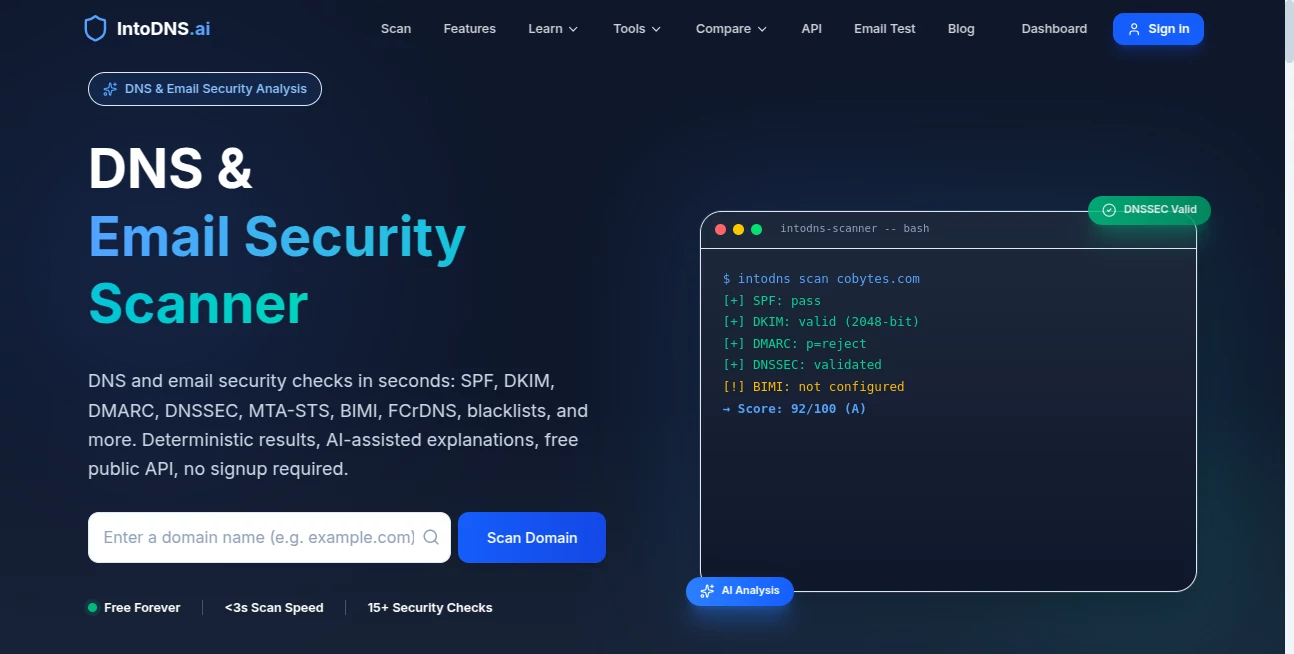
Think of it as a health scanner for your domain. You type in your website address, and within seconds, you get a complete report card showing exactly what's working, what's broken, and—most importantly—how to fix it. No technical degree required.
Key Features
User Interface
Let's be real for a second. Most DNS tools look like they haven't been updated since the early 2000s. You know the type—walls of cryptic text, confusing tables, and zero guidance on what any of it actually means. This one flips that script completely.
The interface is clean, modern, and actually pleasant to look at. You just drop your domain into the search bar, hit enter, and watch the magic happen. Results are organized in clear sections with visual indicators—green for good, yellow for warnings, red for things that need immediate attention. Each issue comes with a plain-English explanation and actionable steps to resolve it. There's even a handy copy button next to every DNS record, so you can grab what you need without awkwardly highlighting text and praying you didn't miss a character.
Works perfectly on your phone too, which is a lifesaver when you're troubleshooting at 11 PM from your couch.
Accuracy & Performance
Speed matters when you're trying to diagnose a problem. Nobody wants to wait around while a tool slowly chugs through its checks. This platform is fast—really fast. Most scans complete in just a few seconds, giving you instant insight into your domain's health.
But speed doesn't mean cutting corners. The tool runs comprehensive checks across dozens of different DNS parameters. We're talking nameservers, MX records, SOA settings, TXT records, and all the email security protocols that actually matter (SPF, DKIM, DMARC, MTA-STS, BIMI). It even checks if your IP addresses have landed on any blacklists—a silent killer for email deliverability that most domain owners never even know about.
The scoring system is refreshingly honest. You get a clear 0-100 score that tells you exactly where you stand. Anything above 90 is excellent. Below 50? You've got some work to do, but at least you know where to start.
Capabilities
This isn't just a one-trick pony that checks a few basic records and calls it a day. The depth of analysis is genuinely impressive. Here's what it actually looks at:
- DNS Configuration – Checks your A, AAAA, CNAME, MX, NS, PTR, SOA, and TXT records for common mistakes and best practice violations
- DNSSEC Validation – Verifies whether your domain has DNSSEC enabled (a critical security feature most people overlook)
- Email Security Stack – Full SPF, DKIM, DMARC analysis to ensure your emails actually reach inboxes instead of spam folders
- Advanced Protocols – BIMI for branded email logos, MTA-STS for encrypted email transport, and TLS reporting
- Blacklist Monitoring – Checks over 100 different anti-spam databases to see if your IP has been flagged
- Propagation Status – Shows how widely your DNS changes have spread across the globe
And here's the kicker—it's all available through a public API. So if you're a developer or running a managed service provider business, you can integrate these health checks directly into your own dashboards and workflows.
Security & Privacy
Whenever you use an online tool to scan your domain, there's that little voice in the back of your head wondering: are they logging this? Are they storing my data? What happens to the information I submit?
The team behind this tool seems to get those concerns. The API requires no authentication for basic scans, which means they're not collecting API keys or tying scans to user accounts unless you want them to. The service focuses purely on public DNS data—the same information anyone on the internet can already see. You're not handing over server access or sensitive credentials.
For businesses running automated scans through the API, the platform is designed to be lightweight and privacy-conscious. No unnecessary data collection, no tracking scripts bogging down your experience.
Use Cases
The New Domain Owner
You just bought a domain and pointed it to your hosting provider. But is everything actually working? Run a quick scan before sending traffic to catch issues early.
The Email Marketer
Your open rates have been dropping. Before blaming your subject lines, check if your SPF or DKIM records are misconfigured. This tool will tell you exactly why your emails aren't landing.
The Agency Owner
Managing DNS for dozens of client domains is a nightmare. Use the API to build automated health monitoring into your client dashboard. Catch issues before clients do.
The Security-Conscious Admin
Worried about DNS hijacking or spoofing attacks? Regular scans help you spot unauthorized changes to your nameservers or missing DNSSEC configurations before they become real problems.
The E-commerce Operator
Every minute of downtime costs you real money. Regular DNS health checks help you catch configuration errors that could take your store offline during peak shopping hours.
Pros and Cons
What Works Well
- Completely free to use with no hidden paywalls or feature restrictions
- Clean, modern interface that actually explains what results mean
- Lightning-fast scans that complete in seconds, not minutes
- Comprehensive email security checks that go way beyond basic DNS
- Public API available for developers and businesses
- One-click copying for every DNS record value
- Mobile responsive design works on any device
Where It Could Improve
- No real-time monitoring or automated alerts for DNS changes
- Reports are static snapshots rather than continuous tracking
- Limited historical data—you can't easily compare scans over time
- Advanced features like custom check configurations aren't available
- No proactive notifications when something breaks after you've fixed it
Pricing Plans
Here's where things get refreshingly simple. The core scanning functionality is completely free. No credit card required, no "start your free trial" bait-and-switch, no limits on how many domains you can check. You type in a domain, you get a report. That's it.
For developers and businesses that want to integrate DNS health checks into their own platforms, the API follows the same philosophy—public endpoints with no authentication required for standard lookups. It's rare to find this level of functionality without some kind of usage cap or paid tier, which says a lot about what the team is trying to build here.
If they ever introduce premium features (like continuous monitoring or historical trend analysis), those would likely come with a paid plan. But for 99% of users who just need to diagnose DNS issues, free does everything you need.
How to Use This Tool
Using it takes less time than making coffee. Here's the step-by-step:
Step 1: Head to the website and look for the big search bar. It's hard to miss.
Step 2: Type in the domain you want to check. Just the domain name—no "https://" or "www" needed. Something like "yoursite.com" works perfectly.
Step 3: Hit enter or click the scan button. Watch the progress indicator as it runs through dozens of different checks.
Step 4: Review your results. You'll see an overall score at the top, followed by category breakdowns. Green means good. Yellow means pay attention. Red means fix this now.
Step 5: Click into any section that needs attention. Each issue comes with a clear explanation and specific instructions on what to change and where.
Step 6: Use the copy buttons to grab any DNS record values you need for your registrar or hosting provider.
Step 7: Make the recommended changes, wait a few minutes for propagation, then scan again to verify everything's fixed.
For developers wanting to use the API, the endpoints follow a simple pattern. Send a GET request to the quick scan endpoint with your domain, and you'll get back JSON containing the score, category breakdowns, issues list, and recommendations. No authentication, no complicated setup.
Comparison with Similar Tools
How does this stack up against alternatives? Let's be honest—there are other DNS checkers out there. Some have been around for years. But most of them feel like they were built in a different era. The interface is ugly, the results are cryptic, and you spend more time Googling what things mean than actually fixing problems.
Unlike traditional options that give you raw data and leave you to figure it out, this platform holds your hand through the entire process. Each warning comes with context and actionable advice. That's huge for non-technical domain owners.
Compared to enterprise DNS monitoring services that charge hundreds per month, this tool is obviously less feature-rich. You won't get real-time alerts or historical trending. But for small business owners, freelancers, and marketers who just need to know why their email isn't working, the trade-off is more than fair—especially considering the price tag.
There are also AI-powered domain monitoring platforms that do continuous scanning and predictive analysis. Those are great if you manage dozens of domains and need proactive alerts. But for a quick health check when something feels off, this tool gets the job done faster and with less complexity.
Conclusion
Your domain is the foundation of everything you do online. If the foundation has cracks, nothing else matters. Your beautiful website won't load. Your important emails won't deliver. Your customers will get frustrated and leave.
The best time to check your DNS configuration was when you first set up your domain. The second best time is right now. This tool makes it easy enough that there's really no excuse to put it off. Type in your domain, spend two minutes reviewing the results, and fix whatever's broken before it becomes an emergency.
For something that could save you hours of troubleshooting, lost revenue from downtime, and the embarrassment of bounced customer emails, the price tag of free is pretty hard to argue with. Give it a shot—your future self will thank you when everything just works the way it's supposed to.
Frequently Asked Questions (FAQ)
Do I need to create an account to use this tool?
Nope. Just type in a domain and get your report. No signup, no email required, no hidden catches.
Is it really free forever?
The core scanning functionality is completely free with no usage limits. If the team adds premium features like continuous monitoring in the future, those might come with a cost. But basic DNS health checks will likely stay free.
How accurate are the results?
The tool queries live DNS records directly, so results are as accurate as the data published by your domain's nameservers. Keep in mind that DNS changes can take anywhere from a few minutes to 48 hours to fully propagate worldwide.
Can I use the API for commercial purposes?
Yes. The public API endpoints don't require authentication and can be integrated into commercial products. Just be respectful with request volumes and don't hammer the servers.
What's the difference between this and a paid DNS monitoring service?
Paid services typically offer continuous monitoring, real-time alerts when things change, historical data, and more advanced analytics. This tool gives you on-demand snapshots—perfect for troubleshooting but not a replacement for ongoing monitoring if you need proactive alerts.
Will scanning my domain hurt my SEO or security?
Not at all. The tool only reads publicly available DNS information—the same data any nameserver lookup would reveal. It doesn't crawl your website, send test emails, or trigger any security flags.
AI SEO Assistant , AI Research Tool , AI Analytics Assistant , AI Developer Tools .
These classifications represent its core capabilities and areas of application. For related tools, explore the linked categories above.

IntoDNS.AI Alternatives Product

ClawBridge

TutuoAI

PatentFig AI

SeoWebChecker

Empiriolabs …

AI Entity

zGEO Ranker

Surmado
Dedoctive
