
Is Agentic
What is Is Agentic?
AI agents are becoming a new kind of visitor on the web. They do not browse pages exactly like people do. They need to discover information, understand page structure, follow links, interact with controls, recover from errors, and sometimes work with APIs or other machine-readable interfaces. A website that looks perfect in a normal browser can still create friction for an AI agent.
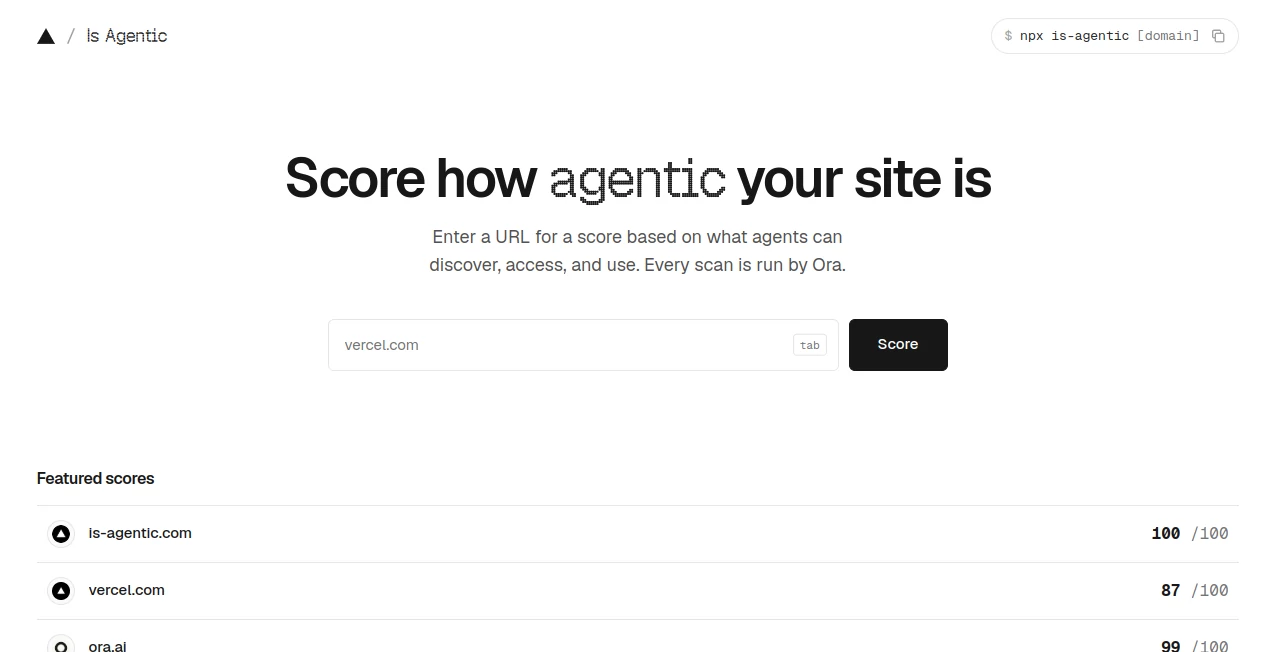
Is Agentic is designed to make that hidden problem easier to see. It lets a website owner enter a public URL and receive an agent-readiness score based on what AI agents can discover, access, understand, and use. The scans are performed by Ora, while the interface, reports, storage, and scoring presentation are operated by Vercel.
The result is more than a simple number. A report explains the checks behind the score, shows evidence from the scan, identifies areas that need attention, and provides practical recommendations. For developers and product teams preparing their websites for an increasingly agent-driven web, this can turn an abstract idea into a concrete technical checklist.
Key Features
- Agent-readiness scoring: Websites receive a score based on how effectively AI agents can interact with their public surfaces.
- Essential and Recommended checks: The scoring system separates fundamental requirements from checks that only apply to certain technical surfaces.
- Evidence-backed findings: Individual results explain what was observed rather than simply presenting a pass or fail label.
- Observed agent journey: Reports include an agent run that shows where an AI agent encountered friction while navigating a site.
- API access: Completed reports can be retrieved as structured JSON through a public read-only API.
- CLI support: Developers can retrieve reports directly from a terminal using the official npm package.
- MCP integration: A read-only MCP server makes completed reports accessible to compatible agent hosts.
- Stable reports: Report URLs can be revisited and refreshed after improvements are deployed.
- Machine-readable content: Reports support HTML, Markdown, and structured JSON representations for different consumers.
User Interface
The interface keeps the initial workflow remarkably straightforward. A visitor enters a public website address, starts a scan, and receives a report containing the resulting score and supporting findings. This is useful because there is no complicated dashboard to learn before getting a first result.
The report itself is more technical. It separates critical access concerns from other readiness signals and allows developers to move from the overall score into individual checks. Failed or partial findings can then become a practical to-do list rather than a vague recommendation to “optimize for AI.”
The public score pages are also designed with machine consumption in mind. Completed reports are rendered in the initial HTML response, while Markdown and structured JSON representations can be requested by compatible clients.
Accuracy & Performance
The scoring methodology is built around evidence collected from a public URL at a particular point in time. Essential checks account for 80 points, while Recommended checks account for another 20. Emerging signals can provide a limited bonus of up to five points. Checks that are not relevant to a particular website are excluded rather than treated as failures.
This applicability-based approach is important. A small marketing website should not be punished for failing to provide an API, OAuth flow, GraphQL endpoint, or MCP server when none of those interfaces are part of its product. Conversely, a developer platform with these surfaces can receive additional checks that are relevant to its architecture.
There is also an important limitation to keep in mind. A report is a snapshot of publicly observable behavior, not a universal guarantee that every AI model or browser automation system will successfully complete every possible task. Private workflows, authentication, regional differences, temporary outages, bot protection, and user-specific experiences may not be visible during a public scan.
Capabilities
The tool covers several layers of modern website accessibility for AI agents. Fundamental checks look at areas such as server-rendered content, HTTP behavior, document structure, recoverable navigation, and understandable controls.
When applicable, the evaluation can also examine developer-facing surfaces and machine interfaces. API, OAuth, GraphQL, MCP, and developer-resource checks can become part of the report when evidence shows that those capabilities exist.
For developers, the integration options are particularly useful. The public API returns the latest completed report as JSON, the CLI can display the report in a terminal, and the MCP server exposes read-only tools for retrieving reports, methodology information, and developer documentation.
The CLI can also return structured JSON, which makes it practical for scripts and automated workflows. Teams that regularly deploy changes could use this capability as part of a broader technical review process.
Security & Privacy
The service is intended for public URLs and public scan reports. Submitted URLs, scan results, evidence, recommendations, and related service information may be stored as part of operating the reporting system.
Because reports are public by design, private, authenticated, confidential, or secret-bearing URLs should not be submitted. Embedded credentials are rejected. The service documentation also makes clear that its public API and MCP interfaces are read-only and do not themselves launch scans, mutate the target website, or require credentials.
This makes the product better suited to public websites, documentation portals, developer resources, and public API or MCP surfaces than to private applications or internal systems.
Use Cases
Website owners: A business can quickly discover whether its public website exposes information in a way that modern AI agents can understand. A high visual-quality score from human visitors does not necessarily mean an agent will have the same experience.
Developers: Developers can use the findings as a technical checklist when improving server-rendered content, navigation, structured data, APIs, documentation, or machine-readable interfaces.
SaaS companies: SaaS teams can evaluate whether product pages, documentation, and public interfaces are ready for AI-assisted discovery and interaction.
API and developer platforms: Teams exposing APIs, OAuth, GraphQL, or MCP can use the applicable checks to identify missing documentation or integration signals that could make their services harder for agents to use.
SEO and technical teams: The reports provide another perspective on discoverability. Instead of focusing only on search engines and human visitors, teams can examine whether automated agents can actually retrieve and interpret important content.
Before and after technical changes: A particularly useful workflow is to run a scan, fix the failed findings, deploy the changes, and rescan the same public URL. This creates a simple feedback loop for measuring improvements.
Pros and Cons
- Pros: Simple URL-based workflow, clear numerical score, evidence-backed findings, applicability-aware scoring, observed agent journeys, developer API, CLI support, MCP support, and currently free access.
- Pros: The reports can turn complicated agent-readiness concepts into specific technical improvements that developers can act on.
- Pros: Non-applicable capabilities are excluded, so websites are not automatically penalized for features they do not actually need.
- Cons: The evaluation focuses on public surfaces and cannot fully represent private or authenticated user journeys.
- Cons: A score is still a snapshot. Websites, crawler policies, APIs, and agent protocols can change after a report has been generated.
- Cons: Agent readiness is only one part of website quality and should not replace dedicated accessibility, security, privacy, or compliance testing.
Pricing Plans
The service is currently free to use. There are no paid plans, subscription charges, or per-report fees listed for the public website, read-only API, official CLI, or MCP server.
This pricing model makes it particularly attractive for developers and small teams that want to experiment with agent-readiness testing without committing to another monthly software subscription. The ability to retrieve completed reports programmatically also adds value for technical users who want to include the results in their own workflows.
How to Use It
- Open the public website and enter the URL of the website you want to evaluate.
- Start the scan and wait for the completed report.
- Review the overall agent-readiness score.
- Start with failed Essential checks because these represent the baseline requirements for ordinary AI agents.
- Review Recommended findings that match the actual capabilities of your website.
- Read the evidence behind each result instead of relying only on the score.
- Apply the suggested technical improvements to your website or developer resources.
- Deploy the changes and run another scan to obtain a fresh snapshot.
Developers can also work from the command line or retrieve completed reports programmatically. The official documentation provides an npm-based CLI, a public report API, structured error responses, and an MCP server for compatible agent environments.
Comparison with Similar Tools
Traditional website testing tools tend to concentrate on areas such as page speed, accessibility, SEO, security, or browser compatibility. Those measurements remain valuable, but they do not necessarily answer a newer question: can an AI agent actually discover and use the website effectively?
This product takes a more agent-focused approach. Instead of treating AI readiness as another generic SEO metric, it evaluates practical interactions such as whether content is accessible without relying entirely on client-side rendering, whether navigation can recover from errors, whether controls are understandable, and whether relevant developer interfaces can be discovered.
Another distinction is the observed agent journey. A numerical score summarizes the evaluation, while the recorded journey can reveal the kind of friction an actual agent experienced while trying to understand the site. That combination makes the report more useful for developers who want to understand not only that something is wrong, but also where the experience breaks down.
It should not be viewed as a replacement for performance audits, security scanners, accessibility testing, or comprehensive QA. Its strongest role is as an additional layer focused specifically on how public web experiences are exposed to AI agents.
Conclusion
The rise of AI agents is changing what it means for a website to be accessible. A page can load quickly for a person and still be difficult for an automated agent to understand. Documentation can look polished while important developer resources remain difficult to discover. Forms can work perfectly in a browser but expose weak signals to machine users.
This tool offers a practical way to investigate those problems. Its biggest strength is not simply the 0–100 score; it is the combination of individual checks, observed evidence, agent journeys, technical recommendations, and developer-facing interfaces.
For teams building public websites, SaaS products, documentation, APIs, and emerging agent interfaces, an agent-readiness scan can be a useful addition to the normal technical checklist. The best approach is to treat the result as a starting point: fix the important findings, verify the changes, and scan again.
Frequently Asked Questions (FAQ)
What does the score measure?
The score estimates how readily AI agents can discover, access, understand, and use a public website. It considers essential website fundamentals and additional checks when relevant technical surfaces are detected.
Is the service free?
Yes. The current public offering is free, with no paid plans, subscription fees, or per-report charges.
Does a higher score guarantee that every AI agent will work correctly?
No. The score is a technical assessment based on publicly observable evidence. Different AI agents, tasks, authentication requirements, geographic conditions, and temporary website states can produce different results.
Can developers access reports programmatically?
Yes. Completed reports can be retrieved through a public read-only JSON API. There is also a command-line interface and an MCP server for compatible development and agent environments.
Does the scanner penalize websites for not having an API or MCP server?
Not automatically. Recommended checks activate when the scan finds evidence that a particular interface applies. Non-applicable checks are excluded from the score.
What should I fix first after receiving a report?
Start with failed Essential checks. These represent the baseline capabilities an ordinary AI agent needs to reach, read, navigate, and interact with a public website. After that, address Recommended findings that apply to your actual product.
Can private URLs be submitted?
No. The service is designed around public web surfaces, and reports are public by design. Private, authenticated, confidential, or secret-bearing URLs should not be submitted.
Should this replace SEO, accessibility, or security testing?
No. Agent readiness is a separate concern. A comprehensive website review should still include performance, SEO, accessibility, security, privacy, legal compliance, and product-quality testing.
AI Testing & QA , AI Analytics Assistant , AI Developer Tools .
These classifications represent its core capabilities and areas of application. For related tools, explore the linked categories above.

Is Agentic Alternatives Product

BetterAntisp…

Project Mela

Grow Creator

Pixelied

freellm

Velokey

Analyse

PatentFig AI

DiRe-RAPIDS