
Knowlify
What is Knowlify?
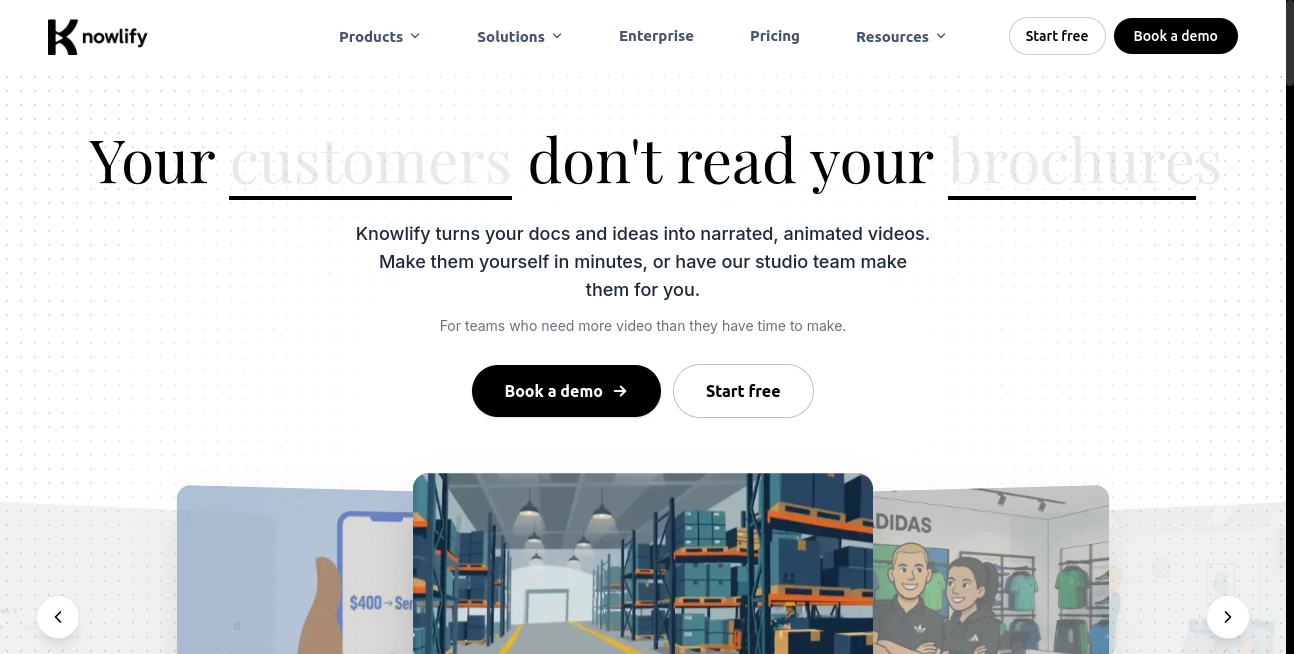
Your team pours hours into writing detailed guides, training materials, and product explanations, yet most people barely skim them. This platform solves that frustration beautifully. You upload a document, paste a blog post, or simply describe an idea, and it transforms the content into a professional narrated animated video in minutes. No scriptwriting, no editing software, no production crew required. I’ve seen internal teams go from “nobody reads our docs” to employees actually watching and understanding the material. It feels like finally having a video team that works at the speed of your ideas.
Introduction
People don’t read long documents anymore — they watch. Knowlify makes the switch effortless for busy teams. Whether you need training videos, explainer videos, patient education, or internal communications, it turns your existing written content into clear, engaging animated videos. You can create them yourself on the platform or hand everything over to their studio team for a polished, done-for-you result. Backed by Y Combinator and trusted by growing companies, it’s quickly becoming the smarter, faster way to communicate complex ideas without losing attention.
Key Features
User Interface
The platform is delightfully simple. Upload a document or type a prompt, choose your style preferences, and watch it generate a full video with narration, animation, and timing that actually makes sense. Editing is done by chatting — tell it what to change and it updates the video accordingly. The interface stays out of your way so you can focus on the message rather than learning complicated tools.
Accuracy & Performance
It captures the core message of your documents with impressive accuracy while turning dry text into lively, easy-to-follow stories. Voiceovers sound natural, animations are smooth and purposeful, and the pacing keeps viewers engaged. Generation is fast enough that you can iterate quickly, and the results consistently look professional enough for external use.
Capabilities
You can create videos from documents, blog posts, or plain ideas. It supports explainer videos, training content, onboarding, patient education, and more. The self-serve platform gives you full control and speed, while the studio option delivers end-to-end production in as little as 72 hours. It handles complex topics by breaking them down visually and turning technical content into something people actually want to watch.
Security & Privacy
Your documents and generated videos are handled securely, with appropriate safeguards for business and sensitive content. The platform is designed for professional use, giving teams confidence when working with internal training materials or client-facing content.
Use Cases
A healthcare company turns complicated patient instructions into short, friendly animated videos that improve understanding and reduce support calls. An HR team creates engaging onboarding videos that new employees actually complete. A SaaS company explains new features through clear explainer videos instead of long release notes. Training departments replace dense PDFs with watchable content that boosts retention. It works beautifully anywhere written information needs to reach people who prefer watching over reading.
Pros and Cons
Pros:
- Turns existing documents into professional videos incredibly fast.
- High-quality animation and natural narration that holds attention.
- Self-serve option for speed and studio option for polish.
- Editing by chatting makes revisions painless.
- Great for both internal communications and customer-facing content.
Cons:
- Very complex or highly technical documents may benefit from light human review.
- Studio production, while fast, still has a short wait compared to instant self-serve.
Pricing Plans
You can start creating videos right away with the self-serve platform — no credit card needed for initial exploration. Paid plans unlock higher usage, premium features, and the full studio service. The pricing is designed for teams that need more video than they have time or budget for traditional production, making professional video communication accessible and scalable.
How to Use Knowlify
Upload your document, paste text, or describe your idea in the platform. Review the automatically generated script and storyboard, then generate the video. Watch the result and chat with the AI to request any changes — “make the animation faster here” or “emphasize this point more.” Download the finished video or hand it off to the studio team for extra polish. The entire self-serve process can be done in minutes, while studio videos arrive in as little as 72 hours.
Comparison with Similar Tools
Many AI video tools start from scratch and require heavy prompting, while others are template-based and feel rigid. Knowlify stands out by starting from your existing content and turning it into natural, engaging videos with minimal effort. It combines the speed of AI with the quality expected from professional production, without the usual complexity or high costs.
Conclusion
Great communication shouldn’t require a video production team or endless hours of editing. This platform makes high-quality animated videos accessible to any team that has important information to share. By turning documents people skip into videos they actually watch, it helps organizations communicate more effectively and build better understanding. For anyone tired of content that gets ignored, it’s a refreshing and practical solution.
Frequently Asked Questions (FAQ)
How long does it take to create a video?
Self-serve videos can be ready in minutes. Studio production delivers in as little as 72 hours.
Do I need video editing experience?
Not at all — you can create great videos just by uploading documents or typing prompts.
Can I edit the generated video?
Yes — simply chat with the AI to request changes, or use the studio for more extensive revisions.
Is it suitable for professional use?
Absolutely — many companies use it for training, onboarding, customer education, and marketing.
AI Animated Video , AI Content Generator , AI Video Generator .
These classifications represent its core capabilities and areas of application. For related tools, explore the linked categories above.

Knowlify Alternatives Product

seedance 2.0

Motion Contr…

v04 ai
VideoFlux

HappyHorse AI

Voe4 AI Video

Veo4

Presenti AI

Spark Robin …