
Kovvid
What is Kovvid?
Creating professional visual content no longer requires a complex workflow or multiple subscriptions. This platform brings together several leading AI image and video generation models inside one intuitive workspace, making it easy to experiment, compare outputs, and choose the best result for every project.
Whether you are designing product images, producing marketing videos, building social media campaigns, or creating YouTube content, everything happens in one place. Instead of switching between separate applications, creators can generate images, transform existing visuals, produce videos from text, animate still images, and compare multiple AI models before downloading the final result.
One of its biggest strengths is flexibility. Beginners can start with simple prompts, while experienced creators can take advantage of advanced workflows such as image-to-video generation and frame-based video creation. The platform is equally useful for freelancers, agencies, content creators, designers, and marketing teams looking to accelerate production without sacrificing quality.
Key Features
User Interface
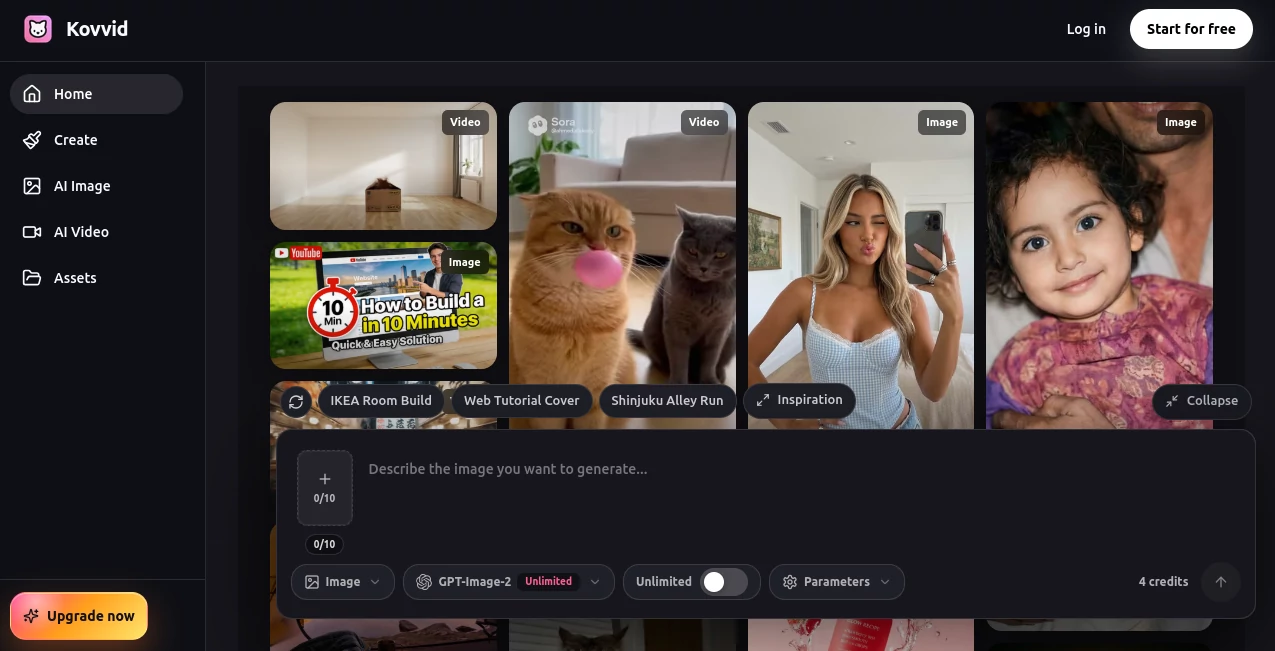
The interface is clean, modern, and designed for productivity. Users simply choose the desired generation mode, select an AI model, enter a prompt or upload a reference image, and receive results within minutes. The organized dashboard keeps projects, generation history, and assets easily accessible, allowing creative work to remain efficient even during larger campaigns.
Accuracy & Performance
The platform integrates several state-of-the-art AI models, allowing users to compare different outputs generated from the same prompt. This approach helps creators select the most realistic image, the smoothest animation, or the most visually appealing video without repeating work across multiple services. Most generations complete quickly, making rapid iteration possible.
Capabilities
- Generate AI images from text prompts.
- Create AI videos from text descriptions.
- Transform existing images into new artistic styles.
- Convert still images into animated videos.
- Create product photos and marketing creatives.
- Design posters, banners, and advertising graphics.
- Generate YouTube thumbnails and social media visuals.
- Compare multiple AI models side by side.
- Support frame-to-video workflows for smoother transitions.
- Produce high-resolution visuals suitable for commercial projects.
Security & Privacy
The platform includes privacy controls for professional users, allowing projects to remain private when needed. Commercial plans provide watermark-free downloads and additional visibility settings, making the service suitable for agencies, businesses, and content production teams that handle client work.
Use Cases
- Create eye-catching social media advertisements.
- Produce product showcases for eCommerce stores.
- Generate promotional videos for digital marketing.
- Create engaging YouTube intros and short clips.
- Design presentation visuals and business graphics.
- Produce creative concept art for designers.
- Build marketing materials for startups.
- Create educational illustrations and visual content.
- Generate branded content for agencies.
- Develop visual assets for websites and landing pages.
Pros and Cons
Pros
- Multiple leading AI models available in one workspace.
- Supports both image and video generation.
- Easy for beginners while powerful enough for professionals.
- Fast generation speed.
- Reference image support.
- Free credits for new users.
- Commercial plans include watermark-free exports.
- Excellent for marketing and creative teams.
Cons
- Advanced features require paid plans.
- Free plan includes limited credits.
- Account registration is required.
- Video downloads are restricted on the free tier.
Pricing Plans
A free plan allows new users to explore the platform with complimentary credits. Paid subscriptions include Starter, Pro, Premium, and Ultra plans, offering increased credit allocations, watermark-free downloads, enhanced privacy controls, commercial usage rights, and higher production capacity for professional creators and teams.
How to Use Kovvid
- Create a free account.
- Select whether you want image or video generation.
- Choose the AI model that best matches your project.
- Write a prompt or upload a reference image.
- Generate multiple versions.
- Compare outputs from different models.
- Download the preferred result.
Comparison with Similar Tools
Unlike many AI creative platforms that specialize in only one generation model, this solution combines several popular image and video models within a unified environment. Instead of paying for multiple subscriptions or switching between different websites, creators can compare outputs instantly and select the strongest result for each task. This workflow significantly improves productivity while reducing creative friction.
Conclusion
This platform delivers an impressive all-in-one environment for AI-powered visual creation. By combining image generation, video generation, image editing, animation, and model comparison into a single workspace, it simplifies creative production for individuals and businesses alike. The balance between ease of use, professional-quality output, and flexible pricing makes it an excellent choice for marketers, designers, content creators, and agencies seeking faster creative workflows.
Frequently Asked Questions (FAQ)
Can beginners use this platform?
Yes. The interface is designed to be straightforward, allowing anyone to generate professional visuals with simple prompts.
Can I create both images and videos?
Yes. The platform supports text-to-image, image-to-image, text-to-video, image-to-video, and frame-based video generation.
Is there a free version?
Yes. New users receive free credits to test the core features before upgrading.
Can I use generated content commercially?
Commercial usage is supported through eligible paid plans, which also include watermark-free downloads and additional privacy controls.
Who is this platform best suited for?
It is ideal for marketers, designers, agencies, social media managers, YouTubers, entrepreneurs, and anyone who regularly creates visual content.
AI Photo & Image Generator , AI Image to Video , AI Video Generator , AI Text to Image .
These classifications represent its core capabilities and areas of application. For related tools, explore the linked categories above.

Kovvid Alternatives Product

Pixelfox AI

Seedance 2 A…

Ernie Image
Seedance 2.0…

HappyHorse A…

gemini video

GPT Image 1.5

Nano Banana 2

Nano Banana …