KusArt
What is KusArt?
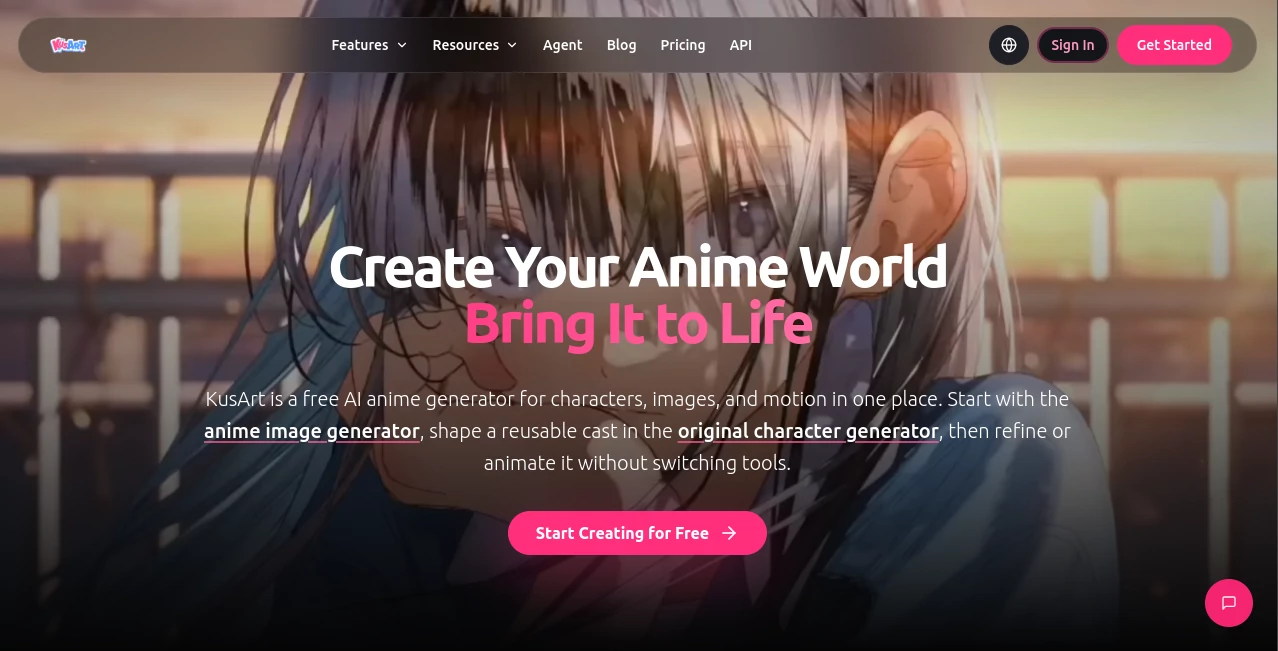
For anime artists, character designers, manga creators, and anyone who enjoys building imaginative worlds, turning an idea into a finished visual can take a surprising amount of time. KusArt brings many of those steps into one creative workspace, allowing users to generate anime artwork, build original characters, edit existing images, and turn still illustrations into motion.
The platform is particularly interesting for creators who care about character identity and visual consistency. Instead of treating every generation as an isolated image, it lets users carry references, prompts, previous results, and creative decisions into the next stage of a project. That makes it easier to develop a character from an initial sketch of an idea into different outfits, poses, expressions, environments, and even short animated scenes.
A useful example would be an independent game creator developing a new character. They can begin with a text description, turn the strongest result into an original character, adjust the outfit and pose, and later animate the finished artwork. The workflow feels much closer to developing a small visual project than simply generating a single picture.
Key Features
- Anime-focused image generation from text prompts and visual references.
- Original character creation with reusable character traits and visual details.
- AI-assisted editing for outfits, poses, hairstyles, expressions, backgrounds, and other elements.
- Image-to-video capabilities for adding movement to finished anime artwork.
- Multiple specialized models for different generation and editing requirements.
- Reference-guided creation for maintaining a particular visual direction.
- Creative workflows that keep prompts, references, generations, revisions, and alternate ideas connected.
- Additional tools for manga, stickers, memes, wallpapers, emojis, posters, and other anime-related content.
User Interface
The interface is designed around creation rather than complicated editing controls. Users can begin with a prompt or reference image and move between image generation, character creation, editing, and animation without constantly changing platforms.
One particularly useful concept is the canvas-based workflow. Prompts, references, generated images, revisions, and alternative directions can remain organized together. For someone experimenting with several versions of the same character, this can save a lot of time compared with keeping dozens of unrelated files and prompts in separate places.
The platform also includes a creative assistant that accepts everyday language. Instead of figuring out which tool should be used first, a creator can describe the intended result and let the workflow guide them toward image generation, character creation, editing, or video.
Accuracy & Performance
Performance is strongly influenced by the selected model and the complexity of the request, but the platform gives creators several models to choose from rather than forcing every project through one generation system.
Models such as Anima are aimed at expressive anime characters, while Kusa-Niji and Kusa-XL provide different approaches to anime image creation. Kusa-Easy is designed around natural-language descriptions, while Kusa-Mix is useful when reference-guided editing is the priority. Other available models extend the workflow into image generation, image editing, and video.
Character consistency is another important part of the experience. Reference images and previously established character details can be reused when changing clothing, poses, expressions, or backgrounds. In practice, this is much more useful for a character project than generating unrelated images and hoping the same face appears again.
Capabilities
The platform covers considerably more than basic text-to-image generation. Users can create anime characters from scratch, edit existing characters, change clothing and hairstyles, adjust poses, replace backgrounds, and experiment with face swaps and other transformations.
Creators can also move from static artwork into animation. A finished illustration can become a short video with character movement, camera direction, and scene motion. This opens up practical possibilities for animated social posts, story concepts, character demonstrations, memes, and early animation tests.
For artists who work with original characters, the combination of generation and editing is especially valuable. A character can be established once and then developed through different scenes rather than recreated from zero every time.
Security & Privacy
The service collects account information, usage data, and generated content as part of operating the platform. Its privacy policy states that personal data is not sold and that generated content may be stored while an account remains active. Payment processing is handled through third-party processors rather than storing complete payment card information on the platform's servers.
Privacy options depend on the user's service tier. Subscriber accounts may have access to enhanced privacy controls, while content created by non-subscribers can have more limited privacy settings and may be eligible for display in community galleries or promotional areas.
Users should also pay attention to the platform's terms when creating work based on recognizable characters, copyrighted material, trademarks, or other third-party intellectual property. The service does not automatically grant rights to third-party material included in prompts or generated results.
Use Cases
- Anime character design: Create original characters with recognizable faces, hairstyles, outfits, expressions, and visual traits.
- Manga development: Explore character concepts, scenes, compositions, and visual directions before producing finished pages.
- Game development: Develop character concepts, promotional artwork, character variations, and visual references for indie projects.
- Social media content: Produce anime-style posts, memes, profile artwork, posters, and other shareable visuals.
- Story visualization: Turn descriptions of fictional characters and scenes into visual references for novels, comics, and creative projects.
- Character customization: Experiment with outfits, hairstyles, poses, backgrounds, and expressions while keeping a character recognizable.
- Animation concepts: Turn finished illustrations into short moving scenes for previews, social posts, or creative experiments.
- Digital art exploration: Test different anime aesthetics, compositions, styles, and visual directions before committing to a final concept.
Pros and Cons
- Pros: Strong focus on anime artwork, original character workflows, multiple specialized models, reference-based editing, character customization, image-to-video creation, and a connected creative workspace.
- Pros: Free access is available, making it possible to explore the core experience before committing to a paid plan.
- Pros: The combination of generation, editing, character creation, and animation makes it useful for longer creative projects.
- Cons: Output quality and generation costs can vary depending on the model and operation selected.
- Cons: Users looking primarily for photorealistic images may find the anime-focused approach less suitable for their needs.
- Cons: Privacy and commercial-use features can depend on the selected plan and the specific content being created.
Pricing Plans
The platform uses a combination of free access, subscriptions, and credit packs. Free users receive basic image-generation capabilities, daily credits, and may receive outputs with watermarks. Paid subscription options provide higher credit allowances and additional benefits such as watermark-free generation and priority access.
Credit packs are also available for users who do not want a recurring subscription. According to the current service information, purchased credits can be used for additional generation capacity and do not expire. Some specialized tools and models consume different amounts of credits, so the actual cost of a project depends on what the creator chooses to generate.
Paid plans can also provide enhanced privacy controls and commercial-use rights where applicable. Because available plans, credit allowances, and benefits can change, users should check the current pricing information before purchasing.
How to Use KusArt
- Start by opening the image-generation workspace and decide whether you want to work from a written description or a visual reference.
- Describe the character, scene, mood, appearance, clothing, or composition you want to create.
- Choose an appropriate anime-focused model and style based on the type of artwork you want.
- Generate several variations and compare the results rather than settling immediately on the first image.
- Use the strongest result as the foundation for an original character or further editing.
- Adjust details such as clothing, hairstyle, pose, expression, lighting, or background when necessary.
- Keep useful references and previous results connected to the project so the character can remain visually recognizable.
- When the artwork is ready, use the video workflow to introduce movement and create a short animated scene.
Comparison with Similar Tools
Many AI art generators are designed primarily around one prompt producing one image. That approach works well when the goal is a quick illustration, but it becomes less convenient when a creator needs to develop the same character across multiple scenes.
This platform takes a more character-centered approach. Image generation is connected with original character creation, targeted editing, reference images, and animation. That makes it particularly appealing to anime creators who want to keep developing an idea after the first generation.
Another distinction is the range of specialized models available inside the same workspace. A creator can choose a model for natural-language generation, another for reference-guided editing, and another for animation rather than relying on one general-purpose model for every task.
It is not necessarily the best choice for every type of visual work. Someone creating mostly realistic photography, corporate graphics, or general-purpose design may prefer a broader image-generation platform. For anime-focused character creation and visual storytelling, however, the specialized workflow is a meaningful advantage.
Conclusion
For anime creators, the biggest advantage is not simply the ability to generate attractive illustrations. It is the way different stages of the creative process are connected. A simple idea can become an image, that image can become a reusable character, the character can be edited into new situations, and the finished artwork can eventually be animated.
The specialized models, reference support, character editing tools, and connected canvas make the platform especially useful for people building recurring characters or developing a larger visual project. Casual users can experiment with the free credits, while more active creators have subscription and credit-based options for heavier workloads.
If your goal is to create anime artwork that can evolve rather than remain a one-off generation, this is a particularly compelling addition to an AI creative toolkit.
Frequently Asked Questions (FAQ)
Is there a free version?
Yes. The platform offers free access with daily credits and basic generation capabilities. Free outputs may include watermarks, while paid plans provide additional benefits.
Can I create original anime characters?
Yes. The original character workflow lets creators establish recognizable character traits and reuse them across different expressions, poses, outfits, relationships, and scenes.
Can I edit an existing anime image?
Yes. Existing artwork can be refined with changes to clothing, hairstyles, poses, expressions, props, lighting, backgrounds, and other visual details.
Can I turn anime images into videos?
Yes. Finished illustrations can be taken into the video workflow to create short animated clips with character movement, camera direction, and scene motion.
Can I use reference images?
Yes. Reference images can be used to provide additional visual information and help guide the generation or editing process. Multiple references can be useful when different images represent different aspects of the desired result.
Does it support different anime styles?
Yes. The platform provides several anime-focused models and curated styles, allowing creators to explore different approaches to characters, linework, composition, rendering, and overall visual identity.
Can I use generated images commercially?
Commercial-use rights are available where provided by the applicable paid plan and subject to the platform's terms. Users remain responsible for ensuring that their inputs and outputs do not infringe third-party intellectual property or other rights.
Is it suitable for beginners?
Yes. The workflow supports natural-language descriptions and guided creative tools, so users do not need advanced knowledge of traditional image-editing software to begin experimenting with anime artwork.
Does character consistency work across different scenes?
The platform is designed to reuse reference images, character traits, and earlier results when developing a character. Clear references and consistent character details can help maintain the same visual identity across new scenes.
AI Anime Art , AI Image to Video , AI Avatar Generator , AI Art Generator .
These classifications represent its core capabilities and areas of application. For related tools, explore the linked categories above.

KusArt Alternatives Product
videodance

image to vid…
FastMoro AI

ltx 2.3
GrokImagineAI

PixAI - AI A…
Seedance 2.0…

AIGAZOU

Banana AI