LaunchEngine
What is LaunchEngine?
Launching a new SaaS product is rarely difficult because of the product itself. The real challenge often starts afterward: finding the right directories, communities, subreddits, and launch channels, then adapting the message for each one without spending days copying the same information into different forms.
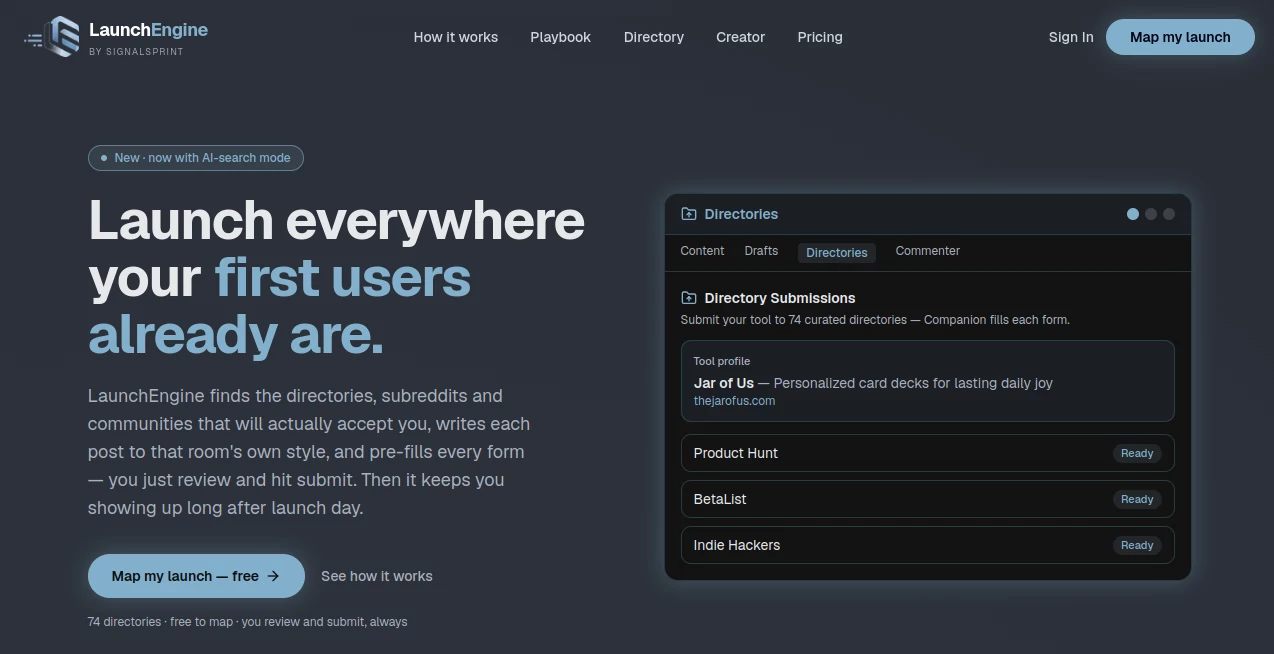
LaunchEngine is built around this exact problem. It helps founders turn a product URL into a practical launch map, identify relevant communities, prepare platform-specific content, and fill out submission forms. Instead of trying to automate everything blindly, it keeps the founder in control of the final submission.
The approach is particularly useful for indie hackers, SaaS founders, developers, and small marketing teams that want broader distribution without turning launch day into a full-time administrative task.
Key Features
- Launch mapping across 74 curated directories.
- Community and subreddit discovery based on product relevance.
- Platform-specific post drafts instead of one generic announcement.
- Browser-based form pre-filling for directory submissions.
- AI-assisted launch planning and content creation.
- Daily social content and comment drafts on the Creator plan.
- Launch video creation with multiple production options.
- Community matching across platforms such as Reddit, Discord, Slack, LinkedIn, and Facebook.
- AI-search-focused discovery for recommendation and buying-intent discussions.
User Interface
The experience is designed around a simple idea: the founder should approve the work rather than spend hours doing repetitive data entry. The main application works as a command center where launch content can be reviewed, edited, and approved.
There is also a browser companion that handles repetitive form-filling. Product names, taglines, links, screenshots, and other details can be inserted into submission forms, while the user remains responsible for the final action. This makes the workflow feel much closer to having an assistant beside you than operating another complicated marketing dashboard.
Accuracy & Performance
One of the more thoughtful parts of the system is its attempt to understand where a product actually belongs before recommending a community. The launch map ranks directories and communities instead of simply producing a long, unfiltered list.
For communities where relevant information can be read, the system can examine recent popular posts and adapt the draft to the style of that particular room. That matters because a Product Hunt announcement, a Reddit discussion, and a developer community post rarely work with the same wording.
The free mapping experience is also designed to be quick. A product URL can be used to generate a launch map without requiring an account first, giving founders an opportunity to evaluate the recommendations before committing to a paid plan.
Capabilities
The platform goes beyond directory submissions. Its AI launch partner can draft posts for communities such as Reddit, Product Hunt, and Show HN, create a launch-day schedule, rewrite content for different audiences, and prepare replies to comments.
Video is another notable part of the platform. Users can record themselves with a phone teleprompter, use an AI presenter, create an AI voiceover video, or use a cloned version of their own voice. The workflow is script-first and storyboard-driven, which gives users an opportunity to review the idea before the final video is produced.
For ongoing promotion, the Creator plan adds daily posts and comments, deeper community discovery, 15 monthly video credits, and support for up to three separate product launches.
Security & Privacy
The service takes a deliberately conservative approach to automated posting. It does not automatically submit posts, solve captchas, or mass-blast communities on the user's behalf. Instead, the browser companion prepares the form and the user completes the final submission.
This distinction is important for founders who depend on established Reddit, directory, or social accounts. Keeping the final action in the user's hands reduces the need for aggressive automation and gives the founder an opportunity to check every message before it goes live.
Use Cases
SaaS launches: A founder preparing a new SaaS product can start with a URL and receive a structured list of directories and communities worth considering.
Product Hunt preparation: Instead of writing one launch message and stopping there, founders can prepare related content for several channels and keep the messaging consistent while adapting it to each audience.
Reddit community outreach: The community-matching features can help identify discussions where a product genuinely fits, while the draft-first workflow gives the user control over what gets posted.
Post-launch marketing: The Creator plan is useful when the goal is not just to create launch-day noise but to continue publishing content and engaging with relevant communities afterward.
Launch videos: Founders who do not want to appear on camera can create videos using an AI presenter or voiceover, while creators who prefer a personal touch can use a teleprompter or cloned voice.
Pros and Cons
Pros
- Turns a product URL into a structured launch map.
- Includes 74 curated directories in the free mapping experience.
- Adapts content to different community styles.
- Reduces repetitive directory form-filling.
- Keeps users responsible for final submissions.
- Combines directory discovery, community outreach, social content, and video creation.
- Useful beyond launch day through its ongoing content engine.
Cons
- Users still need to review and submit forms themselves.
- Community recommendations are most useful when the product has a clear target audience.
- The deeper social discovery and ongoing automation features require the paid plan.
- Some planned features, including the cross-promotion network, are not yet available.
Pricing Plans
The platform offers a free starting point with no account required for launch mapping. The Free plan provides a ranked launch map, access to 74 curated directories, platform-specific content drafts, and starter video credits.
The Creator plan costs £29 per month and is aimed at founders who want continued promotion after launch day. It includes everything in the free plan, plus the full social engine, 15 video credits per month, deeper community matching, support for up to three launches, and approval and posting from a phone.
This pricing structure makes sense for users who are still experimenting with their launch strategy because they can first see where their product could be promoted before paying for the ongoing engine.
How to Use It
- Paste your product URL into the launch mapping tool.
- Review the generated directories, subreddits, and communities.
- Check the recommended platforms and prioritize the ones that best match your audience.
- Review the generated posts and adapt them where necessary.
- Install the browser companion if you want help filling directory and community forms.
- Open each submission page and review the information that has been pre-filled.
- Complete any required captcha and submit the form yourself.
- Use the content and video features to continue promoting the product after launch day.
Comparison with Similar Tools
Many launch products focus on a single destination, such as a product directory, social scheduling, or launch-day promotion. This platform takes a broader approach by combining discovery, content preparation, directory submissions, community research, and ongoing promotion in one workflow.
Another important difference is the level of automation. Fully automated posting may appear convenient, but it can be problematic in communities where repetitive or bot-like activity is discouraged. Here, automation is concentrated on research, drafting, and form-filling, while the user remains responsible for publishing.
For a founder who only needs to submit a product to one directory, a specialized service may be enough. For someone preparing a multi-channel launch and looking for continued community exposure afterward, the wider workflow can be considerably more practical.
Conclusion
Getting a product noticed is often less about producing one perfect launch announcement and more about consistently showing up in the places where potential users already spend time. That is where this platform has a clear advantage.
Its strongest feature is not simply the number of directories it can identify. It is the combination of research, community-aware writing, form assistance, launch planning, and ongoing content creation. The founder can move faster without handing over complete control of the publishing process.
For indie hackers and SaaS teams preparing a launch, the free mapping option is an easy way to see whether the workflow fits their product. Those who need continuous promotion can then move to the Creator plan and use the additional social, community, and video features to keep the launch alive well beyond the first day.
Frequently Asked Questions (FAQ)
Can I use the launch mapping feature for free?
Yes. The free plan provides a ranked launch map and can be used without creating an account. It includes access to 74 curated directories, content drafts, and starter video credits.
Does it automatically post to Reddit and other communities?
No. The workflow is designed around user approval. Content is drafted and forms can be pre-filled, but the user reviews the submission and completes the final posting action.
How many directories are included?
The current free launch map covers 74 curated directories, with the platforms ranked according to their relevance to the product.
Can it create launch posts for different communities?
Yes. It can draft content for platforms and communities such as Reddit, Product Hunt, and Show HN, while adapting the writing to the destination rather than relying on one identical announcement.
Can I create promotional videos?
Yes. The video system supports recording yourself with a teleprompter, AI presenters, AI voiceovers, and cloned voice options. Video credits are included with the free experience, while the Creator plan provides 15 credits each month.
Is there a plan for multiple products?
Yes. The Creator plan supports up to three launches, allowing founders or small teams to manage multiple products with separate launch maps, voices, and content.
Does it help after the initial launch?
Yes. The Creator plan is designed for ongoing promotion with daily social posts and comments, deeper community matching, recurring video credits, and AI-assisted discovery of relevant conversations.
Who is this tool best suited for?
It is particularly useful for SaaS founders, indie hackers, developers, startup teams, and marketers who want to distribute a new product across multiple directories and communities without manually researching and filling every submission from scratch.
AI Workflow Management , AI Marketing Plan Generator , AI Social Media Assistant , AI Digital Marketing Generator .
These classifications represent its core capabilities and areas of application. For related tools, explore the linked categories above.
LaunchEngine details
Website unavailable — View Alternatives
Pricing
- Freemium
Apps
- Web App
- iOS App
- Android App
- Chrome Extensions
Categories

LaunchEngine Alternatives Product

SEOTakeoff

AllInOneTools

KoloQR

Diploria AI

igrecent
X Growth Eng…

Beat API

Trimless for…

VoiceFlow Te…