

















LivePhotoLab
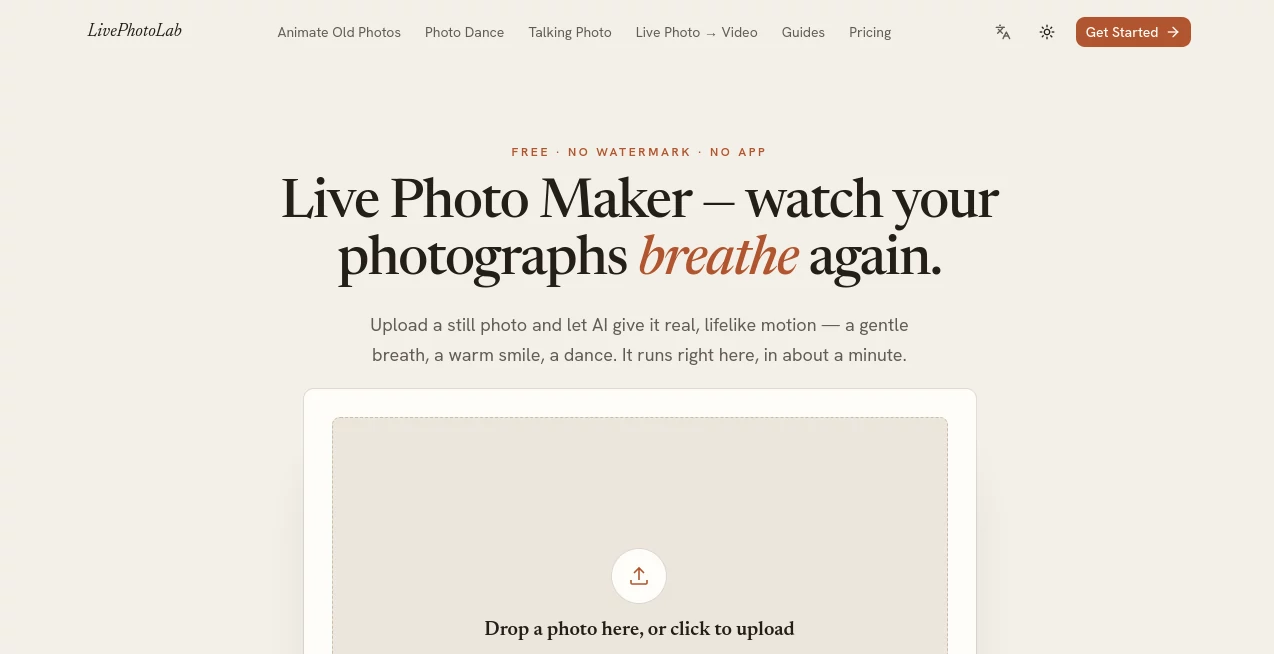
What is LivePhotoLab?
LivePhotoLab is an AI-powered photo animation platform designed to turn ordinary still images into short, moving moments. Instead of simply applying a pan-and-zoom effect, it generates actual motion from a single photograph, allowing faces, expressions, hair, and other visual details to move naturally.
The experience is intentionally simple. Upload a photo, choose the amount of movement you want, and let the AI create the result. There is no complicated timeline or editing workflow to learn, making it especially appealing to people who want something more interesting from their existing photographs without becoming video-editing experts.
A clear portrait tends to produce the best results, particularly when the face is visible from the front. JPG and PNG images are supported, and the resulting video can be downloaded as an MP4 file without a watermark.
Key Features
- AI photo animation: Turn a static image into a short video with generated facial and body movement.
- Multiple motion styles: Choose between subtle breathing, a smile, or more noticeable movement depending on the effect you want.
- Old photo animation: Bring vintage family photographs to life with gentle movement.
- Photo dance generation: Create playful dancing clips from photographs of people, pets, or selfies.
- Talking photos: Turn a photograph into a speaking character with synchronized lip movement.
- Live Photo conversion: Existing Live Photos can also be converted into MP4 video directly in the browser.
- Watermark-free exports: Generated videos are available without a visible watermark.
- Browser-based workflow: The platform works on iPhone, Android, Windows, and Mac without requiring an application installation.
User Interface
The interface keeps the process refreshingly straightforward. Rather than presenting users with layers of controls, timelines, or technical settings, the main workflow revolves around uploading an image and selecting the desired motion.
This approach works particularly well for casual users. Someone who simply wants to animate an old family portrait or create a moving profile picture can get started without first learning how a traditional video editor works.
Accuracy & Performance
Performance depends heavily on the source photograph. Clear, front-facing portraits with visible facial features are recommended for the most convincing animation. Higher-resolution images can also help produce cleaner and smoother results.
The platform states that generation takes roughly a minute, while its simpler workflow is designed to get users from an uploaded image to a downloadable clip with very little waiting or manual adjustment.
Capabilities
The platform goes beyond a single photo-animation effect. Users can create subtle movements, smiles, more pronounced animated clips, dancing photographs, talking portraits, and animations from older images.
One particularly useful distinction is that the system is intended to generate genuine movement rather than merely moving the camera across a still picture. This makes the results more suitable for personal memories, social posts, greetings, and creative experiments.
Security & Privacy
Privacy is an important consideration when working with personal photographs. The service states that uploaded photos are used to create the requested video and emphasizes that files remain private.
That makes the platform more appealing for people working with personal portraits and family photographs. As with any online image-processing service, users should still review the current privacy policy before uploading particularly sensitive material.
Use Cases
- Family memories: Animate old portraits and give historical photographs a gentle sense of movement.
- Social media: Turn ordinary selfies and portraits into short clips that are more engaging than static images.
- Personal greetings: Create talking photographs for messages, celebrations, or memorable occasions.
- Creative projects: Experiment with animated characters, portraits, and visual storytelling.
- Pet content: Transform a favorite pet photograph into a playful animated clip.
- Profile content: Create moving visual assets for social profiles and personal pages.
- Content creation: Produce short MP4 clips that can be shared across modern social platforms.
Pros and Cons
- Pros: Very simple workflow, no software installation, free initial generations, watermark-free exports, several animation modes, mobile and desktop browser support, and support for both JPG and PNG images.
- Pros: The ability to animate old photographs and create talking or dancing images gives it broader creative use than a basic Live Photo converter.
- Cons: Results depend considerably on the quality and composition of the uploaded photograph.
- Cons: Users who need advanced manual control over timing, camera movement, or detailed video editing may find the simplified workflow limiting.
Pricing Plans
New users can create three free videos after signing in, with no credit card required. The free generations are provided without watermarks. For users who need more capacity, paid plans are available for different levels of usage.
- Starter: $11.90 per month for 20 AI videos, access to the four main AI tools, HD MP4 downloads without watermarks, and email support.
- Pro: $29.90 per month for 60 AI videos, access to all four tools at the highest quality, watermark-free downloads, commercial use, and priority generation.
- Studio: $79.90 per month for 150 AI videos, everything included in Pro, API access, and priority support.
There is also a credit-pack option for users who prefer buying generation credits rather than committing to a monthly subscription. Failed generations are automatically refunded to the user's balance.
How to Use the AI Live Photo Maker
- Upload a clear portrait or photograph in JPG or PNG format.
- Select the type or intensity of motion you want to create.
- Start the generation process and allow the AI to animate the image.
- Preview the resulting moving photograph.
- Download the finished MP4 without a watermark.
For the best experience, start with a sharp photograph where the main subject is clearly visible. A straightforward front-facing portrait is usually a better starting point than a heavily cropped, blurry, or complicated image.
Comparison with Similar Tools
Traditional photo animation tools often rely on simple zooming, panning, or camera movement. That can make a picture feel dynamic, but it does not actually animate the person or subject inside the photograph.
This platform takes a different approach by generating movement within the image itself. That difference becomes especially noticeable with portraits, where subtle breathing, smiling, dancing, or speaking can create the impression that a previously static moment has started moving again.
It also combines several related creative tools in one browser-based experience. Users can move from ordinary photo animation to old-photo restoration, dancing photographs, talking portraits, or Live Photo conversion without needing a separate application for each task.
Conclusion
For anyone who has a collection of photographs that feel a little too static, this platform offers an unusually approachable way to experiment with AI animation. The strongest part of the experience is its simplicity: there are no complicated editing panels to master and no software package to install.
Its range of options also makes it more than a basic photo-to-video converter. A family portrait can become a gentle moving memory, a selfie can become a short social clip, and a photograph can even be turned into a speaking or dancing video.
The best results naturally come from good source images, but for users looking for quick, creative photo animation with clean exports and a straightforward workflow, it is a compelling option worth trying.
Frequently Asked Questions (FAQ)
What is an AI Live Photo maker?
An AI Live Photo maker transforms a still photograph into a short moving video by generating motion within the image. This can include subtle facial movement, breathing, smiling, dancing, or speech depending on the selected tool.
Is it free to use?
Yes. New users receive three free video generations after signing in, and no credit card is required for those initial videos. Paid plans are available for users who need additional generations.
Are generated videos watermarked?
No. The service provides watermark-free exports, including the initial free videos.
What type of photo produces the best results?
Clear, front-facing portraits with a visible face generally work best. JPG and PNG files are supported, while higher-resolution photographs can help produce cleaner animation.
Can old photographs be animated?
Yes. A dedicated old-photo animation feature is designed to give vintage or family photographs gentle movement, making it possible to revisit older memories in a new format.
Can a photograph be made to talk?
Yes. The talking-photo feature allows users to provide a message and generate a speaking version of the photograph with synchronized lip movement.
Do I need to install an application?
No. The tools run directly in a web browser and are designed to work across iPhone, Android, Windows, and Mac.
Can I download the generated video?
Yes. Finished creations can be downloaded as MP4 files, making them suitable for saving, sharing, and posting on social platforms.
Are there paid plans for commercial use?
Yes. The Pro plan includes commercial use, while the Studio plan adds higher monthly capacity, API access, and priority support for heavier workflows.
AI Photo & Image Generator , AI Image to Video , AI Animated Video , AI Photography .
These classifications represent its core capabilities and areas of application. For related tools, explore the linked categories above.
LivePhotoLab details
Website unavailable — View Alternatives
Pricing
- Freemium
Apps
- Web App
Categories

LivePhotoLab Alternatives Product

NB2 Hub

toolsclaw

GPT Image 2 …

Seedance 2.0…
hailuo03

seedance 3.0

Seedance

Faceless Ree…
Visfeng AI F…
