
LTX Studio
What is LTX Studio?
LTX Studio is an advanced AI-powered video creation platform designed to help creators, filmmakers, marketers, and businesses transform ideas into complete visual stories. Instead of managing multiple tools for scripting, storyboarding, video generation, editing, and production planning, users can build their entire creative workflow in one place.
The platform combines AI video generation, image-to-video creation, story development, editing controls, and production-focused features to make professional video creation more accessible. Whether you are creating marketing campaigns, social media content, concept videos, or cinematic projects, it helps turn a simple idea into a structured visual experience.
With support for modern AI video models, advanced camera controls, character consistency, and creative workflows, this solution is built for people who want more control than traditional automated video generators provide.
Key Features
User Interface
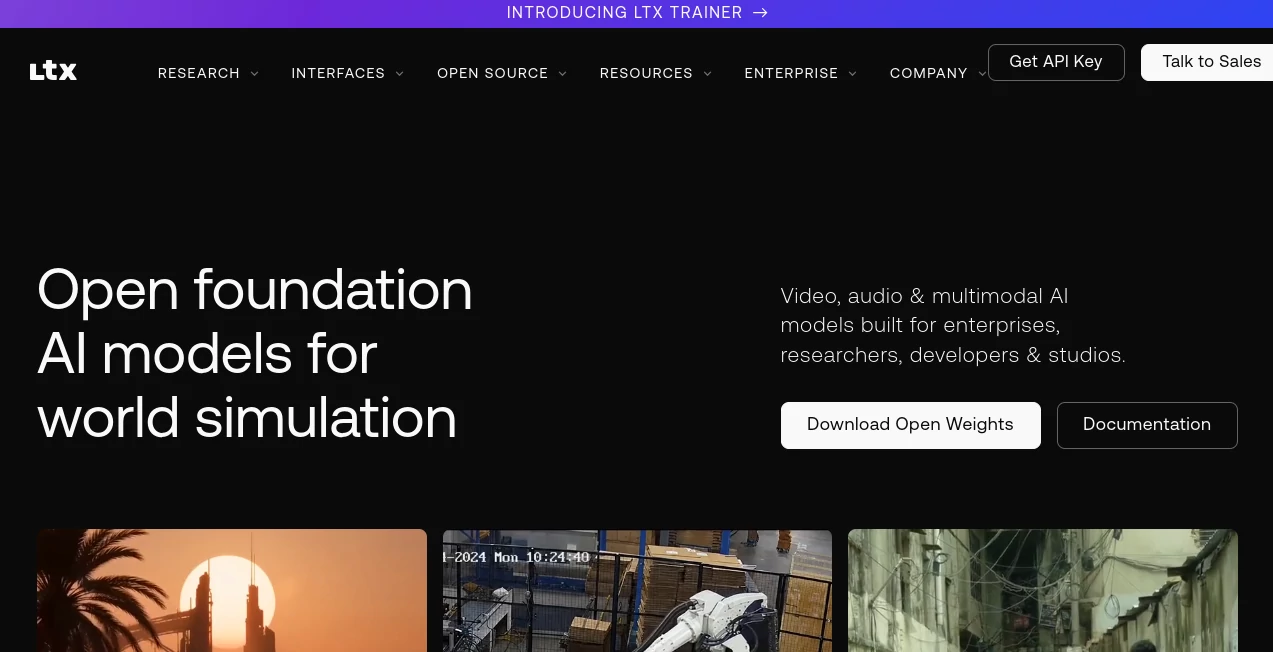
The platform offers a clean and creator-focused workspace where users can move from an initial concept to a finished video project without complicated production software. The interface is designed around creative workflows, allowing users to develop scenes, organize storyboards, adjust visuals, and refine generated content from a single environment.
For beginners, the guided workflow makes experimentation simple. For experienced creators, the available controls provide more flexibility for adjusting scenes, camera movements, visual styles, and storytelling elements.
Accuracy & Performance
The platform uses advanced AI video models to generate realistic visuals while maintaining scene structure and creative consistency. Users can create videos from text prompts, images, or existing concepts while maintaining control over motion, framing, and visual direction.
Its AI models are optimized for production workflows, allowing creators to quickly explore different ideas, generate variations, and refine concepts without spending hours on manual editing. The system supports high-quality video generation and provides tools for improving output quality through editing and enhancement features.
Capabilities
The platform provides a complete AI video production toolkit with features including text-to-video generation, image-to-video transformation, AI storyboards, video editing, scene planning, voice features, captions, and workflow automation.
- Generate videos from text descriptions and creative concepts
- Create dynamic videos from still images
- Build AI-powered storyboards for planning scenes
- Maintain character and scene consistency across shots
- Control camera angles, movement, and visual composition
- Edit and refine generated videos inside the workspace
- Create content for marketing, entertainment, and social platforms
- Support professional creative workflows with collaboration options
Security & Privacy
The platform is designed with professional creators and organizations in mind. Different plans provide options suitable for personal projects, commercial production, and larger team workflows. Enterprise users can explore solutions designed for more controlled creative environments and scalable production needs.
Use Cases
AI video creation can support many industries and creative tasks. Marketing teams can quickly produce advertisements, product demonstrations, and social media campaigns without traditional production costs. Content creators can experiment with storytelling ideas and create engaging videos faster.
- Marketing: Create promotional videos, advertisements, and branded content.
- Film Production: Develop concepts, storyboards, and visual prototypes before filming.
- Social Media: Produce short-form videos for modern content platforms.
- Education: Create visual lessons, tutorials, and explainer videos.
- Product Design: Visualize concepts and create presentations for new ideas.
- Creative Agencies: Speed up brainstorming and client presentation workflows.
Pros and Cons
Pros
- Complete AI video production workflow in one platform
- Strong focus on storytelling and professional creation
- Supports text-to-video and image-to-video generation
- Provides advanced creative controls
- Useful for both beginners and experienced creators
- Helps reduce production time and creative barriers
Cons
- Advanced features may require learning time for new users
- High-quality generations can consume more credits
- Professional workflows may require paid plans
Pricing Plans
The platform offers multiple pricing options designed for different types of users. A free plan is available for users who want to explore the core experience, while paid subscriptions provide additional credits, advanced generation features, editing capabilities, and commercial usage options.
- Free: Suitable for testing features and personal experimentation.
- Lite: Designed for individual creators who need more monthly generation capacity.
- Standard: Includes expanded creative features and commercial usage options.
- Pro: Built for professional creators and teams requiring higher limits and advanced controls.
- Enterprise: Provides customized solutions for organizations with larger production requirements.
How to Use
Getting started is straightforward. Users can begin with an idea, script, image reference, or creative direction. The AI helps transform that input into visual scenes and allows further adjustments before producing the final result.
- Create an account and open the creative workspace.
- Enter a text prompt, upload an image, or start with a story concept.
- Generate scenes and review the suggested visual direction.
- Adjust camera movements, styles, characters, and timing.
- Edit the generated content and export the final video.
Comparison with Similar Tools
Many AI video generators focus mainly on producing short clips from text prompts. This platform takes a broader approach by combining generation with storytelling, planning, editing, and production management.
Compared with simpler video generators, it provides more creative control and is better suited for users who want to develop complete visual narratives rather than isolated clips. Compared with traditional editing software, it reduces the technical workload by automating many production steps while keeping creative decisions in the user's hands.
Conclusion
LTX Studio represents a new approach to video production by combining artificial intelligence with creative control. It helps creators move from an early idea to a polished visual project with fewer technical limitations and less production complexity.
For filmmakers, marketers, designers, and content creators looking for a smarter way to produce videos, this platform provides a powerful environment where imagination can quickly become a finished story.
Frequently Asked Questions (FAQ)
Can users create videos from text?
Yes. The platform supports text-based video creation, allowing users to describe scenes and generate visual content from written ideas.
Can images be converted into videos?
Yes. Users can animate still images and transform them into dynamic video sequences with AI-powered motion generation.
Is it suitable for professional creators?
Yes. The platform includes advanced controls and workflows designed for filmmakers, marketers, creative teams, and professional content production.
Does it offer a free plan?
Yes. Users can access a free option to explore the platform before upgrading to plans with additional features and usage limits.
What type of content can be created?
Users can create marketing videos, social media content, cinematic concepts, educational materials, product visuals, and many other creative projects.
AI Image to Video , AI Video Generator , AI Video Editor , AI Text to Video .
These classifications represent its core capabilities and areas of application. For related tools, explore the linked categories above.

LTX Studio Alternatives Product

AI Baby Video

HappyHorse A…

Sora AI Vide…
Veo 4

ImageVids AI

Seedance 4.0
Artaivo

Sora 2 AI

Seedream 6.0