
Lucer Art
What is Lucer Art?
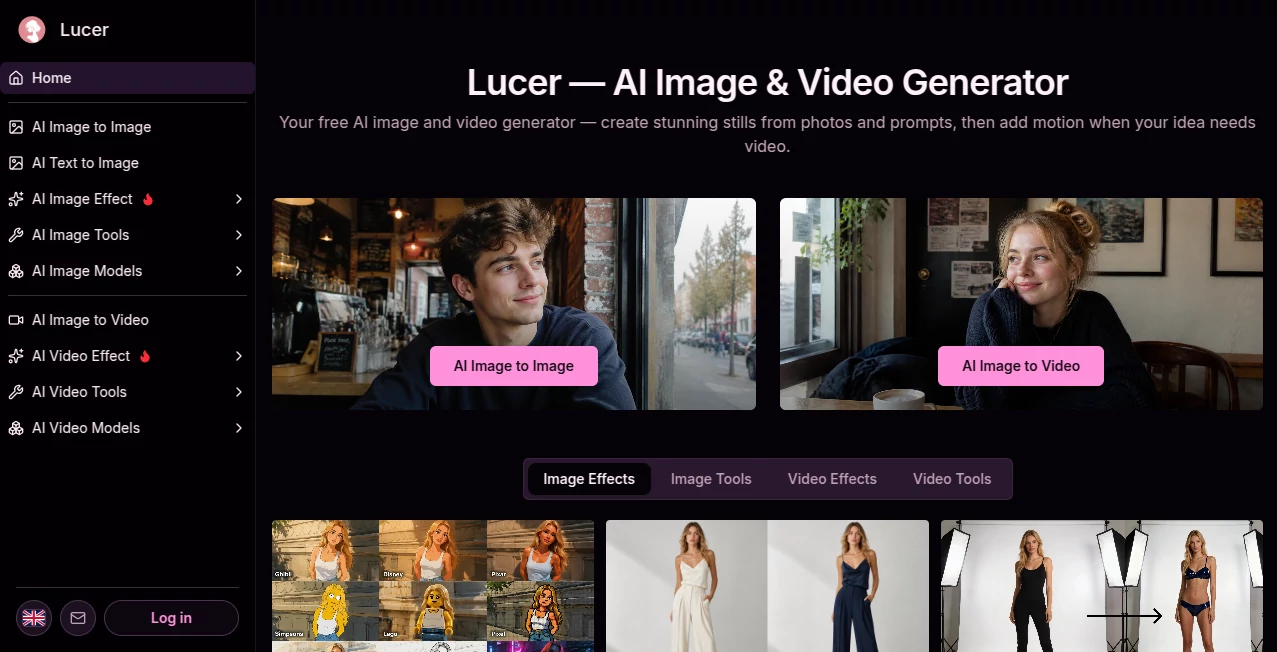
Creating visual content often becomes slower than the creative idea itself. You may start with a simple photo, need a different style, and then realize that the same concept would work better as a short video. Lucer brings these steps into one browser-based workspace, letting creators generate and edit images first and move into video when motion is needed.
The platform is designed around a straightforward workflow: upload a reference when needed, describe the result in natural language, select the appropriate generation model, preview the output, and download it. This makes it useful for creators who want to experiment quickly without jumping between several specialized applications.
Key Features
The main strength of the platform is the combination of image and video creation under one account and one credit balance. Its image workspace supports one or two reference images, while the video workflow can turn still imagery into short animated clips. Natural-language prompts can be used to guide edits, lighting, movement, style, and other visual details.
- AI image generation and image editing workflows
- Image-to-image generation using reference images
- Image-to-video generation for creating motion from still images
- Multiple generation models for different creative requirements
- Natural-language prompt control
- Two-image reference mode for selected image workflows
- Inline image previews and video playback
- Download-ready image and video outputs
- Credit costs displayed before generation
- Additional creative tools and effects for images and video
User Interface
The interface follows a practical creator-first approach. Instead of placing every possible control on one screen, the platform separates image and video workflows into dedicated workspaces. This is particularly helpful when moving between a still concept and a motion version of the same idea.
The basic process is easy to understand. Choose the type of creation you need, add a reference image when appropriate, write your prompt, select a model and generation settings, and review the result directly in the workspace. For someone trying an AI visual tool for the first time, this is considerably easier to follow than a workflow built around dozens of technical controls.
Accuracy & Performance
Performance depends on the selected generation model, the complexity of the prompt, the reference material, and the requested output. The platform is built for iteration rather than expecting every first attempt to be perfect. Users can preview a result, adjust the wording of a prompt, and generate another version without rebuilding the entire project elsewhere.
The image-to-video workflow is particularly practical for this approach. A reference image establishes the visual starting point while the prompt describes the movement, camera behavior, mood, or action. Video generations can be reviewed directly in the workspace before downloading the finished MP4.
Capabilities
The platform covers a surprisingly broad range of visual tasks. Its image workflow can be used for generating concepts, transforming existing visuals, exploring different looks, and creating reference-based compositions. The system can work with one or two reference images where the selected workflow supports them.
For motion content, image-to-video generation allows a still image to become a short clip. The available video workspace includes model selection, quality settings, duration controls, and inline playback. Depending on the model and workflow, creators can focus on camera movement, action, atmosphere, and pacing through ordinary written prompts.
There are also specialized tools beyond the core generators, including image enhancement, watermark removal, clothing changes, image conversion, and various image and video effects. This gives creators several useful options without requiring a separate application for every small editing task.
Security & Privacy
The privacy policy states that account information, uploaded images, usage information, device information, cookies, and payment-related information may be collected as part of operating the service. Uploaded images are used to process requested transformations and generated results, while the policy states that uploaded images are not used to train the AI models without explicit consent.
The service also states that uploaded images are encrypted during transmission and storage and that processed images are retained for a limited period so users can access their generated results. Users can request deletion of their images. Anyone working with private or commercially sensitive material should still review the current privacy policy before uploading important files.
Use Cases
There are several situations where this type of workflow makes practical sense. A social media creator can produce a still thumbnail, refine its appearance, and then turn the same visual concept into a short promotional clip. A photographer can explore wardrobe or lighting ideas before committing to a real shoot.
E-commerce teams can use generated visuals for product concepts, promotional material, and creative testing. Designers can also use reference images to explore visual directions quickly, while marketers can create early campaign concepts without organizing a complete production workflow.
For example, imagine a creator preparing a product launch. They could first establish the product's visual style as a still image, test several compositions, choose the strongest frame, and then animate it into a short clip for social media. That image-first approach can save considerable time when the goal is experimentation rather than final production immediately.
Pros and Cons
Pros
- Combines image and video generation in one service
- Simple prompt-first workflow
- Supports reference-based image creation
- Image-to-video generation is available for turning still concepts into motion
- Inline previews make iteration convenient
- Credit costs are shown before generation
- Additional image and video tools extend the platform beyond basic generation
Cons
- Generation quality can vary depending on the selected model and prompt
- More advanced creative control may require experimenting with prompts rather than traditional editing controls
- Video generation consumes credits more quickly than lightweight image tasks
- Creators with highly specialized professional workflows may still need dedicated editing software afterward
Pricing Plans
The platform uses a credit-based system rather than forcing every user into a fixed workflow. Each generation displays its credit cost, and users can check their remaining balance and add more credits when they need additional image or video generations.
This approach can be useful for occasional creators because spending is connected to actual generation activity. Someone producing a few concepts does not necessarily need the same usage pattern as a creator producing video content every day.
The service is presented as free to start, while additional usage can be purchased through the credit system. Since generation costs can differ between models and tasks, checking the current pricing page before purchasing credits is the safest way to understand the latest options.
How to Use It
Start by deciding whether your project is better suited to an image or video workflow. For image creation, upload one or two reference images when the selected workflow supports them and describe the desired result with a clear prompt. For video, use an appropriate reference image when needed and explain the movement, camera direction, atmosphere, and action you want.
Next, choose the available model and generation settings. Before running the job, review the displayed credit cost. Generate the result and inspect the preview directly in the workspace. If the result is close but not quite right, adjust the prompt and try again rather than starting the entire process from scratch.
Once the result matches the intended direction, download the finished image or video and continue editing it in your preferred production software if additional post-processing is required.
Comparison with Similar Tools
Many AI creative platforms specialize heavily in one medium. Some concentrate almost entirely on image generation, while others focus on text-to-video production. The more interesting aspect here is the connection between still-image experimentation and motion generation.
For creators who regularly move from concept images to short videos, having both workflows under one account can reduce unnecessary switching. The reference-image approach is also useful when maintaining a particular visual direction matters more than starting with an entirely blank text prompt.
It is not necessarily a replacement for a professional image editor or full video production suite. Its value is strongest earlier in the creative process, when the goal is to generate ideas, test visual directions, create variations, and quickly turn promising stills into motion.
Conclusion
For creators who want a practical bridge between AI image generation and AI video creation, this platform offers a well-focused workflow. The combination of reference images, natural-language prompts, model selection, inline previews, and a shared credit system keeps the creative process relatively straightforward.
Its biggest advantage is not simply having image and video generation available. It is the ability to move from one medium to the other without completely changing the workflow. A strong still can become the starting point for a video, while additional image tools can help refine the visual direction along the way.
For social media creators, marketers, photographers, e-commerce teams, designers, and anyone experimenting with AI-generated visuals, it is worth exploring when speed and creative iteration matter more than building every asset manually from scratch.
Frequently Asked Questions (FAQ)
What can the platform create?
It supports AI image generation, image editing workflows, image-to-image creation, image-to-video generation, video generation, and additional image and video effects.
Can I use reference images?
Yes. The image workflow supports one or two reference images in supported modes, while image-to-video workflows can use reference images to establish the visual starting point for animation.
Can I create videos from images?
Yes. The image-to-video workflow allows a reference photo to become the starting frame for a generated clip. Users can describe the desired movement and camera behavior with a natural-language prompt.
Is it free to start?
The service is presented as free to start, with generation usage handled through credits. Additional credits can be purchased when more generation capacity is required.
How does the credit system work?
Generation costs depend on the task and selected model. The service displays the required credit cost before a generation is started, allowing users to review usage before spending credits.
Does it support high-resolution video?
Available video settings depend on the selected workflow and model. Current video tools expose options such as 480p, 720p, and in supported workflows 1080p, along with different clip durations.
Are uploaded images used to train the AI?
The privacy policy states that uploaded images are not used to train the AI models without the user's explicit consent. It also describes encryption during transmission and storage and limited retention of processed images.
Can I download the generated results?
Yes. Generated images can be downloaded from the image workspace, while video workflows provide downloadable MP4 results after reviewing the generated clip.
Who is this tool best suited for?
It is a good fit for content creators, photographers, marketers, designers, e-commerce businesses, and anyone who wants to experiment with AI-generated images and short-form video without maintaining separate tools for every stage of the creative process.
AI Photo & Image Generator , AI Image to Video , AI Video Generator , AI Image to Image .
These classifications represent its core capabilities and areas of application. For related tools, explore the linked categories above.

Lucer Art Alternatives Product

AI Dog Dance

You.bot

Veo 3.1

Seedance 2.0…

Mediagen

Wan AI

seedream 6

Image 2 AI

RenderFlow AI