


















MathBuddy.ai
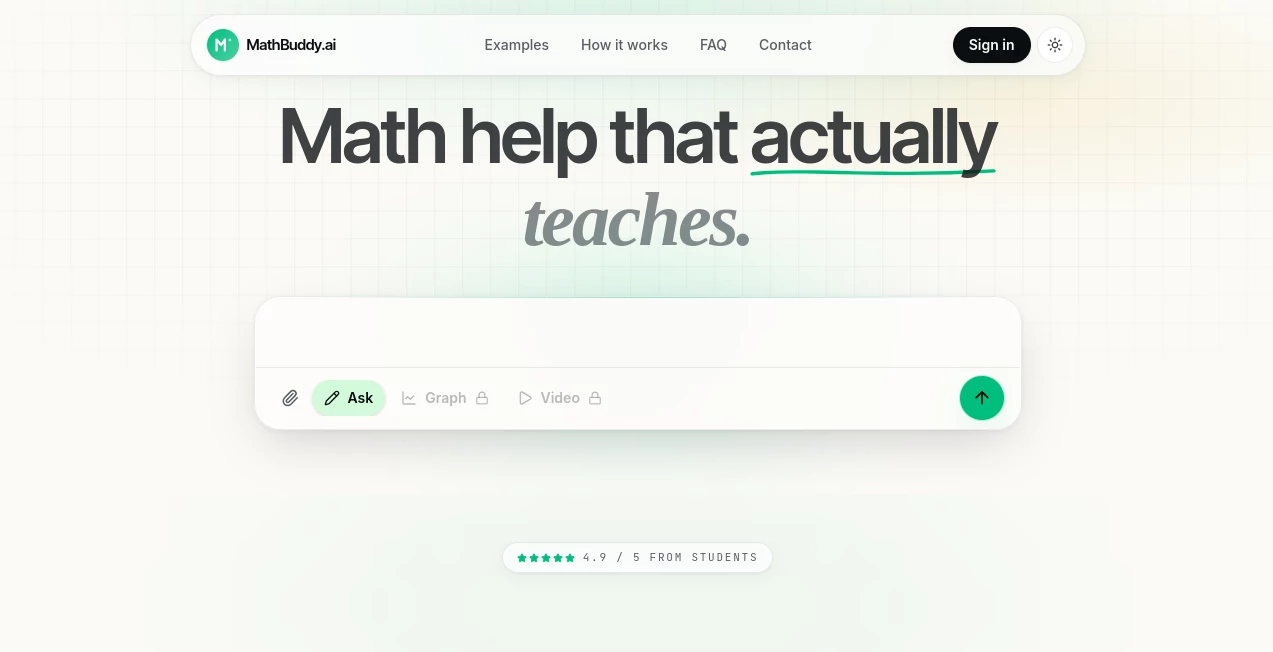
What is MathBuddy.ai?
Learning mathematics can become frustrating when a solution appears without explaining how to reach it. MathBuddy.ai takes a different approach by focusing on the reasoning behind each answer. It is an AI-powered math learning workspace designed to help students work through problems, understand individual steps, explore graphs, and even watch short video explanations when a written solution is not enough.
The platform covers everything from algebra to multivariable calculus and is built around a simple idea: getting the answer is useful, but understanding why the answer is correct is far more valuable. Students can type a problem, upload a worksheet, or take a photo of handwritten work and use the resulting explanation as part of their study session.
Rather than feeling like a basic calculator, the experience is closer to having a dedicated study companion for mathematics. The combination of explanations, visual tools, uploaded materials, and video walkthroughs makes it particularly useful when a student gets stuck on a specific concept.
Key Features
- Step-by-step mathematical solutions with intermediate work.
- Support for problems ranging from algebra through multivariable calculus.
- Photo-based input for handwritten notes and worksheets.
- Interactive graphing for visual exploration of mathematical problems.
- Short whiteboard-style video explanations generated around individual problems.
- A workspace for keeping conversations, notes, and mathematical outputs together.
- Support for uploading worksheets and PDF materials.
- Access from phones, tablets, and laptops.
User Interface
The interface is designed around the way students actually study. Instead of forcing every problem into a single text conversation, the platform brings questions, notes, and generated results into one workspace. This makes it easier to move between asking a question, examining a graph, and reviewing an explanation.
The workflow is also straightforward. A student can type a question, photograph a problem from a textbook, or upload a worksheet. The platform then turns that input into a mathematical explanation or visual result. For someone studying between classes or reviewing material late at night, that simplicity can make a meaningful difference.
Accuracy & Performance
One of the strongest aspects of the platform is its emphasis on showing the mathematical process rather than presenting a bare result. Its solver is designed to show the rule being applied and the intermediate work, which can make mistakes easier to identify and concepts easier to follow.
For example, a calculus problem involving the derivative of sin(x²) can be broken down into identifying the outer function, applying the chain rule, and reaching the final expression. That style of explanation is much more useful for study than simply displaying the final derivative.
As with any AI-based learning system, students should still verify important academic work, particularly when dealing with complicated or unusual problems. The real value here is the combination of an answer with an understandable path toward that answer.
Capabilities
The platform brings several mathematical learning tools into one place. Its solver handles mathematical questions with step-by-step reasoning, while the photo and worksheet features allow students to work with material that already exists on paper or in digital documents.
Graphing adds another useful dimension. Instead of reading an equation only as symbols, students can explore its visual behavior through interactive graphs. This can be especially helpful in areas such as functions, calculus, and linear algebra, where seeing the relationship between values often makes an abstract concept easier to understand.
Video explanations provide another option when written steps are not quite enough. Short whiteboard-style walkthroughs can revisit the exact problem and explain the sequence visually, giving students another way to approach a difficult concept.
Security & Privacy
The service states that it collects account information, math questions, chat messages, uploaded images or PDFs, class materials when enabled, and certain usage and diagnostic information needed to operate the platform. This information can be used to provide tutoring, process uploads, maintain history, create graphs and videos, and improve reliability.
The privacy policy also explains that prompts, uploads, extracted text, chat context, and tool requests may be processed through AI infrastructure providers. Users should therefore avoid submitting sensitive personal information unless they are comfortable with that processing. The service states that it does not sell personal information, although data may be shared with service providers for functions such as hosting, storage, analytics, security, support, payments when enabled, and AI processing.
Use Cases
Homework help: Students can work through difficult assignments by seeing how a solution develops instead of copying a final number.
Calculus study: Step-by-step differentiation and visual explanations can be particularly helpful when learning rules such as the chain rule.
Worksheet assistance: A photograph or uploaded worksheet can turn a physical homework problem into an interactive study session.
Visual learning: Interactive graphs are useful for students who understand mathematical ideas more easily when they can see them.
Exam preparation: Students can revisit difficult problems, review explanations, and use video walkthroughs to reinforce concepts before an exam.
Independent learning: When a teacher, tutor, or classmate is unavailable, the platform can provide another way to investigate a problem and understand the underlying method.
Pros and Cons
Pros
- Focuses on explaining the reasoning rather than only providing answers.
- Supports both typed problems and photographed or uploaded materials.
- Combines solving, graphing, and video explanations in one workspace.
- Covers mathematics from algebra to multivariable calculus.
- Useful across phones, tablets, and laptops.
- Offers a student-focused learning experience rather than a general-purpose chatbot interface.
Cons
- Students should still verify complicated solutions before relying on them for important academic work.
- The platform is primarily focused on mathematics rather than broader academic subjects.
- AI processing of uploaded materials means users should be careful about submitting sensitive information.
- Some advanced capabilities may be more useful to students with access to the full workspace experience.
Pricing Plans
The website currently promotes the service as free for launch. This makes it particularly attractive for students who want to try the solving, graphing, worksheet, and video capabilities without committing to a paid subscription at the beginning.
Because pricing and availability can change as the product develops, students should check the current offering before making plans around long-term access to specific features.
How to Use MathBuddy.ai
Getting started is intentionally simple. Begin with a mathematics problem that you want to understand. You can type the question directly, take a photo of handwritten notes or a worksheet, or upload relevant material.
Once the problem is submitted, review the step-by-step solution rather than jumping immediately to the final result. Pay attention to the rule or method used at each stage. If the problem involves a relationship that is easier to understand visually, use the graphing capability to explore it.
When a written explanation still feels unclear, create a short video walkthrough. This can be particularly useful before an exam because it allows you to revisit the same problem in a more visual format.
A practical study routine is to attempt the problem yourself first, compare your work with the explanation, identify where your approach changed, and then solve a similar problem without assistance. Used this way, the platform becomes a learning aid rather than simply an answer generator.
Comparison with Similar Tools
There are many AI chatbots and traditional calculators that can produce mathematical answers, but they do not always provide the same combination of education-focused explanations, visual graphing, image input, and video walkthroughs.
A general AI chatbot can be useful for discussing a mathematical topic, while a calculator is excellent for obtaining numerical results. This platform is positioned more specifically around the learning process. Its step-by-step solver, handwritten input, graphs, and problem-specific videos are designed to keep the student's attention on how a solution works.
That distinction matters. A student who only needs a number may prefer a conventional calculator. Someone looking at a difficult calculus problem and thinking, “I know the answer, but I don't understand how to get there,” can benefit much more from an explanation-first workflow.
Conclusion
For students who want more than a final answer, this AI math workspace offers a thoughtful way to approach difficult problems. The combination of step-by-step solving, handwritten and worksheet support, interactive graphs, and short video explanations gives mathematics several different entry points.
Its biggest strength is the emphasis on understanding. Whether the problem is a straightforward algebra equation or a more demanding calculus exercise, the platform is designed to make the reasoning visible. That makes it a useful addition to a student's study routine, especially when a confusing problem needs to become a clear sequence of manageable steps.
Frequently Asked Questions (FAQ)
What types of math can it help with?
The platform is designed to help with mathematics ranging from algebra through multivariable calculus. Its examples and capabilities also highlight areas such as calculus and linear algebra.
Can it explain the steps instead of only giving an answer?
Yes. Step-by-step explanations are a central part of the experience. The solver shows intermediate work and the rules applied along the way.
Can I upload a photo of a math problem?
Yes. Students can photograph handwritten notes or worksheets and use the uploaded material as the starting point for a solution or visual explanation.
Can I upload a PDF or worksheet?
Yes. The platform supports uploaded worksheets and PDF materials, making it possible to work with existing study documents rather than manually typing every problem.
Can it create graphs?
Yes. Interactive graphing is one of its core capabilities and can help students understand mathematical relationships visually.
Can it create video explanations?
Yes. Short whiteboard-style walkthroughs can be generated around a specific problem when a visual explanation is more helpful than written steps alone.
Is it available on mobile devices?
Yes. The service states that it works on phones, tablets, and laptops, allowing students to use it across different study environments.
Is it free?
The website currently describes the service as free for launch. Pricing and feature availability may change as the product evolves.
Should students use it instead of learning mathematics themselves?
No. Its greatest value comes from using the explanations to understand a method, checking your own work, and then attempting similar problems independently. That approach turns AI assistance into a study tool rather than a shortcut.
AI Charting , AI PDF , AI Education Assistant , AI Homework Helper .
These classifications represent its core capabilities and areas of application. For related tools, explore the linked categories above.

MathBuddy.ai Alternatives Product

EZ Grader

Sovi.AI

Connections …

Docubix

Fig0

AI Diagram M…

Watermark in…

morse code t…

Keepmind
