
MeeLang
What is MeeLang?
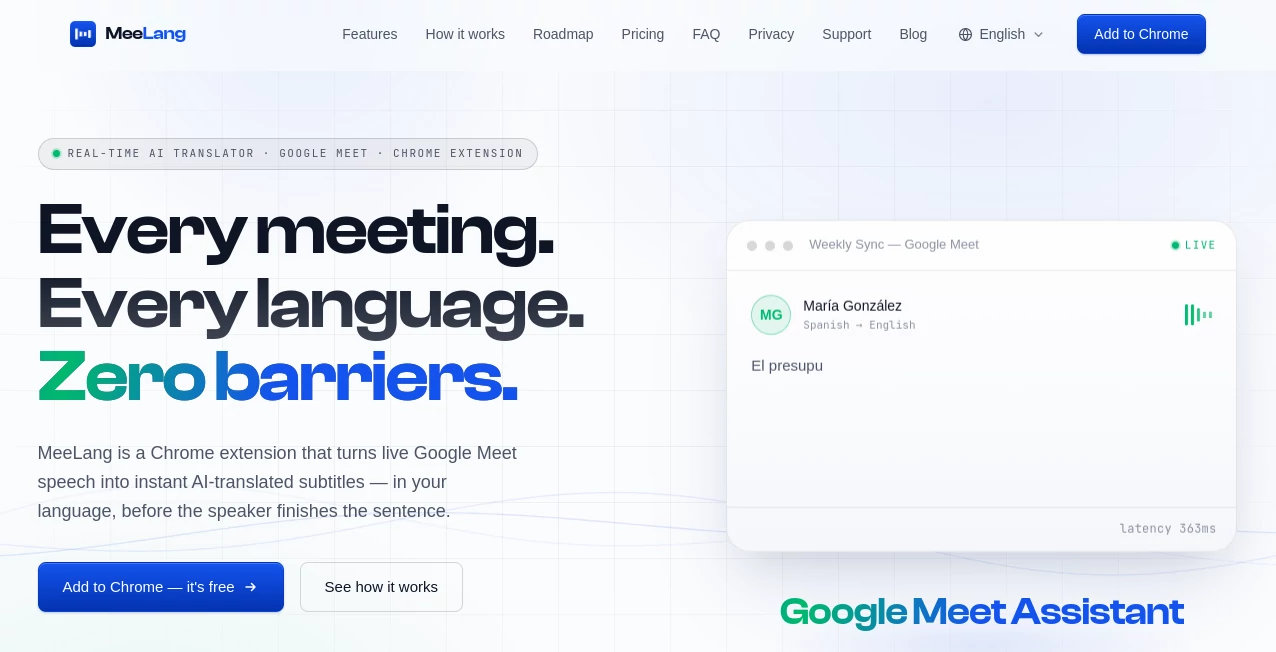
Language differences can make an otherwise productive meeting surprisingly difficult. A speaker moves quickly, technical terms appear without warning, and waiting for someone to translate can interrupt the natural flow of a conversation. MeeLang takes a refreshingly direct approach: it turns live Google Meet speech into AI-translated subtitles while the conversation is happening.
The Chrome extension is designed for people who regularly join international meetings, work with overseas clients, study with people from other countries, or simply want to follow conversations in a language they do not speak fluently. Instead of asking participants to invite a translation bot or switch between different applications, the translated text appears directly over the meeting.
The experience is particularly useful when conversations move quickly. The service reports subtitle latency below 400 milliseconds, allowing translated words to appear while the speaker is still talking. More than 30 languages are supported, with automatic source-language detection making it easier to join multilingual calls without complicated setup.
Key Features
- Real-time AI-translated subtitles for Google Meet.
- Reported subtitle latency of less than 400 milliseconds.
- Support for more than 30 target languages.
- Automatic detection of the source language.
- Bilingual meeting transcripts that can be searched and exported.
- Local browser-based storage for meeting records.
- No meeting bot needs to be invited to the call.
- No account or credit card is required to start using the free version.
- AI meeting summaries are available with the Pro plan.
- Support for additional meeting platforms is planned.
User Interface
The interface is built around the meeting rather than trying to become another application that users have to manage. After installing the Chrome extension and enabling Google Meet captions, translated subtitles can appear as a floating overlay on the meeting screen.
This approach makes sense for real conversations. You can keep your attention on the speaker, presentation, or shared screen while using the translated text as a second layer of understanding. There is no need to copy sentences into a separate translation website every few seconds.
Accuracy & Performance
Speed is one of the most important parts of live translation, because a translation that arrives too late is difficult to use in an active conversation. The platform states that its subtitle latency can be under 400 milliseconds, with words translated before the speaker finishes a sentence.
Its AI translation is also designed to account for conversational context and fast, terminology-heavy speech. Actual translation quality can still vary depending on pronunciation, audio quality, accents, background noise, and the complexity of the conversation, but the emphasis on low latency makes the service particularly well suited to live meetings rather than post-meeting translation.
Capabilities
The current focus is Google Meet, where the extension can work with the captions already available in the meeting. Supported translation languages include widely used options such as English, Chinese, Japanese, Korean, Spanish, French, German, Portuguese, Hindi, Arabic, Russian, Turkish, Italian, Dutch, Ukrainian, Hebrew, Urdu, and several others.
Beyond translation, meeting records can be managed, searched, exported, and replayed. The roadmap also includes features such as AI-generated meeting summaries, speaker identification, live voice dubbing, optional team synchronization, and native desktop applications. Zoom Web, Microsoft Teams, and Webex support are also listed as upcoming capabilities rather than current fully supported integrations.
Security & Privacy
Privacy is a notable part of the product's positioning. Meeting content and audio are not intended to be retained by the service, while bilingual transcripts are kept locally in the user's browser. Users can search, export, or delete their meeting records from there.
This local-first approach can be attractive for professionals who regularly discuss confidential projects or client information. As with any browser extension handling meeting information, users should still review the current privacy policy and browser permissions before using it for sensitive business conversations.
Use Cases
- International business meetings: Follow conversations with overseas clients, suppliers, and partners without constantly interrupting the discussion.
- Remote teams: Help multilingual team members participate more comfortably in recurring calls.
- Online education: Follow lectures, workshops, and study sessions where the instructor speaks another language.
- Customer conversations: Understand international clients during remote calls and consultations.
- Freelancers: Communicate more easily with clients from different countries without adding a translation bot to the meeting.
- Research and interviews: Keep searchable bilingual records of conversations that may need to be reviewed later.
- Travel and international collaboration: Reduce the language barrier when participating in online conversations across borders.
Pros and Cons
- Pros: Real-time translation, low reported latency, 30+ languages, simple Chrome-based setup, no meeting bots, searchable bilingual transcripts, local transcript storage, and a free starting option.
- Cons: Google Meet is the primary supported platform today, while Zoom Web, Microsoft Teams, and Webex are still on the roadmap. Translation quality can naturally depend on audio quality, accents, and the subject being discussed. The free plan also has a monthly translation-minute limit.
Pricing Plans
The service uses a straightforward free-and-paid model. The Free plan costs $0 per month and includes 90 translation minutes per month, along with meeting record management and export capabilities. No payment card is required to get started.
The Pro plan costs $9.99 per month and provides 600 translation minutes, meeting record management and exports, plus AI meeting summaries. This makes the free option suitable for occasional users, while the paid tier is aimed more at people who regularly participate in multilingual meetings.
How to Use It
- Install the Chrome extension from the Chrome Web Store.
- Open or join a Google Meet meeting.
- Turn on Google Meet's built-in captions.
- Enable the translation functionality from the extension.
- Select the language in which you want to read the subtitles.
- Follow the translated subtitles directly over the meeting.
- After the meeting, manage, search, export, or review the available bilingual transcript.
Comparison with Similar Tools
Many translation products are designed around written text, uploaded recordings, or dedicated meeting bots. This solution takes a different route by working directly inside the browser during a live Google Meet session.
That distinction can make the setup more convenient for people who do not want to invite an additional participant into a meeting. It also avoids the awkward experience of repeatedly copying spoken content into another translation service. On the other hand, users who need a broader collection of meeting platforms today may prefer a solution with established support for multiple conferencing applications.
For someone whose main requirement is fast translated subtitles during Google Meet calls, the combination of low-latency captions, multilingual support, and browser-based operation creates a compelling option. Users who need voice dubbing, speaker identification, or wider conferencing compatibility should keep an eye on the product's roadmap as those capabilities are developed.
Conclusion
Real-time translation works best when it stays out of the way, and that is where this tool makes a strong impression. Instead of turning a multilingual meeting into a complicated technical process, it places translated subtitles directly where the conversation is happening.
The combination of fast subtitles, more than 30 languages, searchable bilingual records, a privacy-focused approach, and a free entry plan makes it worth considering for anyone who frequently joins international Google Meet calls. It is especially appealing to remote professionals and teams who want conversations to feel more natural without making language differences the center of attention.
Frequently Asked Questions (FAQ)
How does real-time meeting translation work?
The Chrome extension uses the captions from a Google Meet call and processes them with AI, displaying translated subtitles as a floating overlay while the meeting continues.
How many languages are supported?
More than 30 languages are supported, including English, Chinese, Japanese, Korean, Spanish, French, German, Portuguese, Hindi, Arabic, Russian, Turkish, Italian, Dutch, Ukrainian, Hebrew, Malay, Filipino, and Urdu.
Is there a free plan?
Yes. The Free plan costs $0 per month and provides 90 translation minutes per month, along with meeting record management and export features.
Does it work with Zoom and Microsoft Teams?
Google Meet is the currently supported meeting platform. Zoom Web, Microsoft Teams, and Webex are listed as upcoming integrations on the roadmap.
Where are meeting transcripts stored?
Bilingual transcripts are stored locally in the user's browser, where they can be searched, exported, or deleted. Users should review the current privacy documentation for complete details about data handling.
AI Translate , AI Meeting Assistant , AI Transcription , AI Speech to Text .
These classifications represent its core capabilities and areas of application. For related tools, explore the linked categories above.
MeeLang details
Website unavailable — View Alternatives
Pricing
- Free
Apps
- Web App
- Chrome Extensions
Categories

MeeLang Alternatives Product

MeetAssist

ModelsLab

AudioScribe

WhisperWebUI

Whisper AI

TranslateAI …

Read

PureMIDI
TranAI