
Metrician
What is Metrician?
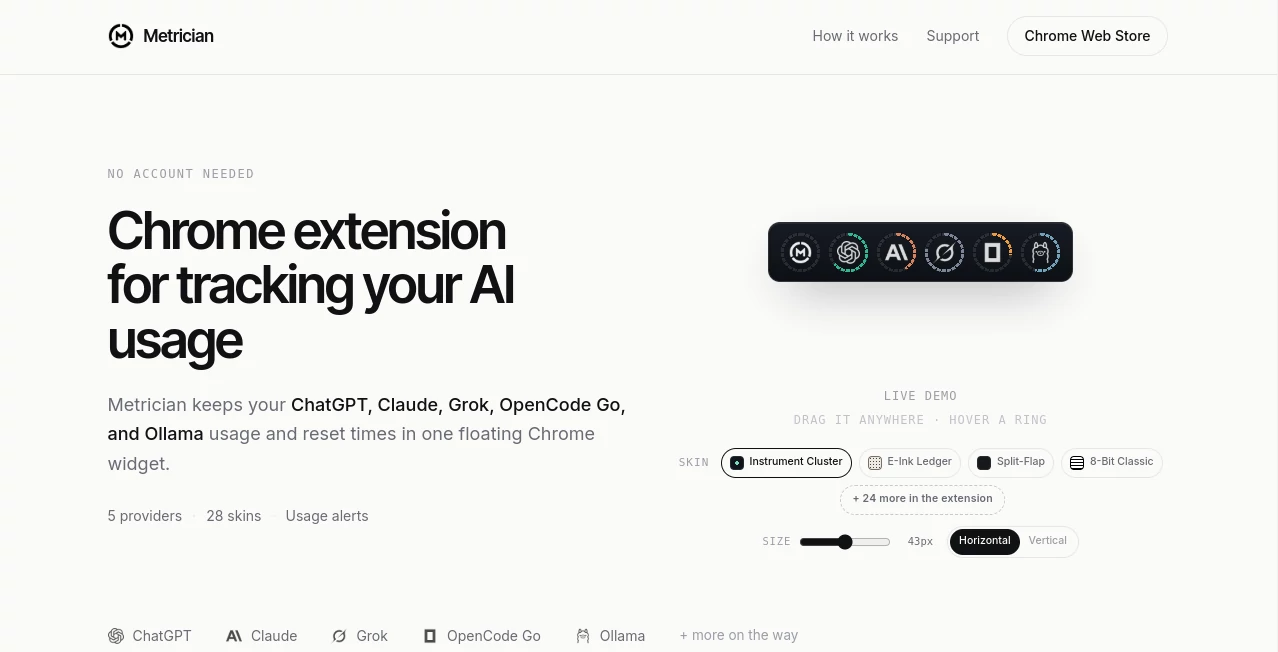
Keeping track of AI usage can become surprisingly difficult when you rely on several services throughout the day. ChatGPT, Claude, Grok, OpenCode Go, and Ollama can each have different allowances and reset cycles, making it easy to lose track of how much capacity remains. Metrician brings those details together in a single floating Chrome widget, giving users a quick way to check their AI usage without constantly opening different provider pages.
The extension is designed around a simple idea: important usage information should be visible when you need it. There is no account required, and connected provider readings are kept inside the browser. For developers, researchers, writers, and heavy AI users who move between several platforms, that small change can make daily AI work much easier to manage.
Key Features
- Tracks AI usage and allowance information from multiple providers in one place.
- Supports ChatGPT, Claude, Grok, OpenCode Go, and Ollama.
- Shows usage and reset information through a floating Chrome widget.
- Provides notifications when an allowance is approaching its reset point.
- Can warn users when usage is progressing unusually quickly.
- Offers 28 visual skins, including styles such as Instrument Cluster, E-Ink, Ledger, Split-Flap, and 8-Bit.
- Allows the widget to be dragged and resized.
- Users can switch between horizontal and vertical layouts.
- The widget can be hidden on selected websites or disabled when it is not needed.
- No account is required to get started.
User Interface
The interface takes a deliberately compact approach. Instead of sending users to a separate dashboard, the tracker appears as a floating widget that can stay on the screen while they work. Usage rings provide an immediate visual indication of remaining allowance, while hovering over a ring reveals additional details such as reset timing, usage pace, and how fresh the reading is.
The customization options are particularly useful for people who spend many hours working in the browser. The widget can be moved, resized, rearranged, or hidden on particular websites. With 28 available skins, it can also be made to feel more like a personal desktop utility than another browser panel.
Accuracy & Performance
The extension reads allowance information from provider pages where the user is already signed in. The displayed information is therefore based on the usage data available from those services rather than a manually maintained counter. The interface also indicates how fresh a reading is, which is useful when monitoring limits that can change during an active work session.
Usage warnings add another practical layer. For example, a notification can indicate that an allowance is approaching its reset time or that consumption is moving unusually fast. This can help users recognize a potential limit problem before it interrupts an important task.
Capabilities
The main strength of the extension is its ability to bring several AI usage indicators into one visual space. A user working with multiple AI providers can glance at the widget rather than repeatedly checking individual services. This is especially convenient for people who use one provider for coding, another for research, and another for general conversations.
The current setup covers five providers, with additional services planned for the future. Its combination of usage rings, reset information, pace indicators, warnings, and customizable presentation makes it more useful than a simple static usage counter.
Security & Privacy
Privacy is an important part of the design. Provider allowance information is read from pages the user connects and the readings are stored in the browser. According to the product's privacy information, there is no extension telemetry. This browser-first approach means users do not need to create an additional account simply to monitor their AI allowances.
For people who are cautious about adding another service between themselves and their AI providers, keeping usage readings locally in Chrome is a meaningful advantage. As always, users should review the extension's permissions and privacy policy before installing any browser extension.
Use Cases
- AI power users: Monitor several AI subscriptions without checking each service individually.
- Developers: Keep an eye on coding-related AI allowances while working in the browser.
- Researchers: Track remaining capacity when using AI services throughout long research sessions.
- Writers: Quickly check whether enough usage remains before starting a lengthy writing or editing session.
- AI teams and freelancers: Reduce the need to remember different reset periods across multiple services.
- Heavy daily users: Receive warnings when usage is approaching a limit or moving faster than expected.
Pros and Cons
Pros
- Supports multiple popular AI providers from a single widget.
- No account is required.
- Usage and reset information can be viewed at a glance.
- Includes useful warnings for approaching limits and unusually fast usage.
- Highly customizable appearance and positioning.
- Provider readings remain in the browser.
- Works directly inside Chrome rather than requiring a separate dashboard.
Cons
- It is currently focused on Chrome.
- The number of supported providers is still relatively limited.
- Usage information depends on the data available from connected provider pages.
- Users who only rely on one AI service may find a multi-provider tracker unnecessary.
Pricing Plans
The official website presents the extension without requiring an account to get started and does not prominently advertise a paid subscription or pricing tier. This makes the initial setup straightforward for users who simply want to monitor their AI allowances. The product is also available through the Chrome Web Store.
Because pricing and availability can change as new features and providers are introduced, users should check the current official listing before making a purchasing decision.
How to Use the Extension
Getting started is straightforward. Install the Chrome extension and choose the AI provider you want to monitor. The extension reads the relevant allowance information from provider pages where you are already signed in. Once connected, the usage rings appear in the floating widget.
From there, you can move the widget to a convenient position, resize it, select a preferred skin, and choose whether it should appear on particular websites. Hovering over a usage ring provides additional information about the current allowance, reset time, usage pace, and reading freshness.
Comparison with Similar Tools
Traditional AI usage tracking often requires visiting each provider separately or relying on memory to keep track of different limits. This approach can be inconvenient when several AI services are part of the same workflow.
This extension takes a more immediate approach by placing multiple usage indicators directly inside Chrome. Rather than functioning as a broad analytics platform, it focuses on the specific problem of knowing how much AI capacity remains and when it will become available again. That focused design makes it particularly appealing to users who value quick information over a large reporting dashboard.
Conclusion
For anyone who regularly switches between multiple AI services, keeping track of usage limits can become a small but persistent distraction. This Chrome extension addresses that problem with a lightweight widget, clear usage rings, reset information, customizable skins, and timely warnings.
Its browser-based approach is also appealing from a privacy perspective, while the lack of an account requirement keeps the barrier to entry low. It may not be necessary for occasional AI users, but for people who rely on several providers every day, having their allowances visible at a glance can make AI work more predictable and less frustrating.
Frequently Asked Questions (FAQ)
What AI providers are supported?
The extension currently supports ChatGPT, Claude, Grok, OpenCode Go, and Ollama, with additional providers planned for the future.
Do I need to create an account?
No. The official website states that no account is needed to use the extension.
Where is my provider usage information stored?
The product states that allowance readings are stored in the browser and that there is no extension telemetry.
Can I customize the widget?
Yes. Users can drag and resize the widget, change its orientation, select from 28 skins, hide it on specific websites, or turn it off.
Does it notify me before I reach an AI limit?
It can provide usage warnings when an allowance is approaching its reset point and can also flag unusually fast usage.
AI Productivity Tools , AI Analytics Assistant .
These classifications represent its core capabilities and areas of application. For related tools, explore the linked categories above.
Metrician details
Website unavailable — View Alternatives
Pricing
- Free
Apps
- Web App
- Chrome Extensions
Categories

Metrician Alternatives Product

LazyLister

PDFgear

Lynote

CtrlOps

LLaMaRush

Betula AI

ShipBoost

SkipBait

CoolVerdict