
Moda
What is Moda?
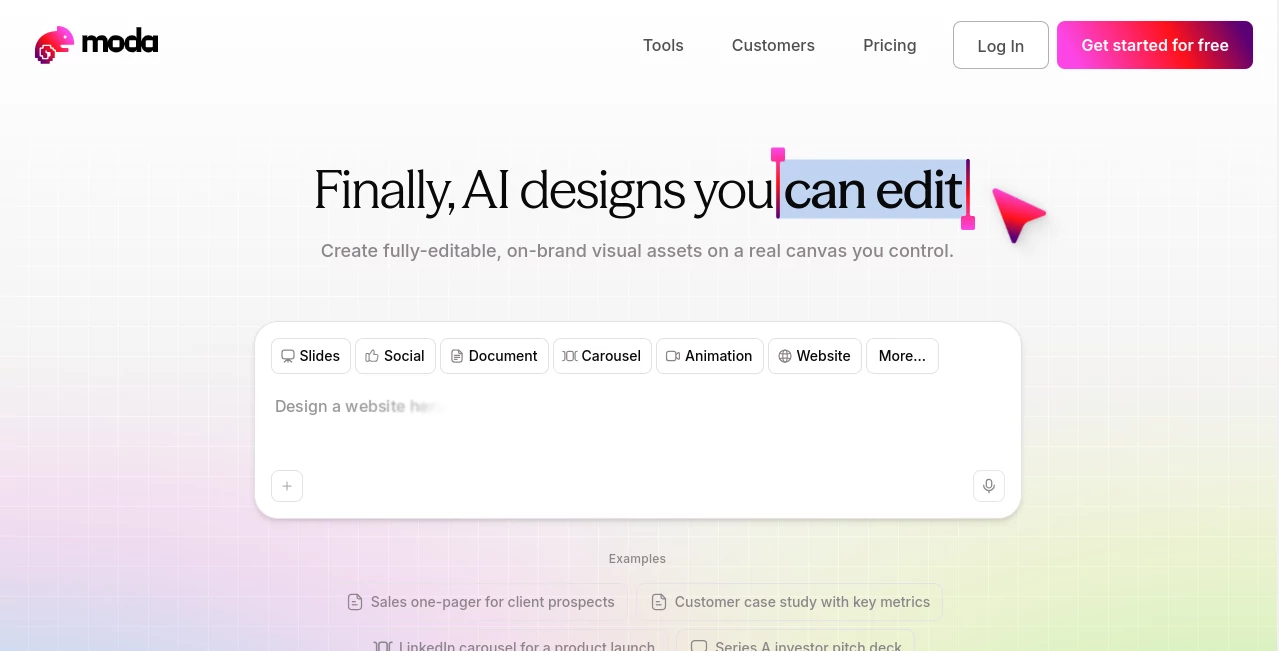
Moda is an AI-powered design platform built for people who want polished visual content without giving up control over the final result. Instead of producing a finished image that has to be recreated or rebuilt, it creates editable designs on a real canvas. That makes it useful for presentations, social media graphics, marketing materials, documents, and other visual assets.
The platform is particularly appealing to teams that care about brand consistency. A business can create content around its existing visual identity while still having the freedom to change text, layouts, images, and individual design elements after generation. For someone who has ever spent an afternoon fixing an AI-generated presentation slide by slide, that difference is significant.
Key Features
- AI-generated editable designs rather than flattened visual outputs
- Real canvas editing with control over individual design elements
- Presentation and slide deck generation
- Social media graphics and marketing collateral
- Brand kits for maintaining colors, fonts, logos, and visual identity
- Real-time collaboration for teams
- AI-assisted image generation and editing
- REST API and Model Context Protocol support for programmatic workflows
- Export options including presentation and common visual formats
- Integration with AI agents and development environments through MCP
User Interface
The interface combines conversational AI with a visual canvas. Users can describe what they want, let the design agent build the first version, and then continue editing the result directly. This approach feels more practical than repeatedly generating an image and hoping the next version gets the details right.
The canvas is especially useful when a design is almost correct but needs a few human decisions. A headline can be changed, an image can be replaced, or a layout can be adjusted without throwing away the entire project. For teams working on sales decks, social campaigns, or internal presentations, that hands-on control can make the workflow considerably smoother.
Accuracy & Performance
Design generation is strongest when the request includes useful context such as the intended audience, content structure, brand requirements, and visual direction. Simple designs can be produced relatively quickly, while more complex multi-page presentations generally take longer to generate.
The platform states that multi-page slide decks typically take around one to five minutes to generate, with simpler designs taking less time. The important advantage is what happens after generation: the result remains editable instead of becoming a static image that requires starting over.
Capabilities
The platform covers a broad range of visual communication tasks. It can be used for investor pitch decks, sales one-pagers, customer case studies, LinkedIn carousels, internal meeting presentations, hiring materials, marketing graphics, and other branded documents.
Brand consistency is one of its more interesting capabilities. A brand kit can provide the AI with information about colors, typography, logos, and visual direction. Once the brand context is available, new designs can be created with that identity in mind rather than treating every project as a blank canvas.
There is also a developer-oriented side to the product. Its REST API can be used for programmatic access to designs, canvases, brand kits, exports, and related functionality. Its MCP server allows compatible AI agents such as Claude, Codex, and Cursor to create and work with designs through conversational or automated workflows.
Security & Privacy
For teams, account and workspace management are supported through the platform's paid offerings, with higher plans adding organizational features and enterprise authentication options. The Enterprise tier includes SSO and SAML authentication, while paid usage is managed through workspace-based billing and AI credit allocation.
Another practical point is that AI operations use the platform's managed infrastructure rather than requiring users to bring their own AI provider API keys. Teams considering the service should still review the current terms, privacy documentation, and organizational requirements before placing sensitive business material into any cloud-based design platform.
Use Cases
- Presentations: Create investor decks, sales presentations, quarterly business reviews, and internal meeting slides.
- Marketing: Produce campaign graphics, promotional materials, customer stories, and sales collateral.
- Social Media: Design LinkedIn carousels, announcement graphics, and other social content.
- Branding: Apply brand colors, typography, logos, and visual guidelines across multiple projects.
- Sales Teams: Build one-pagers and client-facing materials without waiting for a designer for every small request.
- Startups: Create pitch decks, launch materials, hiring graphics, and product communication assets quickly.
- Internal Communication: Turn ordinary documents and meeting materials into more polished visual presentations.
- AI Workflows: Connect design generation to AI agents through MCP for automated or conversational creation.
Pros and Cons
- Pros: Fully editable AI-generated designs, strong brand-oriented workflow, real canvas editing, presentation creation, real-time collaboration, API access, MCP support, and a useful free tier.
- Pros: Particularly well suited to teams that need professional-looking marketing and presentation assets without rebuilding every AI result manually.
- Cons: The platform is more focused on visual and presentation-based design than areas such as video editing, 3D design, or traditional photo editing.
- Cons: Higher-level AI models and larger credit allowances require paid plans, while AI credits reset each billing cycle rather than carrying over.
- Cons: Users who need an enormous template marketplace or a very broad all-in-one creative ecosystem may find the platform more specialized than larger design suites.
Pricing Plans
The Free plan costs $0 and includes 500 AI credits per seat each month, support for up to 10 members, Standard and Lite design models, slide decks of up to 10 slides, publishing to a subdomain, real-time collaboration, and API/MCP access with up to three concurrent tasks.
The Pro plan costs $30 per user per month when billed monthly and includes 6,000 AI credits per seat, the Pro design model, unlimited pages for slides and designs, up to three brand kits, custom domains, data-backed apps, pooled team credits, and API/MCP access with up to ten concurrent tasks.
The Ultra plan costs $100 per user per month and raises the allowance to 22,000 AI credits per seat. It also adds the Fast model, unlimited brand kits, organizations and teams, shared team workspaces, higher API/MCP concurrency, and priority support.
Enterprise pricing is custom and is designed for organizations with larger teams or specific requirements. Enterprise customers can receive custom credit packages, SDK access for embedding or white-labeling, SSO/SAML authentication, custom onboarding, higher-volume API/MCP access, and a dedicated Slack channel.
How to Use the Tool
- Create an account and open a new workspace or project.
- Describe the design you want, including its purpose, audience, content, and preferred visual direction.
- Choose or configure a brand kit when brand consistency is important.
- Let the AI generate the initial design on the canvas.
- Review the generated layout and edit individual elements directly on the canvas.
- Ask the AI to make revisions when you want to change the structure, visual treatment, or content.
- Collaborate with teammates when working on shared projects.
- Export or publish the finished design in the format required for your workflow.
Comparison with Similar Tools
Compared with traditional template-based design software, the biggest difference is the emphasis on generating a complete design while keeping the result editable. Instead of selecting a template and manually filling every section, users can begin with a natural-language description and refine the generated canvas.
It also takes a different approach from presentation generators that primarily produce slide-like cards or static layouts. Here, the focus is on a genuine editable design canvas, which makes it more suitable when precise visual adjustments matter after the initial generation.
For teams already using AI agents, the MCP functionality is another important distinction. A compatible agent can handle the conversation and intent while the design system handles the actual visual construction, editing, and canvas operations.
Conclusion
For anyone who regularly creates presentations, marketing assets, social graphics, or branded documents, Moda offers a compelling middle ground between AI automation and hands-on design control. The AI can handle much of the initial creative workload, but users are not forced to accept whatever it generates.
That balance is what makes the platform worth considering. A sales team can create a polished one-pager, a founder can prepare an investor deck, or a marketing team can produce a campaign graphic and still have the freedom to make detailed changes afterward. The free plan also provides a practical way to test the workflow before committing to a paid subscription.
Frequently Asked Questions (FAQ)
What can I create with this platform?
You can create presentations, social media graphics, marketing collateral, documents, UI mockups, diagrams, and other static visual assets.
Are AI-generated designs editable?
Yes. Designs are created on an editable canvas, allowing you to modify individual elements instead of being limited to a flattened AI-generated image.
Does it support brand kits?
Yes. Brand kits can provide colors, fonts, logos, and other visual identity information so generated designs can better match an organization's branding.
Is there a free plan?
Yes. The Free plan provides 500 AI credits per seat each month and includes core design generation, collaboration, and limited API/MCP access.
How much does the Pro plan cost?
The Pro plan is $30 per user per month when billed monthly and includes 6,000 AI credits per seat each month.
Does it support API access?
Yes. A REST API is available for programmatic access to canvases, designs, brand kits, exports, and related functionality.
What is MCP support used for?
MCP allows compatible AI agents to interact with the design system programmatically. This can be useful for creating presentations, documents, advertisements, and social content directly from an AI-assisted workflow.
Do unused AI credits roll over?
No. AI credits reset at the beginning of each billing cycle and unused credits do not roll over to the following cycle.
Is the platform suitable for video or 3D design?
No. The platform is primarily designed for static and presentation-based visual content rather than video editing, 3D design, or traditional photo editing.
AI Design Assistant , AI Social Media Assistant , AI Presentation Generator , AI Graphic Design .
These classifications represent its core capabilities and areas of application. For related tools, explore the linked categories above.

Moda Alternatives Product

Simplified

OGimage

Invitation M…

Pixelied

Quso AI

Twistly

GPT Image 2

Alai

MakeBanner.ai