

















Motion Hero
What is Motion Hero?
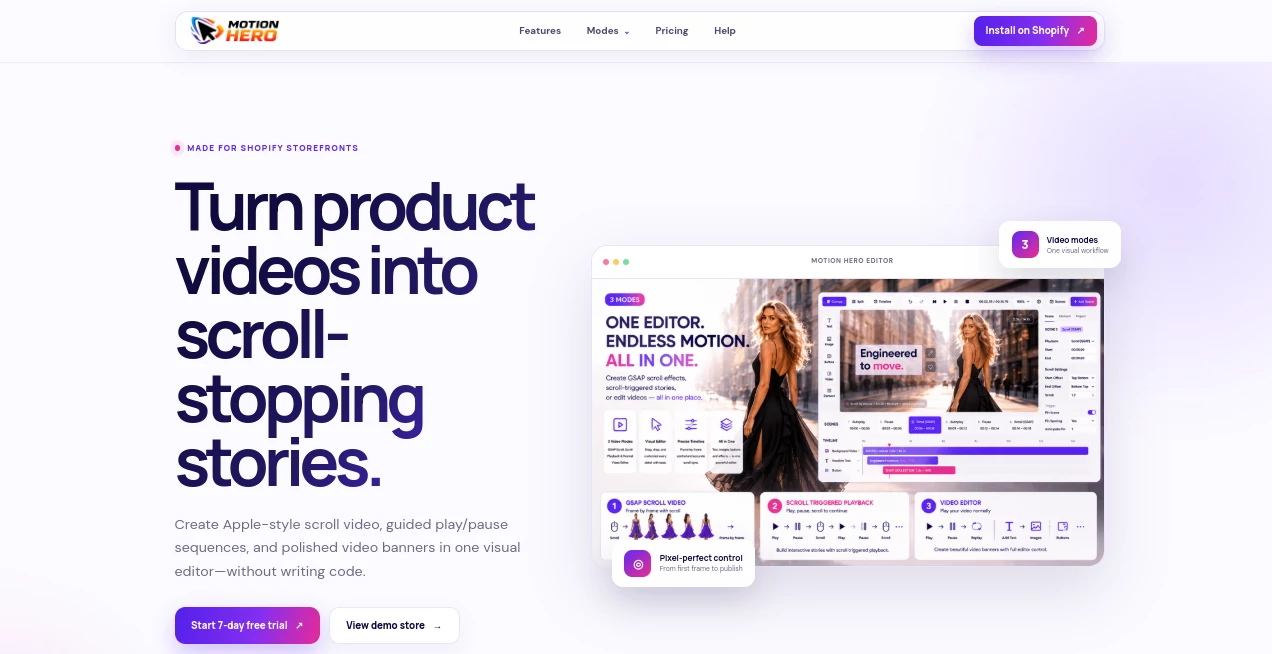
Motion Hero is a Shopify-focused video experience that helps store owners turn ordinary product footage into more engaging storefront content. Instead of relying on static banners or a basic video player, it lets merchants build interactive video presentations where movement can respond to scrolling, follow guided playback, or behave like a polished standard video banner.
The biggest appeal is simplicity. The visual editor is designed for merchants and creators who want more control over their storefront without having to write custom code. For example, a product video can reveal different moments as someone scrolls down a product page, while text, buttons, images, icons, and shapes appear at carefully chosen points in the timeline.
For Shopify stores where presentation matters, this approach can make a product page feel considerably more deliberate and immersive.
Key Features
- Three video experiences: GSAP scroll video, guided playback, and standard video playback.
- A visual timeline for controlling video layers and timing.
- Support for text, images, buttons, icons, and shapes over video.
- Separate positioning and sizing controls for desktop and mobile layouts.
- Live preview for checking responsive designs before publishing.
- No-code workflow designed specifically for Shopify storefronts.
- Storefront-ready video experiences with precise control over individual elements.
User Interface
The interface follows a visual editing approach rather than forcing users to work with code. A timeline sits at the center of the workflow, allowing individual elements to be placed at specific points in a video. A store owner could, for instance, have a product headline appear after a few seconds, introduce supporting product text later, and display a shopping button at the moment when the viewer is most likely to be interested.
This timeline-based workflow is particularly useful for ecommerce because the video and the surrounding sales message can be designed as one experience rather than as separate pieces of content.
Accuracy & Performance
For this type of application, performance is less about generating content and more about delivering controlled motion consistently across a storefront. The platform provides GSAP-based scroll interaction, guided playback, standard video playback, responsive layouts, and live previews.
The separate desktop and mobile controls are a practical touch. A layout that looks excellent on a large screen can easily become crowded on a phone, so being able to position and resize overlays independently gives merchants more control over the final presentation.
Capabilities
The most distinctive capability is frame-by-frame scroll interaction. Video progress can be linked directly to page scrolling, allowing a product reveal to unfold as the shopper moves through the page. This is well suited to products that benefit from showing details gradually.
Guided playback offers another approach. Instead of leaving everything to the visitor, merchants can create a cinematic sequence that plays, pauses, and continues at intentional moments. The standard video mode is useful when a familiar playback experience is preferable, while still providing access to the visual editor.
The editor also supports multiple visual layers, giving creators room to combine product footage with promotional copy, calls to action, imagery, icons, and shapes.
Security & Privacy
The public product information emphasizes the Shopify storefront experience and provides dedicated privacy and terms pages. As with any ecommerce application, merchants should review the current privacy documentation and Shopify app permissions before installing it, particularly when using the application on a production store.
There is no need to introduce unnecessary technical complexity into the workflow. The service is designed around Shopify installation and storefront publishing, keeping the main editing experience focused on creating and presenting product content.
Use Cases
This platform is especially useful for Shopify merchants who want their product pages to feel more interactive without commissioning custom front-end development.
- Product launches: Reveal a new product through a carefully paced scrolling sequence.
- Premium ecommerce: Use cinematic motion to give products a more polished presentation.
- Product demonstrations: Show how a product works through controlled video playback.
- Feature highlights: Pair individual product moments with supporting text and visual callouts.
- Promotional banners: Create responsive video banners with precisely timed overlays.
- Mobile storefronts: Adjust overlays specifically for smaller screens rather than relying on one fixed desktop layout.
A practical example would be a fashion store introducing a new jacket. The opening section could show the full garment, scrolling could reveal close-up details, descriptive text could appear alongside specific features, and a shop button could arrive near the end of the sequence. That feels much closer to a designed product story than simply embedding a video.
Pros and Cons
Pros
- Built specifically for Shopify storefronts.
- Three distinct video modes cover different presentation styles.
- Visual editing reduces the need for custom coding.
- Detailed timeline control over individual elements.
- Desktop and mobile layouts can be adjusted independently.
- All listed features are included in a single paid plan.
- A 7-day free trial is available.
Cons
- The product is primarily aimed at Shopify merchants rather than general-purpose video creators.
- Users looking for traditional long-form video editing may need a more conventional video editor.
- The strongest value comes from storefront experiences, particularly interactive product presentation.
- Merchants who do not need animated or interactive video may find a basic video embed sufficient.
Pricing Plans
The service keeps its pricing straightforward with one Pro plan priced at $9.99 per month. The plan includes all three video modes, the visual video editor, the element timeline, and desktop and mobile layouts.
A 7-day free trial is available, which gives Shopify merchants an opportunity to test the workflow on their storefront before committing to a subscription. The single-plan structure also avoids the common problem of having to compare several feature tiers before getting started.
How to Use Motion Hero
- Install the application through Shopify.
- Choose the video experience that matches the desired storefront interaction.
- Add the background product video to the visual editor.
- Add supporting text, images, buttons, icons, or shapes as needed.
- Use the timeline to control when each element appears and disappears.
- Adjust the positioning and sizing for desktop and mobile separately.
- Preview both layouts and refine the composition.
- Publish the finished video experience to the Shopify storefront.
The workflow is intentionally visual, so a merchant can concentrate on the product story rather than spending time writing animation code.
Comparison with Similar Tools
Traditional video editors are generally designed to produce finished video files, while this solution takes a more storefront-oriented approach. Its focus is not simply cutting clips or adding transitions; it is about controlling how shoppers experience video inside a Shopify store.
Compared with a basic Shopify video block, the timeline, interactive scrolling, guided playback, layered elements, and separate mobile controls provide considerably more room for creative direction. On the other hand, merchants looking for advanced filmmaking features, extensive audio production, or general-purpose video editing may be better served by a dedicated video production application.
Its strongest position is therefore somewhere between video editing and interactive ecommerce design: it gives Shopify merchants the tools to make product videos behave more like designed sections of a storefront.
Conclusion
For Shopify merchants who believe product presentation can do more than sit inside a conventional video player, this is an appealing addition to the storefront toolkit. The combination of scroll-driven video, guided playback, standard video presentation, and a visual timeline gives creators meaningful control without making them build the experience from scratch.
The $9.99 monthly Pro plan and 7-day free trial also make it relatively easy to test. If the goal is to turn product footage into a more interactive shopping experience, particularly one that feels carefully designed on both desktop and mobile, this is a tool worth exploring.
Frequently Asked Questions (FAQ)
Is it designed for Shopify?
Yes. The application is specifically built for Shopify storefronts and is installed through Shopify.
Does it require coding?
No. The product is built around a visual editor and is promoted as a no-code solution for creating interactive video experiences.
How many video modes are available?
There are three modes: GSAP scroll video, guided playback, and standard video playback.
Can video respond to page scrolling?
Yes. The GSAP scroll mode connects video progress to page scrolling, allowing shoppers to move through a video frame by frame.
Can I add text and buttons over a video?
Yes. The editor supports text, images, buttons, icons, and shapes, with timeline controls for when individual elements appear and disappear.
Does it support mobile layouts?
Yes. Desktop and mobile layouts can be positioned and sized separately, and both can be previewed before publishing.
Is there a free trial?
Yes. A 7-day free trial is available before the paid plan begins.
How much does the Pro plan cost?
The Pro plan costs $9.99 per month and includes the listed video modes, visual editor, element timeline, and desktop and mobile layouts.
Who can benefit most from this type of tool?
Shopify merchants, ecommerce brands, product marketers, and designers who want to create more engaging video-based storefront experiences are the most natural users.