
Musiclly
What is Musiclly?
Musiclly is an AI-powered music creation platform designed to turn a simple idea, text prompt, or original lyrics into a complete musical track. It can create songs with vocals, generate instrumental music, and help creators continue developing a track after the initial generation.
What makes the platform particularly appealing is that it brings several parts of the music-making process into one place. Instead of moving between separate tools for lyrics, song generation, and extending a track, creators can move from one stage to another within the same workflow. The service is also designed for people without traditional music production experience, so the starting point can be as simple as describing the sound, mood, or style they have in mind.
For example, a content creator working on a YouTube video could describe an energetic background track, while a game developer might request a cinematic piece with a particular atmosphere. Someone who already has lyrics can use those words as the foundation instead of starting with a blank prompt.
Key Features
The platform combines AI music generation with tools intended to make the creative process more flexible. Users can generate complete songs, work with their own lyrics, compare lyric drafts, create instrumental tracks, and extend existing music.
- Generate complete songs from text prompts.
- Use original lyrics as the foundation for a song.
- Create vocal or instrumental-only music.
- Guide generations using genre, mood, and vocal direction.
- Generate music for videos, podcasts, games, trailers, and social media content.
- Extend an existing track from a selected point.
- Compare lyric drafts using multiple AI models.
- Preview, save, download, and continue developing generated tracks.
- Export finished music in MP3 or WAV format.
User Interface
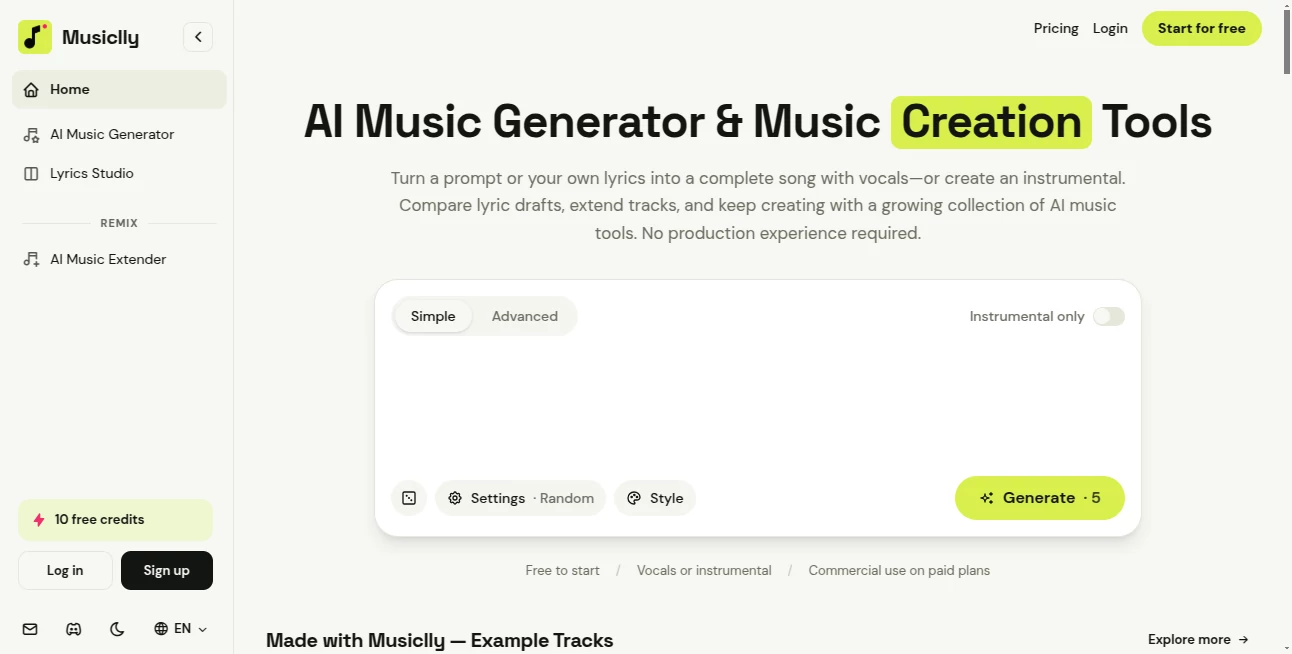
The interface is built around a straightforward creative workflow rather than traditional music-production software. Users can start with a prompt or their own lyrics, select the desired direction for the music, and generate a track without needing to understand complex production settings.
There is also a Simple and Advanced experience, giving beginners an easier starting point while leaving room for users who want more control. The workflow feels particularly practical for quick experiments: describe an idea, listen to the result, decide what works, and continue from there.
Accuracy & Performance
With generative music, accuracy is less about reproducing a predetermined answer and more about how closely the result follows the creative direction provided by the user. The platform lets creators specify elements such as style, mood, and vocals, while its generation system handles arrangement, vocals, and mixing.
One useful feature is the ability to extend a song from a chosen point rather than regenerating the entire piece. The service aims to preserve the melody, rhythm, and overall character of the original track, which can be helpful when a song needs a longer intro, outro, or additional section.
Generation is credit-based, and the required credit cost is displayed before starting a task. According to the platform, unsuccessful generations do not consume the credits permanently because failed generations are automatically refunded.
Capabilities
The platform goes beyond simple text-to-music generation. A creator can begin with an idea, turn it into a complete song, and then continue working on that material using additional AI music tools.
Its capabilities cover vocal songs, instrumentals, lyric development, music extension, and music creation for different types of media. The platform specifically highlights use cases such as YouTube videos, TikTok and Instagram content, podcasts, indie games, trailers, and other visual projects.
Another practical advantage is support for user-created lyrics and compatible music uploads. This gives creators the option to bring their own material into the workflow instead of relying entirely on generated content.
Security & Privacy
The platform distinguishes between tools that process files locally and cloud-based tools. For local-processing operations, the source file is not uploaded for that particular operation. Cloud-based features may send the required inputs to the relevant infrastructure and model providers to complete the requested task.
Users can also remove saved content through the available deletion controls. Anyone working with uploaded lyrics or music should make sure they own the material or have the necessary permission to use and modify it.
Use Cases
This type of music generator can fit into many creative workflows. A YouTube creator can produce background music without hiring a composer for every small project. A podcaster can create an intro, outro, or atmospheric music bed. An indie game developer can experiment with soundtracks that match different scenes or gameplay moments.
It can also be useful for social media creators who need short-form music for videos and reels. Someone preparing a trailer could describe the intended pace and atmosphere, generate several ideas, and continue developing the one that feels closest to the project.
Songwriters may find the lyrics workflow especially useful. Instead of abandoning a good idea because the first musical arrangement does not work, they can experiment with different lyric drafts and approaches before settling on a direction.
Pros and Cons
Pros
- Complete songs can be created from prompts or original lyrics.
- Supports both vocal and instrumental music.
- Combines generation, lyric work, and track extension in one workflow.
- Useful for video, podcast, gaming, and social media projects.
- MP3 and WAV downloads are available.
- Paid plans include commercial use rights for eligible generated output.
- A free option is available without requiring a payment card to get started.
Cons
- Music generation consumes credits, so frequent users need to monitor their usage.
- The most extensive workflows may be better suited to users who are comfortable experimenting with multiple generations.
- Commercial licensing depends on the applicable plan and eligibility of the generated output.
- Copyright protection for AI-generated material can vary depending on jurisdiction.
Pricing Plans
The platform uses a credit-based pricing system with free and paid options. The Free plan costs $0 per month and includes 10 one-time credits. The service states that this is enough for around two generations and up to four tracks, while also providing access to released AI music tools and music downloads.
The Starter plan costs $9.99 per month and provides 200 credits each month. It is designed for creators who want regular access to music generation and includes commercial use for eligible output.
The Pro plan costs $29.99 per month and includes 700 credits each month. It is positioned for more frequent music creation and offers a better value per credit than the Starter tier.
Paid subscriptions include a commercial licence for eligible generated output, covering activities such as publishing, distribution, monetization, modification, videos, podcasts, games, and advertising. The exact rights should still be reviewed before using generated material in an important commercial release.
How to Use Musiclly
Getting started does not require previous music-production experience.
1. Describe your idea
Enter a description of the music you want to create or provide lyrics you have written yourself. You can guide the result with details such as genre, mood, and vocal direction.
2. Generate the track
Start the generation and let the platform handle the arrangement, vocals, and mix. You can create a vocal song or choose an instrumental-only result depending on the project.
3. Review the result
Listen to the generated track and decide whether it fits your idea. If it needs a different direction, experiment with another prompt or approach rather than settling for the first result.
4. Continue developing the music
If the track is promising but needs additional material, use the music extension functionality to create a new section from a selected point while maintaining the character of the existing piece.
5. Download or use it in your project
Finished tracks can be downloaded as MP3 or WAV files. Depending on the applicable plan and licensing terms, the resulting music can be incorporated into projects such as videos, podcasts, games, and advertisements.
Comparison with Similar Tools
Many AI music services focus primarily on generating a song from a text description. This platform takes a somewhat broader approach by connecting song generation with lyric development and music extension.
That difference matters when the goal is not simply to generate a one-off audio file. A creator who wants to experiment with lyrics, produce a complete song, extend an existing section, and eventually download the result can handle those steps within a connected environment.
It is also positioned as an accessible option for people who do not have traditional music-production skills. Professional producers with specialized digital audio workstations may still prefer a conventional production setup for detailed mixing and mastering, but creators looking for a faster idea-to-track workflow can benefit from the simpler approach.
Conclusion
Musiclly brings AI song generation, lyrics, instrumental creation, and track extension together in a way that makes experimentation feel approachable. Its strongest advantage is not simply producing music from a prompt, but giving creators several ways to continue working with an idea after the first generation.
The free starting option makes it easy to test the workflow, while the paid plans provide larger credit allowances and commercial licensing for eligible output. For YouTube creators, podcasters, game developers, social media creators, and independent musicians who want to turn musical ideas into usable tracks without a traditional production setup, it is a compelling addition to an AI music toolkit.
Frequently Asked Questions (FAQ)
Can I create music without music-production experience?
Yes. The platform is designed so users can describe the music they want, provide their own lyrics if desired, and select options such as style, mood, and vocals without needing traditional production knowledge.
Can I generate instrumental music?
Yes. Users can create complete songs with vocals or choose an instrumental-only generation.
Can I use my own lyrics?
Yes. You can provide lyrics that you have written yourself and use them as the basis for a generated song. You should have the necessary rights to any material you submit.
Can I extend an existing song?
Yes. The AI Music Extender can generate a new section from a selected point in a track while attempting to maintain its melody, rhythm, and overall style.
Can I use the generated music commercially?
Paid subscriptions include commercial licences for eligible generated output. The stated licence covers uses such as publishing, monetization, modification, videos, podcasts, games, and advertising. Copyright protection may vary by jurisdiction.
Is there a free plan?
Yes. The Free plan costs $0 per month and provides 10 one-time credits. The platform says no payment card is required to get started.
What file formats can I download?
Generated music can be exported in MP3 or WAV format.
What happens when a music generation fails?
Credits are held while a generation is processing and are charged only when the task succeeds. Failed generations are automatically refunded according to the platform's credit policy.
AI Text to Music , AI Lyrics Generator , AI Music Generator .
These classifications represent its core capabilities and areas of application. For related tools, explore the linked categories above.

Musiclly Alternatives Product

Flow Song

MP3toMIDI

AISongsGener…
MemoTune

Lyria3 AI

Songtell

Custom Song

AI Rap Gener…

HypeClip