MyInk.ai
What is MyInk.ai?
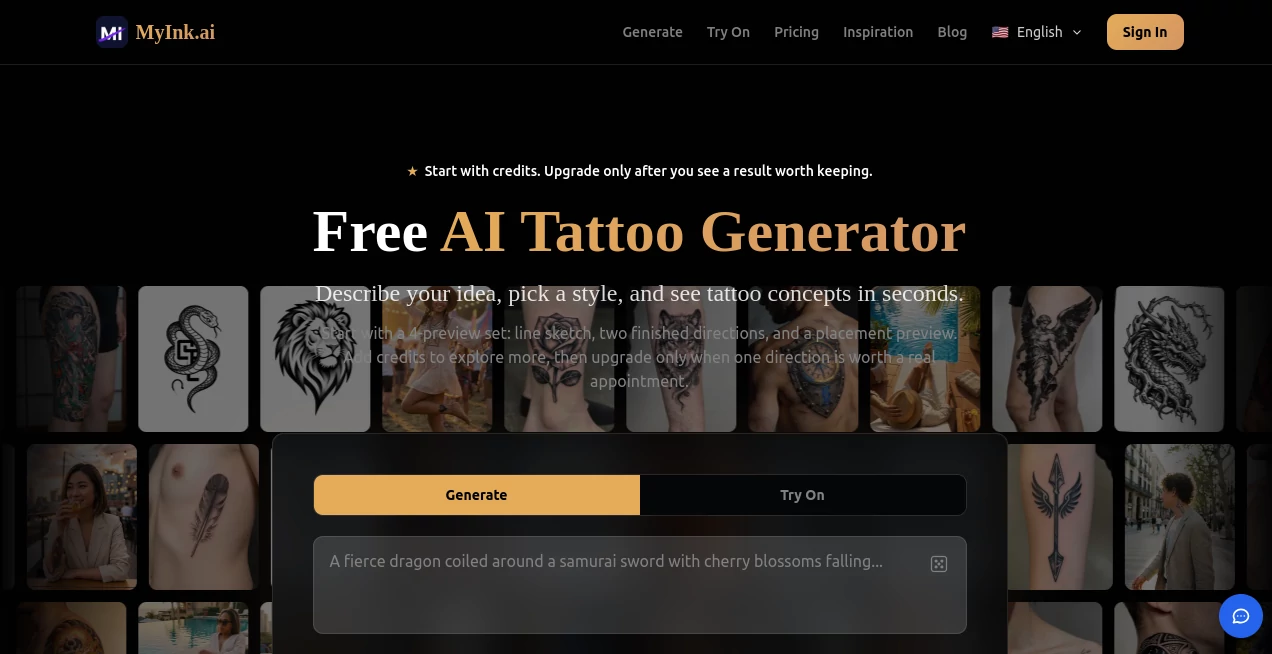
Let’s be honest for a second. How many times have you had a killer tattoo idea floating around in your head, but when you tried to explain it to an artist, something got lost in translation? You end up scrolling through Pinterest for hours, settling for something that’s “close enough” but not exactly what you wanted. That frustration is exactly why this platform was built. It acts as a bridge between that vague feeling you have and a concrete, professional design you can actually take to a shop. Whether you are a first-timer nervous about commitment or a collector adding to a sleeve, this tool changes the game. It takes the guesswork out of the equation, giving you the confidence to walk into a studio knowing exactly what you want.
Key Features
Unlike generic art generators that have no clue how ink behaves on skin, this engine is specifically fine-tuned for body art. It understands the difference between shading for realism and the bold lines needed for traditional work. The platform isn't just a simple text box; it is a full suite designed to take you from "I have an idea" to "I have a stencil." It respects the fact that tattooing is permanent, so it gives you tools to iterate, compare, and preview before you ever feel the buzz of the needle.
User Interface
You don't need to be a tech wizard to navigate this site. The layout is clean, uncluttered, and puts the creative process front and center. You land on a page that asks you two simple questions: What do you want? and What style? There is no steep learning curve here. Everything is intuitive, from the placement selector that lets you choose between your forearm, shoulder, or back, to the inspiration gallery that helps you find your vibe if you are feeling stuck. It feels less like using software and more like collaborating with a friend who happens to be a really talented designer.
Accuracy & Performance
Speed matters when inspiration strikes. You won’t be waiting around for minutes on end. In most cases, your design is ready in fifteen to thirty seconds. But speed doesn't come at the cost of quality. The linework is notably cleaner than what you see on standard image generators. Because it uses a multi-model image stack specifically trained on tattoo styles, it avoids the "melty" or distorted look that often ruins AI art. When you ask for dotwork or blackwork, the engine respects the texture and density required for those techniques.
Capabilities
The magic here lies in the comparison and preview features. First, there is the dual-model comparison. This allows you to generate two different interpretations of the same idea simultaneously, letting you see which artistic direction resonates more with you. Then, there is the virtual try-on feature. This is arguably the most important tool for the indecisive. You upload a photo of the body part you want to ink, and the AI projects the design onto your image. You get to see how the curves of the dragon follow the muscle of your arm or how a floral piece sits on your ribs before you commit.
Security & Privacy
When you upload personal photos of yourself for the virtual try-on, you want to know they aren't floating around the internet. The platform handles image processing with standard security protocols. Furthermore, the free tier is incredibly generous; you get credits just for signing up without having to hand over your credit card information immediately. There are no surprise charges lurking around the corner, which builds a lot of trust right off the bat.
Use Cases
This tool is incredibly versatile. For the person with "artist's block," it acts as a brainstorming partner, generating hundreds of variations on a theme like a geometric wolf or a watercolor galaxy. For the meticulous planner, the virtual try-on is a lifesaver. You can see how a neck tattoo will affect your professional appearance or how a massive back piece flows with your posture. Tattoo artists themselves are even using it. They plug in a client's vague description, generate a few base options, and then use that as a starting sketch to refine by hand. It saves hours of back-and-forth emails and "No, that's not what I meant" conversations. It is perfect for cover-up ideas, memorial pieces, or just matching script fonts for sibling tattoos.
Pros and Cons
Pros:
- Tattoo-Specific Training: It knows how to handle line weight and shading, unlike Midjourney or DALL-E.
- Virtual Try-On: Seeing the tattoo on your actual body via photo upload removes all the risk of regret.
- Dual Model Comparison: You get two distinct artistic takes on the same prompt, helping you find your style.
- Generous Free Tier: You get credits monthly just for being a user, no credit card needed to start.
- Curated Styles: Ten specific styles including Traditional, Japanese, Dotwork, and Minimalist.
Cons:
- Credit System: Advanced features like the comparison tool consume more credits than basic generation.
- Pro Features Locked: To get high-resolution stencil files (3K) ready for professional printing, you will likely need the Pro subscription.
Pricing Plans
Getting started won't cost you a dime. Every new user receives 5 free credits per month just for signing up. This allows you to test the waters completely risk-free. A standard generation is affordable, but a dual-model tattoo comparison costs 3 credits, and the very useful virtual try-on costs 2 credits. This pricing structure encourages you to be intentional with your designs. For the serious collector or the artist running a shop, the Pro plan unlocks the vault. It provides higher-resolution outputs, access to the premium models that handle complex prompts better, and the ability to export professional-grade tattoo stencils (transfers) that are ready to be placed on the skin.
How to Use MyInk.ai
First, navigate to the site and just start typing in the text box. Describe the vibe, the animal, the object, or the quote you want. Be specific—mention if you want it to look "sketched" or "solid black."
Second, pick your poison from the ten style presets. If you are getting a Japanese sleeve, pick that style; if you want fine-line geometric, choose minimalist.
Third, hit generate and wait about fifteen seconds. Once the image pops up, you have options. If you aren't sure, hit the dual compare to see a different take. If you want to check placement, use the virtual try-on and upload a selfie of your arm or leg.
Finally, download the design. If you are a free user, you get a standard image. If you are a Pro user, you download the high-res stencil and take it straight to your appointment.
Comparison with Similar Tools
While tools like Midjourney can technically generate a "tattoo design," they often fail at the practical application. Those general tools tend to generate images that look like paintings on skin rather than ink embedded in it. They often ignore the need for bold outlines to prevent blurring over time. This platform, however, was built specifically for this niche. It prioritizes "tattoo readiness." The line art is clean, the contrast is high, and the styles are accurate to actual flash sheets. Also, other platforms lack the specific utility features like the dual-model comparison or the body placement preview. They give you a picture; this gives you a plan.
Conclusion
Tattoos are permanent, so the design phase should be treated with care. This tool respects that weight while making the process fun and accessible. It bridges the gap between the imagination and the tattoo chair. By providing accurate style rendering, a safe way to preview placement, and high-quality exports for the artist, it ensures you walk into the studio confident and prepared. If you have been sitting on an idea for months because you can't draw it yourself, stop waiting. Let the AI handle the hard part while you focus on choosing the perfect spot for your new ink.
Frequently Asked Questions (FAQ)
Is it really free to start?
Yes. Every user gets 5 free credits every month. No credit card is required to sign up and test the generator.
Can I use these designs directly on a client?
The tool is excellent for generating base ideas and inspiration. The Pro version allows you to download high-resolution stencils that artists can use as a base, though many professional artists will still add their own human touch to the final linework.
What styles does it support?
It supports ten curated styles including Traditional (Americana), Watercolor, Japanese (Irezumi), Minimalist, Geometric, Realistic, Tribal, Dotwork, Blackwork, and Neo-Traditional.
Does the virtual try-on work for any body part?
Yes, the tool allows you to select specific placements like the forearm, shoulder, back, chest, or ribs, and you can upload a specific photo of yourself to see exactly how the design fits your anatomy.
How do I get my design to my artist?
Once you are happy with the design, simply download the image. If you have a Pro subscription, you can export a high-contrast stencil file that the artist can print directly onto transfer paper.
AI Design Assistant , AI Tattoo Generator .
These classifications represent its core capabilities and areas of application. For related tools, explore the linked categories above.

MyInk.ai Alternatives Product

Simplified
LoveGen AI
HTMLSlides
RoomDecorFin…
Apprentice
Logo Teddy

Pixelied

Image2GPT

insMind