

















NanoPic AI
What is NanoPic AI?
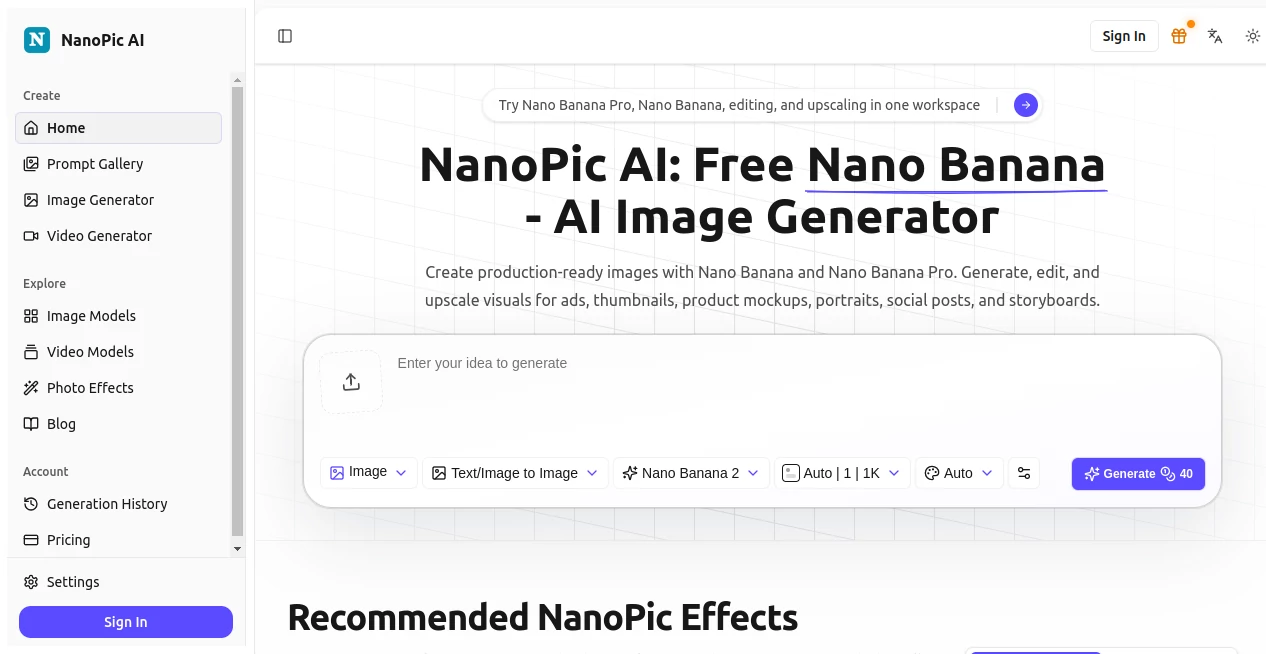
Creating polished visuals no longer requires advanced design skills or expensive software. This platform brings together image generation, editing, upscaling, and video creation in a single browser-based workspace, making it easy for creators, marketers, designers, and businesses to turn ideas into high-quality visual assets. From marketing campaigns to social media graphics, every step of the creative process becomes faster and more enjoyable.
Instead of jumping between multiple applications, users can generate original artwork from text prompts, improve existing photos, replace backgrounds, upscale images for professional use, and even transform still images into animated videos. The workflow feels smooth, allowing beginners to produce impressive results while giving professionals the flexibility they need for commercial projects.
The platform supports several leading AI image and video models, enabling users to experiment with different visual styles before choosing the perfect result. Whether you're building product mockups, advertising creatives, YouTube thumbnails, presentations, or digital artwork, it provides a practical environment for modern content creation.
Key Features
User Interface
The interface is clean, intuitive, and entirely web-based. Every major tool is organized into dedicated sections, allowing users to move from image generation to editing, enhancement, and animation without confusion. Prompt galleries and reusable templates also help speed up the creative process.
- Simple browser-based workspace
- Prompt gallery for inspiration
- Reference image uploads
- One-click editing workflow
- Fast navigation between image and video tools
Accuracy & Performance
The platform focuses on producing detailed, production-ready visuals with strong prompt understanding. Multiple AI models are available for different artistic styles and quality levels, allowing creators to balance speed with premium output. High-resolution upscaling also helps preserve image clarity for commercial use.
- High-quality image generation
- Accurate prompt interpretation
- 4K-ready image enhancement
- Multiple AI generation models
- Fast processing workflow
Capabilities
The creative toolkit goes far beyond text-to-image generation. Users can edit photos with natural language instructions, replace objects or backgrounds, create marketing graphics, design storyboards, generate illustrations, upscale finished artwork, and convert images into videos using advanced AI models.
- Text-to-image generation
- Image-to-image editing
- Background replacement
- AI image upscaling
- Image-to-video creation
- Video generation
- Product mockup creation
- Creative prompt library
Security & Privacy
Users create content inside their own accounts while managing projects through a centralized workspace. Uploaded images remain part of individual workflows, making it practical for business presentations, marketing materials, product concepts, and commercial creative projects.
Use Cases
- Creating social media graphics
- Designing advertising creatives
- Generating YouTube thumbnails
- Building product mockups
- Producing marketing visuals
- Creating presentation graphics
- Designing storyboards
- Generating illustrations for blogs
- Enhancing old or low-resolution photos
- Creating promotional videos from images
Pros and Cons
Pros
- Combines image generation, editing, upscaling, and video tools.
- Supports several modern AI models.
- Easy enough for beginners while powerful for professionals.
- Excellent for marketing and commercial content.
- Prompt gallery helps users discover creative ideas.
- No desktop installation required.
Cons
- Premium features require paid credits or subscriptions.
- Large commercial projects may consume credits quickly.
- Image quality can vary depending on the selected model and prompt.
Pricing Plans
The platform provides a free experience for testing image generation before upgrading. Paid options include permanent credit packs and subscription plans designed for individuals, professional creators, and teams with higher production requirements. Larger plans reduce the effective cost per generated image and support both image and video workflows.
How to Use NanoPic AI
- Open the online workspace.
- Choose an AI generation model.
- Enter a detailed text prompt or upload a reference image.
- Generate the initial artwork.
- Edit specific elements using natural language instructions.
- Upscale the final image if higher resolution is needed.
- Optionally transform the finished image into an animated video.
- Download the completed visual for personal or commercial use.
Comparison with Similar Tools
Unlike many AI image generators that focus on only one stage of the creative process, this solution combines generation, editing, enhancement, and animation within the same workspace. Users can begin with a simple prompt, refine individual details, improve resolution, and continue into AI-powered video creation without exporting projects to multiple platforms. This integrated workflow makes it particularly attractive for marketers, content creators, ecommerce businesses, and design teams managing frequent visual production.
Conclusion
This platform stands out as a complete visual creation environment rather than just another image generator. Its combination of multiple AI models, natural-language editing, professional upscaling, and integrated video generation creates an efficient workflow suitable for creators of all experience levels. Whether the goal is producing marketing assets, product visuals, digital artwork, or social media content, it offers an impressive balance between simplicity, flexibility, and professional-quality output.
Frequently Asked Questions (FAQ)
Can beginners use this platform?
Yes. The interface is beginner-friendly while still offering advanced tools for experienced designers.
Does it support image editing?
Yes. Users can upload existing images and modify them using natural language editing instructions.
Can images be converted into videos?
Yes. Generated or uploaded images can be animated using integrated AI video generation tools.
Is there a free version?
Yes. New users can test image generation before upgrading to paid plans with additional credits and premium features.
Who benefits most from this platform?
Content creators, marketers, ecommerce businesses, designers, agencies, educators, and anyone who regularly creates visual content can benefit from its comprehensive workflow.
AI Photo & Image Generator , AI Image to Video , AI Video Generator , AI Photo Enhancer .
These classifications represent its core capabilities and areas of application. For related tools, explore the linked categories above.

NanoPic AI Alternatives Product
PicLumen AI …
Seedance 2.0

AI Image Edi…
LipPulse

lyric video …

KKV AI
Toon Composer

Image2

Banana Promp…
