


















NeatScribe
What is NeatScribe?
I still remember sitting through a long interview recording, rewinding constantly just to catch what was said. Hours wasted. Then I tried this tool and the difference was night and day. Upload the file or paste a link, and a clean, timestamped transcript appears in minutes. You can edit it like a normal document, fix speaker labels, and export it ready for notes, subtitles, or sharing. It’s become my default whenever I need to turn spoken words into something usable — whether it’s a podcast episode, client meeting, lecture, or YouTube video I want to reference later.
Introduction
Transcribing audio and video used to be a painful, time-consuming chore. NeatScribe makes it feel effortless. It handles a wide variety of formats, supports links from major platforms like YouTube, Instagram, TikTok, and more, and delivers accurate, editable transcripts with speaker identification. The interface is clean, the results are fast, and the export options cover everything you might need — from simple text to professional subtitles. For students, journalists, content creators, researchers, and business professionals, it quietly removes one of the biggest bottlenecks in working with spoken content.
Key Features
User Interface
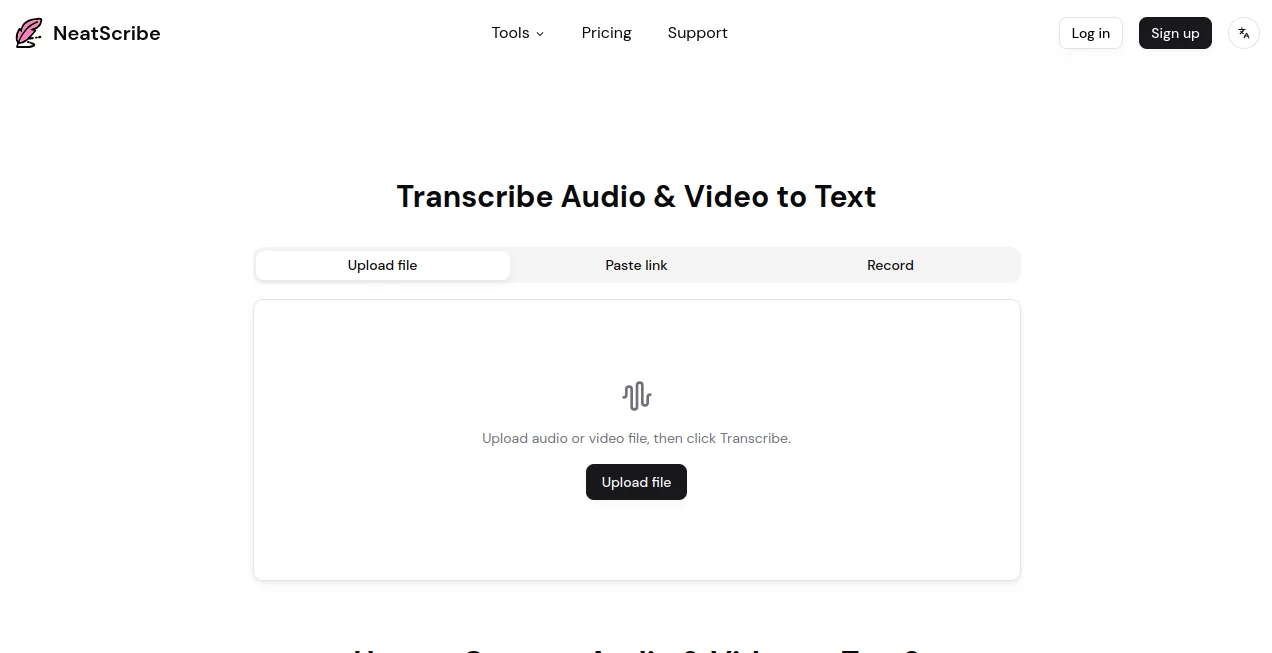
The design is straightforward and welcoming. You can drag and drop a file, paste a link, or even record directly in the browser. Once uploaded, the transcript loads with timestamps and speaker labels that you can edit inline like a regular document. Everything stays responsive and fast, even with longer files. No steep learning curve — you can go from upload to polished transcript in minutes.
Accuracy & Performance
It delivers impressively accurate results across different accents, background noise levels, and speaking styles. Speaker diarization works reliably in most cases, and the processing speed is excellent — even longer videos or meetings finish quickly. The AI understands context well enough that common phrases and technical terms come through correctly more often than not, saving you significant editing time.
Capabilities
Beyond basic transcription, you get AI-powered mind maps to summarize key points, translation options, subtitle generation (SRT/VTT), and support for a wide range of export formats including TXT, DOCX, PDF, and CSV. It works with uploaded files and direct links from YouTube, Instagram, Facebook, TikTok, X/Twitter, and Vimeo. You can also compress audio if needed and convert between subtitle formats.
Security & Privacy
Your files and transcripts are handled securely. The platform focuses on delivering value without holding onto your content longer than necessary. For sensitive interviews, client calls, or private recordings, that respectful approach provides important reassurance.
Use Cases
A student records a lecture and gets a searchable, timestamped transcript they can highlight and review before exams. A podcaster turns raw interview audio into clean show notes and subtitles in one flow. A business professional summarizes long client meetings and pulls out action items quickly. A content creator repurposes YouTube videos into blog posts or social clips by working directly from the transcript. It fits naturally into almost any workflow that involves spoken content.
Pros and Cons
Pros:
- Fast processing with solid accuracy across many accents and formats.
- Easy inline editing with timestamps and speaker labels.
- Rich export options including subtitles and mind maps.
- Works with both uploaded files and direct platform links.
- Clean, no-nonsense interface that gets out of your way.
Cons:
- Very noisy or heavily accented recordings may still need manual cleanup.
- Heavy daily use benefits from a paid plan for higher limits.
Pricing Plans
A free tier gives you a good taste with limited weekly transcriptions — enough for occasional use or testing. The Pro plan at a modest monthly fee unlocks significantly higher limits, longer files, commercial use, and extra features like AI translation and speaker diarization. Premium offers even more capacity for power users. The structure feels fair and scales with real needs.
How to Use NeatScribe
Go to the main page and either upload your audio or video file, paste a public link from YouTube or another supported platform, or record directly. Click Transcribe and wait a short moment. Once ready, review the timestamped text, correct any mistakes, and use the built-in tools to generate summaries or mind maps. Finally, export in your preferred format — TXT for notes, SRT for subtitles, or DOCX for reports. The entire flow is designed to feel natural and productive.
Comparison with Similar Tools
Many transcription services are either expensive enterprise solutions or free tools with heavy limitations and watermarks. NeatScribe stands out with its balance of speed, accuracy, ease of use, and generous free tier. The combination of strong platform link support, good speaker detection, and useful extras like mind maps makes it more complete for everyday users than many alternatives.
Conclusion
Turning spoken words into usable text shouldn’t be a headache. NeatScribe makes the process fast, accurate, and actually pleasant. Whether you’re dealing with meetings, lectures, interviews, or content creation, it saves time and delivers results you can trust. In a busy world where every minute counts, having a reliable transcription companion like this feels like a small but meaningful upgrade to your workflow.
Frequently Asked Questions (FAQ)
How accurate is the transcription?
It performs very well on clear audio and improves constantly, though noisy recordings may need light editing.
Can I transcribe YouTube videos?
Yes — just paste the public URL and get a timestamped transcript.
Do I need to create an account?
You can try basic transcription without one, but an account unlocks more features and history.
What formats can I export?
TXT, DOCX, PDF, SRT, VTT, CSV, and more.
Is it suitable for commercial use?
Yes, the paid plans explicitly allow commercial usage.
AI Documents Assistant , AI Transcription , AI Speech to Text , AI Notes Assistant .
These classifications represent its core capabilities and areas of application. For related tools, explore the linked categories above.

NeatScribe Alternatives Product

Solovio

Image to URL…

Odysseus AI

TurboScribe

Whisper AI

AI Voice Clo…

JSON to Excel

Whisper Web

Watermark in…
