
Nebula
What is Nebula?
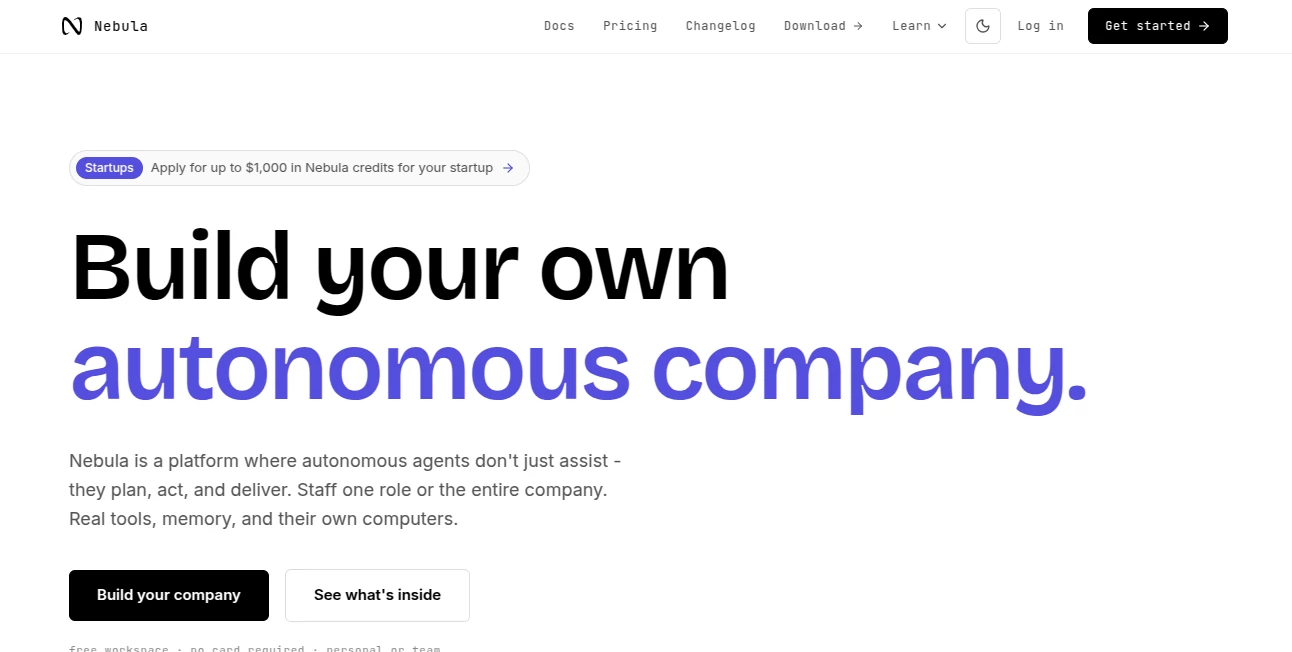
Most AI tools are designed to answer questions or help with one task at a time. This platform takes a different approach. It provides a shared workspace where AI agents can research, write, code, browse the web, communicate with connected services, run scheduled jobs, and continue working without someone sitting in front of the screen.
The idea is simple but useful: instead of treating AI as another chat window, you can give an agent a role and let it handle work from beginning to end. A research analyst can investigate a market, a support agent can help triage customer requests, or a development-focused agent can review code and work with connected tools.
It is equally suited to an individual building a personal workflow and a team looking for a shared environment for AI-assisted operations. The workspace keeps agents, conversations, tools, automations, memory, and cloud computing resources in one place.
Key Features
The platform combines several parts of an AI workspace that are often spread across different products. Agents can use web search, code execution, browsing, web scraping, communication tools, and media capabilities. Connected services can also expand what an agent is able to do.
- Autonomous AI agents for different roles and responsibilities
- Scheduled jobs and event-driven automations
- More than 4,000 built-in tools and integrations
- Persistent cloud Linux computers for agents
- Workspace-wide memory and reusable skills
- Channels, direct messages, and shared conversations
- Miniapps for dashboards, forms, maps, and interactive tools
- Web, desktop, iOS, Android, and CLI access
- Voice sessions with AI agents
- Support for coding, research, media generation, and browser automation
User Interface
The interface is organized around a workspace rather than a traditional single chat screen. Channels and threads give teams a place to discuss projects, while agents can participate directly in those conversations. Shared agents are visible to workspace members, making it easier to build repeatable processes instead of keeping useful prompts locked inside one person's account.
Another interesting touch is the miniapp system. When a conversation needs something more practical than text, an agent can create a small interactive application such as a dashboard, form, map, picker, or decision tool. This makes the workspace feel closer to a lightweight operating environment than a conventional chatbot.
Accuracy & Performance
Performance depends on the model, tools, connected services, and complexity of the task, so results should be checked when the work involves important business decisions. The platform is designed for tasks that require several steps rather than just a single response. Agents can research information, execute code, interact with websites, and report back after completing a job.
The ability to keep an agent running in the background is particularly useful. A scheduled report, recurring research task, or monitoring workflow does not need to wait for someone to open the application and start a conversation manually.
Capabilities
The range of capabilities is one of the strongest parts of the platform. Agents can search the web, extract information from websites, execute Python, Bash, or TypeScript, operate a browser, generate and process media, transcribe recordings, and communicate through connected applications.
There are also more than 4,000 built-in tools, including integrations with services such as GitHub, Linear, Stripe, Postgres, Slack, Notion, Gmail, and many others. OAuth connections allow agents to work with accounts that users already have, while MCP servers, APIs, command-line tools, and custom tools can extend the environment further.
For developers, the persistent cloud computer is another useful feature. It provides an always-available Linux environment where agents can work with files, execute code, and handle development tasks without relying on the user's personal computer.
Security & Privacy
Access to connected applications is based on the permissions granted by the user, which is important when agents are allowed to perform actions rather than simply provide information. Workspace members also have defined roles and permissions, while billing and connected applications are managed at the workspace level.
Because agents can access external services and perform real actions, users should still follow normal security practices: connect only the accounts an agent genuinely needs, review permissions carefully, and avoid granting unnecessary access to sensitive systems.
Use Cases
This platform can fit a surprisingly broad range of workflows. A small company might create separate agents for research, customer support, development, marketing, or finance operations. A solo founder could use the same environment as a personal AI operations team.
- Research: Investigate markets, competitors, trends, reports, and technical information.
- Software Development: Review code, analyze repositories, run tests, and work with development tools.
- Marketing: Prepare content, research audiences, organize campaigns, and monitor results.
- Customer Support: Triage incoming requests and prepare responses.
- Business Operations: Automate recurring reports, administrative tasks, and internal processes.
- Data Analysis: Process CSV files, run code, and turn data into charts or reports.
- Team Collaboration: Keep AI agents inside shared channels where employees already communicate.
- Automation: Run recurring jobs at specific times or react to events from connected services.
Pros and Cons
Pros
- Combines AI agents, automation, tools, memory, and computing in one workspace.
- More than 4,000 built-in integrations reduce the need to connect services manually.
- Agents can work autonomously for longer-running tasks.
- Persistent cloud computers are useful for development and technical workflows.
- Supports both individual and team workspaces.
- Miniapps provide a practical way to turn conversations into interactive tools.
- Multiple access options make the workspace available across devices.
Cons
- The broad feature set may take some time to understand.
- AI-generated work still requires human review for high-stakes tasks.
- Usage costs can vary depending on models, tools, and the amount of agent activity.
- Users who only need simple AI chat may find the platform more extensive than necessary.
Pricing Plans
The platform uses a credit-based pricing system. Users can start with a free workspace and do not need a credit card to begin. Subscription plans provide monthly Nebula Credits, while usage of models and certain services draws from available credits.
There are also separate Tool Credits for third-party services, media generation, and browsing. Additional services are available as add-ons, including cloud devices from $0.025 per hour per device, extra team seats at $15 per seat per month after the first two teammates, and live voice sessions at $0.05 per active minute.
One notable pricing detail is that the platform does not lock major features behind different feature tiers. All plans include access to the major LLMs and built-in agents, while actual usage determines how credits are consumed.
How to Use It
Getting started is relatively straightforward. Create an account and open a personal workspace. From there, you can create an AI agent, start a channel, connect applications, or ask an agent to build a miniapp.
- Create your workspace and complete the initial sign-in process.
- Create or configure an agent for the type of work you want to automate.
- Connect the applications and services the agent needs.
- Give the agent a clear task or describe the role you want it to perform.
- Use channels and threads to collaborate with agents and team members.
- Create scheduled jobs for recurring work.
- Review the results and adjust the agent's skills or permissions when necessary.
A good starting point is a small, repeatable task. For example, instead of asking an agent to manage an entire marketing operation immediately, start with a weekly competitor research report. Once the workflow produces reliable results, it can be expanded with scheduling, connected applications, and additional agents.
Comparison with Similar Tools
Traditional AI chat applications are excellent for conversations, brainstorming, writing, and quick answers, but they generally stop once the response is delivered. AI coding assistants are more specialized and focus heavily on software development. Automation platforms, meanwhile, are usually built around predefined triggers and actions.
This platform sits somewhere between these categories. Its main distinction is the combination of autonomous agents, a persistent computer, connected tools, memory, scheduled jobs, and a shared team workspace. That makes it more appropriate for workflows where the AI needs to take several actions, use external systems, and continue working after the initial instruction.
For someone who only wants help writing an email or answering a question, a simpler assistant may be enough. For a founder, developer, marketer, researcher, or team that wants AI to take ownership of recurring operational work, the broader approach can be much more compelling.
Conclusion
The strongest idea here is not simply having access to another AI model. It is giving AI a place to work. Agents can have roles, tools, memory, computing resources, schedules, and access to the applications that a business already uses.
That combination opens the door to workflows that would be difficult to manage with ordinary chat-based AI. Whether the goal is automating research, supporting development, handling repetitive operations, or building a collection of specialized digital workers, the platform provides a practical environment for putting AI to work rather than simply talking to it.
For individuals and teams ready to move beyond one-off prompts and experiment with longer-running AI workflows, it is an especially interesting option.
Frequently Asked Questions (FAQ)
What is this platform designed for?
It is designed for working with AI agents that can research, write, code, browse websites, communicate with connected services, automate recurring tasks, and perform work with less continuous human supervision.
Can it be used by a team?
Yes. Workspaces can be shared with team members, with shared agents, channels, threads, miniapps, connected applications, and workspace-level context.
Can AI agents run tasks automatically?
Yes. Jobs can be scheduled to run recurring work or configured to react to events, allowing agents to continue working when nobody is actively using the workspace.
Does it support coding?
Yes. Agents can execute Python, Bash, and TypeScript on the workspace computer and can work with development tools, repositories, browser sessions, and connected services.
How many integrations are available?
The platform advertises more than 4,000 built-in tools and integrations, including popular business and developer services. Additional MCP servers, APIs, command-line tools, and custom tools can also be connected.
Is there a free option?
Yes. A free workspace is available to get started, and no credit card is required at signup. Users can later choose a subscription or continue using the pay-as-you-go approach.
Can agents create applications?
Yes. The miniapp feature allows agents to create interactive dashboards, forms, maps, pickers, simulators, and other small tools from natural-language instructions.
Is human supervision still necessary?
For important business, financial, legal, security, or customer-facing work, human review remains advisable. Autonomous execution can save substantial time, but the appropriate level of supervision depends on the task and the permissions granted to the agent.
AI Workflow Management , AI Productivity Tools , AI Team Collaboration , AI Developer Tools .
These classifications represent its core capabilities and areas of application. For related tools, explore the linked categories above.

Nebula Alternatives Product

Sourcetable

AI Agent Ski…

KaneAI
ClearWork

TrySchedule

SalaryHow

David One

Markdown to …

BootstrapKing