Next3D
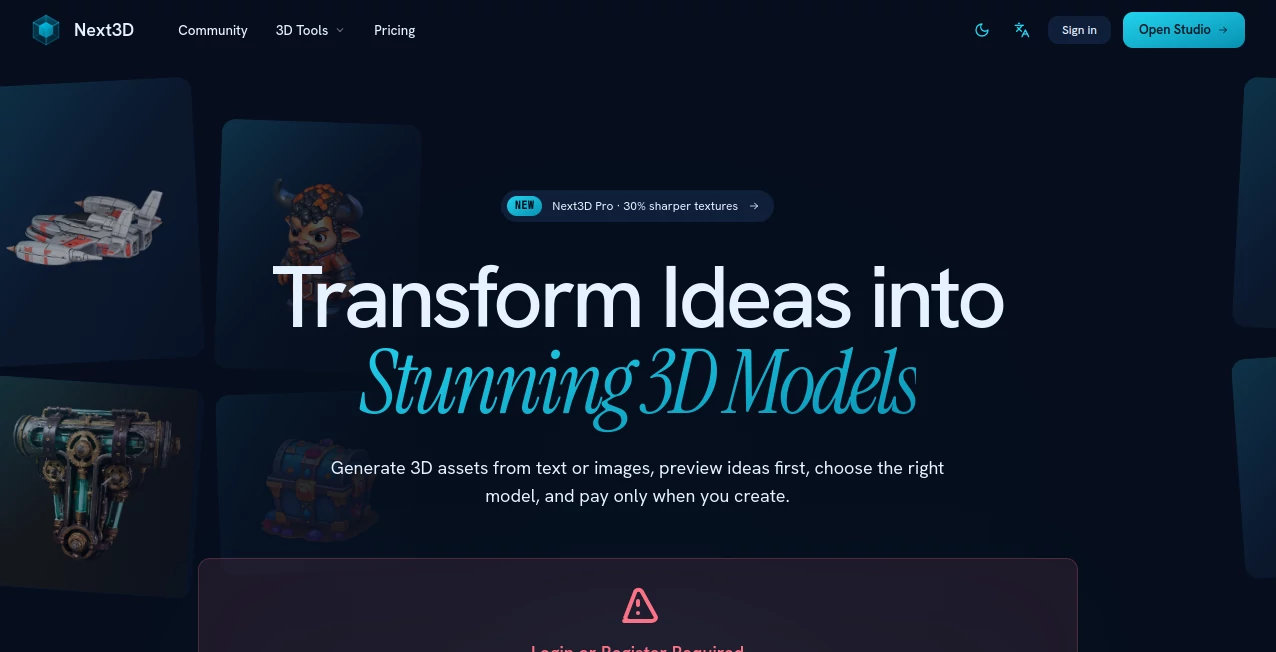
What is Next3D?
I still remember the first time I described a quirky robot character and watched it come to life as a fully textured 3D model in under a minute. No Blender, no months of learning curves, just a clear idea turned into something I could rotate, inspect, and actually use. That moment of wonder is what Next3D delivers consistently. It takes the heavy technical burden out of 3D creation and puts the focus back on imagination and speed. Whether you're a game developer prototyping assets, a product designer mocking up concepts, or a creator building for AR, it makes professional-quality 3D feel accessible instead of intimidating.
Introduction
Traditional 3D modeling demands expensive software, powerful hardware, and years of practice. Next3D flips that reality. Powered by advanced AI, it lets you generate high-quality 3D models from simple text descriptions or reference images. You can preview concepts first, choose the best generation style, and only pay when you're happy with the result. It supports multiple AI models so you can pick the one that best matches your vision, and exports clean, production-ready files. For indie creators, agencies, and businesses needing fast 3D assets, it removes the biggest barriers and turns what used to take days into something you can do during a coffee break.
Key Features
User Interface
The studio feels clean and focused. A generous prompt box invites your ideas, with easy options to upload reference images or switch between different generation models. Real-time previews let you see a 2D concept before committing to the full 3D generation, which saves credits and frustration. The browser-based 3D viewer is smooth and lets you inspect materials, lighting, and details before downloading. It never overwhelms you with options — everything is there when you need it, but stays out of the way otherwise.
Accuracy & Performance
The models come out with solid geometry and respectable textures right from the start. Different generation modes give you choices between speed, detail, or artistic flair. Generation times are quick enough to keep momentum going, and the preview step helps you avoid wasting credits on ideas that don't quite work. In practice, the consistency across various prompts is impressive, especially when you give it good references or clear descriptions.
Capabilities
You can generate from text or images, experiment with multiple AI models, preview concepts first, and export in GLB with textures (plus easy conversion to other formats). It handles a wide range of subjects — characters, products, environments, props — and produces assets ready for games, e-commerce, AR, or 3D printing. The pay-as-you-go credit system means you only spend when you create, and the browser viewer makes it easy to check assets before final download.
Security & Privacy
Your prompts and generated models stay under your control. The platform focuses on delivering great results without unnecessary data retention or sharing. For creators working on client projects or original IP, that respectful approach builds confidence to experiment freely.
Use Cases
An indie game developer generates character and prop models rapidly to prototype levels. A product designer creates multiple variations of a new gadget for client presentations. An e-commerce brand turns product photos into 3D models for interactive storefronts. An architect quickly visualizes concept furniture in existing spaces. The speed and quality open doors for people who previously couldn't afford traditional 3D workflows.
Pros and Cons
Pros:
- Multiple AI models give you real creative choice instead of one-size-fits-all output.
- Preview step saves credits and helps you refine ideas before generating.
- Production-ready exports that work in Unity, Unreal, Blender, and more.
- Pay-as-you-go credits mean no forced subscriptions.
- Browser-based workflow works from anywhere without heavy software.
Cons:
- Very complex or highly detailed scenes may need several attempts or good references.
- Higher resolution and advanced features require more credits.
Pricing Plans
It offers a free way to explore and try basic generations so you can feel the quality firsthand. Paid credit packs give you more flexibility and access to Pro features like sharper textures and faster generations. The model is fair — you only pay for what you actually create, which suits both occasional users and heavy creators well.
How to Use Next3D
Head to the studio, write a clear description or upload a reference image. Choose your preferred generation model and hit preview to see the 2D concept first. When it looks promising, generate the full 3D model. Inspect it in the built-in viewer, make adjustments if needed, and download the GLB with textures. Convert to other formats if your pipeline requires them. The whole process stays fast and iterative, letting you explore multiple directions without wasting time or credits.
Comparison with Similar Tools
Many 3D AI tools lock you into one model or force subscriptions before you see results. Next3D stands out with multiple generation options, smart preview functionality, and flexible pay-as-you-go credits. It feels more creator-friendly than heavier enterprise tools while delivering quality that competes with them. For most independent creators and small teams, that balance of control, speed, and cost makes it the smarter daily choice.
Conclusion
3D creation should be about ideas and vision, not technical hurdles and expensive software. Next3D brings that ideal closer by making professional models accessible, fast, and enjoyable to create. Whether you're prototyping, building portfolios, or delivering client work, it gives you the tools to move from concept to asset without the usual pain. If you've ever wished 3D was simpler, this is one of the best steps forward available right now.
Frequently Asked Questions (FAQ)
How long does generation take?
Most models finish in 30 seconds to a couple of minutes, depending on complexity.
Can I use the models commercially?
Yes — generated assets are yours to use in commercial projects.
What file formats are supported?
GLB with textures is standard, with easy conversion to OBJ, FBX, STL, and others.
Do I need 3D modeling experience?
Not at all — just describe what you want or upload a reference.
Is there a free way to try it?
Yes — you can start generating and exploring without immediate payment.
AI 3D Model Generator , AI Image to 3D Model , AI Design Generator , AI Graphic Design .
These classifications represent its core capabilities and areas of application. For related tools, explore the linked categories above.

Next3D Alternatives Product
genie3

AppScreens

AI Raphael

volume shader

Nano Banana …
Circle Crop …

Meshy AI

flux 3
text to 3d w…