NoClick, Inc.
What is NoClick, Inc.?
There’s a special kind of relief when you describe what you want your software to do in plain English and watch it actually come together—forms, dashboards, workflows, all connected and working—without touching a single line of code. This platform delivers that experience in a way that feels almost too smooth to be real. You tell it your idea, connect a few tools, and suddenly you have a functional app or automation that you can share or scale. I’ve seen solo founders go from rough concept to working internal tool in an afternoon, and small teams replace clunky spreadsheets with clean, shared interfaces that actually get used. It’s the kind of tool that makes you wonder why building software ever felt so hard.
Introduction
Most no-code platforms still force you into rigid templates or steep learning curves. This one starts with your words. Describe the workflow or app you need, and the AI helps assemble the pieces—connecting apps, adding logic, even building user-facing interfaces. It’s built for people who need things done now, not next quarter: marketers automating lead flows, support teams building internal tools, or indie makers launching small products. The combination of natural language input, visual canvas, and instant publishing makes it feel like having a full development team that never sleeps and actually understands what you meant.
Key Features
User Interface
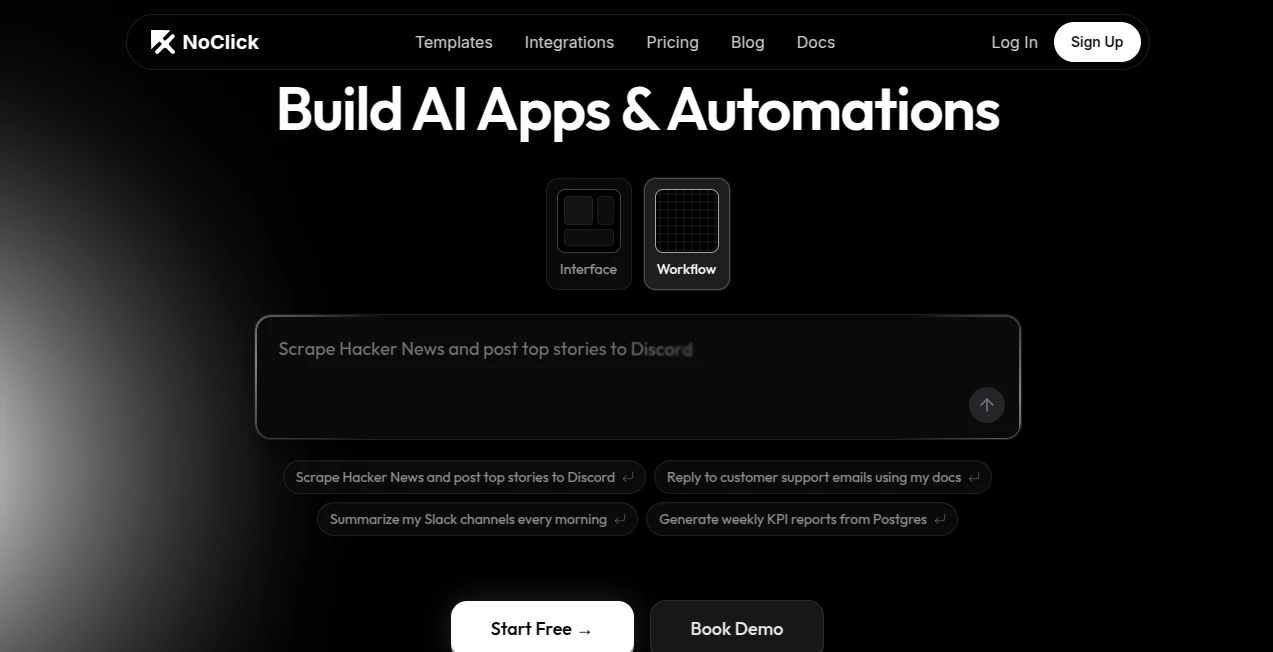
The workspace is clean and inviting. You can start by typing a description like “Scrape Hacker News top stories and post them to Discord,” and the AI suggests the full workflow. Switch to the visual canvas to drag, connect, and tweak. Everything feels responsive and modern—no overwhelming side panels or cryptic icons. Previews and test runs are one click away, so you stay in flow instead of constantly switching tabs. It’s one of those rare interfaces that gets better the more you use it.
Accuracy & Performance
The AI does a remarkably good job turning vague ideas into working logic. It understands context, suggests sensible connections between tools, and rarely needs major corrections. Workflows run reliably, with good error handling and logging so you can see exactly what happened if something goes wrong. Performance stays snappy even as you add complexity, and the published apps feel fast for end users. It’s the kind of reliability that lets you trust the system with important automations.
Capabilities
You get natural language workflow building, a full visual editor, 100+ integrations, the ability to publish real apps with forms and dashboards, AI agents that can handle multi-step tasks, and realtime collaboration. It supports everything from simple notifications to complex data pipelines with databases and conditional logic. The publish feature is particularly strong—you turn an automation into a usable web app for your team or customers with almost no extra effort.
Security & Privacy
Your workflows and data stay under your control. Integrations use secure OAuth where possible, and published apps can have role-based access. The platform is built with attention to how real teams handle sensitive information—no unnecessary data sharing, clear permission settings, and the ability to keep things private until you’re ready to share. For businesses moving important processes here, that thoughtful approach builds confidence.
Use Cases
A support team builds a tool that reads new emails, checks their knowledge base, and drafts replies for approval. A content creator sets up daily scraping of trending topics and auto-posts to multiple channels with custom formatting. An operations manager creates a dashboard that pulls KPI data from Postgres every morning and sends a clean summary to Slack. A founder prototypes a customer onboarding flow with forms and conditional emails—all without hiring developers. The common thread is replacing “we should automate this someday” with “it’s done this afternoon.”
Pros and Cons
Pros:
- Starting with plain English makes building feel natural and fast.
- Publishing real apps on top of automations is surprisingly powerful.
- Strong integration ecosystem and visual editor for complex flows.
- Collaboration features work well for small teams.
- Free tier is generous enough to build meaningful things.
Cons:
- Very custom or highly complex logic may still need some manual tweaking.
- Advanced enterprise features (SSO, audit logs) are in higher plans.
Pricing Plans
It starts with a solid free plan that lets you build and test real workflows and small apps. Paid tiers add more executions, priority support, advanced publishing options, and team features. Pricing feels fair—many users say it replaces tools that cost more while giving them more control and speed. You can start small and grow without painful jumps.
How to Use NoClick
Sign up (it’s quick), go to the dashboard, and either describe your idea in the chat-like builder or start on the visual canvas. Connect the apps you need (Slack, Google Sheets, email, databases, etc.). Test the flow with sample data, refine as needed, then publish as a shareable app or keep it as a background automation. Invite teammates for real-time editing if you’re working together. The loop from idea to working solution is short enough that you can see progress in the same session.
Comparison with Similar Tools
Many automation platforms force you into rigid blocks or require deep technical setup. This one starts with your words and gives you both automation power and a real published app layer—something most competitors treat as separate products. It sits comfortably between heavy enterprise iPaaS tools and simpler no-code builders, offering more flexibility than the former and more depth than the latter.
Conclusion
Building software shouldn’t feel like fighting the tools. This platform gets out of your way and lets you focus on solving real problems. Whether you’re automating daily tasks, creating internal tools, or launching small customer-facing apps, it makes the process feel approachable and even enjoyable. In a world where speed matters more than ever, having a reliable AI partner that turns ideas into working reality is incredibly valuable. If you’ve ever wished building was simpler, this is worth trying today.
Frequently Asked Questions (FAQ)
Do I need coding experience?
Not at all. You can build entirely with natural language or the visual editor.
Can I publish real apps for customers?
Yes—published apps can have forms, dashboards, and user logins.
How many integrations are available?
Over 100 popular tools and services, with more being added regularly.
Is there a free way to try it?
Yes, the free plan lets you build and run meaningful workflows and apps.
Can teams collaborate in real time?
Yes, multiple people can work on the same workflow simultaneously.
AI Workflow Management , AI App Builder , AI No-Code & Low-Code , AI Developer Tools .
These classifications represent its core capabilities and areas of application. For related tools, explore the linked categories above.

NoClick, Inc. Alternatives Product

ChatFlowchart

OGimage

KaneAI
AI Wire

Somnio

Simple Dev T…

Luma AI

CodeProt

DDS Gub