NovaImage AI
What is NovaImage AI?
NovaImage AI brings image creation, image editing, and video generation together in one practical creative workspace. Instead of moving between several specialized services, creators can work with multiple modern AI models from a single platform, making it easier to go from an early idea to a finished visual.
The platform is particularly appealing to people who need more than simple text-to-image generation. You can create new visuals, refine existing images, combine reference material, improve image quality, remove text, and turn creative concepts into video. New users can also receive free credits after signing up, making it easy to test the workflow before committing to a paid plan.
One of the strongest aspects is the selection of models available for different creative jobs. Nano Banana 2 is positioned for fast iteration, while Nano Banana Pro focuses on detailed, professional image work. GPT Image 2, Seedream 4.0, Seedance 2.0, and Veo 3 add further options for image and video production.
Key Features
- AI image generation from natural-language prompts
- Conversational image editing
- Multi-image reference and composition workflows
- High-resolution image generation up to 4K with supported models
- Strong text rendering for posters, advertisements, and visual layouts
- AI video generation through modern video models
- Image upscaling for higher-resolution results
- AI-powered image text removal
- Prompt generation for image and video creation
- Character and subject consistency across image transformations
- Photo restoration and creative image transformation workflows
- Commercial-use support on eligible paid plans
User Interface
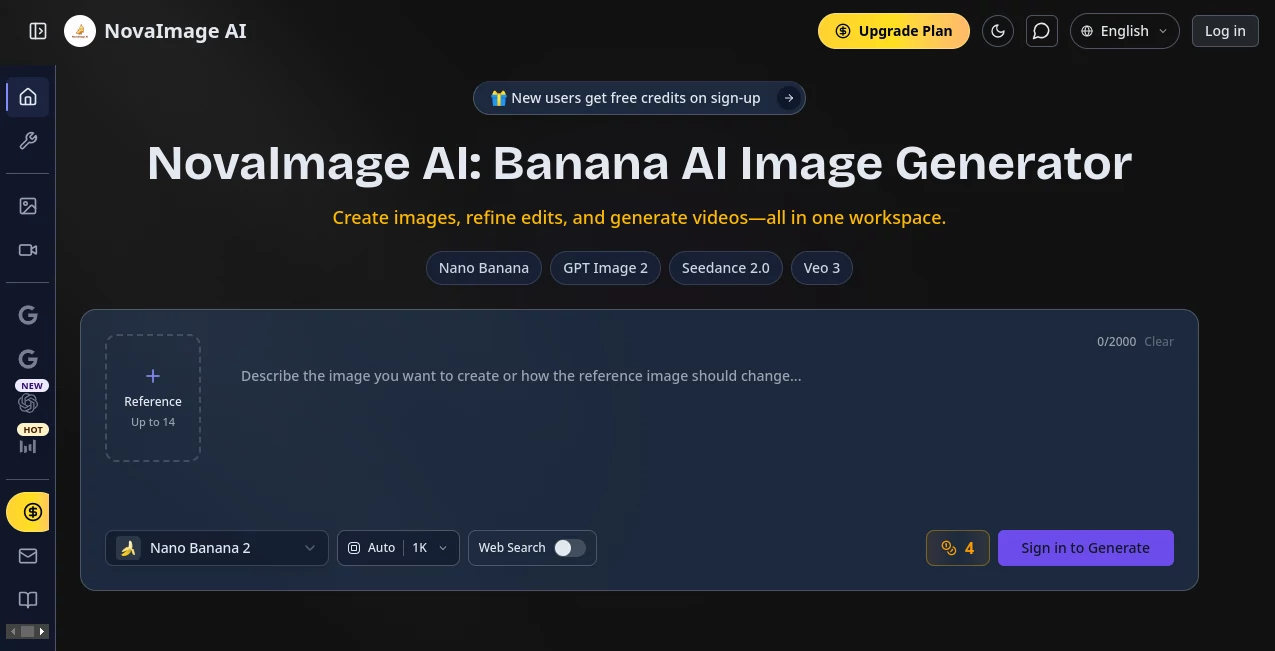
The interface is designed around a straightforward creative workflow. Rather than requiring users to understand complicated layers, masks, or professional editing software, many transformations can be described with natural language. This makes the platform approachable for marketers, content creators, designers, photographers, and small businesses that need polished visuals without a lengthy editing process.
The model selection also gives users more control over how they work. A creator experimenting with several concepts can favor a faster model, while a designer preparing a campaign asset can choose a model designed for more detailed output.
Accuracy & Performance
Performance depends on the selected model and the complexity of the request, but the platform is built around models that emphasize visual consistency, prompt understanding, and high-quality rendering. Nano Banana 2 is designed for rapid creative iteration, while Nano Banana Pro is aimed at more demanding production work.
Text inside images is another notable strength. The platform highlights multilingual text rendering and structured layouts, which can be particularly useful when creating advertisements, posters, product graphics, social media designs, or presentation visuals where readable typography matters.
Capabilities
The platform covers a broad range of visual workflows. Users can generate images from descriptions, transform photographs into different styles, combine multiple references into a single composition, and make conversational edits to existing visuals.
For example, a product seller could combine a product photograph with a lifestyle background and ask the AI to create a cohesive scene. A photographer could work on restoring an older image, while a social media manager could rapidly create several variations of a campaign visual. Designers can also use reference images to maintain a particular character, product, or visual direction across multiple generations.
Beyond still images, the platform includes video generation through models such as Seedance 2.0 and Veo 3. Additional creative utilities include image upscaling, text removal, and prompt generation, giving users useful supporting tools alongside the main generation features.
Security & Privacy
Privacy is addressed through account and content handling policies, and paid plans include private creation. The service states that prompts, uploaded images, reference media, generated outputs, and account information may be processed as part of providing its services.
Users should still review the platform's privacy policy and terms before uploading sensitive or confidential material. As with any generative AI service, it is also sensible to check generated content before publishing it, especially when the output will be used commercially or contains important factual details.
Use Cases
- Marketing: Create advertising concepts, promotional graphics, campaign visuals, and branded social media assets.
- E-commerce: Turn product photos into polished lifestyle compositions and create alternative product presentations.
- Social Media: Produce thumbnails, posts, visual variations, and attention-grabbing creative concepts quickly.
- Photography: Restore older photographs, improve image quality, experiment with styles, and create alternative compositions.
- Graphic Design: Develop posters, layouts, illustrations, product graphics, and early design concepts.
- Real Estate: Explore virtual staging concepts and redesign empty rooms from existing photographs.
- Fashion and Beauty: Experiment with makeup looks, styling concepts, portrait transformations, and visual campaigns.
- Content Creation: Turn written ideas into images and video concepts without relying entirely on traditional production tools.
- Creative Projects: Develop characters, environments, concept art, and visual storytelling sequences.
Pros and Cons
Pros
- Combines image and video generation in one workspace.
- Offers several leading AI models for different creative requirements.
- Supports conversational image editing.
- Strong capabilities for text-heavy visual designs.
- Supports multi-image reference workflows.
- High-resolution output is available with supported models and plans.
- Includes useful utilities such as upscaling and text removal.
- Paid plans provide private creation and no-watermark output.
- Commercial use is supported on eligible plans.
Cons
- Credit usage varies depending on the model and generation.
- Users looking for advanced manual editing may still need traditional design software.
- The number of available features can feel extensive for someone who only wants a basic image generator.
- Professional workflows may require a higher-tier plan because of credit requirements.
Pricing Plans
The service uses a credit-based pricing system with both subscription and one-time purchase options. A free starting experience is available for new users, while paid plans are intended for people who need more regular generation and editing.
The yearly Starter plan is listed at $99 per year, equivalent to $8.20 per month, and includes 299 credits per month. The Basic yearly plan costs $299 per year, equivalent to $24.90 per month, with 1,399 credits per month. The Pro yearly plan is listed at $599 per year, equivalent to $49.90 per month, and provides 3,099 credits per month.
The higher plans include access to the platform's leading image and video models, while the Pro tier adds tools such as image marking, prompt generation, image upscaling, and image text removal. The platform also offers additional credit packs, and unused credits from one-time packages do not expire.
How to Use the Platform
- Create an account and claim any available new-user credits.
- Choose an image or video workflow based on the result you want to create.
- Select an appropriate AI model for your project.
- Describe the desired result using a clear natural-language prompt.
- Upload reference images when the project requires specific people, products, objects, or visual styles.
- Generate the first result and review the composition, details, text, and overall appearance.
- Use conversational editing or another generation to refine areas that need improvement.
- Upscale or otherwise process the final image when higher resolution or additional cleanup is required.
- Download and review the finished asset before using it publicly or commercially.
Comparison with Similar Tools
Many AI image generators focus primarily on producing an image from a text prompt. This platform takes a broader approach by combining several image models, video generation, editing capabilities, reference-image workflows, and supporting utilities.
For someone who only needs quick text-to-image experiments, a specialized generator may be enough. The advantage here becomes clearer when a project involves several stages. A user can create an initial concept, refine it, combine references, improve its resolution, remove unwanted text, and then move into video generation without rebuilding the entire workflow in another application.
The choice between the available image models also makes the service more flexible. Faster models are useful for exploring ideas, while more advanced models are better suited to detailed commercial assets, complex compositions, and projects where consistency matters.
Conclusion
NovaImage AI is a strong choice for creators who want a broader visual production environment rather than a single-purpose image generator. Its combination of modern image models, video generation, conversational editing, reference-image workflows, and practical enhancement tools makes it useful across marketing, e-commerce, design, photography, social media, and content production.
The biggest benefit is the ability to experiment quickly while keeping multiple parts of the creative process in one place. Someone preparing a product campaign, for example, can move from a rough concept to polished imagery and then explore video variations without constantly switching between unrelated services.
For casual users, the free credits provide a convenient way to explore the experience. For professionals and businesses producing visual content regularly, the larger credit plans and commercial-use benefits make the platform considerably more practical as part of an ongoing creative workflow.
Frequently Asked Questions (FAQ)
What can I create with this platform?
You can create and edit AI images, combine reference images, generate visual compositions, upscale images, remove text, create prompts, and generate videos using supported AI models.
Does it support high-resolution image generation?
Yes. Supported models can produce high-resolution results, including native 2K and 4K output on applicable workflows and plans.
Can I use generated images commercially?
Yes. Paid plans advertise full commercial use for generated content, although users should review the current terms of service for the exact conditions that apply to their projects.
Does it offer AI video generation?
Yes. Video generation is available through models including Seedance 2.0 and Veo 3, giving users an option to move from still-image concepts into video creation.
Can I upload multiple reference images?
Yes. Multi-image reference workflows are supported, with the exact number depending on the selected model. Some of the more advanced workflows support multiple reference images for composition and subject consistency.
Do failed generations consume credits?
The platform states that credits are only deducted for successful generations. If a generation fails or returns a duplicate result, the credits are automatically restored.
Is there a free option?
New users can receive free credits after signing up, allowing them to explore the available creative workflows before choosing a paid plan.
Are generated creations private?
Private creation is included with the paid plans. Users should also review the privacy policy to understand how prompts, uploaded content, generated outputs, and account information are handled.
AI Photo & Image Generator , AI Video Generator , AI Image to Image , AI Text to Image .
These classifications represent its core capabilities and areas of application. For related tools, explore the linked categories above.

NovaImage AI Alternatives Product
Wplace Live
Video to GIF…

Transform An…
Kirkified AI

AI Hairstyle…

ChatGPT Imag…
gpt image

Seedance 2.0
Kling 3.0