
Onbrand
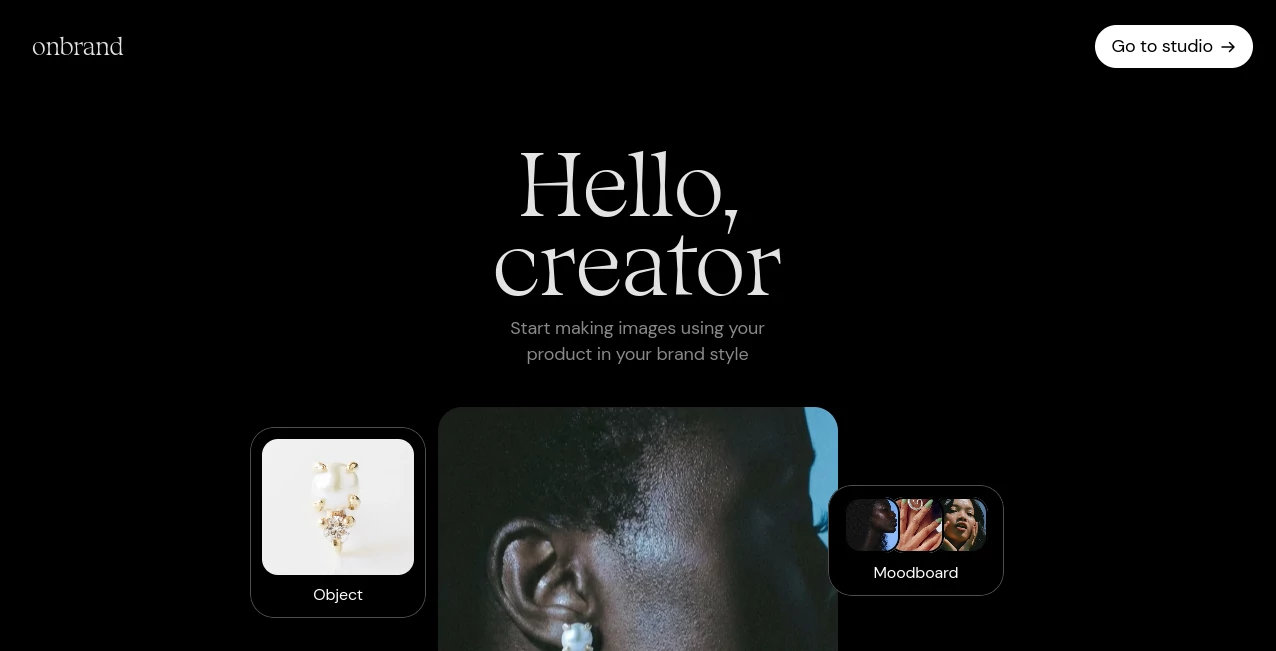
What is Onbrand?
Creating visual content that matches a company's identity can be surprisingly difficult. Many AI image generators produce impressive artwork, but keeping the same product, color palette, and overall style across multiple images often requires extensive editing. This platform focuses on solving that challenge by helping users create brand-consistent visuals with minimal effort.
Instead of starting from scratch every time, users can reference specific products or objects and combine them with a preferred visual style. The result is a faster creative workflow that produces marketing images suitable for advertising, social media, product campaigns, presentations, and digital branding. The platform was built with simplicity in mind, making advanced AI image generation accessible even to users without design experience. :contentReference[oaicite:0]{index=0}
Key Features
User Interface
The interface is intentionally clean and beginner-friendly. Users simply describe the desired scene, reference an object, and optionally upload a mood board or brand inspiration. The workflow feels natural, allowing designers, marketers, and business owners to focus on creativity instead of learning complicated editing tools.
Accuracy & Performance
One of the strongest advantages is visual consistency. Rather than generating unrelated images, the platform maintains recognizable products and brand identity across multiple generations. This makes it particularly valuable for businesses that need cohesive marketing materials or product showcases. :contentReference[oaicite:1]{index=1}
Capabilities
- Generate branded marketing images from text prompts.
- Reference products or objects using simple commands.
- Maintain visual consistency across multiple generations.
- Use mood boards to guide artistic direction.
- Create promotional assets for websites and social media.
- Produce campaign-ready product imagery.
- Reduce the need for expensive photoshoots during early campaigns.
- Support rapid concept exploration for creative teams.
Security & Privacy
The platform is designed for commercial image creation and allows businesses to work with their own branded assets. Users should still review the service's privacy policy and terms before uploading sensitive or confidential materials, particularly when working with unreleased products or proprietary branding.
Use Cases
- Creating branded social media graphics.
- Producing advertising creatives.
- Designing eCommerce product promotions.
- Generating campaign visuals for digital marketing.
- Creating presentation graphics.
- Testing creative concepts before organizing professional photoshoots.
- Building consistent product catalogs.
- Supporting agencies that manage multiple client brands.
Pros and Cons
Pros
- Excellent brand consistency across generated images.
- Simple workflow suitable for beginners.
- Supports custom objects and branded products.
- Mood board support improves creative direction.
- Speeds up marketing asset production.
- Helpful for businesses with limited photography budgets.
Cons
- Creative results still depend on prompt quality.
- May not completely replace professional commercial photography.
- Advanced editing options are more limited than traditional design software.
Pricing Plans
The platform offers online access for AI-powered image generation. Pricing and available subscription plans may change over time, so users should visit the official website for the latest details before choosing a plan. :contentReference[oaicite:2]{index=2}
How to Use Onbrand
Begin by creating an account and opening a new project. Reference the object or product you want to keep consistent, describe the desired scene, and optionally upload a mood board that reflects your preferred branding style. Generate multiple variations, compare the outputs, and download the images that best match your marketing goals. This workflow allows teams to create professional-looking visuals in just a few minutes.
Comparison with Similar Tools
Traditional AI image generators excel at producing artistic images but often struggle to maintain consistency across an entire campaign. This platform focuses specifically on preserving brand identity and recognizable products throughout multiple image generations. Compared with more complex node-based creative workflows, it offers a much simpler experience while still delivering reliable marketing visuals. :contentReference[oaicite:3]{index=3}
Conclusion
For businesses that rely on consistent branding, this platform provides an efficient way to create high-quality marketing images without spending hours editing every design. Its combination of object consistency, mood board guidance, and easy-to-use interface makes it an excellent choice for marketers, designers, startups, agencies, and eCommerce brands looking to produce attractive promotional visuals quickly while maintaining a professional visual identity.
Frequently Asked Questions (FAQ)
What is this platform designed for?
It helps users generate AI images that remain visually consistent with their brand identity and products.
Can I use my own products as references?
Yes. The platform allows users to reference specific objects or products to maintain consistency across generated images.
Who benefits most from using it?
Marketing teams, designers, agencies, startups, content creators, and eCommerce businesses can all benefit from faster branded image creation.
Does it support mood boards?
Yes. Users can provide mood boards or style references to guide the overall appearance of generated images.
Is it suitable for commercial marketing?
Yes. It is specifically designed to help businesses create branded visuals for campaigns, advertising, and promotional content.
AI Photo & Image Generator , AI Social Media Assistant , AI Image to Image , AI Advertising Assistant .
These classifications represent its core capabilities and areas of application. For related tools, explore the linked categories above.

Onbrand Alternatives Product

WonderShare …

Enji

Edit Stamp

Nano Banana …

Yodayo AI

Quso AI
GTA AI

Atracker

GPT Image 1.5