
Onlymusic
What is Onlymusic?
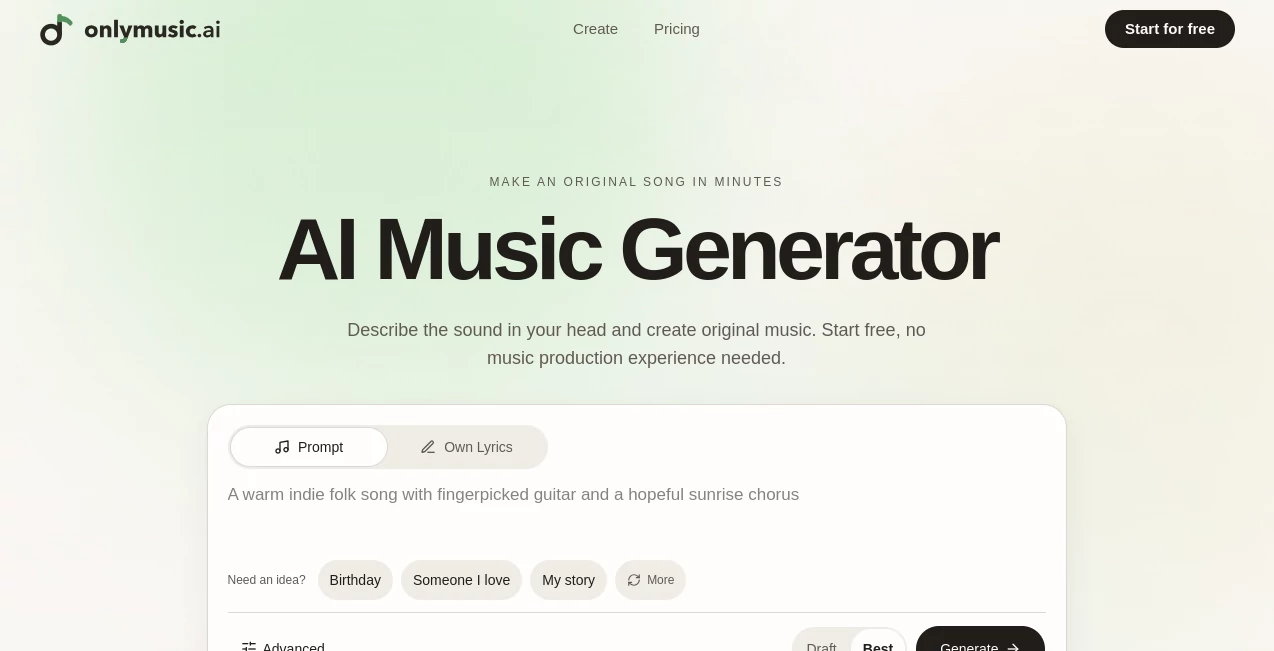
Creating a complete song usually takes more than a good idea. You may have a melody in mind, a few lines of lyrics, or simply a mood you want to hear, but turning that idea into a finished track can require music production skills and a lot of time. This AI music generator takes a much simpler approach: describe the sound you want in everyday language and let the system handle the melody, arrangement, instruments, and vocals.
The experience is particularly appealing for people who want to experiment without learning complicated music software first. A single sentence can be enough to get started, while users who already have lyrics can take a more hands-on approach. There is also an instrumental option for projects where vocals are not needed.
One useful detail is that users can listen to complete generated songs rather than relying only on short previews. The examples available on the site cover styles such as pop, rock, folk, rap, jazz, country, gospel, soul, and romantic folk, giving newcomers a good sense of what is possible.
Key Features
- Text-to-music generation from a written idea or description.
- Lyrics-to-song creation using lyrics supplied by the user.
- Instrumental music generation for tracks without a lead singer.
- AI-generated melody, arrangement, instruments, and vocals.
- Multiple music models when available to the user's account.
- Different quality levels ranging from Draft to Best.
- Complete song playback before deciding what to create next.
- MP3 and WAV downloads on eligible paid plans or credit options.
- My Music workspace for keeping generated tracks.
- Commercial licensing included with paid plans.
User Interface
The creator is designed around a straightforward starting point: describe the song you want. Users can mention a genre, mood, tempo, instruments, vocal style, story, or intended use without needing to understand technical music terminology.
For example, someone could ask for a warm acoustic folk song with gentle guitar, a slow tempo, and an intimate vocal. Another user might simply describe a high-energy electronic track for a short video. The interface keeps the creative decision with the user while taking care of the more technical production steps.
Advanced controls are available when more direction is needed. Users can bring their own lyrics, choose instrumental creation, and select from the music models available to their account. This creates a nice balance between simplicity for beginners and control for more experienced creators.
Accuracy & Performance
Music generation is different from a conventional search or writing tool, so accuracy is better understood as how closely the finished track follows the creative direction. The system considers details such as genre, mood, instruments, vocal style, speed, and the intended setting when generating a song.
The ability to listen to the entire result is helpful here. If the first version feels too slow, the vocals do not fit the mood, or the instrumentation misses the idea, users can adjust the description and generate another version. That iterative process feels more practical than expecting a perfect song from the first prompt.
The service also offers four quality levels across its paid plans, allowing users to choose between faster drafts and higher-quality generations. Generation limits and concurrent creation capacity increase with the higher plans.
Capabilities
The platform supports several distinct ways of approaching music creation. Text-to-music is useful when an idea exists but lyrics do not. Lyrics-to-song is better suited to songwriters who already have words they want performed. Instrumental mode works well when the goal is background music rather than a vocal performance.
There are plenty of practical applications. A creator might generate an intro for a YouTube video, background music for a podcast, a theme for a game, a birthday song, or simply a personal track. Social media creators can also experiment with music for short videos, transitions, and recurring content themes.
Another strong point is the ability to start without formal music theory knowledge. Instead of thinking about arrangement terminology first, users can describe the result in normal language. That makes the creative process approachable even for someone who has never produced a song before.
Security & Privacy
Users should only provide lyrics, recordings, and other material they created themselves or have permission to use. The service also advises users not to include unnecessary private information in their prompts or ask the system to copy living artists or protected recordings.
Storage depends on the account and plan. Songs created as a guest or with a free account are currently stored for up to seven days, while paid plans or eligible credit options can provide longer storage and additional download capabilities.
Commercial use also depends on the plan or credit option used to create a track. Anyone planning to publish music commercially should review the applicable terms and licensing conditions before using a generated song in advertising, client projects, monetized videos, games, podcasts, or music distribution.
Use Cases
- Content creators: Produce background tracks, intros, transitions, and themes for videos and social posts.
- Songwriters: Turn original lyrics into a performed song with melody, instruments, arrangement, and vocals.
- Podcasters: Create original opening themes and background music.
- Game developers: Experiment with character themes, atmosphere, and background tracks.
- Personal projects: Make birthday songs, gifts, personal soundtracks, and memorable tracks.
- Music beginners: Explore songwriting and production without first learning complex music software.
Pros and Cons
Pros
- Very easy starting point for people without music production experience.
- Supports prompts, user-written lyrics, and instrumental creation.
- Generates complete songs rather than only short musical fragments.
- Users can listen to full tracks before deciding on the next version.
- Free trial access can be available without signing up.
- Paid plans include MP3 and WAV downloads and commercial licensing.
- Higher plans provide substantially more generations and simultaneous jobs.
Cons
- Generated results can vary, so important tracks may require several attempts.
- Free access has limitations compared with paid plans.
- Commercial rights depend on the plan or credit option used.
- AI-generated songs can sometimes share similar phrases, rhythms, structures, or sounds.
- Advanced music-production controls are more limited than those found in traditional professional production software.
Pricing Plans
A free option makes it possible to test the experience before committing to a paid subscription. Eligible users can create a first song without signing up, while registered accounts can receive free daily generations according to the current availability shown in the creator.
The paid plans are structured around credits and music generations. The Starter plan costs $14.99 per month, or $10.49 per month when billed yearly, with 6,000 credits and up to 1,200 music generations per year. The Hobby plan costs $29.99 monthly, or $20.99 per month on annual billing, and includes 15,000 credits and up to 3,000 generations per year.
For heavier use, the Professional plan is $49.99 monthly, or $34.99 per month when billed yearly, with 36,000 credits and up to 7,200 generations per year. The Studio plan is designed for the highest volume, costing $129.99 monthly, or $90.99 per month on annual billing, with 102,000 credits and up to 20,400 generations per year.
All four paid tiers include the available music quality levels, MP3 and WAV downloads, commercial licensing, lifetime cloud storage, and access to available AI music tools. The main differences are generation volume, concurrent generations, processing priority, and support level.
How to Use It
- Start with an idea: Describe the genre, mood, instruments, vocal style, story, or intended use.
- Choose your creation method: Use a normal prompt, add your own lyrics, or enable instrumental mode.
- Add useful details: Mention two or three important characteristics such as tempo, mood, instruments, or vocal type.
- Generate the track: Let the system build the melody, arrangement, instrumentation, and vocals.
- Listen to the complete song: Evaluate the entire result instead of judging only a short preview.
- Refine the idea: Change the description if the first version does not match what you had in mind.
- Save or download: Keep the result in the music workspace or download it in an eligible format when your plan allows it.
Comparison with Similar Tools
There are many AI music services, but the main difference here is the emphasis on a simple creative workflow. Instead of requiring users to understand detailed production controls from the beginning, the experience starts with a plain-language description and gradually exposes more options when they are useful.
It is also well suited to people who already have lyrics. The lyrics-to-song workflow lets a songwriter keep their own words while the system builds the musical side around them. For users who do not need vocals, instrumental generation provides another practical route.
Compared with traditional digital audio workstations, the advantage is speed and accessibility rather than detailed manual control. A producer who wants to edit every instrument, note, effect, and recording parameter will still benefit from conventional production software. Someone who wants to turn an idea into a playable song quickly may find the AI approach much more convenient.
Conclusion
This AI music generator offers a friendly way to move from a vague musical idea to a finished track. Its strongest quality is the simplicity of the workflow: describe what you want, choose how you want to create it, listen to the result, and refine it when necessary.
The combination of text-to-music, lyrics-to-song, and instrumental generation makes it useful for a surprisingly broad range of projects. It can serve a first-time creator experimenting with songwriting just as easily as a content creator looking for background music or a songwriter who wants to hear their lyrics performed.
It is not a replacement for every part of professional music production, and generated music should always be reviewed before publication. Still, for turning ideas into complete songs without a steep technical learning curve, it offers a compelling and practical creative experience.
Frequently Asked Questions (FAQ)
Can I create music without signing up?
Yes. When the free try is available, users can create their first eligible song without paying or creating an account. Registration provides access to additional features such as daily free generations and a saved music library.
Can I use my own lyrics?
Yes. Users can paste lyrics they wrote or have permission to use and describe the desired musical style. The system can then create melody, instruments, arrangement, and vocals around those lyrics.
Can I make instrumental music?
Yes. Instrumental mode removes the need for a lead singer and can be useful for videos, podcasts, games, study tracks, gifts, and other projects.
Can I download generated songs?
Yes, MP3 and WAV downloads are available with eligible paid plans or credit options. Free users can listen to their complete songs online, subject to the current account and storage limitations.
Can I use generated songs commercially?
Commercial licensing depends on the plan or credit option used to create the track. Users should check the current pricing and terms before using generated music in commercial or monetized projects.
How should I write a good music prompt?
A useful prompt can mention the style, mood, speed, main instruments, vocal type, and intended use. You do not need music theory. A simple description such as a slow soul song with electric piano, warm drums, and an intimate vocal can provide enough direction to begin.
Does the service claim ownership of generated songs?
The service states that it does not claim ownership of the songs it generates for users. However, users remain responsible for having the necessary rights to their inputs, and copyright protection for AI-generated music can vary by country.
How long are generated songs stored?
Songs created as a guest or free user are currently stored for up to seven days. Paid plans or credit options may provide longer storage, with the song page showing the applicable storage period.
AI Text to Music , AI Music Generator .
These classifications represent its core capabilities and areas of application. For related tools, explore the linked categories above.

Onlymusic Alternatives Product

AIMusicFlow

MakeBestMusic

Solmi AI
Lyria 3 AI M…
gemini music

Song Lyrics …

MP3toMIDI

Flow Song

Custom Gift …