
PanoramaGenerator
What is PanoramaGenerator?
Creating immersive 360-degree environments used to require specialized cameras, complicated stitching software, and plenty of editing time. Today, that process is dramatically simpler thanks to an intelligent platform that transforms either a text description or a handful of reference images into seamless panoramic environments ready for virtual reality, interactive presentations, and digital experiences.
Designed for creators, designers, architects, marketers, game developers, and VR enthusiasts, this solution produces true 2:1 equirectangular panoramas that work directly with popular viewers and development platforms. Whether you want to visualize a futuristic city, recreate a historical landscape, design a virtual showroom, or build atmospheric game environments, everything can be generated from a simple prompt within minutes. The built-in panorama viewer, seamless edge processing, and multiple export resolutions make the workflow smooth from creation to final delivery.
Key Features
User Interface
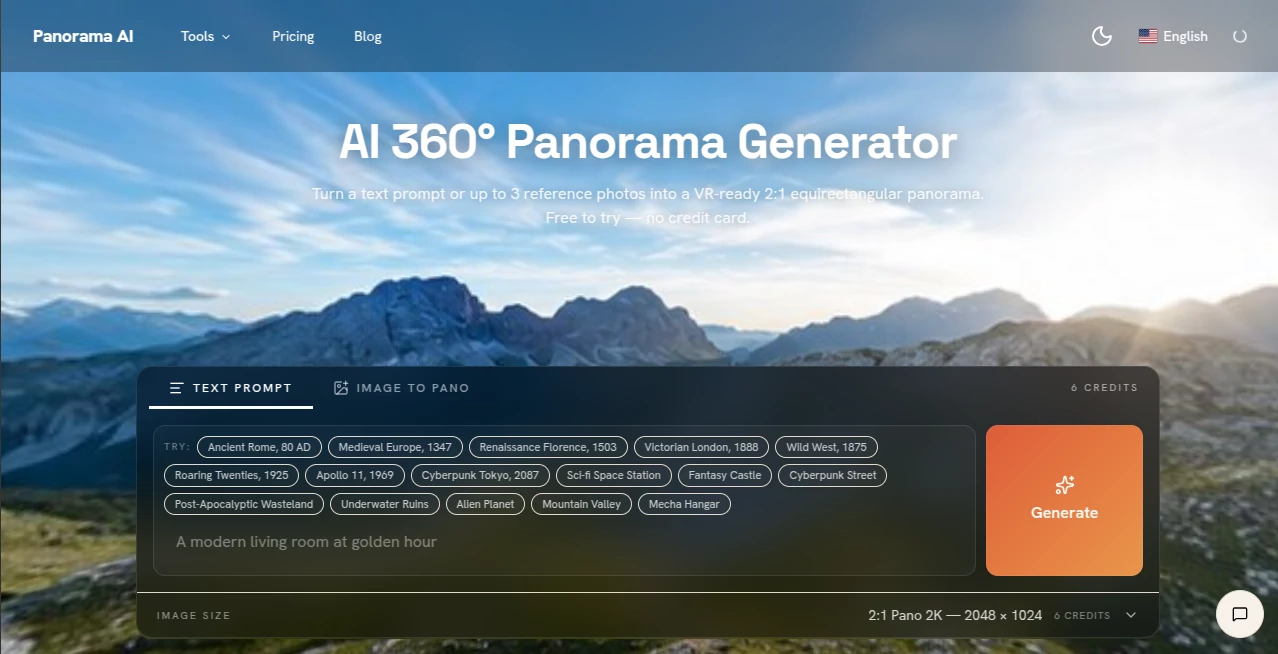
The interface is refreshingly clean and beginner-friendly. Users can start with a written prompt or upload up to three reference photos to guide the visual style. Generation progress is displayed clearly, while an integrated 360-degree viewer allows immediate exploration of the finished panorama without requiring third-party software or browser plugins.
Accuracy & Performance
The platform is specifically optimized for panoramic image generation rather than traditional AI artwork. It intelligently enhances prompts for spherical composition, applies seam-aware processing to eliminate visible edges, and generates high-quality outputs suitable for VR headsets, virtual tours, and interactive environments. Multiple resolution options, including 1K, 2K, and 4K, provide flexibility for different professional needs. :contentReference[oaicite:0]{index=0}
Capabilities
- Generate complete 360° panoramas from text prompts.
- Create immersive scenes using up to three reference images.
- Produce VR-ready 2:1 equirectangular panoramas.
- Export high-resolution PNG files.
- Preview panoramas inside a built-in interactive viewer.
- Generate environments for games, architecture, education, and virtual experiences.
- Support commercial usage on paid plans.
- Offer API access for automation and application integration.
Security & Privacy
The platform provides browser-based viewing tools that can operate locally without uploading existing panorama files, offering additional privacy for users reviewing sensitive visual content. Commercial plans also include licensing suitable for professional client work and production environments. :contentReference[oaicite:1]{index=1}
Use Cases
- Building immersive VR environments.
- Creating virtual real estate tours.
- Designing game backgrounds and skyboxes.
- Producing concept art for films and animation.
- Visualizing architectural ideas.
- Generating educational historical environments.
- Developing interactive museum experiences.
- Creating marketing visuals for products and destinations.
Pros and Cons
- Pros
- Designed specifically for true panoramic image generation.
- Supports both text-to-panorama and image-guided workflows.
- Integrated 360-degree viewer simplifies previewing.
- High-resolution VR-ready exports.
- Commercial licensing available.
- Developer-friendly REST API.
- Cons
- Highest resolutions consume more credits.
- Generation may take several minutes depending on workload.
- Commercial rights require a paid subscription.
Pricing Plans
A free trial allows new users to experience panorama generation without a credit card. Paid subscriptions operate on a credit-based model and unlock commercial usage rights, API access, and higher generation limits. One-time credit packs are also available for occasional users. :contentReference[oaicite:2]{index=2}
How to Use PanoramaGenerator
Start by describing the environment you want to create or upload reference images that define the desired visual style. Choose the preferred output resolution, generate the panorama, preview the interactive result using the built-in viewer, and finally download the finished equirectangular image for use in VR platforms, game engines, virtual tours, or creative projects.
Comparison with Similar Tools
Unlike general-purpose image generators that primarily create standard flat illustrations, this platform focuses entirely on immersive panoramic environments. It automatically prepares spherical compositions, minimizes visible seams, and delivers files compatible with popular VR viewers and engines. The addition of built-in panorama viewing, reference-image guidance, and developer APIs makes it a particularly attractive option for professionals building interactive experiences instead of conventional artwork.
Conclusion
For anyone looking to create realistic or imaginative 360-degree environments without investing in expensive camera equipment or complex editing software, this platform offers an impressive solution. Its combination of prompt-driven generation, image-guided creation, seamless panorama optimization, high-resolution exports, integrated viewing tools, and API support makes it valuable for creators across architecture, gaming, marketing, education, and virtual reality. The overall workflow feels polished, efficient, and remarkably accessible even for first-time users.
Frequently Asked Questions (FAQ)
Can panoramas be generated from text?
Yes. Simply describe the desired environment, and the platform generates a complete VR-ready panorama.
Can existing photos be used?
Yes. Up to three reference images can guide the style, colors, and lighting of the generated scene.
What output formats are available?
The generated panoramas are exported as 2:1 equirectangular PNG images suitable for VR applications and 360-degree viewers.
Is commercial usage allowed?
Yes. Commercial rights are included with paid subscription plans.
Does it provide an API?
Yes. Developers can integrate panorama generation into their own applications using the available REST API. :contentReference[oaicite:3]{index=3}
AI Photo & Image Generator , AI Image to 3D Model , AI Design Generator , AI Image to Image .
These classifications represent its core capabilities and areas of application. For related tools, explore the linked categories above.
PanoramaGenerator details
Website unavailable — View Alternatives
Pricing
- Free
Apps
- Web App
Categories

PanoramaGenerator Alternatives Product

Z Image Turbo

Lensgo
Photoshoot A…

Circle Crop …

Ambigram Gen…

Z-Image

insMind

Best AI SVG …

Banana Prompt