
Paradigm
What is Paradigm?
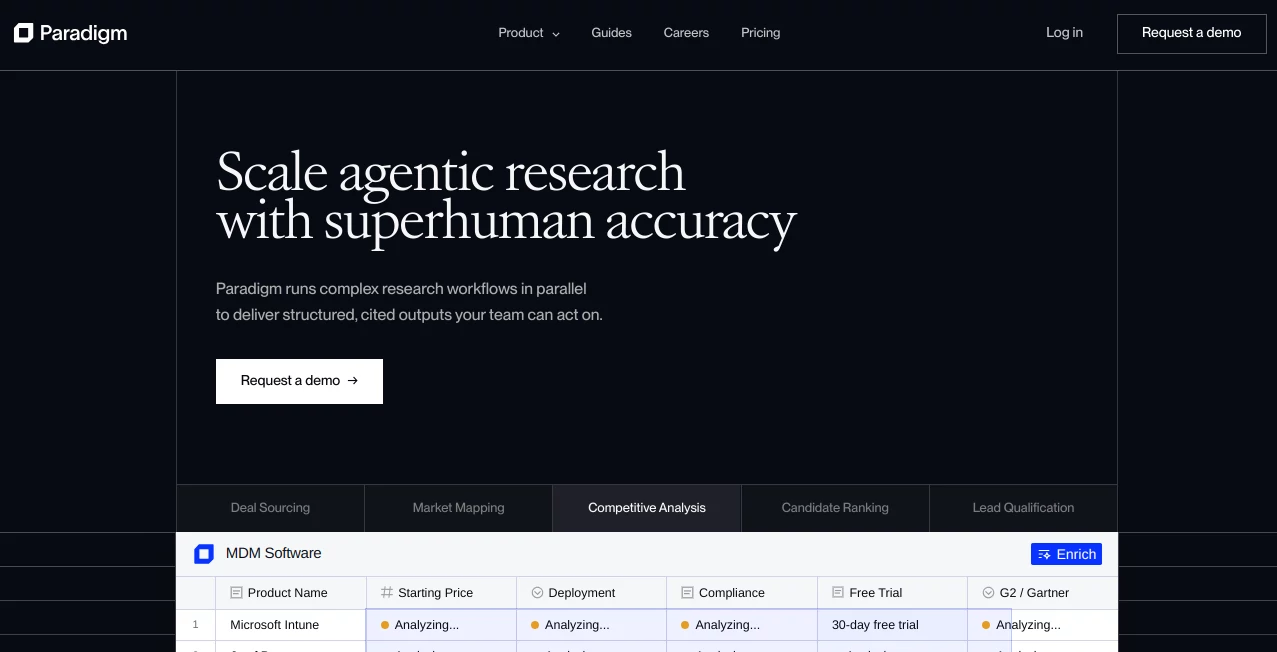
Paradigm is an AI-native workspace built around a familiar spreadsheet experience, but it goes well beyond traditional spreadsheets. Its main purpose is to take repetitive research and data-enrichment work off your hands, helping you gather information, organize it into structured datasets, and turn raw data into something useful.
The idea is particularly appealing for people who spend hours researching companies, investors, prospects, products, markets, research papers, or other structured information. Instead of repeatedly searching across different sources and manually copying findings into rows and columns, you can define what you want to collect and let AI handle much of the work.
For example, a growth researcher could start with a list of company websites and add columns for CEO, revenue, industry, funding, or competitive positioning. The workspace can then enrich those columns with relevant information. It feels less like using a chatbot and more like having a research assistant working directly inside a spreadsheet.
Key Features
- AI-powered research and data enrichment inside a spreadsheet-style workspace
- Natural-language chat for asking questions and building structured datasets
- Multiple research and data sources for people, companies, financial information, papers, news, social activity, and web data
- Prebuilt templates for company research, investors, recruiting, real estate, startups, stock analysis, travel planning, and more
- Custom columns and prompts for defining exactly what information should be collected
- Import and export capabilities for working with existing datasets
- Input and output webhooks for connecting research workflows with external systems
- Team workspaces with private, shared, and public sheet options
- Reusable templates that can be kept private, shared with a team, or published publicly
User Interface
The interface takes a sensible approach: it keeps the spreadsheet grid at the center instead of forcing users to learn an unfamiliar research environment. Rows and columns remain easy to understand, while AI features are available when they are actually needed.
The chat panel provides another way to interact with a dataset. You can ask questions about the information you are working with, request additional rows or columns, and combine different research tools. Keyboard shortcuts are also available for common actions, which is a nice touch for people who spend most of their day inside data-heavy workflows.
Templates make the first experience even easier. Rather than staring at an empty sheet and wondering where to begin, users can select a prepared workflow, inspect its columns, and adapt it to their own project.
Accuracy & Performance
Research automation is only useful when the resulting information is organized and traceable. The platform approaches this by combining AI agents with purpose-built research tools and external data sources. Its Cell Agent is designed specifically for enrichment, while Chat is better suited to structuring questions, creating columns, and reasoning through a dataset.
This distinction is practical. If you need to fill a column with information about hundreds of companies, using a dedicated enrichment workflow makes more sense than repeatedly asking a general chatbot the same question. The system can also provide source information when exporting enriched data, making it easier to understand where results came from.
Results can still depend on the availability and quality of the underlying sources, so important business decisions should always receive human review. The real advantage is the amount of repetitive research work that can be reduced.
Capabilities
The range of supported research tasks is one of the strongest parts of the platform. Available tools cover areas such as people search, company research, financial data, research papers, news articles, tweets, web scraping, and media information.
Templates extend these capabilities into ready-to-use workflows. There are examples for researching startups, tracking investors, analyzing stocks, comparing product prices, finding recruiting candidates, studying research papers, and planning travel. Users can also create their own templates by saving a sheet's column setup and prompts for repeated projects.
For teams with more advanced workflows, webhooks can push incoming information into a sheet or send enriched rows to external services. This opens the door to automated pipelines rather than keeping the tool as a standalone research application.
Security & Privacy
Security features vary by plan, which is important to consider before moving sensitive business workflows into the platform. Enterprise customers can receive advanced controls such as SAML or OIDC single sign-on, optional tenant isolation, and SOC 2 Type 2 coverage.
For email functionality, the service uses OAuth connections with Google or Microsoft rather than asking users to provide their email passwords. Its documentation states that it does not store email passwords, while OAuth tokens are encrypted and email sends are logged for auditing.
Workspace permissions also provide useful separation between private and team content. Individual sheets can be shared with selected people, teams, or made publicly accessible, giving organizations control over how research is distributed.
Use Cases
- Market Research: Build structured datasets about companies, industries, competitors, products, and markets without manually collecting every field.
- Sales Prospecting: Enrich lists of potential customers with company information, professional details, and other useful qualification data.
- Recruiting: Organize candidate information and enrich profiles with professional experience, projects, and related details.
- Investment Research: Track startups, investors, funding information, research papers, and stock-related data in a repeatable format.
- Competitive Analysis: Create custom columns for competitors and automatically investigate areas such as positioning, products, pricing, and company details.
- Research Operations: Turn recurring research processes into templates that can be reused by individuals or teams.
- Data Enrichment: Start with a simple list and progressively add AI-generated columns containing the information required for a particular project.
Pros and Cons
Pros:
- Combines spreadsheet workflows with AI research capabilities
- Useful for large-scale repetitive data collection
- Supports multiple external research and data sources
- Offers practical templates for common research scenarios
- Custom columns make workflows highly adaptable
- Supports CSV and XLSX export, including source information
- Webhooks allow integration with external workflows
- Team and enterprise features make it suitable for organizational use
Cons:
- The number of features may take some time to learn fully
- Research quality can vary depending on the underlying data sources
- Advanced capabilities are concentrated in higher-priced plans
- Heavy usage can require additional credits
- Some workflows still benefit from careful human verification
Pricing Plans
The platform offers four main plans: Starter, Pro, Business, and Enterprise.
- Starter: Free, with limited usage intended for trying the platform and validating small use cases.
- Pro: $20 per month, aimed at individuals and smaller teams with low-to-medium usage. It includes additional usage, data export, webhooks, and team capabilities.
- Business: $500 per month, designed for medium-to-high usage with premium AI capabilities, model selection, team features, analytics, and additional support.
- Enterprise: Custom pricing for organizations that need advanced security, dedicated support, custom data sources, SSO, and other enterprise-level controls.
Usage is credit-based, and more complex research operations can consume more credits than simple generations. Pro and higher plans can purchase additional credits, while enterprise usage is handled separately.
How to Use It
- Start with a template that matches your research goal, or create a blank sheet.
- Add or paste your initial data into the first column.
- Create enrichment columns describing the information you want to collect.
- Select the relevant cells and use the enrichment function to populate the dataset.
- Use Chat when you need to reason about the dataset, create new rows or columns, or ask questions about your research.
- Review the generated information and sources before using it for important decisions.
- Export the finished dataset as CSV or XLSX, or connect it to another workflow using webhooks.
Comparison with Similar Tools
Many AI research products are designed primarily around a chat window. That approach works well when the goal is to ask individual questions, but it becomes less convenient when the final result needs to be a structured dataset containing hundreds or thousands of records.
This platform takes a different route by making the spreadsheet the primary workspace. That makes it particularly interesting for researchers, sales teams, analysts, recruiters, and operators who already think in rows, columns, filters, and datasets.
It also sits somewhere between an AI spreadsheet and an automated research environment. The combination of custom enrichment columns, specialized research sources, reusable templates, and workflow integrations makes it more suitable for recurring data projects than a simple AI chat interface.
Conclusion
For anyone who regularly turns scattered online information into structured spreadsheets, this platform offers a genuinely useful change of workflow. Instead of treating research as a series of searches followed by hours of copying and organizing, it brings much of that process into one workspace.
The strongest use cases are not necessarily one-off questions. The real value appears when the same research process needs to be repeated: finding prospects, analyzing companies, tracking investors, studying markets, enriching recruiting lists, or building datasets for ongoing projects.
It will not remove the need for human judgment, particularly when research is used for financial, commercial, or strategic decisions. But as a way to reduce repetitive research and turn unstructured information into usable data, it is a compelling option for people who live in spreadsheets and need considerably more automation.
Frequently Asked Questions (FAQ)
What is this platform mainly used for?
It is designed for AI-powered research, data collection, enrichment, and organization. Users can create structured datasets from information gathered across different sources.
Can I use it for company research?
Yes. Company research is one of the supported workflows, and available tools can gather information about companies and enrich spreadsheet columns with additional details.
Does it support templates?
Yes. Templates cover areas such as companies, investors, LinkedIn research, price comparison, real estate, recruiting, research papers, startups, stock analysis, travel planning, and social profiles. Users can also create and share their own templates.
Can I export my research?
Yes. Data can be exported as CSV or XLSX files. Exporting with sources can also include the sources associated with enriched columns.
Does it integrate with external systems?
Yes. Input webhooks can bring data into sheets for enrichment, while output webhooks can send enriched rows to external services.
Is there a free plan?
Yes. The Starter plan is available at no monthly cost and provides limited usage for individuals who want to test the platform.
Is it suitable for teams?
Yes. Team features are available on paid plans, with additional collaboration, permissions, analytics, and enterprise controls available as the plan level increases.
AI Data Mining , AI Research Tool , AI Lead Generation , AI Spreadsheet .
These classifications represent its core capabilities and areas of application. For related tools, explore the linked categories above.

Paradigm Alternatives Product

Where Is Thi…

obbylist

GEO Checker

Geoleaper

Sales Prospe…

Skygen AI

MiniValuator

Lessie AI

FiveMinChat