


















Parlo
What is Parlo?
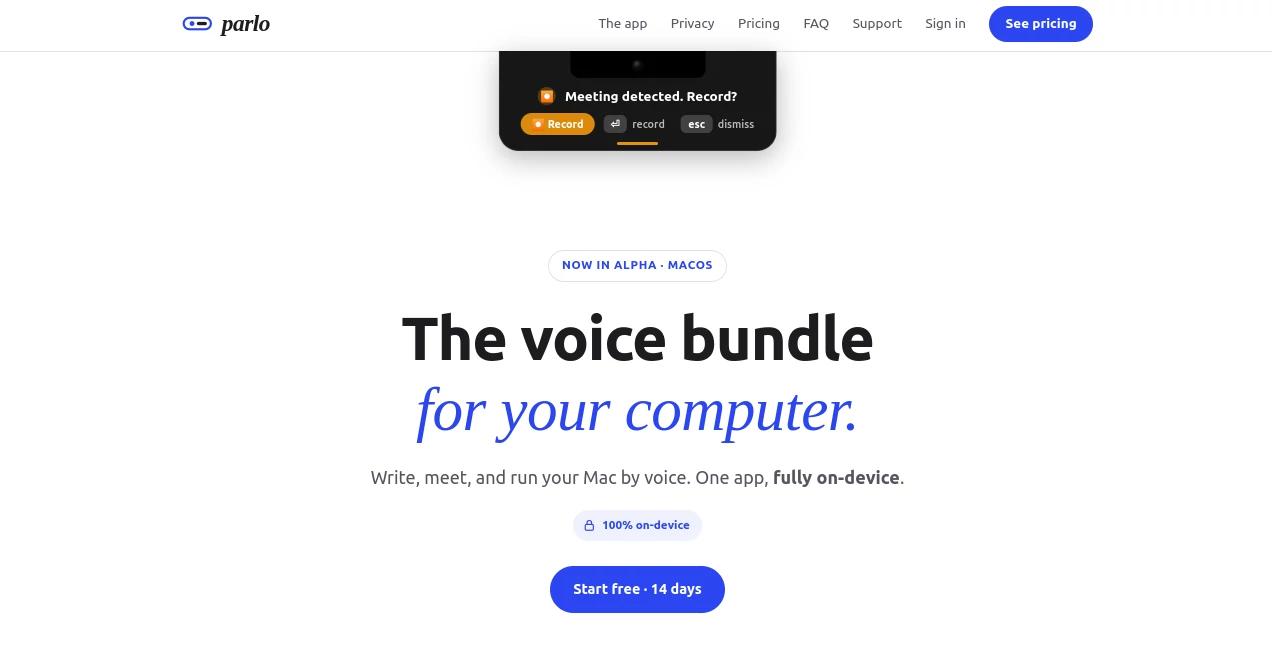
Parlo is a voice-first Mac application designed to make everyday computer work feel more natural. Instead of switching between separate dictation, meeting transcription, and automation tools, it brings writing, listening, and voice commands into one place. The app is currently in alpha and is built specifically for Apple Silicon Macs running macOS 26 or later.
The central idea is refreshingly simple: speak to your computer instead of constantly reaching for the keyboard. You can dictate text into virtually any app, capture meetings locally, turn conversations into organized notes, and use spoken commands for tasks such as opening applications, setting reminders, moving files, performing calculations, and answering quick factual questions.
What makes the approach particularly interesting is its emphasis on local processing. Speech and language models run directly on the Mac, allowing the core experience to work without an active internet connection. For people who deal with sensitive conversations, private documents, or simply prefer keeping their data close to home, that architecture is a meaningful advantage.
Key Features
- Voice dictation that works across Mac applications
- Automatic cleanup of fillers, false starts, and spoken punctuation
- Meeting detection and local meeting recording
- Automatic meeting transcripts and clean notes
- Voice commands for applications, reminders, files, calculations, and lookups
- On-device speech and language processing
- Offline support after the required model download
- No usage limits on the paid plan
- A lightweight interface designed to stay out of the way
User Interface
The interface follows a deliberately minimal approach. Rather than filling the screen with controls, the experience centers around a small pill near the Mac's notch, a menu bar icon, and a dedicated meetings library. Most of the interaction happens through voice.
For dictation, users can hold the Function key, speak naturally, and release it when finished. The resulting text can then appear in the application where they are already working. Meeting recordings and notes are accessible through the meetings library, while voice actions provide confirmation when a command could make a destructive change.
This restrained design is one of the product's strengths. It feels less like another dashboard to manage and more like a background utility that becomes available exactly when needed.
Accuracy & Performance
The dictation system is designed for natural speech rather than carefully rehearsed sentences. It can remove common fillers and false starts, recognize spoken punctuation, and handle self-corrections. For example, if someone says that a meeting should happen at two and then immediately corrects it to three, the final text can reflect the corrected statement rather than preserving the messy spoken version.
Because the core speech and language processing takes place locally, the experience is not dependent on sending audio to a remote server for every interaction. This can also help reduce the network-related delay associated with cloud-based voice services.
Capabilities
The application combines three major functions: writing, listening, and acting. The writing side provides system-wide voice dictation, making it useful for emails, documents, messages, notes, and other text-heavy work.
The listening side focuses on meetings. The application can recognize a call through a calendar invite or sustained microphone activity, ask whether the user wants to record, and capture microphone and system audio locally. Afterward, the recording can be turned into a transcript and organized notes, including useful meeting information such as decisions.
The action side is currently in active alpha. Users can issue commands such as opening an application, switching to Finder, setting a reminder, moving a file, calculating a percentage, or requesting a quick lookup. Commands that could cause a destructive change require confirmation before they are carried out, which adds an important layer of control.
Security & Privacy
Privacy is a major part of the product's architecture rather than simply an additional setting. Audio is designed to stay on the Mac, and the core dictation, meeting, and command features can operate offline after the one-time model download.
The company states that audio never leaves the computer and that spoken input is not logged. Meeting recordings are also processed locally and stored on the Mac rather than uploaded to a remote service.
There is one specific exception for factual questions. When a request needs an external factual source, such as a currency exchange rate or a general public fact, a short text query may be sent to public sources. The audio itself is not sent, and the local model handles the returned information.
Use Cases
Writing and communication: People who spend much of their day writing can dictate directly into their existing applications. This is especially useful for drafting emails, messages, notes, documents, and other material where speaking can be faster than typing.
Meetings: Remote workers, founders, managers, consultants, and teams can use the meeting functionality to capture conversations locally and turn them into searchable transcripts and notes.
Hands-free computer control: Simple computer actions can be performed through voice commands. Opening an application, switching windows, setting a reminder, or moving a file can become a spoken instruction rather than a series of clicks.
Privacy-conscious workflows: Professionals who are uncomfortable sending recordings or sensitive conversations to cloud services may appreciate the local-first architecture.
Fast everyday tasks: Quick calculations, reminders, application launches, and factual lookups can be handled without interrupting the current workflow.
Pros and Cons
- Pros: Combines dictation, meeting notes, and voice commands in one application.
- Pros: Core processing happens locally on the Mac.
- Pros: Works offline after the model has been downloaded.
- Pros: No usage limits are advertised for the paid membership.
- Pros: Minimal interface keeps the focus on the task.
- Pros: Destructive voice actions require confirmation.
- Cons: It is currently in alpha, so some features are still developing.
- Cons: The application requires macOS 26 or later.
- Cons: Apple Silicon is required and Intel Macs are not supported.
- Cons: Voice commands are still an active alpha feature.
Pricing Plans
The monthly membership costs $8 per month and includes writing, meeting functionality, and voice actions, with processing performed on-device and no usage limits. The price is also locked for subscribers who remain subscribed. A 14-day free trial is available, giving users a chance to test the workflow before committing.
There is also a limited Founder option priced at $80 as a one-time payment. It provides lifetime access without recurring billing and includes the same core membership features. Founder users also receive a direct line to the founder and can help influence the direction of the product during its early development.
The pricing is particularly notable when compared with assembling several separate applications for dictation, meeting transcription, and voice-based computer control. Bringing those functions together can make the $8 monthly option appealing to people who would otherwise maintain several subscriptions.
How to Use the Tool
Start by installing the application on a compatible Apple Silicon Mac running macOS 26 or later. After the initial model download, the main voice features can operate locally.
For writing, hold the Function key, speak naturally, and release it when finished. The spoken input is converted into cleaned-up text inside the application you are using.
For meetings, the application can identify a call through a calendar invitation or sustained microphone activity. When a meeting is detected, you can choose whether to record it. The microphone and system audio are captured locally, after which a transcript and notes are created for the meeting library.
For voice actions, hold the Function and Control keys together and give a command. Simple requests can include opening an application, switching to Finder, setting a reminder, moving a file, or performing a calculation. If an action could be destructive, confirmation is requested before it happens.
Comparison with Similar Tools
Traditional dictation applications generally focus on converting speech into text, while dedicated meeting assistants concentrate on recording conversations and generating transcripts or summaries. Automation tools, meanwhile, are designed around actions and workflows. The interesting distinction here is the attempt to combine all three experiences into a single Mac application.
It also takes a different approach to privacy from many cloud-first voice products. The core experience is designed around local processing rather than continuously streaming audio to remote servers. This makes it particularly attractive for users who want voice interaction without making cloud processing the default.
The product itself identifies Wispr Flow and Superwhisper as alternatives, but positions its offering around a broader combination of dictation, meeting notes, and voice commands rather than focusing on only one of those functions.
Conclusion
For Mac users who spend a large part of their day typing, attending meetings, and jumping between applications, the idea of controlling more of that workflow by voice is compelling. The combination of dictation, local meeting transcription, and voice commands gives the application a wider purpose than a conventional speech-to-text utility.
The local-first approach is arguably the biggest differentiator. Keeping the core audio processing on the computer, supporting offline use, and avoiding unnecessary audio uploads creates a workflow that feels especially suitable for privacy-conscious users.
There is still an early-stage element to the experience, particularly around voice commands, since the product is in alpha. Even so, the foundation is promising. Instead of treating voice as a small feature added to an existing application, it treats voice as a different way of interacting with the computer itself.
Frequently Asked Questions (FAQ)
Does it work without an internet connection?
Yes. Dictation, meeting processing, and voice commands can run locally after the one-time model download. Certain factual questions may use short text queries to public sources, but the audio is not sent for those requests.
Does it send audio to the cloud?
No. The product states that audio stays on the Mac and that meeting recordings are processed locally.
Can it clean up natural speech?
Yes. It can remove fillers and false starts, handle spoken punctuation, and apply corrections when the speaker changes their wording during dictation.
Can it control applications?
Yes. Its voice-command functionality can open applications, switch to Finder, create reminders, move files, perform quick calculations, and handle certain lookups. This feature is currently in alpha.
Can it create meeting transcripts?
Yes. It can detect meetings, offer to record them, capture microphone and system audio locally, and produce a transcript and organized notes.
What Mac computers are supported?
The application requires macOS 26 or later and an Apple Silicon Mac. Intel Macs are not supported.
Is there a free trial?
Yes. A 14-day free trial is available for the monthly membership.
Is there a lifetime plan?
Yes. A Founder option is offered for $80 as a one-time payment, providing lifetime access without recurring billing.
AI Meeting Assistant , AI Transcription , AI Speech to Text , AI Voice Assistants .
These classifications represent its core capabilities and areas of application. For related tools, explore the linked categories above.

Parlo Alternatives Product

EasyVC

ekstrakt

NepVox
TranscribeYT

Zeemo AI

Maestra

TurboScribe

AudioScribe

VoiceMOAT
