PDFtoMD
What is PDFtoMD?
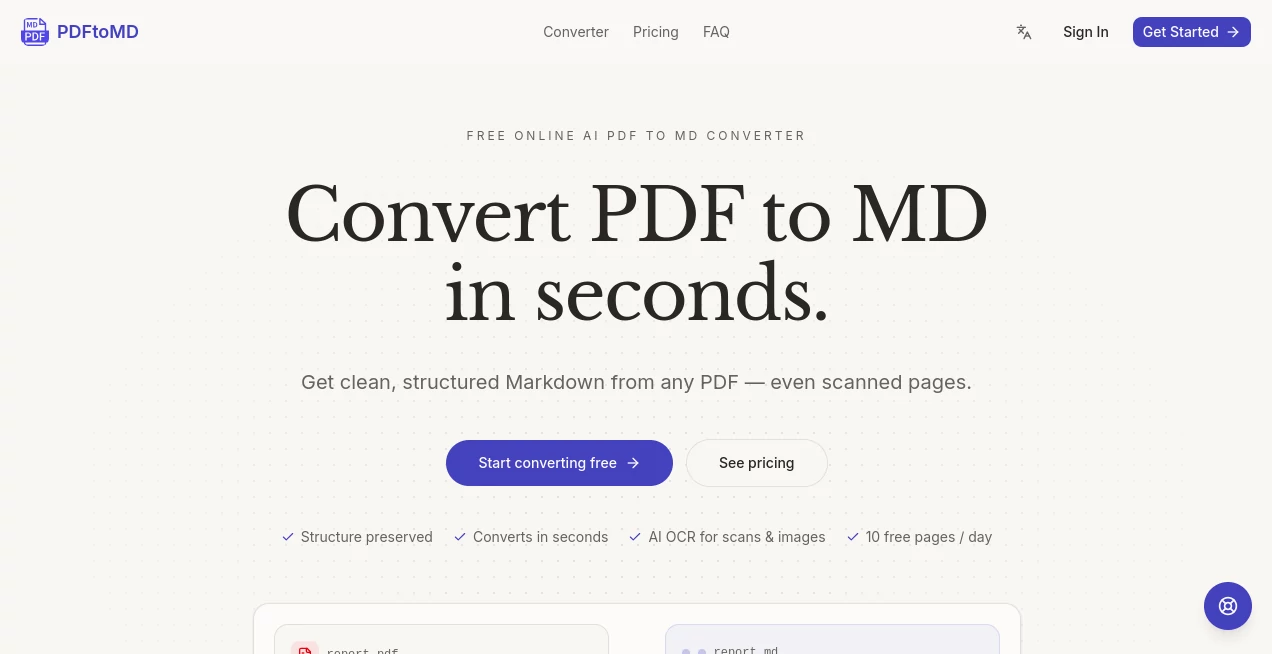
Working with PDF documents can be frustrating when the content needs to be edited, reused, or prepared for AI workflows. This tool solves that problem by transforming text-based PDF files into clean, structured Markdown directly inside your browser. Since the conversion runs locally on your device, documents remain private while the output is ready for documentation, note-taking, knowledge bases, or large language models.
Instead of copying and cleaning messy text manually, users can upload a PDF, review the generated Markdown, then copy or download the result in seconds. The workflow feels simple, yet the quality of the formatting makes a noticeable difference for developers, technical writers, students, and researchers who depend on well-structured content every day.
Key Features
User Interface
The interface is refreshingly minimal. Uploading a PDF requires only a drag-and-drop action or a simple file selection. After the local engine loads, the converted Markdown appears in a dedicated preview panel where it can be reviewed before being copied or downloaded. There are no unnecessary settings or distractions, making the experience accessible even for first-time users.
Accuracy & Performance
The converter is designed specifically for text-based PDFs and preserves document hierarchy whenever possible. Headings, lists, paragraphs, and tables are converted into readable Markdown that requires far less manual cleanup than traditional copy-and-paste methods. Because processing happens locally inside the browser, conversion is fast and responsive without waiting for server uploads. Scanned PDFs require OCR before conversion, ensuring the tool focuses on delivering the best possible results for selectable-text documents.
Capabilities
- Convert PDF documents into structured Markdown.
- Run entirely inside the browser without software installation.
- Generate Markdown suitable for documentation platforms.
- Prepare documents for AI assistants and RAG knowledge bases.
- Produce content compatible with Obsidian and GitHub workflows.
- Copy Markdown directly to the clipboard.
- Download generated files in .md format.
- Maintain headings, lists, and document organization whenever possible.
- Handle reports, manuals, academic papers, and exported documents.
- Reduce manual formatting work after conversion.
Security & Privacy
Privacy is one of the strongest aspects of this solution. Files are processed locally in the browser after the conversion engine loads, meaning documents are not uploaded to external servers during standard conversion. This approach is particularly valuable for confidential business files, internal documentation, research papers, and sensitive project materials that should remain under the user's control.
Use Cases
- Preparing documents for ChatGPT, Claude, and other AI assistants.
- Creating structured knowledge bases for RAG applications.
- Importing documentation into Obsidian.
- Publishing technical documentation with Markdown.
- Converting research papers into editable notes.
- Extracting structured content from business reports.
- Migrating PDF manuals into documentation systems.
- Reusing existing PDF content without formatting headaches.
Pros and Cons
Pros
- Completely browser-based workflow.
- No installation required.
- Excellent privacy through local processing.
- Fast conversion for text-based PDFs.
- Clean Markdown output suitable for AI applications.
- Simple interface with almost no learning curve.
- Copy and download options included.
Cons
- Scanned documents require OCR before conversion.
- Image-heavy PDFs may need additional processing.
- Complex layouts can occasionally require minor Markdown editing.
Pricing Plans
The converter is available as a free online service for standard PDF-to-Markdown conversion. Users can immediately upload supported PDF documents, generate Markdown locally, and download the results without creating an account. Additional OCR-related capabilities are presented separately for scanned documents.
How to Use PDF to MD
- Select a text-based PDF from your computer.
- Allow the browser to load the local conversion engine.
- Wait a few moments while the document is converted.
- Review the generated Markdown in the preview panel.
- Copy the content or download the Markdown file.
- Use the output in documentation, note-taking software, or AI workflows.
Comparison with Similar Tools
Many online PDF converters rely on cloud processing, requiring users to upload potentially sensitive documents to remote servers. This solution takes a different approach by performing the conversion locally within the browser, giving users greater confidence when handling private files.
Compared with traditional PDF-to-text converters, the generated Markdown retains much more useful structure, making it easier to edit and significantly more valuable for documentation systems, GitHub repositories, AI prompts, and knowledge management platforms. The specialized focus on Markdown also reduces cleanup work after conversion.
Conclusion
For anyone who regularly works with documentation, research material, technical manuals, or AI-powered workflows, this converter offers an elegant solution that saves both time and effort. Its privacy-first design, browser-based processing, and well-structured Markdown output create a workflow that feels practical from the very first use.
Whether the goal is preparing documents for large language models, building a searchable knowledge base, or simply making PDF content easier to edit, the combination of speed, simplicity, and local processing makes this tool a compelling choice for professionals and everyday users alike.
Frequently Asked Questions (FAQ)
Can it convert scanned PDFs?
Scanned documents require OCR before they can be converted effectively into Markdown.
Are my PDF files uploaded to a server?
No. Standard conversions are processed locally inside the browser, helping keep documents private.
What types of PDFs produce the best results?
PDFs containing selectable text such as reports, manuals, books, and exported documents typically generate the highest-quality Markdown.
Can I use the generated Markdown with AI tools?
Yes. The structured Markdown format is well suited for AI assistants, documentation systems, note-taking applications, and RAG knowledge bases.
Do I need to install any software?
No installation is required. Everything works directly inside a modern web browser.
AI Documents Assistant , AI Document Extraction , AI PDF , AI Productivity Tools .
These classifications represent its core capabilities and areas of application. For related tools, explore the linked categories above.

PDFtoMD Alternatives Product
AI text clea…

Notion
Referent

gpt-plus.ai

Video To Text

Read PDF Alo…

Flow Veo 3

Zush

Ryne AI