
Photolaria
What is Photolaria?
Editing a photo no longer has to mean opening a complicated editor and spending twenty minutes looking for the right tool. Photolaria takes a much simpler approach: upload a photo, describe the change you want, and let AI handle the transformation.
The browser-based editor is designed for practical image work rather than just generating pictures from scratch. You can change an outfit, replace a background, alter a hairstyle, remove an unwanted person, improve an old image, extend the edges of a photo, or create a more professional-looking portrait with a short text instruction.
One particularly useful detail is that you do not need to create an account before trying the editor. JPG and PNG images up to 10MB can be uploaded directly, making it easy to test the workflow before committing to a regular account.
For someone who simply wants to fix or transform an image without learning traditional editing software, this approach feels refreshingly straightforward.
Key Features
- AI-powered photo editing through natural-language prompts
- AI image generation directly in the browser
- Support for JPG and PNG uploads up to 10MB
- Multiple AI models, including Nano Banana, Nano Banana 2, Nano Banana Pro, and GPT Image 2
- Image generation and editing at up to 4K resolution
- Multiple aspect ratios including square, portrait, landscape, widescreen, and vertical
- Standard and Fast generation modes
- Built-in AI Assistant for creating and improving prompts
- Photo restoration and enhancement
- Background, clothing, hairstyle, lighting, and scene changes
- Image extension for expanding the original frame
- Private galleries and generated images
- Saved images and a temporary Bin for deleted images
- Daily free credits for continued experimentation
User Interface
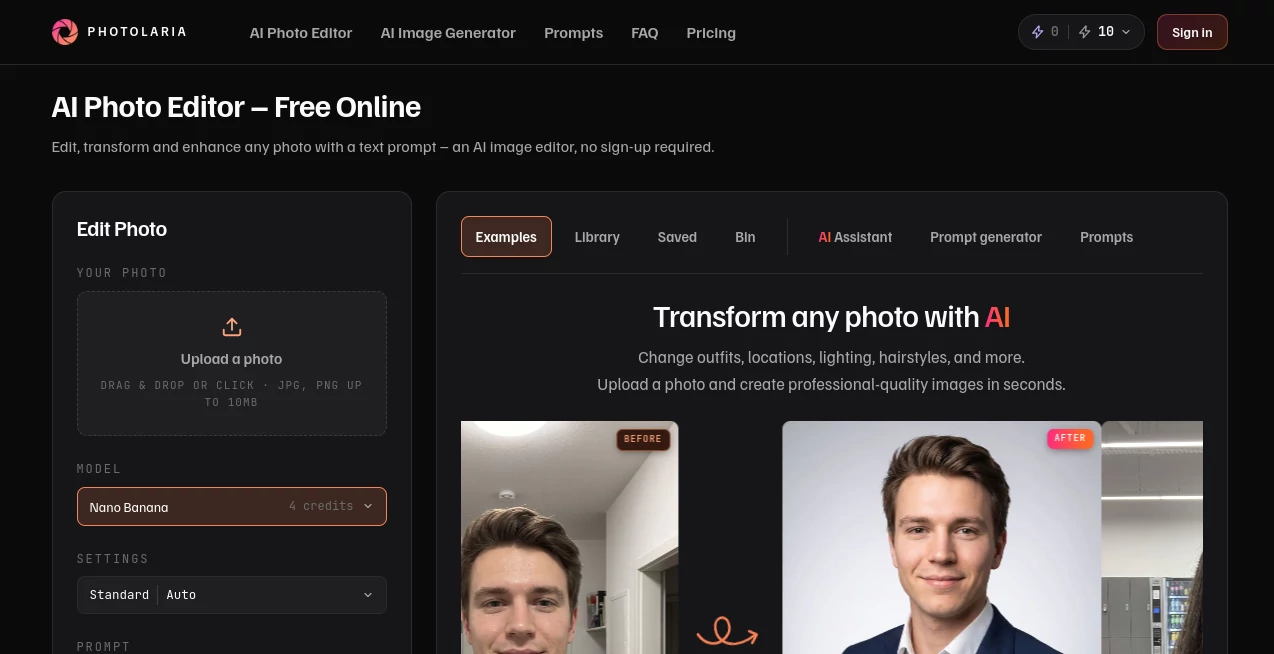
The interface keeps the main workflow in one place. Uploading a photo, choosing a model, selecting the output settings, and writing the prompt can all be handled from the editor without jumping between different applications.
The photo strip is also useful when an edit needs more than one reference. Users can refer to uploaded images as image 1, image 2, and so on. For example, a person from one photograph can be placed into the setting of another image.
There is also an AI Assistant built into the editor. Instead of struggling to describe a complicated edit, you can explain the idea in ordinary language and have the assistant turn it into a more usable prompt. It can also look at the uploaded photo and tailor the instruction to it.
Accuracy & Performance
The editor provides several model choices rather than forcing every task through a single generation system. Nano Banana is positioned as an affordable all-round option, while other available models provide different balances between quality, speed, and credit consumption.
Output resolution can be selected between 1K, 2K, and 4K where supported. Users can also choose between Standard and Fast generation. Standard mode is available broadly, while Fast generation is designed for quicker and more stable processing during busy periods.
The site estimates roughly 20 seconds for a typical photo edit, although actual processing time can vary depending on demand and the selected settings.
Capabilities
The strongest part of the platform is the range of changes that can be expressed with a simple instruction. A normal portrait can become a professional headshot, a distracting person can be removed, clothing can be changed, or an entirely different environment can be introduced without manually selecting and masking every element.
It is equally useful for creative experimentation. You can try a different hairstyle, change lighting, extend a cropped composition, or restore an older photograph. Because the workflow is prompt-driven, the same original image can be approached in several different ways without rebuilding the edit from scratch.
The platform also works as an image generator, giving users access to several current image models and different output resolutions. This makes it more versatile than a traditional one-purpose photo retouching tool.
Security & Privacy
Privacy is clearly addressed in the product's current workflow. Generated images and galleries are private, including on the free plan. Users can delete individual images or permanently remove their entire image history.
Deleted images are placed in a Bin for 30 days unless permanently removed sooner. Guest sessions also have automatic expiration, with images deleted after seven days when the service is used without an account.
The service states that users own the images they generate and that it does not claim ownership of those generations. Commercial usage rights are included for accounts, while guest sessions are intended for personal use. Users should still review the service's terms when an image is being used for an important commercial or legal purpose.
Use Cases
- Professional headshots: Turn an ordinary portrait into a cleaner, more polished professional image.
- Social media content: Quickly experiment with backgrounds, outfits, hairstyles, and different visual concepts.
- Product and marketing images: Adapt existing photographs for different scenes and promotional concepts.
- Photo restoration: Give older or damaged photographs a cleaner appearance.
- Background editing: Replace distracting surroundings or create a completely different setting.
- Creative photography: Explore alternative outfits, locations, lighting conditions, and compositions.
- Portrait experimentation: Test different hairstyles, clothing choices, and visual styles before making real-world changes.
- Image enhancement: Improve an existing photograph without relying on traditional editing software.
- Content creation: Prepare visual assets for websites, presentations, social posts, and other digital projects.
Pros and Cons
Pros
- Very simple prompt-based editing workflow
- No account is required to try the editor
- Daily free credits are available
- Several AI image models are available
- Supports outputs up to 4K
- Useful for both editing existing photos and generating images
- Built-in prompt assistance can help less experienced users
- Private galleries are available across plans
- Purchased credits do not expire
Cons
- Advanced models and higher resolutions consume more credits
- Standard generation can take longer during periods of high demand
- Users working with large numbers of images may need a paid plan
- Results can still depend heavily on the quality and clarity of the prompt
Pricing Plans
The service uses a credit-based system rather than charging separately for every individual feature. The free option provides daily credits, making it possible to experiment without immediately paying for a subscription.
- Free: 10 daily credits as a guest or 15 daily credits with a free account.
- Starter: 300 monthly credits.
- Pro: 1,200 monthly credits.
- Studio: 4,800 monthly credits.
Credit usage depends on the selected model and output resolution. For example, Nano Banana uses 4 credits per generation, GPT Image 2 starts at 6 credits for 1K output, and Nano Banana Pro uses 18 credits for 1K or 2K output and 36 credits at 4K.
There are also one-time credit packs for users who do not want a subscription. Purchased credits do not expire, which is useful for people whose image-editing needs come in occasional bursts rather than on a fixed monthly schedule.
How to Use Photolaria
Getting started is straightforward. Upload a JPG or PNG image, choose the AI model and generation settings, and describe the desired change in the prompt field.
For a simple edit, you might ask for a different background, a new outfit, improved lighting, or the removal of an unwanted person. If the edit involves multiple images, upload the required references and identify them as image 1, image 2, and so forth.
Users who are unsure how to phrase a complicated instruction can open the AI Assistant. It can turn a basic description into a more detailed prompt and can take the selected image and current editing settings into account.
Before generating, choose the desired aspect ratio and resolution. After processing, the resulting image can be reviewed and saved, while unwanted generations can be removed through the gallery and Bin controls.
Comparison with Similar Tools
There are plenty of AI image generators available, but the main distinction here is the emphasis on editing an existing photograph through natural-language instructions. Many image generators begin with a blank prompt and create something new. This workflow starts with an image you already have and lets you describe what should change.
That makes it particularly appealing for practical edits such as changing clothes, replacing scenery, improving a portrait, removing a photobomber, or extending an image. The presence of multiple models and resolutions also gives users more control than a basic one-model photo editor.
It is not necessarily the right choice for every professional imaging workflow. Designers who need detailed layer-based editing, advanced masking, typography controls, or extensive manual retouching may still prefer a traditional graphics application. But for prompt-driven transformations, quick improvements, and everyday creative experiments, the simpler approach can be a real advantage.
Conclusion
AI photo editing becomes much more approachable when the interface lets you describe the result instead of manually constructing it. That is where this tool makes the most sense. It combines photo editing, image generation, multiple AI models, prompt assistance, and flexible output settings in a browser-based workspace.
The free daily credits make it easy to test the experience, while subscription and one-time credit options give more frequent users room to create at a larger scale. Privacy controls, private galleries, data deletion tools, and support for commercial use on accounts also make the platform practical beyond casual experimentation.
For creators, marketers, photographers, social media users, and anyone who regularly needs to modify images, it offers a convenient alternative to more complicated editing workflows. Sometimes the most useful editor is simply the one that lets you say what you want and gets out of the way.
Frequently Asked Questions (FAQ)
Is the AI photo editor free to use?
Yes. A free option is available with daily credits. Guests receive 10 daily credits, while users with a free account receive 15 daily credits.
Do I need an account to edit a photo?
No. The editor can be used without signing up. However, creating a free account provides 15 daily credits, access across devices, and a persistent image history and gallery.
What image formats are supported?
The editor currently accepts JPG and PNG images up to 10MB.
Can I generate images in 4K?
Yes. The editor provides 1K, 2K, and 4K resolution options, with the exact availability and credit cost depending on the selected AI model.
Are generated images private?
Yes. Generated images and galleries are private across the available plans, including the free option.
Can I use generated images commercially?
Commercial usage rights are included for accounts. Guest sessions are intended for personal use, and users should review the applicable terms for specific commercial projects.
Do purchased credits expire?
No. One-time purchased credit packs do not expire, making them suitable for users who do not need a recurring subscription.
Can I delete my generated images?
Yes. Individual images can be deleted, or users can permanently remove their image history and data. Deleted images normally remain in the Bin for 30 days unless permanently deleted earlier.
AI Photo & Image Generator , Photo & Image Editor , AI Image to Image , AI Text to Image .
These classifications represent its core capabilities and areas of application. For related tools, explore the linked categories above.

Photolaria Alternatives Product

poseup

Flux.2 AI

Image Text E…
Ernie Image

ModelsLab
GPT Image 2

Flux 2 Cloud

Nano Banana 2

AIGAZOU