
Photo to Video AI
What is Photo to Video AI?
Photo to Video AI makes the jump from a still image to a moving video remarkably straightforward. Instead of working through a traditional editing timeline, users can upload a JPG, PNG, or WEBP image, describe the motion they want, select a supported video model, and generate an MP4 clip.
The workflow is particularly useful for creators who already have strong visual assets but need more video content. A product photograph can become a short promotional clip, a portrait can gain subtle movement, and artwork can be turned into a cinematic scene without requiring a camera or advanced editing skills.
One of the most useful details is the ability to see the credit cost before starting a generation. That makes experimentation easier to manage, especially when testing different models, durations, resolutions, or aspect ratios.
Key Features
- Convert photos, portraits, products, landscapes, and artwork into AI-generated videos.
- Use multiple supported image-to-video models, including Veo, Kling, Seedance, and Wan models.
- Add an optional motion prompt for subject movement, camera direction, or atmosphere.
- Choose supported duration, resolution, aspect ratio, frames, and sound settings depending on the selected model.
- Generate videos in common formats such as 9:16, 16:9, and 1:1.
- Preview the credit cost before launching a generation.
- Automatically receive credits back when a generation job fails.
- Export videos in MP4 format, with paid plans offering watermark-free output.
User Interface
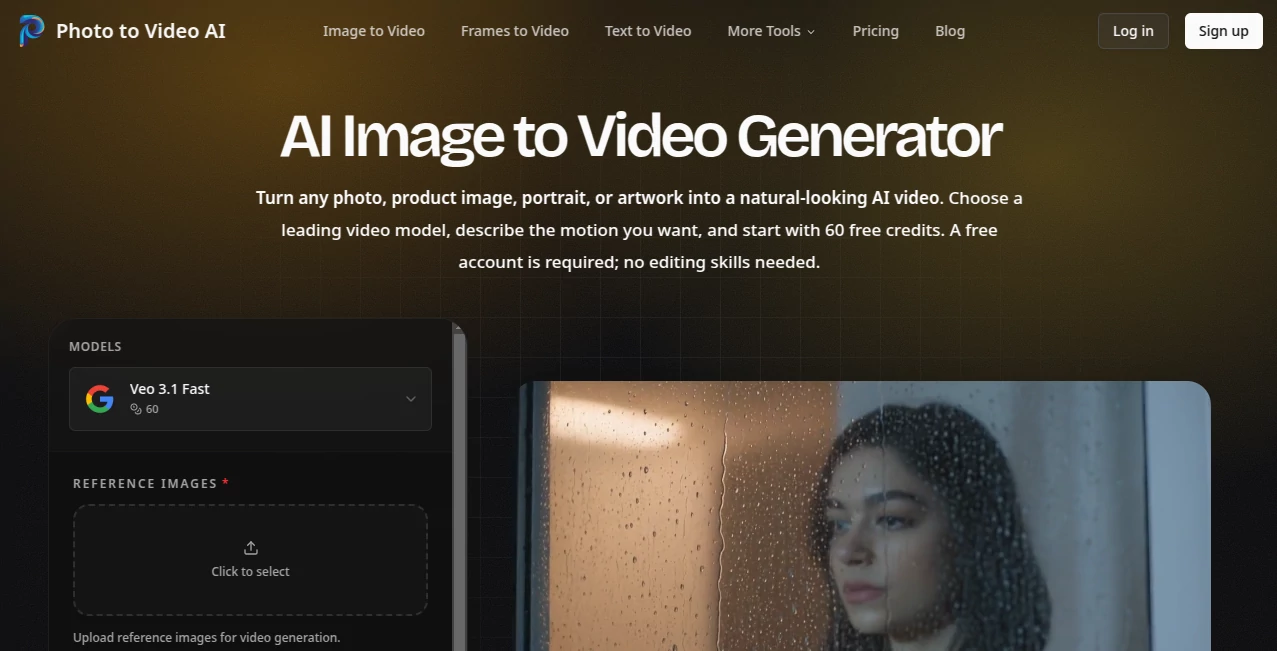
The interface is built around the task rather than packed with unnecessary editing controls. Uploading an image, adding a motion description, selecting a model, and choosing the output format are all part of the same focused workflow.
This simplicity is a real advantage for someone who has never used professional video software. A creator can upload a product image, write something like “slow camera push-in with soft studio lighting,” select the desired settings, and move directly to generation.
The aspect-ratio choices are also practical. Vertical output works well for TikTok, Instagram Reels, and YouTube Shorts, while widescreen output is better suited to YouTube and traditional video placements.
Accuracy & Performance
Video generation quality naturally depends on the selected model and the source image, but the workflow is designed to give the model a clear visual starting point. The uploaded image remains the visual reference while AI generates the movement around it.
Clear, well-lit images with an obvious main subject generally provide more predictable results. The platform also recommends keeping motion prompts focused on movement rather than repeatedly describing details that are already visible in the source image.
For example, a prompt such as “subtle head turn, slow camera movement, gentle breeze” gives the generation a much clearer direction than an unnecessarily long description of the entire photograph.
Capabilities
The strongest part of the platform is its flexibility across different types of visual content. Product photography can be transformed into ecommerce showcases, portraits can receive subtle animation, and existing artwork can become short cinematic sequences.
It also supports reference-image workflows, allowing creators to provide additional visual guidance when a project requires more than a single source image. Depending on the selected model, users can work with controls for duration, resolution, aspect ratio, frames, sound, and other generation settings.
Another practical feature is the ability to create different versions of the same visual asset. A single product photograph, for instance, can be adapted into a square product-page clip, a vertical social advertisement, and a widescreen promotional video.
Security & Privacy
The service states that subscription plans include unlimited encrypted history storage by default. This is useful for creators who need to return to previous generations rather than repeatedly rebuilding projects from scratch.
Users should still review the applicable privacy, terms, and acceptable-use policies before uploading sensitive personal or commercial material. As with any cloud-based creative service, it is sensible to avoid uploading files that you are not authorized to process.
Use Cases
E-commerce: Product photography does not have to remain static. Sellers can turn approved product images into short showcase videos featuring controlled camera movement, lighting changes, floating effects, or gradual zooms.
Social Media: Vertical 9:16 videos can be created from existing photos for TikTok, Instagram Reels, and YouTube Shorts. This makes it easier to build a larger content library without arranging a new shoot for every post.
Portrait Animation: Personal portraits and selfies can be given subtle movement such as a gentle head turn, changing expression, hair movement, or atmospheric lighting.
Marketing Campaigns: Brands can reuse existing photography to produce video assets for advertisements, landing pages, and email campaigns. This can reduce the need for separate video production for every campaign variation.
Memories and Personal Projects: Family photographs, old portraits, landscapes, and other personal images can be transformed into short animated memories with restrained movement.
Creative Projects: Illustrators, designers, and visual artists can experiment with turning static artwork into moving scenes without having to animate every frame manually.
Pros and Cons
Pros
- Very focused image-to-video workflow.
- Multiple AI video models available from one interface.
- Optional motion prompting gives users additional creative control.
- Useful aspect-ratio options for different publishing platforms.
- Credit cost is shown before generation.
- Failed generations automatically return the charged credits.
- Free account includes 60 credits with no credit card required.
- Paid plans provide watermark-free exports and higher-resolution options.
Cons
- Anonymous generation is not available; an account is required.
- Free-credit videos include an evaluation watermark.
- Generation results can vary depending on the source image and selected model.
- High-volume creators may need a paid subscription or additional credit packs.
- Some controls depend on the capabilities of the selected video model.
Pricing Plans
A free account provides 60 credits to test the workflow without requiring a credit card. Free-credit generations include an evaluation watermark, while paid plans unlock additional generation capacity, watermark-free output, higher-resolution options, and commercial-use rights under the applicable terms.
The Basic plan costs $15.90 per month and includes 1,200 credits, with up to 20 video generations each month. It also provides access to available models, encrypted history storage, customer support, and watermark-free exports.
The Pro plan costs $29.90 per month and provides 3,000 monthly credits, with up to 50 video generations. It is aimed at creators who need more frequent generation and faster iteration.
The Max plan costs $69.90 per month and includes 8,000 credits, with up to 133 video generations. It is positioned for teams and users producing a larger volume of content.
For occasional extra usage, a 600-credit pack is available for $9.90 and remains valid for 30 days. Yearly billing is also available at a discounted rate compared with paying monthly.
How to Use It
1. Upload an image. Sign in to a free account and upload a JPG, PNG, or WEBP image. A product photograph, portrait, landscape, or illustration can all serve as the starting point.
2. Describe the motion. Add an optional prompt explaining how the subject, camera, lighting, or environment should move. If no prompt is provided, the selected model can infer movement from the image.
3. Choose your settings. Select an available video model and adjust the supported duration, resolution, aspect ratio, frames, or sound settings. The estimated credit cost is displayed before generation.
4. Generate and review. Start the generation and inspect the resulting clip. If the movement is not quite right, simplify the prompt or change one variable before trying again.
5. Download the video. Once the result meets your expectations, download the generated MP4 and prepare it for your website, social platform, advertising campaign, or other project.
Comparison with Similar Tools
Many AI video platforms attempt to cover everything from text-to-video to timeline editing. This approach is useful for large production workflows, but it can feel excessive when the goal is simply to animate an existing image.
This platform takes a more focused route. Its central workflow starts with an image, while multiple supported models give users room to compare different generation approaches. The visible credit pricing is another useful distinction because creators can check the expected cost before committing to a generation.
It is therefore particularly attractive to users who already have their visual assets and want a straightforward bridge from still photography to short-form video. Someone looking for a complete nonlinear video editor may need a different type of product, but for image-to-video generation, the narrower workflow is a strength rather than a limitation.
Conclusion
Turning a good photograph into useful video content no longer needs to involve a camera crew, complex animation software, or a lengthy editing process. This platform keeps the process centered on the visual asset: upload the image, describe the movement, choose the model and settings, and generate.
Its combination of multiple video models, practical output formats, visible generation costs, free starter credits, and automatic refunds for failed jobs makes it an appealing option for creators and businesses experimenting with image-to-video production.
For ecommerce sellers, social media creators, marketers, designers, and anyone with a collection of strong photographs, it offers a practical way to turn static content into something more dynamic without adding a traditional video-production workflow.
Frequently Asked Questions (FAQ)
Is it free to try?
Yes. A new free account receives 60 credits, and no credit card is required to get started. Free-credit videos include a small evaluation watermark.
What image formats are supported?
JPG, PNG, and WEBP images are supported for the standard image-to-video workflow.
Can I control how the image moves?
Yes. Users can provide an optional motion prompt describing subject movement, camera direction, lighting, or atmosphere. Keeping the prompt focused on motion usually produces more predictable instructions.
Can I choose different AI video models?
Yes. The platform supports multiple image-to-video models, including models from Google, Kling, ByteDance, and Alibaba, with available options depending on the current workflow and model support.
What aspect ratios are available?
Supported output options include 16:9 and 9:16, while 1:1 is available for supported workflows. This makes the generated content suitable for different publishing environments.
Are failed generations charged?
Failed generation jobs are automatically refunded, so credits charged for an unsuccessful generation are returned to the account.
Does it support product images?
Yes. Product photographs can be converted into ecommerce showcases, social advertisements, launch clips, and other promotional video variations.
Can the generated videos be used commercially?
Paid plans unlock commercial-use rights according to the applicable terms, while free-credit generations are intended for evaluation and include a watermark.
Is video editing experience required?
No. The workflow does not require a traditional video-editing timeline or professional editing skills. The main steps are uploading an image, optionally describing the desired motion, selecting settings, generating, and downloading the result.
AI Image to Video , AI Video Generator .
These classifications represent its core capabilities and areas of application. For related tools, explore the linked categories above.
Photo to Video AI details
Website unavailable — View Alternatives
Pricing
- Freemium
Apps
- Web App
Categories

Photo to Video AI Alternatives Product

Zilivo AI

Kling 5.0

Fuser Studio

Kling 4.0 AI

Seedance 2.5…

ImgVid

ImageVids AI

Fiddl.art

Seedance 2.0…