
PixResolve
What is PixResolve?
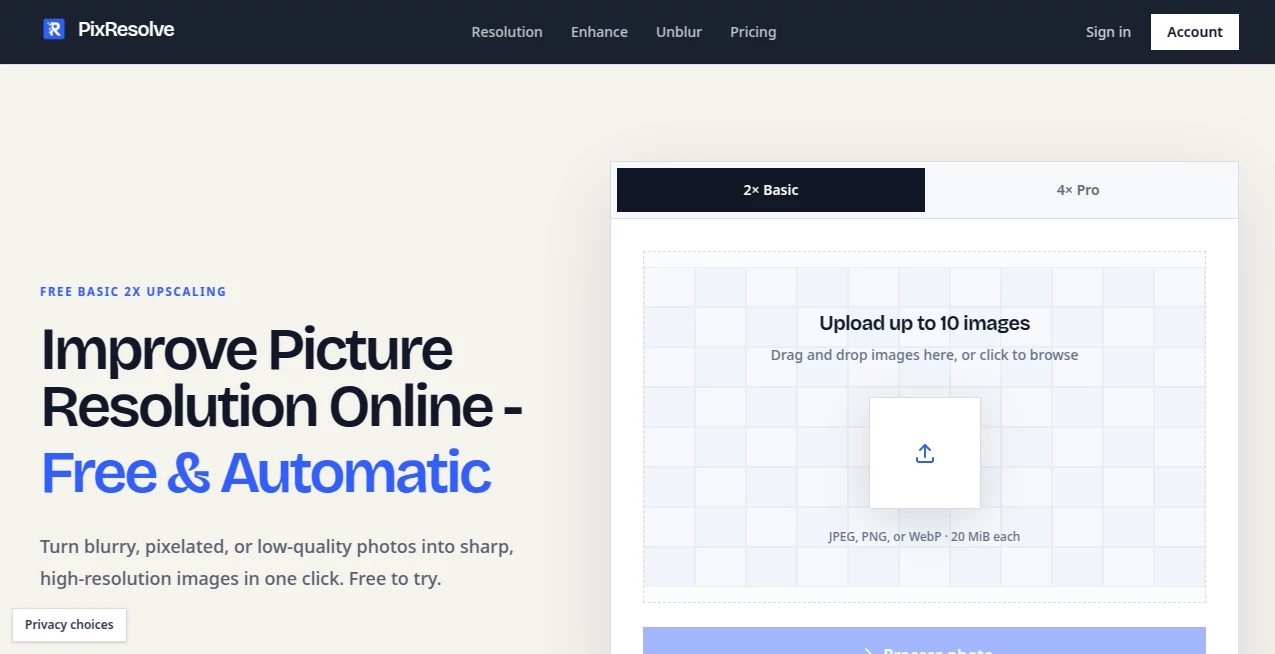
PixResolve is an AI-powered image enhancement tool designed for people who need to make blurry, pixelated, compressed, or low-resolution photos clearer without opening complicated desktop editing software. The service focuses on a straightforward workflow: upload an image, choose an enhancement level, process it, and download the result.
It supports JPEG, PNG, and WebP files, with uploads of up to 10 images and a 20 MiB limit per image. The free experience includes 2x basic upscaling, while the paid option adds 4x enlargement and additional processing capabilities. Results are delivered without watermarks, which makes the service particularly practical for everyday photo cleanup and image preparation.
Key Features
- AI-powered 2x image upscaling on the free plan.
- 4x upscaling for Pro users.
- Support for JPEG, PNG, and WebP images.
- Batch processing of up to 10 images with Pro.
- Automatic enhancement for pixelation, noise, and overexposure.
- Unblur processing for motion blur and camera shake.
- No watermark on processed images.
- Private image handling with automatic deletion after 24 hours.
- One-click processing without a complicated editing interface.
User Interface
The interface is refreshingly simple. Instead of filling the screen with adjustment panels, sliders, and technical controls, the main workflow centers around uploading an image and selecting the desired enlargement level. A drag-and-drop upload area accepts supported files, while the processing controls clearly distinguish between Basic 2x and Pro 4x output.
This approach works especially well for someone who simply wants a better-looking image rather than a lesson in photo editing. You can upload a photo, process it, and compare the output without having to understand sharpening masks, interpolation settings, or advanced retouching tools.
Accuracy & Performance
AI upscaling is most useful when the original image still contains recognizable edges, textures, and shapes. The service is designed around that principle rather than promising to magically recreate information that was never captured. Its own guidance recommends starting with the largest original image available and trying 2x before moving to 4x.
This matters with faces, lettering, hair, and repeating patterns, where aggressive enlargement can sometimes produce details that look convincing but are not actually present in the source. For ordinary low-resolution photographs, screenshots, compressed images, and older pictures, the enhancement workflow can provide a noticeably cleaner starting point.
Capabilities
The platform goes beyond simple resizing. Its enhancement system can address issues such as pixelation, noise, and overexposure while its dedicated unblur capability is intended for motion blur and camera-shake problems. Large images can also be processed using tiled 2x enlargement for Pro users.
The service uses fixed AI model releases for its processing, which keeps the experience predictable instead of presenting users with a long list of technical model choices. That is a useful design decision for anyone who wants the result without having to experiment with different AI models.
Security & Privacy
Privacy is one of the more clearly stated parts of the service. Uploaded source and result images are kept in private storage, and the service says that images are automatically scheduled for deletion after 24 hours. Original filenames and personal details are excluded from the private object keys, and source metadata is removed during processing.
The service also states that customer images are not used to train its own models. AI processing involves an external model-processing provider, so users handling particularly sensitive material should still review the privacy terms before uploading it. The overall approach, however, is notably more privacy-conscious than a typical casual image editor.
Use Cases
There are plenty of situations where an AI image upscaler can save time. Someone might have an old family photograph that looks soft after years of copying and resizing. A social media manager may need a cleaner version of a compressed image before using it in a campaign. An online seller might have product photographs that need a little more clarity before being added to a listing.
It can also be useful for restoring images downloaded from messaging applications, improving small web images, preparing photographs for larger displays, and cleaning up pictures affected by compression or digital zoom. For designers, photographers, and casual users alike, the biggest advantage is the ability to handle these jobs without moving into a full professional editing application.
Pros and Cons
Pros
- Simple browser-based workflow.
- Free 2x enhancement is available without a credit card.
- 4x enlargement is available with Pro.
- No watermark on results.
- Supports common JPEG, PNG, and WebP formats.
- Batch processing is available for Pro users.
- Images are automatically scheduled for deletion after 24 hours.
- Credit packs do not expire.
Cons
- AI enhancement cannot recover genuine detail that was never present in the original image.
- Advanced 4x processing requires a paid option.
- The unblur feature consumes considerably more credits than standard enhancement.
- Very damaged or extremely small source images may still produce limited results.
Pricing Plans
The free plan costs $0 and does not require a credit card. Free members can receive three successful results per rolling 24-hour period, with 2x enhancement available alongside fixes for issues such as noise, pixelation, and overexposure. A free account also unlocks the unblur feature and includes 30 bonus credits for seven days.
The Pro plan is priced at $9 per month when billed monthly, or $7.50 per month when billed annually at $90 per year. It includes 500 credits each month, 4x upscaling, large-image 2x processing, unblur processing, and batch processing for up to 10 images.
For occasional users, one-time credit packs are also available. The available options are 100 credits for $4.99, 400 credits for $14.99, and 1,000 credits for $29.99. These credits do not expire, making them a sensible alternative for people who only need occasional image fixes.
How to Use PixResolve
- Open the image enhancement tool in your browser.
- Upload a JPEG, PNG, or WebP image using the upload area.
- Choose Basic 2x enhancement or the Pro 4x option when available.
- Start the processing job and wait for the AI enhancement to finish.
- Compare the processed image with the original.
- Download the result if it meets your expectations.
For the best outcome, start with the highest-quality original you have. Avoid using a screenshot or an image that has already passed through several rounds of compression. When possible, test 2x first and inspect important areas such as faces, text, hair, and fine patterns before deciding whether a stronger enlargement is worthwhile.
Comparison with Similar Tools
Traditional image resizing tools primarily change the dimensions of an image through interpolation. That can make an image larger, but it does not necessarily make the underlying details appear clearer. Professional desktop editors go much further by offering sharpening, masks, noise reduction, color controls, and detailed export settings, although they also require more time and technical knowledge.
This service sits between those two approaches. It is more focused than a conventional resize function but considerably easier to use than a full photo-editing application. The fixed AI workflow is particularly appealing for users who want a practical result rather than a collection of advanced controls.
Conclusion
For anyone dealing with low-resolution photographs, compression damage, pixelation, or mild blur, this AI upscaling service offers a convenient way to improve images without installing professional editing software. Its strongest qualities are the uncomplicated workflow, free 2x enhancement, watermark-free results, and clearly defined privacy and deletion practices.
The free option makes it easy to test the results before paying, while Pro and one-time credit packs provide more flexibility for heavier use. It is not a replacement for professional restoration in every situation, but for everyday image enhancement, it provides a focused and approachable solution.
Frequently Asked Questions (FAQ)
Can I improve picture resolution for free?
Yes. Free members can process successful Basic 2x results within the service's daily limits, and no credit card is required to start. A free account also unlocks additional functionality.
How much can I upscale an image?
Basic enhancement provides 2x upscaling, while Pro provides 4x upscaling. Large-image 2x processing is also available to Pro users and consumes additional credits.
Does AI upscaling restore missing details?
AI can improve the appearance of edges, textures, and other recognizable structures, but it cannot genuinely recover information that was never captured. This is why starting with the best available original image is important.
What image formats are supported?
The service accepts JPEG, PNG, and WebP images, with individual uploads limited to 20 MiB and subject to source and output constraints.
Are uploaded photos stored permanently?
No. Source and result images are kept private and are scheduled for deletion after 24 hours. The service also states that it does not use customer images to train its own models.
Does the service add a watermark?
No. Processed results are provided without a watermark, including images produced through the free experience.
Is there a subscription?
Yes. Pro is available at $9 per month when billed monthly or $7.50 per month when billed annually. One-time credit packs are also available for users who do not want a recurring subscription.
Photo & Image Editor , AI Photo Enhancer , AI Photo Restoration , AI Image to Image .
These classifications represent its core capabilities and areas of application. For related tools, explore the linked categories above.

PixResolve Alternatives Product

Image Text E…
Z image AI

RemoveLayer

Flux Kontext…

Roblox Man F…

Nano Banana 2

AIImageEdit

poseup

UnblurImage …