

















PixRestorer
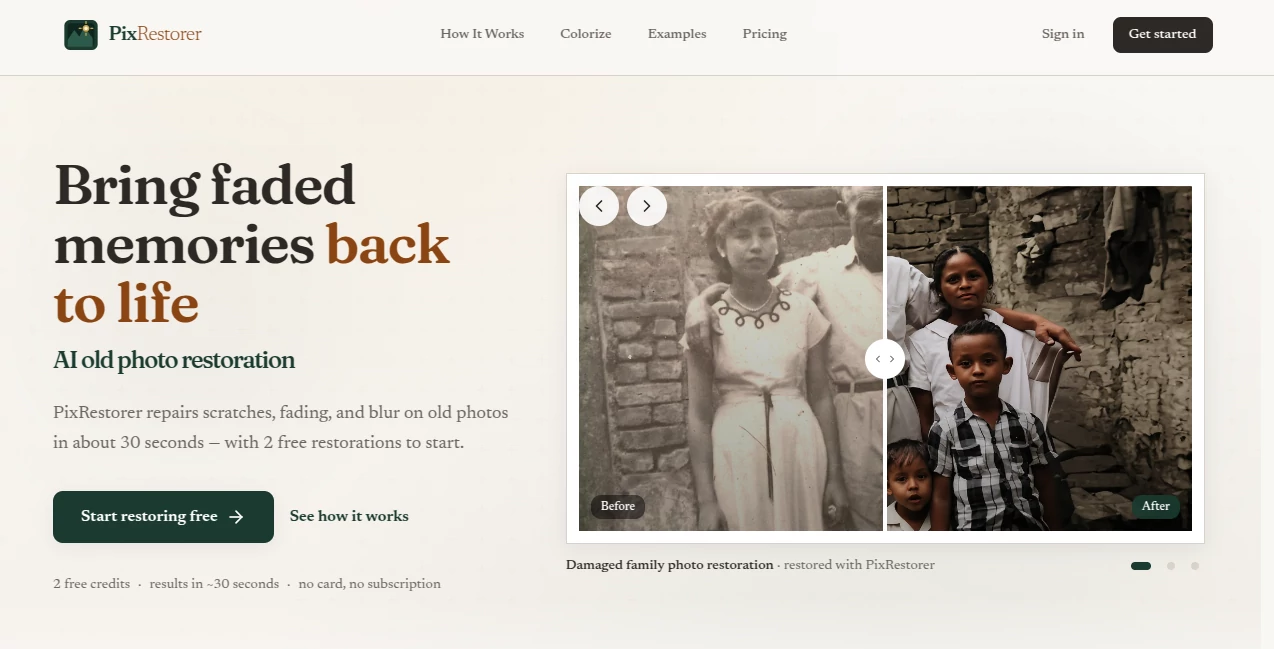
What is PixRestorer?
Old photographs have a way of carrying more meaning than their condition suggests. A faded family portrait, a scratched wedding picture, or a blurry snapshot from decades ago can still hold an important memory. PixRestorer makes it possible to give those images a second life without requiring professional photo-editing skills.
The service focuses specifically on restoring aging photographs with AI. It can repair common problems such as scratches, tears, fading, blur, and noise, while also offering colorization for black-and-white images and HD upscaling when additional clarity is needed. Most restorations are completed in around 30 seconds, making it a practical option for anyone working through a small collection of old photos.
Key Features
- AI-powered restoration for faded, scratched, torn, and blurry photographs
- Automatic removal of scratches, creases, marks, and other common damage
- AI colorization for black-and-white photographs
- HD upscaling up to 4x for larger and sharper images
- Before-and-after preview for checking the result
- Support for JPG, PNG, and WebP files
- Batch processing for up to 10 photographs at once
- Fast processing with most images completed in under 30 seconds
- No monthly subscription required
- Two free credits for new users to test the restoration process
User Interface
The interface keeps the restoration process refreshingly simple. There is no need to learn layers, masks, brushes, or complicated editing controls. Users can drag and drop an image or select one from their device, then let the automated workflow handle the difficult part.
The upload tool accepts JPG, PNG, and WebP images up to 15 MB. Users can submit a single photograph or process up to 10 images in one batch, which is particularly useful when digitizing an old family album.
The before-and-after presentation is another useful touch. Instead of downloading an image and discovering later that the result is not what was expected, users can compare the original and restored versions before saving the finished file.
Accuracy & Performance
Restoration quality depends heavily on the original photograph, but the system is designed to address several of the problems that commonly affect vintage images. It analyzes scratches, fading, blur, tears, and surrounding image information to reconstruct damaged areas while keeping the photograph's overall appearance natural.
Speed is one of its strongest practical advantages. Most photographs can be processed in less than 30 seconds, which makes the service much more convenient for everyday restoration projects than manually repairing every damaged area in traditional editing software.
For example, someone preparing a collection of grandparents' photographs for a family gathering can restore several images without spending an evening manually cleaning individual scratches or adjusting faded colors.
Capabilities
The restoration workflow goes beyond simply increasing sharpness. It can address physical damage such as scratches, creases, tears, and marks, while also improving faded colors and soft or noisy images.
Black-and-white photographs can be colorized using context-aware AI that considers elements such as faces, clothing, landscapes, and objects when predicting colors. This makes the colorization more useful than applying a simple color filter across the entire image.
There is also an optional HD upscale feature that can enlarge and sharpen a restored image by up to 4x. This is helpful when the final photograph needs to be viewed on a larger screen or prepared for printing.
Security & Privacy
Privacy is especially important when dealing with personal photographs. The service states that uploaded images are processed securely and deleted after restoration. Its restoration workflow is also designed around temporary processing rather than keeping users' memories stored indefinitely.
The service's terms further state that users retain ownership of the photographs and images they upload. This is an important consideration for family archives, personal portraits, and other photographs that users may not want permanently retained by an online service.
Use Cases
This tool is particularly useful for people who have boxes of old photographs but little experience with photo editing. A family can scan an album, upload the images, remove visible damage, improve faded details, and create cleaner digital copies without hiring a professional for every photograph.
It can also be useful for memorial projects, anniversary gifts, family reunions, genealogy collections, and personal archives. Someone preparing a framed portrait of a relative, for instance, may benefit from restoring scratches and improving clarity before printing the image.
For larger personal projects, batch processing makes the workflow more convenient. Up to 10 photographs can be submitted together, allowing users to work through an album in manageable groups rather than handling every image individually.
Pros and Cons
- Pros: Very simple workflow with no advanced editing knowledge required.
- Pros: Most restorations are completed in about 30 seconds.
- Pros: Handles scratches, tears, fading, blur, and noise.
- Pros: Includes black-and-white colorization and optional HD upscaling.
- Pros: Supports batch processing of up to 10 photos.
- Pros: New users receive two free credits without needing a credit card.
- Pros: Pay-as-you-go pricing avoids a recurring subscription.
- Cons: AI reconstruction cannot guarantee historically accurate details when large portions of an image are completely missing.
- Cons: More severe restoration projects may still benefit from professional manual retouching.
Pricing Plans
The pricing model is built around one-time credits rather than a monthly subscription. New users can start with two free credits, giving them an opportunity to test the restoration quality before spending money.
A standard restoration uses one credit per photograph. Colorization also uses one credit per photo, while HD upscaling requires an additional credit. The smallest paid pack starts at $5 for 10 credits, which works out to approximately $0.50 per standard restoration before optional extras.
One of the most appealing parts of the pricing structure is that credits do not expire. Someone who only restores photographs occasionally can buy credits once and return to them later instead of paying for a subscription during months when the service is not needed.
How to Use PixRestorer
Start by selecting an old, faded, scratched, or blurry photograph from your device. JPG, PNG, and WebP formats are supported, with files up to 15 MB. For printed photographs, a clean high-resolution scan can provide better source material for the restoration process.
Upload the image and let the AI analyze the photograph. The system automatically works on common problems such as scratches, fading, blur, and tears. Most images are ready in under 30 seconds.
Once processing is complete, review the before-and-after result. If the image needs additional enlargement and clarity, the HD upscale option can be used. Black-and-white photographs can also be sent through the colorization workflow when a color version is desired.
Finally, download the restored image and keep the improved digital copy alongside the original. For important family archives, keeping the untouched original is always a good idea.
Comparison with Similar Tools
The main difference between this type of dedicated restoration service and traditional photo-editing software is the amount of manual work required. Professional editing applications offer far more control, but they can require considerable time and experience when repairing scratches, rebuilding damaged areas, and correcting faded photographs.
A dedicated AI restoration workflow is better suited to users who want a quick result without learning advanced editing techniques. The service reports restoration times of around 30 seconds, while manual workflows can take considerably longer depending on the condition of the photograph.
The pay-as-you-go model is another notable distinction. Instead of committing to a recurring software subscription, occasional users can purchase credits when they have photographs to restore. That makes the approach particularly attractive for small family projects and occasional archival work.
Conclusion
Restoring an old photograph should not require becoming a professional photo editor. This service brings together damage removal, fading correction, colorization, sharpening, and upscaling in a workflow that is approachable even for first-time users.
Its biggest strength is the balance between speed and simplicity. A photograph that has spent decades collecting scratches, losing color, or becoming difficult to recognize can be processed in seconds, while the pay-as-you-go model keeps the service practical for people who only need restoration from time to time.
For family albums, personal archives, gifts, memorial projects, and everyday attempts to preserve photographs that might otherwise continue deteriorating, it is a compelling option worth trying before turning to more expensive or complicated restoration methods.
Frequently Asked Questions (FAQ)
What types of photos can be restored?
The service is designed for old and damaged photographs affected by fading, scratches, tears, creases, blur, noise, and low resolution. It can also colorize black-and-white photographs.
What input formats are supported?
JPG, PNG, and WebP files are supported. The upload tool accepts files up to 15 MB. High-resolution scans are recommended when available because better source images generally provide more information for the restoration process.
How long does restoration take?
Most photographs are restored in under 30 seconds. Actual processing time can vary depending on the image and the selected operation.
Can black-and-white photos be colorized?
Yes. The AI colorization feature can add predicted natural colors to black-and-white photographs. Colorization uses one credit per photo.
Can I restore several photos at once?
Yes. The restoration upload tool supports batch processing of up to 10 photographs at a time.
Does HD upscaling cost extra credits?
Yes. A standard restoration uses one credit, while HD upscaling requires one additional credit per image.
Do credits expire?
No. Purchased credits do not expire, so users can save unused credits for a future restoration project.
Is a subscription required?
No. The service uses one-time credit packs rather than a recurring monthly subscription.
Can I try the restoration before paying?
Yes. New users receive two free credits after signing in, allowing them to test the restoration workflow before purchasing additional credits.
Are uploaded photographs kept on the servers?
The service states that photographs are processed securely and deleted after restoration. Its privacy-focused workflow is designed to avoid permanent storage of users' uploaded memories.
Can AI perfectly reconstruct severely damaged photographs?
AI can intelligently reconstruct missing areas based on the surrounding visual information, but no automated restoration can guarantee historically accurate details when substantial portions of an original photograph are completely missing. For extremely damaged or archival-grade work, manual restoration may still be preferable.