


















plu Cast
What is plu Cast?
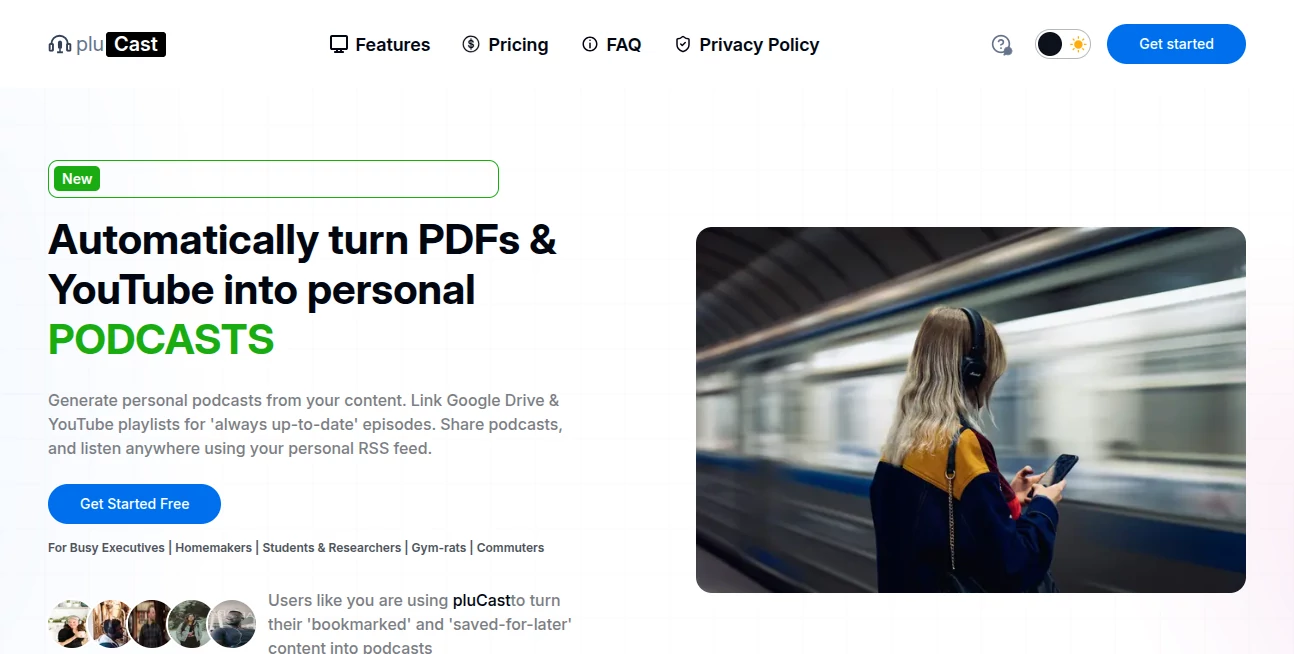
pluCast is an AI podcast generator designed to make long documents and videos easier to consume. Instead of leaving research papers, reports, lecture notes, and saved YouTube videos sitting in a backlog, users can turn them into short, conversational audio episodes.
The idea is refreshingly practical. You provide a PDF or YouTube link, and the platform creates a two-person discussion in which one host explains the material while the other asks questions and brings attention to important points. It is particularly useful for people who have plenty of content to consume but not enough uninterrupted time to read or watch it.
Episodes can be listened to directly on the platform, downloaded as MP3 files by paid users, or accessed through a personal RSS feed on supported plans. That makes it possible to continue learning during a commute, workout, walk, or other part of the day when reading a screen is inconvenient.
Key Features
- Convert PDF documents into conversational podcast episodes.
- Turn YouTube videos into personalized audio discussions.
- Connect Google Drive folders for automated podcast generation on paid plans.
- Connect YouTube playlists so new content can be processed automatically.
- Generate two-host conversations rather than simple word-for-word narration.
- Choose between Regular and HD audio quality.
- Download generated episodes as MP3 files on paid plans.
- Use personalized RSS feeds to listen through supported podcast applications on Premium.
- Share individual podcast episodes with others on paid plans.
- Keep generated podcasts in a personal library with retention limits based on the selected plan.
User Interface
The workflow is deliberately straightforward. Users can start with a PDF upload or a YouTube link, while Essential and Premium subscribers can connect Google Drive folders or YouTube playlists for ongoing automation. Once the source is submitted, the system handles the conversion into an audio discussion.
This simple approach works well for people who do not want to learn a complicated audio-production workflow. A student, for example, could take a course reading and turn it into an episode before heading out for a walk. A researcher could do the same with a long report and listen to the resulting discussion later.
Accuracy & Performance
The platform is designed around summarizing and discussing source material rather than reading every sentence aloud. This is an important distinction. A dense 20- or 30-page report can become a short episode focused on its arguments, evidence, and useful takeaways.
For the best results, source documents should contain selectable text. Scanned PDFs without a text layer may require OCR before processing, while documents whose key information exists mainly inside charts or images may provide less material for the generated discussion.
Processing speed also depends on the subscription. The free plan uses regular processing, Essential provides priority processing, and Premium offers immediate processing with more concurrent generations.
Capabilities
The strongest capability is the conversational format. One AI host explains the material while another asks clarifying questions, creating a structure that feels closer to an interview than conventional text-to-speech.
The service supports PDFs and YouTube links, with Google Drive and YouTube playlist automation available on Essential and Premium. This can turn a static collection of saved material into an ongoing audio learning workflow.
There are also two audio quality options. Regular is suitable for everyday listening, while HD adds enhanced voice processing with differences in enunciation, pacing, intonation, and vocal expressiveness.
Security & Privacy
According to its published policies, uploaded files and generated podcasts are stored in encrypted cloud infrastructure, while account data is protected with row-level security and HTTPS encryption. The service states that it does not sell personal data, and payments are handled through Stripe rather than storing users' credit card numbers directly.
Users should also pay attention to content rights. The terms require users to own their source material or have the necessary permission to create derivative works from it. This is especially important when processing copyrighted research, commercial documents, or other material that belongs to someone else.
Use Cases
Students: Course readings, lecture notes, academic papers, and recorded lectures can be transformed into audio discussions that fit naturally into a commute or study break.
Researchers: Long papers, whitepapers, and reports can be converted into shorter discussions, making it easier to review material before deciding which sources deserve a deeper read.
Professionals: Busy executives and teams can turn reports and saved documents into listenable episodes instead of waiting for a free block of reading time.
Content-heavy users: Anyone with a large collection of bookmarked articles, saved videos, or PDFs can use the service to reduce that backlog without constantly sitting in front of a screen.
Commuters and active users: The audio-first format is particularly convenient when driving, walking, exercising, or doing household tasks.
Pros and Cons
Pros
- Turns dense source material into engaging two-host conversations.
- Supports both PDFs and YouTube content.
- Google Drive and YouTube playlist automation can reduce repetitive work.
- Offers Regular and HD audio options.
- Premium users can use a personal RSS feed with podcast apps.
- Five free credits are available without requiring a payment card.
- Useful for learning during otherwise unused time.
Cons
- Generated discussions are not a replacement for carefully reading important source material.
- Scanned PDFs without selectable text may require OCR first.
- Documents that communicate mainly through charts or images may not translate as effectively into audio.
- Free usage is limited to five credits.
- Automation and some sharing features require a paid subscription.
Pricing Plans
The service uses a credit-based model with three main plans. New users receive five free credits with no card required, providing an easy way to test the core experience before subscribing.
Free: $0 with five starting credits, Regular and HD quality, PDF and YouTube submissions, regular processing, 30-day retention, one concurrent generation, videos up to 45 minutes, and storage for up to 50 saved podcasts.
Essential: $10 per month with 30 credits each month. It adds priority processing, six-month retention, three concurrent generations, up to 100 saved podcasts, and automated Google Drive and YouTube playlist imports.
Premium: $30 per month with 125 credits each month. It provides immediate processing, one-year retention, five concurrent generations, storage for up to 200 saved podcasts, automation, downloads and sharing, plus a personalized RSS feed.
Additional credit top-ups are available across the plans. Monthly subscription credits do not roll over, while purchased top-up credits remain available indefinitely according to the published terms.
How to Use pluCast
Start by creating an account and using the five free credits. From there, upload a PDF or provide a YouTube link containing the material you want to explore.
The system processes the source and creates a two-person podcast discussion. Once the episode is ready, listen to it directly through the service. Paid users can also download episodes or share individual links, while Premium subscribers can connect their personal RSS feed to compatible podcast applications.
If you regularly work with new documents or videos, an Essential or Premium subscription can make the process more hands-off. Connect a Google Drive folder or YouTube playlist and new material can be picked up automatically.
Comparison with Similar Tools
There are several ways to turn written content into audio, but this service takes a different route from traditional text-to-speech software. Instead of simply reading a document from beginning to end with one synthetic voice, it creates a discussion between two hosts.
That distinction matters when the original material is dense. A research paper, for instance, can be easier to follow when one voice explains an argument and another asks the obvious follow-up question. The result is less like listening to an audiobook and more like having someone walk you through the material.
It is therefore best suited to users who value comprehension and convenient review over literal, line-by-line narration.
Conclusion
For anyone staring at a growing pile of PDFs and saved videos, this platform offers a clever way to make that backlog more manageable. Its conversational approach gives dense material a more approachable format, while Google Drive and YouTube automation make it useful beyond one-off experiments.
The five free credits make the service particularly easy to evaluate. If the idea of turning research, coursework, reports, or saved videos into something you can listen to while getting on with your day sounds useful, it is a compelling addition to an AI-powered productivity and learning toolkit.
Frequently Asked Questions (FAQ)
What type of content can be converted into podcasts?
You can submit PDF documents and YouTube links. Essential and Premium users can also connect Google Drive folders and YouTube playlists for automated processing of new content.
Is it simply text-to-speech?
No. The service creates a two-person conversational discussion around the source material instead of reading the original document word for word.
Can I try it for free?
Yes. New accounts receive five free credits and do not need to provide a payment card to start.
Can I listen to episodes outside the platform?
Paid users can download individual MP3 files. Premium users can also use a personalized RSS feed with supported podcast applications such as Apple Podcasts and Overcast.
Can new Google Drive files be converted automatically?
Yes. Essential and Premium users can connect a Google Drive folder so newly added documents can be picked up automatically.
Can YouTube playlists be automated?
Yes. Essential and Premium plans support connecting YouTube playlists for automatic podcast generation when new videos are added.
Does it process scanned PDFs?
It works best with PDFs containing selectable text. A scanned document without a text layer may need to be processed with OCR first.
Does it replace reading the original document?
No. The generated episode is designed as a convenient way to understand and review the main ideas. Important academic, legal, financial, or professional material should still be checked against the original source.
AI Summarizer , AI Education Assistant , AI Transcription , AI Podcast Assistant .
These classifications represent its core capabilities and areas of application. For related tools, explore the linked categories above.

plu Cast Alternatives Product

EasyVC

Whisper Web

Futurwise

Maestra

Translate a …

YT Video Sum…
Transcribe A…

IELTS Writin…

Grades Calcu…
