
PodcastorAI
What is PodcastorAI?
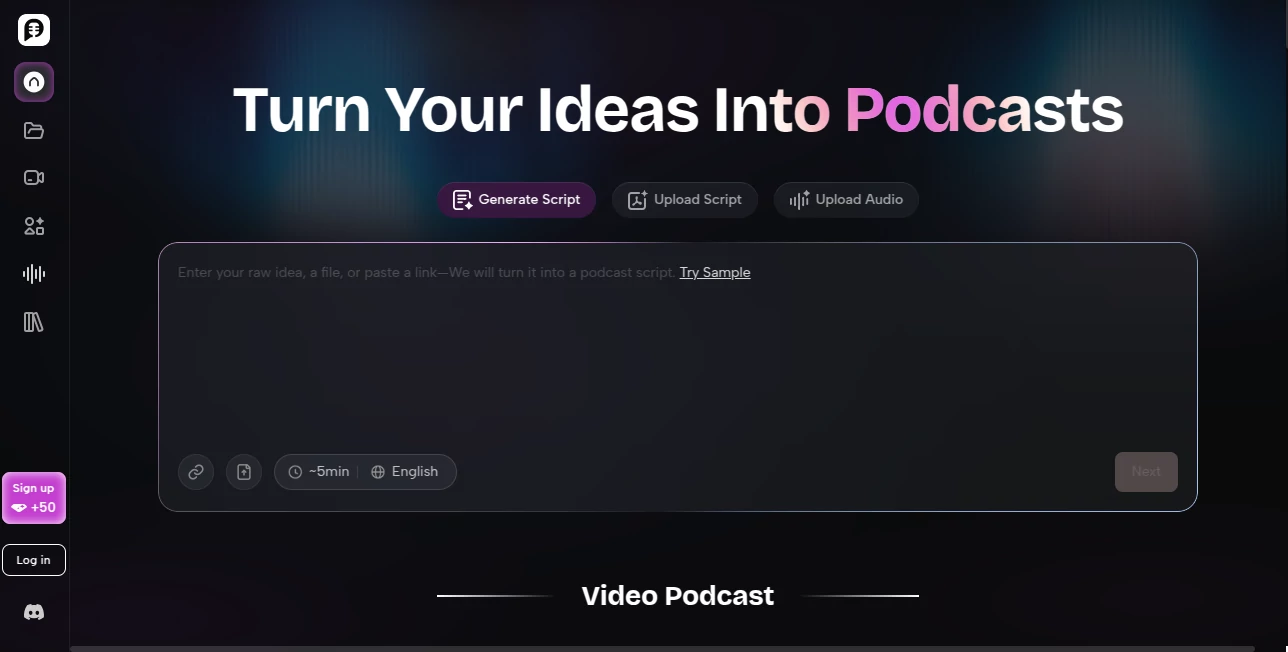
Creating a podcast used to require multiple tools, recording equipment, editing software, and a significant amount of time. Today, that process can be dramatically simplified with a platform designed to transform ideas, documents, links, and audio files into complete podcast episodes. Whether you're a content creator, educator, marketer, or business professional, this solution streamlines podcast production from start to finish.
What makes this platform particularly impressive is its ability to convert existing content into engaging podcast experiences. A blog article, PDF document, presentation, voice recording, or webpage can quickly become a structured script, a professional audio episode, or even a video podcast. The entire workflow is designed to reduce complexity while maintaining creative control.
For anyone looking to publish podcasts consistently without investing countless hours in production, this platform offers a practical and highly effective solution.
Key Features
User Interface
The interface is clean, intuitive, and beginner-friendly. Users can simply paste a URL, upload files, enter text, or provide a rough idea to begin the creation process. Navigation feels straightforward, allowing even first-time podcasters to generate episodes without technical knowledge.
The step-by-step workflow guides users from content input to script generation, voice selection, editing, and final publishing. This streamlined experience helps eliminate the learning curve often associated with podcast production software.
Accuracy & Performance
The platform excels at transforming raw information into structured podcast scripts. Instead of producing disconnected summaries, it organizes content into logical sections, highlights key insights, and creates natural conversational flow.
Audio generation is equally impressive, producing voices that sound smooth and engaging. The system efficiently handles various content types, including PDFs, notes, articles, and audio recordings, delivering results within minutes.
Capabilities
Users can create far more than traditional audio podcasts. The platform supports video podcasts, visual podcast formats, AI-generated hosts, cartoon-style presentations, pet-hosted content, split-screen conversations, and other creative formats.
- Convert URLs, documents, and recordings into podcast scripts.
- Generate audio podcasts with AI voices.
- Create video podcasts without filming.
- Build structured episodes with chapters and talking points.
- Add captions and enhancements for publishing.
- Repurpose existing content into multiple formats.
- Publish content for platforms such as YouTube and TikTok.
Security & Privacy
The platform processes uploaded documents and content within a controlled environment designed for content generation workflows. Users maintain ownership of their created material, making it suitable for professionals, educators, and organizations handling proprietary content.
For businesses and teams, the ability to transform internal reports, presentations, and educational materials into audio formats adds significant value while maintaining content control.
Use Cases
The flexibility of the platform allows it to serve a wide range of users and industries.
- Content creators converting articles and blogs into podcast episodes.
- Educators transforming lessons and study materials into audio learning experiences.
- Marketing teams repurposing webinars, reports, and product updates.
- Businesses creating internal training and knowledge-sharing content.
- Podcasters accelerating script development and production workflows.
- Social media teams generating video podcasts and short-form content.
- Thought leaders turning ideas into publishable episodes quickly.
Pros and Cons
Pros
- Simple workflow from idea to published podcast.
- Supports both audio and video podcast creation.
- Works with links, documents, text, and recordings.
- Multiple AI host and presentation styles available.
- Helpful for content repurposing and distribution.
- Suitable for creators, educators, and marketing teams.
- Reduces production time significantly.
Cons
- Advanced customization may require higher-tier plans.
- Creative users may still want manual editing for unique branding.
- Video generation features can consume credits faster than audio-only projects.
Pricing Plans
The platform offers multiple plans designed for different levels of usage.
- Trial: Free monthly credits for testing audio and video generation features.
- Audio Creator: Suitable for creators focused primarily on audio podcast production.
- Video Starter: Includes expanded video podcast capabilities and additional creative features.
- Creator Pro: Designed for high-volume creators requiring larger generation limits and advanced functionality.
The availability of a free entry-level option makes it easy for new users to evaluate the platform before committing to a paid subscription.
How to Use PodcastorAI
Getting started is remarkably simple.
- Upload a document, paste a URL, add text, or record audio.
- Allow the platform to generate a structured podcast script.
- Select preferred voices and presentation styles.
- Create either an audio or video podcast.
- Review and refine the generated content.
- Add captions and enhancements if needed.
- Publish the final episode to your preferred channels.
The process is designed to minimize manual work while giving creators the flexibility to customize the final output.
Comparison with Similar Tools
Compared with traditional podcast production platforms, this solution focuses heavily on automation and content transformation. Many competing tools specialize in recording or editing, whereas this platform covers the entire workflow from source material to publishable podcast.
Its ability to convert PDFs, articles, notes, presentations, and recordings into complete podcast episodes creates a significant advantage for users who already have content and want to repurpose it efficiently.
The addition of video podcast generation, AI hosts, cartoon presentations, and visual podcast formats further distinguishes it from standard podcasting software.
Conclusion
For creators seeking a faster and more efficient way to produce podcasts, this platform delivers an impressive all-in-one experience. It removes many of the traditional barriers associated with podcast creation while providing modern AI-powered tools for scripting, voice generation, video production, and content publishing.
Its ability to transform virtually any source material into engaging podcast content makes it especially valuable for educators, marketers, businesses, and creators who want to maximize the value of their existing content.
By combining automation, flexibility, and ease of use, it represents a compelling solution for modern podcast production.
Frequently Asked Questions (FAQ)
What types of content can be converted into podcasts?
Users can convert URLs, PDFs, documents, notes, text, presentations, and audio recordings into podcast-ready content.
Can I create video podcasts as well as audio podcasts?
Yes. The platform supports both audio and video podcast creation with multiple visual presentation styles.
Do I need podcasting experience to use it?
No. The workflow is designed for beginners and experienced creators alike.
Can I repurpose existing content?
Yes. One of the platform's strongest capabilities is transforming existing content into podcast episodes and videos.
Who can benefit most from this tool?
Content creators, educators, marketers, businesses, podcasters, and social media teams can all benefit from its automation and publishing capabilities.
AI Podcast Assistant , AI Content Generator , AI Video Generator , AI Voice & Audio Editing .
These classifications represent its core capabilities and areas of application. For related tools, explore the linked categories above.

PodcastorAI Alternatives Product

Seedance

Audio Convert

Seedance Pro…
SkyReels-V4

Seedream 6.0

RenderFlow AI

Motion Contr…

GPT Image 2 …

OmniGemini